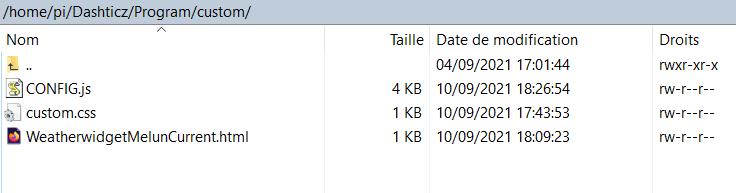
I used the automatic installation, and I don't remember the path I chose. But, as you can see, this is the folder containing my CONGIG.js and custom.css files.
I'm a beginner with dashticz and I try to use an HTML custom block on my screen. I use the example of the wiki and try to retrieve the met of my location.
Here is the code from weatherwidget.io : <a class="weatherwidget-io" href="https://forecast7.com/fr/48d542d66/melun/" data-label_1 ...
I'm really not a specialist, but reading your code triggers an interrogation.
It seems your device with idx = 256 gives you temp and humidity. So, are you sure your code makes a test on the right data : temperature, not on humidity ?
I step in this discussion because I have a similar issue with a Qubino ZMNHCD1. I run domoticz v2021.1. I tried several times the manip explained above but without any success : I still remain on 1.1 canal.
Sadly, I see the state of my shutter is sometimes correct but sometimes not : it's ...
I'm trying to loop through global variables without knowing if it's even possible. I want to get back the values stored in a global variable by another script to update a custom sensor. I tried that :
I try to send a curl message to change a parameter to a device Xiaomi via a Conbee 2.
I've found the correct command : curl -H 'Content-Type: application/json' -X PUT -d '{"duration": 500}' http://192.168.1.1:80/api/A********/sensors/20/config I know it's ok because I tested it on a ...
This is only some kind of workaround ... so I doubt Domoticz developers would agree to implement it permanently :?: :roll:
As I can see, all FGR223 have problems. Don't you think it could worth it to notify your solution to the developpers of Domoticz ? In my case, I would be more than happy if ...
I'm verry interested in a solution to solve this problem with FGR223. So, I tried your solution but I have a problem when testing the refresh in my cmd : I tried : sudo curl -k -d 'fun=racp&node=10' -X POST http://192.168.1.45:7781/ozwcp/refreshpost.html