Page 1 of 1
Problems after crashed SD card
Posted: Wednesday 20 August 2025 12:01
by nkerezov
Version: 2025.1
Platform:Raspberry Pi 3
Hello everyone,
after a terminal crash of my SD card ,where my Domoticz was Im having a lot of troubles trying to run my home automation back on track.
As I have (near) zero knowledge in programing everything is a huge pain for me

Actually installing Domoticz and make everything work at home ,was entirely via this forum.
So long story short : I only have a card clone from 2017 (that works) and domoticz backup from the end of last year.
I have manage to make clean install and recover the db, but non of my devices work at the moment
Have read as much as I can , but as for now (again with my knowledge) Im nowhere ....
I will highly appreciate any help!
Best!
Nikolay
Re: Problems after crashed SD card
Posted: Wednesday 20 August 2025 13:39
by gizmocuz
Does this mean you never updated your system?
If you did, you should have backups in your domoticz/backup folder
"non of my devices work at the moment"
This is a very cryptic sentence that we can not work with... what kind of devices?
Do you use RF hardware? Did you assign the right USB ports?
Re: Problems after crashed SD card
Posted: Wednesday 20 August 2025 19:03
by nkerezov
Hi,
I have updated domoticz every time when there is a stable version.
As the SD card crashed there is no access to any file , so domoticz backup is not an option .
Excuse my way of presenting things, but as I said Im really at ground zero …
I do have way too many devices (mostly wifi switches) ,where in some cases some automations are critical for my house (as drainage pumps, ventilation ,etc.).
What Ive meant with no device is working is,that domoticz doesnt connect to any of them.
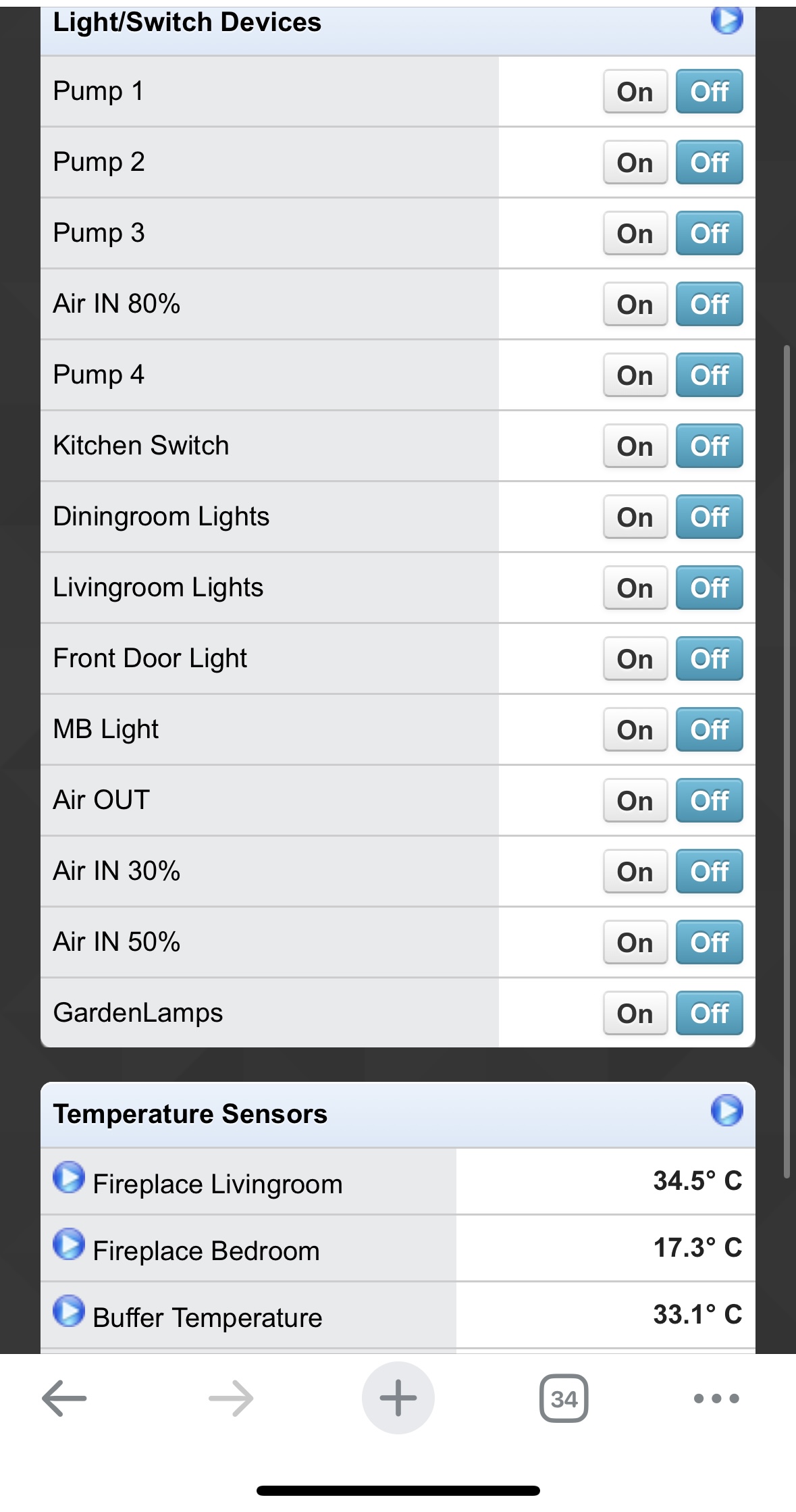
Here is a screenshot on my dashboard just as a reference:
- IMG_5254.jpeg (324.02 KiB) Viewed 566 times
Re: Problems after crashed SD card
Posted: Thursday 21 August 2025 9:48
by gizmocuz
Most times when a SD card is crashed you can still recover some data from it.
If you go to Domoticz->Setup->Hardware, what hardware have you enabled here?
What hardware do you use to connect to your wifi switches? Could it by it is all done via a Python plugin? And is this plugin installed?
Re: Problems after crashed SD card
Posted: Thursday 21 August 2025 11:39
by nkerezov
Ive spend 3-4 weeks trying to recover any info from the card - not a thing
At hardware everything is there as it use to be…
Most of the hardware is sonoff or similar. I did not install Phyton manually on the new installation (I have the presumption that is coming with it).My devices are connecting via mqtt (as far as I know)…
Thanks!
Re: Problems after crashed SD card
Posted: Thursday 21 August 2025 14:26
by gizmocuz
Are you using MQTT Auto Discovery? Could you send a screenshot of the hardware table?
Are you able to connect to the MQTT broker with MQTT Explorer?
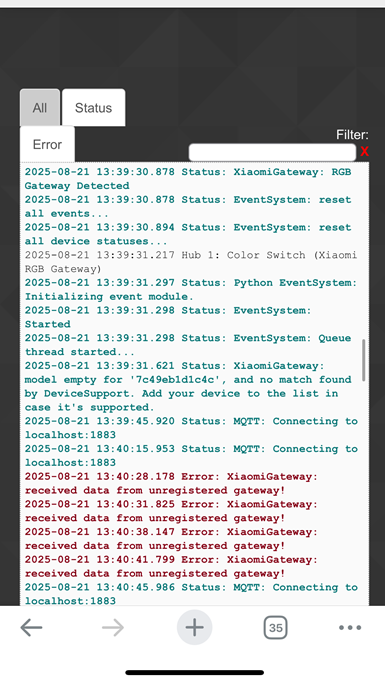
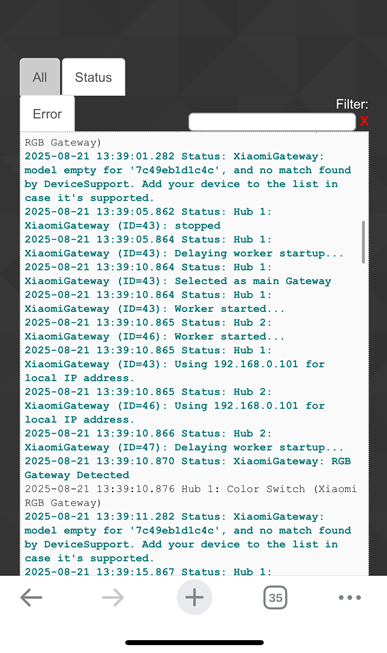
Do you see any errors in the Domoticz logs?
Re: Problems after crashed SD card
Posted: Thursday 21 August 2025 15:07
by nkerezov
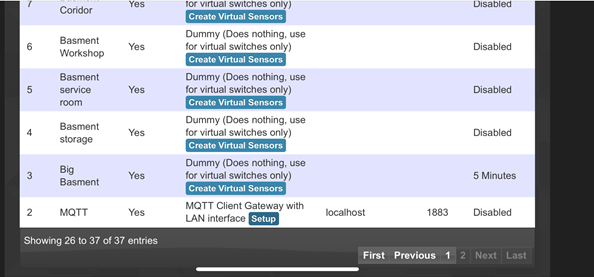
Attached you can see some screenshots.
Unfortunately I have no idea, of how to use MQTT browser.
Sorry , but I really have limited knowledge
N.
- thumbnail_IMG_5258.png (81.23 KiB) Viewed 472 times
- IMG_5262.png (192.13 KiB) Viewed 472 times
- thumbnail_IMG_5258.png (81.23 KiB) Viewed 472 times
- IMG_5260.png (190.89 KiB) Viewed 472 times
Re: Problems after crashed SD card
Posted: Friday 22 August 2025 15:26
by nkerezov
This is 3rd reinstall with backup restore
Re: Problems after crashed SD card
Posted: Friday 22 August 2025 16:29
by gizmocuz
You are not showing all hardware, or I miss something.
"XiaomiGateway", this is the hardware with issues
I am not familiar with this hardware, is it a zigbee controller?
Do you need to pair it?
Re: Problems after crashed SD card
Posted: Friday 22 August 2025 17:02
by nkerezov
All,the rest of the hardware is similar, there are a lot of devices. Other than XiaomiGateway , everything is wifi based
It is the previous version of aquara hub.
Re: Problems after crashed SD card
Posted: Saturday 23 August 2025 7:50
by gizmocuz
Is the IP address correct of your MQTT broker in Domoticz? (localhost)
You don't exactly tell what hardware is not working and are showing a picture of a lot of dummy hardware (and only one is sufficient)
I have to assume the XiaomiGateway is not working correctly?
Did you follow this tutorial?
https://wiki.domoticz.com/Xiaomi_Gateway_(Aqara)
Where do you use MQTT for?
Another option is to move to Zigbee2MQTT as mentioned in this thread:
viewtopic.php?t=36822
Re: Problems after crashed SD card
Posted: Saturday 23 August 2025 11:42
by nkerezov
Thats it….. I didnt install mosquito….
Thanks a lot!
It is working now!