strange behavior with .forMin()

Easy to use, 100% Lua-based event scripting framework.

Moderator: leecollings

Post Reply
Nautilus
Posts: 722
Joined: Friday 02 October 2015 12:12
Target OS: Raspberry Pi / ODroid
Domoticz version: beta
Location: Finland
Contact:

strange behavior with .forMin()

Post by Nautilus »

Hello,

I have been puzzled what causes a strange behavior with .forMin() function. I have a very simple script to keep a device on for 10 minutes, then off for 20 minutes:

Code: Select all

return {
	on = {
		timer = {
			'Every 30 minutes',
		}
	},
	execute = function(dz)
		dz.devices('Device').switchOn().forMin(10)
	end
}
It works for a day or two fine, but then at some point it never switches off again. In the log you can see something like this:
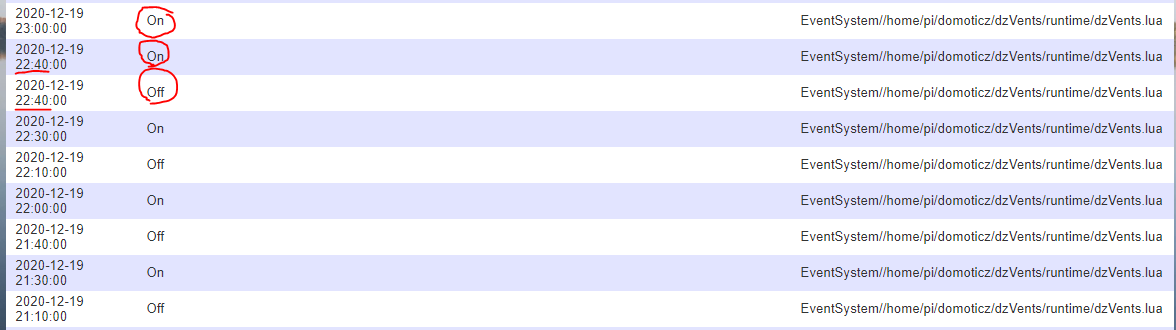
dzvents.PNG
dzvents.PNG (34.84 KiB) Viewed 302 times
So there is the on/off action going on fine but then at some seemingly random point in time the off action is followed by an immeadiate on, and another on after 20 minutes but then nothing. I know I can (and will) write the script in a different way to make sure off swithchin happens reliably, I was just wondering what is causing this behavior...
User avatar
waaren
Posts: 6028
Joined: Tuesday 03 January 2017 14:18
Target OS: Linux
Domoticz version: Beta
Location: Netherlands
Contact:

Re: strange behavior with .forMin()

Post by waaren »

Nautilus wrote: Monday 21 December 2020 9:41 Hello,

I have been puzzled what causes a strange behavior with .forMin() function. I have a very simple script to keep a device on for 10 minutes, then off for 20 minutes:
I was just wondering what is causing this behavior...
Below snippit from the wiki is the only thing I can think of.
"Important note when using forAAA(): Let’s say you have a light that is triggered by a motion detector. Currently the light is Off and you do this: light.switchOn().forMin(5). What happens inside Domoticz is this: at t0 Domoticz issues the switchOn() command and schedules a command to restore the current state at t5 which is Off. So at t5 it will switch the light off.

If, however, before the scheduled switchOff() happens at t5, new motion is detected and you send this command again at t2 then something unpredictable may seem to happen: the light is never turned off! This is what happens:

At t2 Domoticz receives the switchOn().forMin(5) command again. It sees a scheduled command at t5 and deletes that command (it is within the new interval). Then Domoticz performs the (unnecessary, it’s already on) switchOn() command. Then it checks the current state of the light which is On!! and schedules a command to return to that state at t2+5=t7. So, at t7 the light is switched on again. And there you have it: the light is not switched off and never will be because future commands will always be checked against the current on-state.

That’s just how it works and you will have to deal with it in your script. So, instead of simply re-issuing switchOn().forMin(5) you have to check the switch’s state first:
"
Debian buster, bullseye on RPI-4, Intel NUC.
dz Beta, Z-Wave, RFLink, RFXtrx433e, P1, Youless, Hue, Yeelight, Xiaomi, MQTT
==>> dzVents wiki
Nautilus
Posts: 722
Joined: Friday 02 October 2015 12:12
Target OS: Raspberry Pi / ODroid
Domoticz version: beta
Location: Finland
Contact:

Re: strange behavior with .forMin()

Post by Nautilus »

Thanks, I ran into this at some point with my PIR controlled lights at home, but then I was able to see the logic behind it as there were commands coming for the lights from other sources than the PIR script. However, in this case it is only this script that is controlling the device and also in the logs one can see that all commands for the device are issued by the script. So, indeed the second "on" explains why the switch never goes off after this, as it at that point returns it to the "on" state. So it is not a very robust way of trying to automate this, I admit. But still I am left wondering what causes the second "on" command at that (random) time. Does the "every 30 minutes" somehow reset to and start counting again or something like that...
Post Reply

Who is online

Users browsing this forum: No registered users and 1 guest