Page 1 of 1
Display the result of a script into the Dashboard
Posted: Friday 18 January 2019 16:59
by julien92
Hello,
I’ll ask a newbie question (I’m discovering Domoticz since 2 weeks, and everything that could be done with it

).
I would like to know if it would be possible to display within a widget the result of a bash script.
For instance (some basic examples) :
- display in the widget the number of files within a folder
- or, the 3 last lines of a log file
- or the name / IP address of the last user who connected to the openVPN server (or FTP server)
- and so on…
The aim is to add, into domoticz dashboard, not only values related to physical equipment (temperature and so on…) but also values that are obtained with scripts.
Thanks a lot in advance.
Julien
Re: Display the result of a script into the Dashboard
Posted: Friday 18 January 2019 22:19
by julien92
I've tried to execute the shell script with the push button, but there is no way to display the result.
I've also tried to look around the text device, but the value of this keeps displaying "hello world"

Re: Display the result of a script into the Dashboard
Posted: Friday 18 January 2019 22:33
by waaren
julien92 wrote: Friday 18 January 2019 16:59
I would like to know if it would be possible to display within a widget the result of a bash script.
Use this in your bash script
curl "http://domoticzIP:domoticzPort/json.htm?type=command¶m=udevice&idx=<id of your text device>&svalue=yourText"
Re: Display the result of a script into the Dashboard
Posted: Friday 18 January 2019 22:51
by julien92
Hi Waaren
Thanks for your feedback.
But can you please give me some more precision?
My Domoticz IP is : 192.168.1.45
port : 8082
Id of the text device : 34
so the command would be :
curl "
http://192.168.1.45:8082/json.htm?type= ... e=yourText"
But let's assume I would like to use this shell script (basic, just for the example) :
myscript.sh (located into /home/pi/domoticz/scripts)
#!/bin/bash
echo "Today is $(date)" > /dev/null 2>&1
=> How could I tell to domoticz to use the scipt located in /home/pi/domoticz/scripts/myscript.sh ?
Many thanks in advance!!

Re: Display the result of a script into the Dashboard
Posted: Friday 18 January 2019 23:48
by waaren
julien92 wrote: Friday 18 January 2019 22:51
My Domoticz IP is : 192.168.1.45
port : 8082
Id of the text device : 34
myscript.sh (located into /home/pi/domoticz/scripts)
script (make sure it can be executed by domoticz (chmod 755) :
Code: Select all
#!/bin/bash
echo "Today is $(date)" > /dev/null 2>&1
myvar=$(date) # get date string in var
myvar="${myvar// /%20}" # prepare for curl (replace spaces with %20)
curl "http://192.168.1.45:8082/json.htm?type=command¶m=udevice&idx=34&svalue=$myvar"
create a dummy switch and put in the on section:
script:///home/pi/domoticz/scripts/myscript.sh
Make sure to use
3 ///
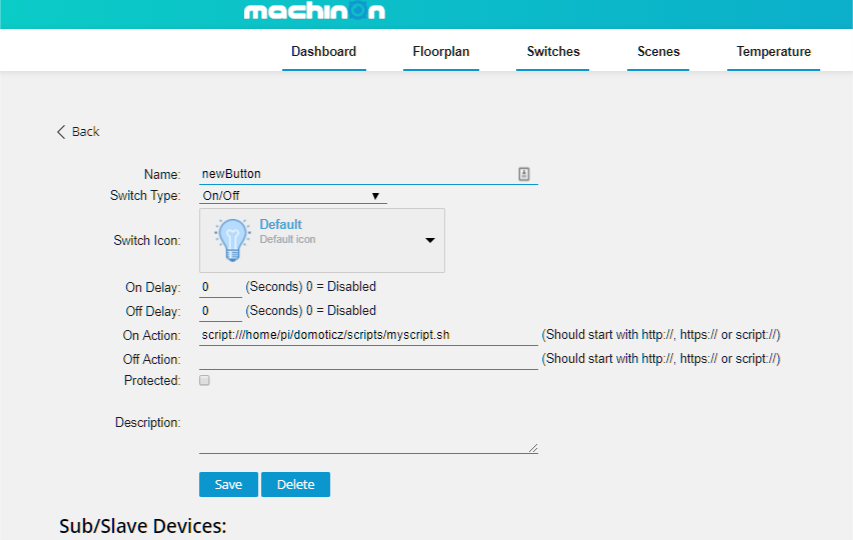
- on Action.png (58.66 KiB) Viewed 1358 times
Re: Display the result of a script into the Dashboard
Posted: Saturday 19 January 2019 0:00
by julien92
Thanks a lot Waaren
But still one question : will the result of the script be displayed if I use a
switch as device?
If so, where would it be supposed to be displayed?
(that's why I fisrt tried to use "text" device type)
Thanks again for your help, much appreciated!

Re: Display the result of a script into the Dashboard
Posted: Saturday 19 January 2019 0:05
by waaren
julien92 wrote: Saturday 19 January 2019 0:00
Thanks a lot Waaren
But still one question : will the result of the script be displayed if I use a
switch as device?
If so, where would it be supposed to be displayed?
(that's why I fisrt tried to use "text" device type)
Thanks again for your help, much appreciated!
No the switch is only used here to have a method to trigger the bash script. The bash script will send the text (here date) to a text device.
Re: Display the result of a script into the Dashboard
Posted: Sunday 20 January 2019 21:11
by julien92
Hi Waaren,
Many thanks for your help ! It works fine, I’m now able to display text within a widget thanks to your help by indicating :
Code: Select all
#!/bin/bash
echo "Today is $(date)" > /dev/null 2>&1
myvar=$(date) # get date string in var
myvar="${myvar// /%20}" # prepare for curl (replace spaces with %20)
curl http://192.168.1.45:8082/json.htm?type=command¶m=udevice&idx=34&svalue=$myvar
This will allow me to display text, as long as the text only stands into one
unique line.
Nevertheless, I’m now struggling with another point. I’m aware this is not related to Domoticz, but rather to general linux / shell scripting skills.
My goal is to display the content of a log file (for example the 5 last lines of a log file).
That why I’m now looking at how replacing the line break by the matching hexadecimal value.
For replacing the “space”, your command was quite easy (even if I didn’t know it until now
:
But I don’t know how to apply the same kind of action for the
line break, as the character which needs to be replaced needs to be typed in…
Hexadecimal value for line break is “0A”.
So I’ve tried with :
But that returns :
curl: (3) Illegal characters found in URL
Would you have any idea about that?
That would be really great!
Thanks a lot in advance!
Julien
Re: Display the result of a script into the Dashboard
Posted: Wednesday 23 January 2019 18:29
by waaren
julien92 wrote: Sunday 20 January 2019 21:11
...So I’ve tried with :
You are close..
Try
Re: Display the result of a script into the Dashboard
Posted: Wednesday 23 January 2019 20:00
by julien92
Thanks for your reply Waaren.
Unfortunately, that does not work...
I've tried with :
and
and
But each time, when trying to execute the script, I get this result :
Code: Select all
pi@raspberrypi:~/domoticz/scripts $ ./myscript.sh
curl: (3) Illegal characters found in URL
Re: Display the result of a script into the Dashboard
Posted: Wednesday 23 January 2019 23:17
by julien92
I've found the solution to replace line break by its hexadecimal character. It must be like this :
It's more or less by chance that I've found that, by trying some ideas found on different websites.
Do you confirm this syntax is correct, indeed?
I've then made the conversion of other symbols.
Here is my complete script to display the openvpn logs into a dummy text device :
Code: Select all
myvar1="$(cat /var/log/openvpn.log)"
myvar2="${myvar1// /%20}"
# replaces the spaces by its hexadecimal character
myvar3="${myvar2//$'\n'/%0A}"
# replaces the line breaks by its hexadecimal character
myvar4="${myvar3//[/%5B}"
# replaces the [ by its hexadecimal character
myvar5="${myvar4//]/%5D}"
# replaces the ] by its hexadecimal character
curl "http://192.168.1.45:8082/json.htm?type=command¶m=udevice&idx=30&svalue=$myvar5"
# sends the myvar5 variable through curl
By the way, do you know if there would be a way to apply all the conversions into one single line? (to avoid using 5 variables).
Julien
Re: Display the result of a script into the Dashboard
Posted: Thursday 24 January 2019 2:01
by waaren
julien92 wrote: Wednesday 23 January 2019 23:17
Unfortunately, that does not work...
By the way, do you know if there would be a way to apply all the conversions into one single line? (to avoid using 5 variables).
My system/ shell behaves different (debian stretch / GNU bash, version 4.4.12(1))
Only one var needed...
Code: Select all
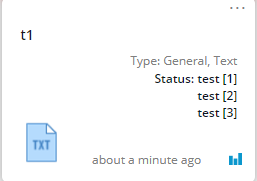
myvar="test [1]\n\rtest [2]\n\rtest [3]\n\r"
echo -en "$myvar"
test [1]
test [2]
test [3]
myvar="${myvar//\\n/%0A}" # LF
myvar="${myvar//\\r/%0D}" # CR
myvar="${myvar//[/%5B}" # [
myvar="${myvar//]/%5D}" # ]
myvar="${myvar// /%20}" # space
echo $myvar
test%20%5B1%5D%0A%0Dtest%20%5B2%5D%0A%0Dtest%20%5B3%5D%0A%0D
curl "http://PI-4:8084/json.htm?type=command¶m=udevice&idx=1445&nvalue=0&svalue=$myvar"
{
"status" : "OK",
"title" : "Update Device"
}
- send text.png (6.15 KiB) Viewed 1278 times
Re: Display the result of a script into the Dashboard
Posted: Monday 27 July 2020 18:27
by Lisa3746
Hi there! Sorry to intervene but I have got the same question and I cannot get my head around it.
I have got a php script which reads an JSON API and get a string as follows: Temperature 30.1C
Now I want to display this result in the dashboard and I cannot understand how to do it. Happy to run crontab every 60 secs but how to display this in the dashboard? Many thanks for any help.
Re: Display the result of a script into the Dashboard
Posted: Monday 27 July 2020 19:48
by waaren
Lisa3746 wrote: Monday 27 July 2020 18:27
I have got a php script which reads an JSON API and get a string as follows: Temperature 30.1C
Now I want to display this result in the dashboard and I cannot understand how to do it. How to display this in the dashboard?
Can you share your script an how it is executed now?
Is the script executed on the same system as domoticz?
What is the id and type, subtype of the target device ?
Re: Display the result of a script into the Dashboard
Posted: Monday 27 July 2020 20:01
by Lisa3746
Sure, here is my script:
Code: Select all
#!/usr/bin/php
<?php
$json_string = file_get_contents ("https://api.example.com");
$parsed_json = json_decode($json_string, true);
$parsed_json = $parsed_json['result'];
echo "Temperature ".$parsed_json."C"."\n";
?>
Yes, the script is on the same system in ../domoticz/scripts
I do not yet have a device for the script, this is why I posted the question here. The script clearly works but how to parse the answer into Dashboard and keep it updated...
Re: Display the result of a script into the Dashboard
Posted: Monday 27 July 2020 20:56
by waaren
Lisa3746 wrote: Monday 27 July 2020 20:01
Yes, the script is on the same system in ../domoticz/scripts
I do not yet have a device for the script, this is why I posted the question here.
create a virtual sensor type temperature. Write down the idx of the new device and insert it in this php and schedule it in cron with the required frequency
Code: Select all
#!/usr/bin/php
<?php
$DomoticzURL = 'http://127.0.0.1:8080/json.htm?'; // assuming domoticz uses port 8080
$temperatureDevice = '1168'; // change 1168 with IDX of your virtual temperature device
$json_string = file_get_contents ("https://api.example.com");
$parsed_json = json_decode($json_string, true);
$parsed_json = $parsed_json['result'];
echo "Temperature ".$parsed_json."C"."\n";
$URL = $DomoticzURL.'type=command¶m=udevice&idx='.$temperatureDevice.'&nvalue=0&svalue='.$parsed_json;
file_get_contents($URL);
?>
Re: Display the result of a script into the Dashboard
Posted: Monday 27 July 2020 21:50
by Lisa3746
Gosh...I do not know what to say, you are genius! Many thanks for you help, I can now read the temperature every X seconds