Page 1 of 1
Cam from RPI running Octoprint wont work
Posted: Thursday 01 March 2018 18:25
by matzeb74
Hello,
I´ve a 3DPrinter and a RPI running Octoprint. on this RPI i´ve the Picam and running in Octoprint. I can reach the Cam via Browser outside of Octoprint. The URL is
http://192.168.178.60:8080/?action=stream.
How can i use this Cam in Domoticz?
Re: Cam from RPI running Octoprint wont work
Posted: Thursday 10 May 2018 12:46
by Lyrex
Facing the same issue. Neither stream or snapshot api calls working with domoticz. Any advices?
Re: Cam from RPI running Octoprint wont work
Posted: Sunday 12 August 2018 11:12
by Alomamabobo
Hello,
Same issue here

Tried login/nologin, https/http port 443/80/8080 with no luck.
I found that I have a picture when swapping https to http on port 80 (weird, the full working path in all browsers is
http://192.168.0.204:8080/?action=stream).
Good day

Re: Cam from RPI running Octoprint wont work
Posted: Sunday 04 November 2018 22:07
by DAVIZINHO
hello,
any idea?
i have octoprint and this will be interesting.
Re: Cam from RPI running Octoprint wont work
Posted: Saturday 17 August 2019 9:17
by axel2906
I known it's an old thread but i find the solution
you must set :
in ip address the ip of octoprint: 192.168.X.X
in port: 8080
in image url: ?action=snapshot
(user and password no needed)
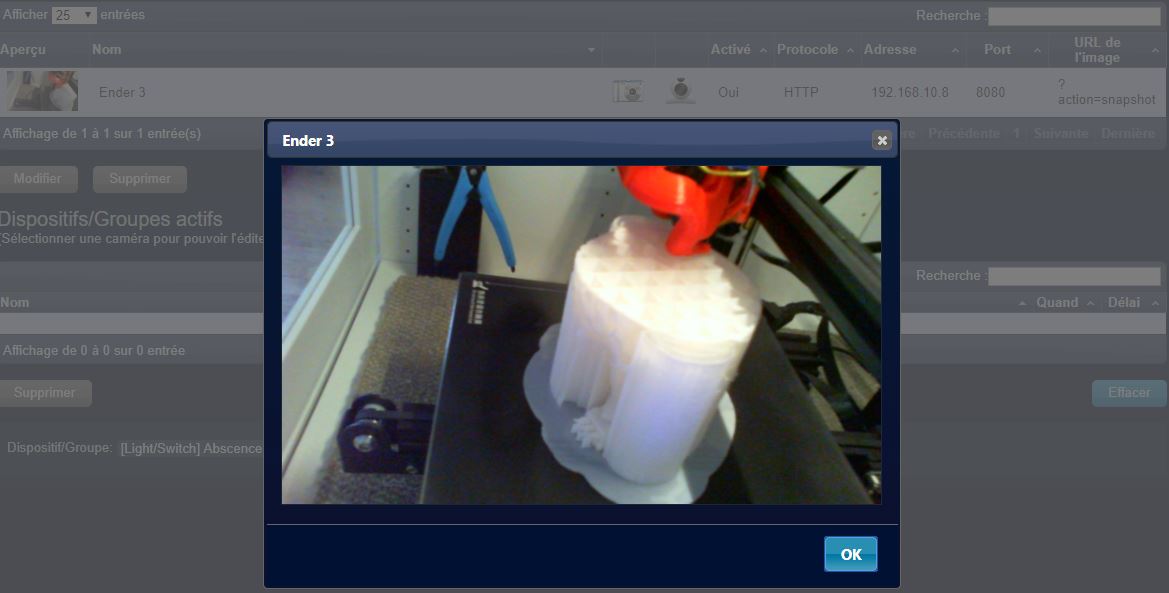
- ende3_1.JPG (65.71 KiB) Viewed 2259 times
Re: Cam from RPI running Octoprint wont work
Posted: Friday 27 March 2020 6:00
by DinnerEland
matzeb74 wrote: Thursday 01 March 2018 18:25
Hello,
I´ve a 3DPrinter and a RPI running Octoprint. on this RPI i´ve the Picam and running in Octoprint. I can reach the Cam via Browser outside of Octoprint. The URL is
http://192.168.178.60:8080/?action=stream.
How can i use this Cam in Domoticz?
I faced the same issue, still facing that, no solution yet.
Re: Cam from RPI running Octoprint wont work
Posted: Wednesday 01 April 2020 9:18
by Yokohama
This is how i did it.
I created a camera in Domoticz, Protocol set to HTTP, Address is IP of Octoprint, Port is 8080, ImageURL is ?action=snapshot
Then connect this camera to a lightswitch, in my case the keep-alive (ping) of octoprint.
Below a picture of how it looks.
The other switch you see is the real on/off switch.
Re: Cam from RPI running Octoprint wont work
Posted: Sunday 30 August 2020 16:15
by ebretteville
axel2906 wrote: Saturday 17 August 2019 9:17
I known it's an old thread but i find the solution
you must set :
in ip address the ip of octoprint: 192.168.X.X
in port: 8080
in image url: ?action=snapshot
(user and password no needed)
ende3_1.JPG
Thks, it solved my problem