dzvents get hardware (not device) last update time [Solved]
Moderator: leecollings
-
kispalsz
- Posts: 31
- Joined: Friday 13 October 2017 19:56
- Target OS: Raspberry Pi / ODroid
- Domoticz version:
- Contact:
dzvents get hardware (not device) last update time
Please help me solve my problem!
With Dzvents, I want to read and interpret the last update time of a battery-powered hardware. I wrote hardware directly because the tool only updates on the hardware side during the wake up, not in the tools tab.
I would use this value to detect zombie, detached devices, but there is no way I can extract value with an arrow.
I read this: https://www.domoticz.com/forum/viewtopi ... 59&t=32730
but it didn't help because I don't see it as having lastupdate value
Thanks.
With Dzvents, I want to read and interpret the last update time of a battery-powered hardware. I wrote hardware directly because the tool only updates on the hardware side during the wake up, not in the tools tab.
I would use this value to detect zombie, detached devices, but there is no way I can extract value with an arrow.
I read this: https://www.domoticz.com/forum/viewtopi ... 59&t=32730
but it didn't help because I don't see it as having lastupdate value
Thanks.
- waaren
- Posts: 6028
- Joined: Tuesday 03 January 2017 14:18
- Target OS: Linux
- Domoticz version: Beta
- Location: Netherlands
- Contact:
Re: dzvents get hardware (not device) last update time
Can you try thiskispalsz wrote: Tuesday 16 June 2020 12:04 With Dzvents, I want to read and interpret the last update time of a battery-powered hardware. I wrote hardware directly because the tool only updates on the hardware side during the wake up, not in the tools tab.
I would use this value to detect zombie, detached devices, but there is no way I can extract value with an arrow.
Code: Select all
local hardwareID = 4
local scriptVar = 'getZwaveNodes'
return
{
on =
{
timer =
{
'every minute'
},
httpResponses =
{
scriptVar,
},
},
logging =
{
level = domoticz.LOG_DEBUG,
marker = scriptVar,
},
execute = function(dz, item)
if not item.isHTTPResponse then
dz.openURL(
{
url = dz.settings['Domoticz url'] .. '/json.htm?type=openzwavenodes&idx=' .. hardwareID,
callback = scriptVar,
})
return
end
if item.ok and item.isJSON then
rt = item.json.result
for _, device in ipairs(rt) do
dz.log('device ' .. device.Name .. ', last updated: ' .. device.LastUpdate, dz.LOG_DEBUG)
end
else
dz.log('There was a problem handling the request: ' .. item.statusText , dz.LOG_ERROR)
dz.log(item, dz.LOG_DEBUG)
end
end
}
Debian buster, bullseye on RPI-4, Intel NUC.
dz Beta, Z-Wave, RFLink, RFXtrx433e, P1, Youless, Hue, Yeelight, Xiaomi, MQTT
==>> dzVents wiki
dz Beta, Z-Wave, RFLink, RFXtrx433e, P1, Youless, Hue, Yeelight, Xiaomi, MQTT
==>> dzVents wiki
-
sailmich
- Posts: 245
- Joined: Wednesday 17 February 2016 22:55
- Target OS: Raspberry Pi / ODroid
- Domoticz version: Beta
- Location: Germany
- Contact:
Re: dzvents get hardware (not device) last update time
Latest beta / Rpi3b /zstick/OZW1.6
I jumped in here, because I have a similar question or issue. I tried the code for a fibaro double relais who randomly become dead. My domoticz log
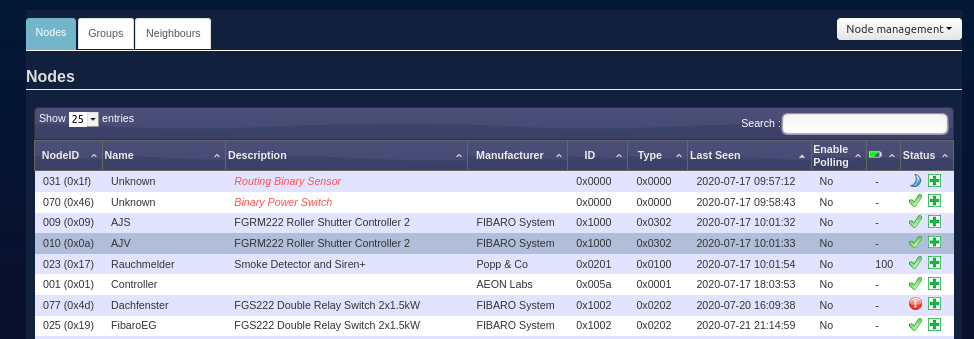
I even don't know if last seen can work because as shown in my screenshot some devices are last seen a couple of days ago but still alive. How does Domoticz notice that a device is dead? Can this be use in dzvents?
I found that follow command should refresh node info. But I just get an error in my browser.
httpS://IP:port/json.htm?type=command¶m=requestzwavenodeinfo&idx=X
I jumped in here, because I have a similar question or issue. I tried the code for a fibaro double relais who randomly become dead. My domoticz log
- Spoiler: show
Code: Select all
local hardwareID = 77
local scriptVar = 'getZwaveNodes'
return
{
on =
{
timer =
{
'every minute'
},
httpResponses =
{
scriptVar,
},
},
logging =
{
level = domoticz.LOG_DEBUG,
marker = scriptVar,
},
execute = function(dz, item)
if not item.isHTTPResponse then
dz.openURL(
{
url = dz.settings['Domoticz url'] .. '/json.htm?type=openzwavenodes&idx=' .. hardwareID,
callback = scriptVar,
})
return
end
if item.ok and item.isJSON then
rt = item.json.result
for _, device in ipairs(rt) do
dz.log('device ' .. device.Name .. ', last updated: ' .. device.LastUpdate, dz.LOG_DEBUG)
end
else
dz.log('There was a problem handling the request: ' .. item.statusText , dz.LOG_ERROR)
dz.log(item, dz.LOG_DEBUG)
end
end
}
I found that follow command should refresh node info. But I just get an error in my browser.
httpS://IP:port/json.htm?type=command¶m=requestzwavenodeinfo&idx=X
- waaren
- Posts: 6028
- Joined: Tuesday 03 January 2017 14:18
- Target OS: Linux
- Domoticz version: Beta
- Location: Netherlands
- Contact:
Re: dzvents get hardware (not device) last update time
I you are sure the hardwareID of your openzwave hardware is 77 then please add
Code: Select all
dz.utils.dumpTable(rt)Debian buster, bullseye on RPI-4, Intel NUC.
dz Beta, Z-Wave, RFLink, RFXtrx433e, P1, Youless, Hue, Yeelight, Xiaomi, MQTT
==>> dzVents wiki
dz Beta, Z-Wave, RFLink, RFXtrx433e, P1, Youless, Hue, Yeelight, Xiaomi, MQTT
==>> dzVents wiki
-
sailmich
- Posts: 245
- Joined: Wednesday 17 February 2016 22:55
- Target OS: Raspberry Pi / ODroid
- Domoticz version: Beta
- Location: Germany
- Contact:
Re: dzvents get hardware (not device) last update time
I don't know if that is what you mean but I already get a remark at line 39 expect 'in' near ','.
-
kispalsz
- Posts: 31
- Joined: Friday 13 October 2017 19:56
- Target OS: Raspberry Pi / ODroid
- Domoticz version:
- Contact:
Re: dzvents get hardware (not device) last update time
Replace the value of the first variable with the ID that appears on the hardware tab. It is important to have the AEON stick ID on the hardware tab. For me, this value is 2 because I have another hardware device as well. And not the Aeotec Zwave stick is the first hardware element.
IF you have no other hardware in Domoticz, this value is 1.
The first script works well. Thanks again.
local hardwareID = 77 -> local hardwareID = 1
IF you have no other hardware in Domoticz, this value is 1.
The first script works well. Thanks again.
local hardwareID = 77 -> local hardwareID = 1
Code: Select all
local hardwareID = 77
local scriptVar = 'getZwaveNodes'
return
{
on =
{
-
sailmich
- Posts: 245
- Joined: Wednesday 17 February 2016 22:55
- Target OS: Raspberry Pi / ODroid
- Domoticz version: Beta
- Location: Germany
- Contact:
Re: dzvents get hardware (not device) last update time
Still the same error but in line 40.
- Spoiler: show
-
sailmich
- Posts: 245
- Joined: Wednesday 17 February 2016 22:55
- Target OS: Raspberry Pi / ODroid
- Domoticz version: Beta
- Location: Germany
- Contact:
Re: dzvents get hardware (not device) last update time [Solved]
-
sailmich
- Posts: 245
- Joined: Wednesday 17 February 2016 22:55
- Target OS: Raspberry Pi / ODroid
- Domoticz version: Beta
- Location: Germany
- Contact:
Re: dzvents get hardware (not device) last update time
I don't know if it would be better to open a new thread or still use this! Last update time doesn't make it (for me). Is there a way to get the node state or device.state if alive or dead? I tried my code inspired by that thread.
https://www.domoticz.com/forum/viewtopi ... de#p232538
- Spoiler: show
- Spoiler: show
- waaren
- Posts: 6028
- Joined: Tuesday 03 January 2017 14:18
- Target OS: Linux
- Domoticz version: Beta
- Location: Netherlands
- Contact:
Re: dzvents get hardware (not device) last update time
The Zwave state is not directly copied to the device state on the domoticz level. So this will not work.sailmich wrote: Wednesday 05 August 2020 10:31 I don't know if it would be better to open a new thread or still use this! Last update time doesn't make it (for me). Is there a way to get the node state or device.state if alive or dead? I tried my code inspired by that thread.
What do you see when you enter this in your browser?
Code: Select all
http://<domoticz ip: domoticz port>/json.htm?type=openzwavenodes&idx=<Zwave hardware ID>
Debian buster, bullseye on RPI-4, Intel NUC.
dz Beta, Z-Wave, RFLink, RFXtrx433e, P1, Youless, Hue, Yeelight, Xiaomi, MQTT
==>> dzVents wiki
dz Beta, Z-Wave, RFLink, RFXtrx433e, P1, Youless, Hue, Yeelight, Xiaomi, MQTT
==>> dzVents wiki
-
sailmich
- Posts: 245
- Joined: Wednesday 17 February 2016 22:55
- Target OS: Raspberry Pi / ODroid
- Domoticz version: Beta
- Location: Germany
- Contact:
Re: dzvents get hardware (not device) last update time
The state is dead. I read deeper in the quoted thread and saw that I have to use also a bin/bash script. Can I avoid this?
- waaren
- Posts: 6028
- Joined: Tuesday 03 January 2017 14:18
- Target OS: Linux
- Domoticz version: Beta
- Location: Netherlands
- Contact:
Re: dzvents get hardware (not device) last update time
Yes give me some time to adjust the dzVents script. Can you please share the complete json output as plain text between code tags?sailmich wrote: Wednesday 05 August 2020 11:36 Bildschirmfoto vom 2020-08-05 11-32-50.png
The state is dead. I read deeper in the quoted thread and saw that I have to use also a bin/bash script. Can I avoid this?
Use PM if you don't want to share it here.
Debian buster, bullseye on RPI-4, Intel NUC.
dz Beta, Z-Wave, RFLink, RFXtrx433e, P1, Youless, Hue, Yeelight, Xiaomi, MQTT
==>> dzVents wiki
dz Beta, Z-Wave, RFLink, RFXtrx433e, P1, Youless, Hue, Yeelight, Xiaomi, MQTT
==>> dzVents wiki
-
sailmich
- Posts: 245
- Joined: Wednesday 17 February 2016 22:55
- Target OS: Raspberry Pi / ODroid
- Domoticz version: Beta
- Location: Germany
- Contact:
Re: dzvents get hardware (not device) last update time
Too many characters for the whole json. Let me know when you need more information.
- Spoiler: show
- waaren
- Posts: 6028
- Joined: Tuesday 03 January 2017 14:18
- Target OS: Linux
- Domoticz version: Beta
- Location: Netherlands
- Contact:
Re: dzvents get hardware (not device) last update time
Could look like belowsailmich wrote: Wednesday 05 August 2020 12:03 Too many characters for the whole json. Let me know when you need more information.
Code: Select all
local hardwareID = 2 -- change this to hardwareID of your zwave stick
local scriptVar = 'getZwaveNodes'
return
{
on =
{
timer =
{
'every minute', -- set to required frequency or remove
},
devices = {
'Z-Wave node status',
},
httpResponses =
{
scriptVar,
},
},
logging =
{
level = domoticz.LOG_DEBUG, -- set to domoticz.LOG_ERROR when all is OK
marker = scriptVar,
},
execute = function(dz, item)
if not item.isHTTPResponse then
dz.openURL(
{
url = dz.settings['Domoticz url'] .. '/json.htm?type=openzwavenodes&idx=' .. hardwareID,
callback = scriptVar,
})
return
end
if item.ok and item.isJSON then
rt = item.json.result
local deadNodes = {}
local foundAtLeastOne
local alarmString = 'One or more Z-Wave node(s) has gone DEAD! '
for _, device in ipairs(rt) do
dz.log( 'Checking device ' .. ( device.Name or '?' ) ..
', node: ' .. ( device.NodeID or '-')..
' ==>> state: ' .. ( device.State or 'Not set')..
', last updated: ' .. ( device.LastUpdate or '-' ), dz.LOG_DEBUG)
if string.upper(device.State or ''):match('DEAD') then
deadNodes[device.NodeID] = ( device.Name or 'Unknown' )
foundAtLeastOne = true
end
end
if foundAtLeastOne then
for node, name in pairs(deadNodes) do
alarmString = alarmString .. '[' .. node ..': ' .. name ..']'
end
-- dz.notify("ALARM", alarmString, dz.PRIORITY_EMERGENCY,nil,nil,dz.NSS_PUSHOVER) -- use this for notification to one defined notification subsystem
dz.notify("ALARM", alarmString, dz.PRIORITY_EMERGENCY) -- use this for notification to ALL defined notification subsystems
dz.devices('RED').switchOn() --Dummy switch
end
else
dz.log('There was a problem handling the request: ' .. item.statusText , dz.LOG_ERROR)
dz.log(item, dz.LOG_DEBUG)
end
end
}
Debian buster, bullseye on RPI-4, Intel NUC.
dz Beta, Z-Wave, RFLink, RFXtrx433e, P1, Youless, Hue, Yeelight, Xiaomi, MQTT
==>> dzVents wiki
dz Beta, Z-Wave, RFLink, RFXtrx433e, P1, Youless, Hue, Yeelight, Xiaomi, MQTT
==>> dzVents wiki
-
sailmich
- Posts: 245
- Joined: Wednesday 17 February 2016 22:55
- Target OS: Raspberry Pi / ODroid
- Domoticz version: Beta
- Location: Germany
- Contact:
Re: dzvents get hardware (not device) last update time
Once again a fantastic job from you! I will try to understand your code. Right now I use the dummy switch RED for a json command to reboot the system. I will try to add some code just to refresh node information for the dead node instead of reboot the system. THX again!waaren wrote: Wednesday 05 August 2020 12:57Could look like belowsailmich wrote: Wednesday 05 August 2020 12:03 Too many characters for the whole json. Let me know when you need more information.
Code: Select all
local hardwareID = 2 -- change this to hardwareID of your zwave stick local scriptVar = 'getZwaveNodes' return { on = { timer = { 'every minute', -- set to required frequency or remove }, devices = { 'Z-Wave node status', }, httpResponses = { scriptVar, }, }, logging = { level = domoticz.LOG_DEBUG, -- set to domoticz.LOG_ERROR when all is OK marker = scriptVar, }, execute = function(dz, item) if not item.isHTTPResponse then dz.openURL( { url = dz.settings['Domoticz url'] .. '/json.htm?type=openzwavenodes&idx=' .. hardwareID, callback = scriptVar, }) return end if item.ok and item.isJSON then rt = item.json.result local deadNodes = {} local foundAtLeastOne local alarmString = 'One or more Z-Wave node(s) has gone DEAD! ' for _, device in ipairs(rt) do dz.log( 'Checking device ' .. ( device.Name or '?' ) .. ', node: ' .. ( device.NodeID or '-').. ' ==>> state: ' .. ( device.State or 'Not set').. ', last updated: ' .. ( device.LastUpdate or '-' ), dz.LOG_DEBUG) if string.upper(device.State or ''):match('DEAD') then deadNodes[device.NodeID] = ( device.Name or 'Unknown' ) foundAtLeastOne = true end end if foundAtLeastOne then for node, name in pairs(deadNodes) do alarmString = alarmString .. '[' .. node ..': ' .. name ..']' end -- dz.notify("ALARM", alarmString, dz.PRIORITY_EMERGENCY,nil,nil,dz.NSS_PUSHOVER) -- use this for notification to one defined notification subsystem dz.notify("ALARM", alarmString, dz.PRIORITY_EMERGENCY) -- use this for notification to ALL defined notification subsystems dz.devices('RED').switchOn() --Dummy switch end else dz.log('There was a problem handling the request: ' .. item.statusText , dz.LOG_ERROR) dz.log(item, dz.LOG_DEBUG) end end }
Who is online
Users browsing this forum: No registered users and 1 guest