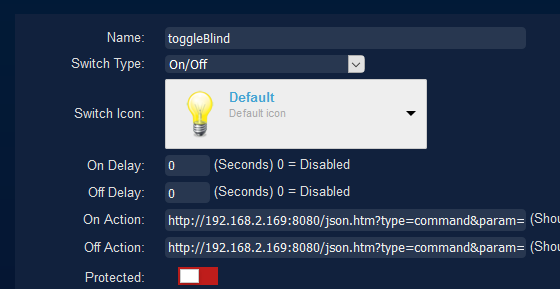
with the urls :
Code: Select all
http://192.168.2.169:8080/json.htm?type=command¶m=switchlight&idx=126&switchcmd=On
http://192.168.2.169:8080/json.htm?type=command¶m=switchlight&idx=126&switchcmd=Off

Moderator: leecollings

Code: Select all
http://192.168.2.169:8080/json.htm?type=command¶m=switchlight&idx=126&switchcmd=On
http://192.168.2.169:8080/json.htm?type=command¶m=switchlight&idx=126&switchcmd=Off

My guess is that this error messages shows what is really going wrong on your system. If you can you confirm that the RFtrx433 is connected to the usb on your list and does work for other devices ?Hesitated wrote: Thursday 26 December 2019 20:27 2019-12-26 20:25:00.264 Error: Switch command not send!, Hardware device disabled or not found!
Yes, it does work!waaren wrote: Thursday 26 December 2019 20:59 My guess is that this error messages shows what is really going wrong on your system. If you can you confirm that the RFtrx433 is connected to the usb on your list and does work for other devices ?
I understand that you see that the problem only occurs when triggered by an event. Fact is that the message you see here does not come from the event system but is generated by the mainworker code (around line 11290 of mainworker.cpp) when the hardware cannot be found.Hesitated wrote: Thursday 26 December 2019 21:16 Yes, it does work!
And if I couldn't send the blinds up and down with Domoticz, you're probably right. But I can! So the only problem is the events...
DM is now send.waaren wrote: Thursday 26 December 2019 21:47 So if the blinds do work from the API but not when triggered from a switch or script, the only thing I can think of is a problem in your database.
If you know how, I would be very interested in the content of the devicestatus - and hardware tables. If not, I am happy to help but best to do this via a DM
 Re: dzVents script runs but nothing happens
Users browsing this forum: No registered users and 1 guest
