dzVents script runs but nothing happens  [Solved]

Easy to use, 100% Lua-based event scripting framework.

Moderator: leecollings

User avatar
Hesitated
Posts: 42
Joined: Monday 04 June 2018 21:40
Target OS: Raspberry Pi / ODroid
Domoticz version: V4.11665
Location: Ede
Contact:

dzVents script runs but nothing happens

Post by Hesitated »

I've created a script:

Code: Select all

return {
	active = true,                  -- set to true to activate this script
	on = {
		timer = {
			'Every 1 minutes'
		}
	},
	execute = function(domoticz)
		domoticz.log('rolluiken naar beneden - start', domoticz.LOG_INFO)
		domoticz.devices('Rolluik studeerkamer').close()
		domoticz.log('rolluiken naar beneden - eind', domoticz.LOG_INFO)
	end
}
According to the logfile, it runs:
2019-12-23 16:54:00.130 Status: dzVents: Info: ------ Start internal script: Rolluiken naar beneden:, trigger: every 1 minutes
2019-12-23 16:54:00.130 Status: dzVents: Info: rolluiken naar beneden - start
2019-12-23 16:54:00.149 Status: dzVents: Debug: Processing device-adapter for Rolluik studeerkamer: Switch device adapter
2019-12-23 16:54:00.149 Status: dzVents: Debug: Constructed timed-command: Off
2019-12-23 16:54:00.150 Status: dzVents: Info: rolluiken naar beneden - eind
2019-12-23 16:54:00.150 Status: dzVents: Info: ------ Finished Rolluiken naar beneden
2019-12-23 16:54:00.150 Status: dzVents: Debug: Commands sent to Domoticz:
2019-12-23 16:54:00.150 Status: dzVents: Debug: - Rolluik studeerkamer = Off
2019-12-23 16:54:00.150 Status: dzVents: Debug: =====================================================
But the blinds are not moving at all...

I've tried:
domoticz.devices('Rolluik studeerkamer').close()
domoticz.devices('Rolluik studeerkamer').open()
domoticz.devices('Rolluik studeerkamer').switchOn()
domoticz.devices('Rolluik studeerkamer').switchOff()

but none of them did send the blinds up or down.

Am I missing something?

FYI: The line
timer = { 'Every 1 minutes' }
is only so I could see what was happening, it will be
'5 minutes after sunset'
;)
Domoticz 2020.2 - RPi3B+ - RFXtrx433XL - P1 - CC2531 - Somfy - Xiaomi - Hue - Omron - MQTT
User avatar
waaren
Posts: 6028
Joined: Tuesday 03 January 2017 14:18
Target OS: Linux
Domoticz version: Beta
Location: Netherlands
Contact:

Re: dzVents script runs but nothing happens

Post by waaren »

Hesitated wrote: Monday 23 December 2019 17:04 But the blinds are not moving at all...
What is your domoticz / dzVents version ?

The commands you send are OK but I don't see any (re)action from domoticz in the logfile.
Can you please try to do this action in Blockly or classic Lua and watch the logfile ?
Debian buster, bullseye on RPI-4, Intel NUC.
dz Beta, Z-Wave, RFLink, RFXtrx433e, P1, Youless, Hue, Yeelight, Xiaomi, MQTT
==>> dzVents wiki
User avatar
Hesitated
Posts: 42
Joined: Monday 04 June 2018 21:40
Target OS: Raspberry Pi / ODroid
Domoticz version: V4.11665
Location: Ede
Contact:

Re: dzVents script runs but nothing happens

Post by Hesitated »

Sorry that I didn't mention that...

Domoticz: V4.10717
dzVents version: 2.4.19
Blinds: Somfy + RFXCom


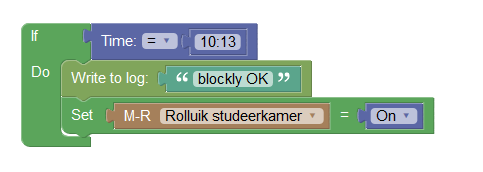
If I run a Blockly script the blinds do react:
Image
2019-12-24 10:13:00.159 EventSystem: Event triggered: Test Blockly_1
2019-12-24 10:13:00.171 (RFXtrx433) RFY (Unknown)
2019-12-24 10:13:00.119 Status: dzVents: Debug: Dumping domoticz data to /home/pi/domoticz/scripts/dzVents/domoticzData.lua
2019-12-24 10:13:00.131 Status: dzVents: Debug: Event triggers:
2019-12-24 10:13:00.131 Status: dzVents: Debug: - Timer
2019-12-24 10:13:00.159 Status: blockly OK
Although the command On sends it down and the command Open sends it to the stop-position.

So why the dsVents script doesn't work?
Domoticz 2020.2 - RPi3B+ - RFXtrx433XL - P1 - CC2531 - Somfy - Xiaomi - Hue - Omron - MQTT
User avatar
waaren
Posts: 6028
Joined: Tuesday 03 January 2017 14:18
Target OS: Linux
Domoticz version: Beta
Location: Netherlands
Contact:

Re: dzVents script runs but nothing happens

Post by waaren »

Hesitated wrote: Tuesday 24 December 2019 10:22 So why the dsVents script doesn't work?
I don't know yet but when I use dzVents or Blockly to activate my somfy blind; the logfile shows:

Code: Select all

2019-12-24 11:06:05.947 (RFtrx433) RFY (Slaapkamer rolluik)
I don't see something similar in your log when your Blockly sends the command ?
If the blind does react to a domoticz switch can you execute this script to help understand what happens ?

Code: Select all

return { on = { devices = { 294 }}, -- change to idx of switch that controls your blind 

execute = function(dz, item)
    item.dump()
end
}
Debian buster, bullseye on RPI-4, Intel NUC.
dz Beta, Z-Wave, RFLink, RFXtrx433e, P1, Youless, Hue, Yeelight, Xiaomi, MQTT
==>> dzVents wiki
User avatar
Hesitated
Posts: 42
Joined: Monday 04 June 2018 21:40
Target OS: Raspberry Pi / ODroid
Domoticz version: V4.11665
Location: Ede
Contact:

Re: dzVents script runs but nothing happens

Post by Hesitated »

In the logfile:
2019-12-24 11:28:04.603 (RFXtrx433) RFY (Unknown)
2019-12-24 11:28:04.554 Status: User: Admin initiated a switch command (126/Rolluik studeerkamer/On)
2019-12-24 11:28:04.639 Status: dzVents: Debug: Dumping domoticz data to /home/pi/domoticz/scripts/dzVents/domoticzData.lua
In domoticzData.lua (partly):

Code: Select all

	[13] = {
		["rawData"] = {
		};
		["name"] = "Rolluik studeerkamer";
		["lastLevel"] = 0;
		["batteryLevel"] = 255;
		["switchTypeValue"] = 15;
		["description"] = "";
		["id"] = 126;
		["lastUpdate"] = "2019-07-02 21:43:29";
		["deviceID"] = "000003";
		["data"] = {
			["hardwareID"] = 8;
			["_state"] = "Stop";
			["levelVal"] = 0;
			["icon"] = "blinds";
			["maxDimLevel"] = 0;
			["protected"] = false;
			["_nValue"] = 0;
			["unit"] = 1;
			["usedByCamera"] = false;
			["hardwareType"] = "RFXCOM - RFXtrx433 USB 433.92MHz Transceiver";
			["hardwareTypeValue"] = 1;
			["hardwareName"] = "RFXtrx433";
		};
		["changed"] = false;
		["subType"] = "RFY2";
		["signalLevel"] = 0;
		["switchType"] = "Venetian Blinds EU";
		["baseType"] = "device";
		["timedOut"] = true;
		["deviceType"] = "RFY";
	};
Are you using RFLink for commanding your blinds? I'm using RFXtrx433XL for that.
Domoticz 2020.2 - RPi3B+ - RFXtrx433XL - P1 - CC2531 - Somfy - Xiaomi - Hue - Omron - MQTT
User avatar
waaren
Posts: 6028
Joined: Tuesday 03 January 2017 14:18
Target OS: Linux
Domoticz version: Beta
Location: Netherlands
Contact:

Re: dzVents script runs but nothing happens

Post by waaren »

Hesitated wrote: Tuesday 24 December 2019 11:44 2019-12-24 11:28:04.603 (RFXtrx433) RFY (Unknown)

Are you using RFLink for commanding your blinds? I'm using RFXtrx433XL for that.
Sorry but this does not help. The content of domoticzData.lua is just a dump of all devices / vars / scenes etc. If you look at the last update value of this device it's from somewhere in July. So it has not been switched for a couple of months.
Also the line in the log does not show that the blind is activated. It refers to an unknown device.
I am using RFXtrx433 for my somfy devices.
Debian buster, bullseye on RPI-4, Intel NUC.
dz Beta, Z-Wave, RFLink, RFXtrx433e, P1, Youless, Hue, Yeelight, Xiaomi, MQTT
==>> dzVents wiki
User avatar
Hesitated
Posts: 42
Joined: Monday 04 June 2018 21:40
Target OS: Raspberry Pi / ODroid
Domoticz version: V4.11665
Location: Ede
Contact:

Re: dzVents script runs but nothing happens

Post by Hesitated »

waaren wrote: Tuesday 24 December 2019 12:55 Sorry but this does not help. The content of domoticzData.lua is just a dump of all devices / vars / scenes etc. If you look at the last update value of this device it's from somewhere in July. So it has not been switched for a couple of months.
Also the line in the log does not show that the blind is activated. It refers to an unknown device.
I am using RFXtrx433 for my somfy devices.
Now I'm truly flabbergasted... :shock:

I never looked at the the last seen date, but all blinds have the same date. (The temparature senser has a last seen date of today, so I'm getting data back from the serial port.)

Why can I use Domoticz to control the blinds if the devices are unknown?
Domoticz 2020.2 - RPi3B+ - RFXtrx433XL - P1 - CC2531 - Somfy - Xiaomi - Hue - Omron - MQTT
User avatar
waaren
Posts: 6028
Joined: Tuesday 03 January 2017 14:18
Target OS: Linux
Domoticz version: Beta
Location: Netherlands
Contact:

Re: dzVents script runs but nothing happens

Post by waaren »

Hesitated wrote: Tuesday 24 December 2019 13:30 I never looked at the the last seen date, but all blinds have the same date. (The temparature senser has a last seen date of today, so I'm getting data back from the serial port.)
Why can I use Domoticz to control the blinds if the devices are unknown?
I don't know yet. That's why I asked you to run my small script with the dump() in it to see what happens when you activate the device in domoticz that operates the blind.
Debian buster, bullseye on RPI-4, Intel NUC.
dz Beta, Z-Wave, RFLink, RFXtrx433e, P1, Youless, Hue, Yeelight, Xiaomi, MQTT
==>> dzVents wiki
User avatar
Hesitated
Posts: 42
Joined: Monday 04 June 2018 21:40
Target OS: Raspberry Pi / ODroid
Domoticz version: V4.11665
Location: Ede
Contact:

Re: dzVents script runs but nothing happens

Post by Hesitated »

waaren wrote: Tuesday 24 December 2019 15:33 I don't know yet. That's why I asked you to run my small script with the dump() in it to see what happens when you activate the device in domoticz that operates the blind.
You making it more mysterious by the minute. :D

I did run your script and posted the outcome:
2019-12-24 16:58:50.408 (RFXtrx433) RFY (Unknown)
2019-12-24 16:58:50.405 Status: User: Admin initiated a switch command (126/Rolluik studeerkamer/Stop)
2019-12-24 16:58:57.605 (Slimme Meter Kabel) P1 Smart Meter (Electriciteit)
If I use it with a shelly 1 switch:
Spoiler: show

Code: Select all

2019-12-24 16:56:53.907 (Virtual switches) Light/Switch (Lamp overloop)
2019-12-24 16:56:54.075 Status: dzVents: > ruleIsBeforeCivilTwilightEnd()
2019-12-24 16:56:54.075 Status: dzVents: > ruleIsAtDayTime()
2019-12-24 16:56:54.075 Status: dzVents: > milliseconds: 0
2019-12-24 16:56:54.075 Status: dzVents: > ruleMatchesMinuteSpecification()
2019-12-24 16:56:54.075 Status: dzVents: > ruleIsAtCivilDayTime()
2019-12-24 16:56:54.075 Status: dzVents: > ruleIsAtCivilNight()
2019-12-24 16:56:54.075 Status: dzVents: > ruleIsAfterSunset()
2019-12-24 16:56:54.075 Status: dzVents: > ruleIsAtSunset()
2019-12-24 16:56:54.075 Status: dzVents: > ruleIsOnDay()
2019-12-24 16:56:54.075 Status: dzVents: > ruleIsBeforeSunrise()
2019-12-24 16:56:54.075 Status: dzVents: > minutes: 54
2019-12-24 16:56:54.075 Status: dzVents: > dayAbbrOfWeek: tue
2019-12-24 16:56:54.075 Status: dzVents: > ruleMatchesHourSpecification()
2019-12-24 16:56:54.075 Status: dzVents: > year: 2019
2019-12-24 16:56:54.075 Status: dzVents: > ruleIsAfterCivilTwilightStart()
2019-12-24 16:56:54.075 Status: dzVents: > millisecondsAgo: 28955916
2019-12-24 16:56:54.075 Status: dzVents: > week: 52
2019-12-24 16:56:54.075 Status: dzVents: > daysAgo: 0
2019-12-24 16:56:54.075 Status: dzVents: > ruleIsAtCivilTwilightStart()
2019-12-24 16:56:54.075 Status: dzVents: > ruleIsInWeek()
2019-12-24 16:56:54.076 Status: dzVents: > isdst: false
2019-12-24 16:56:54.076 Status: dzVents: > ruleIsOnDate()
2019-12-24 16:56:54.076 Status: dzVents: > getISO()
2019-12-24 16:56:54.076 Status: dzVents: > ruleIsAfterCivilTwilightEnd()
2019-12-24 16:56:54.076 Status: dzVents: > utils:
2019-12-24 16:56:54.076 Status: dzVents: > fileExists()
2019-12-24 16:56:54.076 Status: dzVents: > hsbToRGB()
2019-12-24 16:56:54.076 Status: dzVents: > print()
2019-12-24 16:56:54.076 Status: dzVents: > urlEncode()
2019-12-24 16:56:54.076 Status: dzVents: > LOG_FORCE: 0.5
2019-12-24 16:56:54.076 Status: dzVents: > fromJSON()
2019-12-24 16:56:54.076 Status: dzVents: > urlDecode()
2019-12-24 16:56:54.076 Status: dzVents: > DZVERSION: 2.4.19
2019-12-24 16:56:54.076 Status: dzVents: > LOG_ERROR: 1
2019-12-24 16:56:54.076 Status: dzVents: > stringSplit()
2019-12-24 16:56:54.076 Status: dzVents: > log()
2019-12-24 16:56:54.076 Status: dzVents: > LOG_MODULE_EXEC_INFO: 2
2019-12-24 16:56:54.076 Status: dzVents: > osExecute()
2019-12-24 16:56:54.076 Status: dzVents: > dumpTable()
2019-12-24 16:56:54.076 Status: dzVents: > rgbToHSB()
2019-12-24 16:56:54.076 Status: dzVents: > LOG_DEBUG: 4
2019-12-24 16:56:54.076 Status: dzVents: > toJSON()
2019-12-24 16:56:54.076 Status: dzVents: > LOG_INFO: 3
2019-12-24 16:56:54.076 Status: dzVents: > milliSeconds: 0
2019-12-24 16:56:54.076 Status: dzVents: > raw: 2019-12-24 08:54:19
2019-12-24 16:56:54.076 Status: dzVents: > rawTime: 08:54:19
2019-12-24 16:56:54.076 Status: dzVents: > compare()
2019-12-24 16:56:54.076 Status: dzVents: > min: 54
2019-12-24 16:56:54.076 Status: dzVents: > wday: 3
2019-12-24 16:56:54.076 Status: dzVents: > updateElectricity()
2019-12-24 16:56:54.076 Status: dzVents: > switchOff()
2019-12-24 16:56:54.076 Status: dzVents: > hardwareId: 10
2019-12-24 16:56:54.077 Status: dzVents: > updateYouless()
2019-12-24 16:56:54.077 Status: dzVents: > bState: true
2019-12-24 16:56:54.077 Status: dzVents: > stop()
2019-12-24 16:56:54.077 Status: dzVents: > updateMode()
2019-12-24 16:56:54.077 Status: dzVents: > idx: 371
2019-12-24 16:56:54.077 Status: dzVents: > updateAirQuality()
2019-12-24 16:56:54.077 Status: dzVents: > kodiPause()
2019-12-24 16:56:54.077 Status: dzVents: > updateSetPoint()
2019-12-24 16:56:54.077 Status: dzVents: > isVariable: false
2019-12-24 16:56:54.077 Status: dzVents: > setIcon()
2019-12-24 16:56:54.077 Status: dzVents: > isSecurity: false
2019-12-24 16:56:54.077 Status: dzVents: > getColor()
2019-12-24 16:56:54.077 Status: dzVents: > baseType: device
2019-12-24 16:56:54.077 Status: dzVents: > state: On
2019-12-24 16:56:54.077 Status: dzVents: > usedByCamera: false
2019-12-24 16:56:54.077 Status: dzVents: > _data:
2019-12-24 16:56:54.077 Status: dzVents: > deviceType: Light/Switch
2019-12-24 16:56:54.077 Status: dzVents: > rawData:
2019-12-24 16:56:54.077 Status: dzVents: > 1: 0
2019-12-24 16:56:54.077 Status: dzVents: > lastUpdate: 2019-12-24 08:54:19
2019-12-24 16:56:54.077 Status: dzVents: > switchType: On/Off
2019-12-24 16:56:54.077 Status: dzVents: > data:
2019-12-24 16:56:54.077 Status: dzVents: > _nValue: 1
2019-12-24 16:56:54.077 Status: dzVents: > unit: 1
2019-12-24 16:56:54.077 Status: dzVents: > levelVal: 0
2019-12-24 16:56:54.077 Status: dzVents: > hardwareName: Virtual switches
2019-12-24 16:56:54.077 Status: dzVents: > hardwareTypeValue: 15
2019-12-24 16:56:54.077 Status: dzVents: > protected: false
2019-12-24 16:56:54.077 Status: dzVents: > icon: lightbulb
2019-12-24 16:56:54.077 Status: dzVents: > _state: On
2019-12-24 16:56:54.077 Status: dzVents: > hardwareType: Dummy (Does nothing, use for virtual switches only)
2019-12-24 16:56:54.078 Status: dzVents: > usedByCamera: false
2019-12-24 16:56:54.078 Status: dzVents: > maxDimLevel: 100
2019-12-24 16:56:54.078 Status: dzVents: > hardwareID: 10
2019-12-24 16:56:54.078 Status: dzVents: > subType: Switch
2019-12-24 16:56:54.078 Status: dzVents: > changed: true
2019-12-24 16:56:54.078 Status: dzVents: > timedOut: true
2019-12-24 16:56:54.078 Status: dzVents: > switchTypeValue: 0
2019-12-24 16:56:54.078 Status: dzVents: > signalLevel: 12
2019-12-24 16:56:54.078 Status: dzVents: > lastLevel: 0
2019-12-24 16:56:54.078 Status: dzVents: > batteryLevel: 255
2019-12-24 16:56:54.078 Status: dzVents: > baseType: device
2019-12-24 16:56:54.078 Status: dzVents: > description:
2019-12-24 16:56:54.078 Status: dzVents: > deviceID: 000141C3
2019-12-24 16:56:54.078 Status: dzVents: > name: Lamp overloop
2019-12-24 16:56:54.078 Status: dzVents: > id: 371
2019-12-24 16:56:54.078 Status: dzVents: > hardwareID: 10
2019-12-24 16:56:54.078 Status: dzVents: Info: ------ Finished Dump script
But with the blinds it is niente null nada...
Domoticz 2020.2 - RPi3B+ - RFXtrx433XL - P1 - CC2531 - Somfy - Xiaomi - Hue - Omron - MQTT
User avatar
Hesitated
Posts: 42
Joined: Monday 04 June 2018 21:40
Target OS: Raspberry Pi / ODroid
Domoticz version: V4.11665
Location: Ede
Contact:

Re: dzVents script runs but nothing happens

Post by Hesitated »

Sorry, I first wanted to respond on a tablet and accidently marked the question as solved, but it is not... :(
Domoticz 2020.2 - RPi3B+ - RFXtrx433XL - P1 - CC2531 - Somfy - Xiaomi - Hue - Omron - MQTT
User avatar
waaren
Posts: 6028
Joined: Tuesday 03 January 2017 14:18
Target OS: Linux
Domoticz version: Beta
Location: Netherlands
Contact:

Re: dzVents script runs but nothing happens

Post by waaren »

Hesitated wrote: Tuesday 24 December 2019 17:09 Sorry, I first wanted to respond on a tablet and accidently marked the question as solved, but it is not... :(
In the script you see the line
return { on = { devices = { 294 }}, -- change to idx of switch that controls your blind

If you changed the 294 to 126 before clicking the switch then that explains a bit more. It would then appear that the switch is not seen by dzVents.
One reason could be that is not set to active in the devices tab, dzVents will not react in such a case but it stil can be operated from the devices tab.
Debian buster, bullseye on RPI-4, Intel NUC.
dz Beta, Z-Wave, RFLink, RFXtrx433e, P1, Youless, Hue, Yeelight, Xiaomi, MQTT
==>> dzVents wiki
User avatar
Hesitated
Posts: 42
Joined: Monday 04 June 2018 21:40
Target OS: Raspberry Pi / ODroid
Domoticz version: V4.11665
Location: Ede
Contact:

Re: dzVents script runs but nothing happens

Post by Hesitated »

waaren wrote: Tuesday 24 December 2019 19:56 In the script you see the line
return { on = { devices = { 294 }}, -- change to idx of switch that controls your blind

If you changed the 294 to 126 before clicking the switch then that explains a bit more. It would then appear that the switch is not seen by dzVents.
Yes, that I did.
waaren wrote: Tuesday 24 December 2019 19:56 One reason could be that is not set to active in the devices tab, dzVents will not react in such a case but it stil can be operated from the devices tab.
These are all my blinds:
Image

What do you mean by active?

Because they are used but I see no active setting.
Domoticz 2020.2 - RPi3B+ - RFXtrx433XL - P1 - CC2531 - Somfy - Xiaomi - Hue - Omron - MQTT
User avatar
waaren
Posts: 6028
Joined: Tuesday 03 January 2017 14:18
Target OS: Linux
Domoticz version: Beta
Location: Netherlands
Contact:

Re: dzVents script runs but nothing happens

Post by waaren »

Hesitated wrote: Tuesday 24 December 2019 21:17 What do you mean by active?
Just what you showed in the device tab. If the white arrow is in blue background cirkel it is active for domoticz. (if it's on a green one it is not)
So I am not closer to understand what happens yet. :? :?

Can you please describe in detail what you do to operate the blind from domoticz. So which button or what blind icon do you click and what do you see happening in domoticz and in real life. If possible with some screenshots and device idx numbers.
Debian buster, bullseye on RPI-4, Intel NUC.
dz Beta, Z-Wave, RFLink, RFXtrx433e, P1, Youless, Hue, Yeelight, Xiaomi, MQTT
==>> dzVents wiki
User avatar
Hesitated
Posts: 42
Joined: Monday 04 June 2018 21:40
Target OS: Raspberry Pi / ODroid
Domoticz version: V4.11665
Location: Ede
Contact:

Re: dzVents script runs but nothing happens

Post by Hesitated »

waaren wrote: Tuesday 24 December 2019 23:27 So I am not closer to understand what happens yet. :? :?
So that makes two of us... ;)
waaren wrote: Tuesday 24 December 2019 23:27 Can you please describe in detail what you do to operate the blind from domoticz. So which button or what blind icon do you click and what do you see happening in domoticz and in real life. If possible with some screenshots and device idx numbers.
Until a few days ago I only used the dashboard and a scene with a sunset timer, as I didn't had time to do something more.
Image

But the scene did work for some blinds (living room) but not for others (kitchen and study).

So now with the holiday I wanted to script the blinds to go down at sunset, in the hope that it would work better...
And I'm developing a simple website (html/javascript) so I can easier control (bigger buttons :)) the lights and blinds.
So there I use the Domoticz API to control the blinds with

Code: Select all

domoticzurl + '/json.htm?type=command&param=switchlight&idx={0}&switchcmd=Off'
where the {0} gets replaced by the idx of the light or blind and the commands On, Off, Toggle (lights) or Stop (blinds).

This works for all blinds!
Domoticz 2020.2 - RPi3B+ - RFXtrx433XL - P1 - CC2531 - Somfy - Xiaomi - Hue - Omron - MQTT
User avatar
waaren
Posts: 6028
Joined: Tuesday 03 January 2017 14:18
Target OS: Linux
Domoticz version: Beta
Location: Netherlands
Contact:

Re: dzVents script runs but nothing happens

Post by waaren »

Hesitated wrote: Wednesday 25 December 2019 10:02

Code: Select all

domoticzurl + '/json.htm?type=command&param=switchlight&idx={0}&switchcmd=Off'
where the {0} gets replaced by the idx of the light or blind and the commands On, Off, Toggle (lights) or Stop (blinds). This works for all blinds!
OK.
Now if I send this to my domoticz system with the ID of one of my blinds.

Code: Select all

http://192.168.192.59:8084/json.htm?type=command&param=switchlight&idx=294&switchcmd=Off
I get this in my logfile

Code: Select all

2019-12-25 12:49:35.455  Status: User: Admin initiated a switch command (294/Slaapkamer rolluik/Off')
2019-12-25 12:49:35.479  (RFtrx433) RFY (Slaapkamer rolluik)
2019-12-25 12:49:35.987  Status: dzVents: Info: Handling events for: "Slaapkamer rolluik", value: "Stopped"
2019-12-25 12:49:35.988  Status: dzVents: Info: ------ Start internal script: dz dump Rolluik: Device: "Slaapkamer rolluik  

What do you see in the log and in real life when sending the same command to your system with an ID of one of your blinds ?
Debian buster, bullseye on RPI-4, Intel NUC.
dz Beta, Z-Wave, RFLink, RFXtrx433e, P1, Youless, Hue, Yeelight, Xiaomi, MQTT
==>> dzVents wiki
User avatar
Hesitated
Posts: 42
Joined: Monday 04 June 2018 21:40
Target OS: Raspberry Pi / ODroid
Domoticz version: V4.11665
Location: Ede
Contact:

Re: dzVents script runs but nothing happens

Post by Hesitated »

waaren wrote: Wednesday 25 December 2019 12:54 I get this in my logfile

Code: Select all

2019-12-25 12:49:35.455  Status: User: Admin initiated a switch command (294/Slaapkamer rolluik/Off')
2019-12-25 12:49:35.479  (RFtrx433) RFY (Slaapkamer rolluik)
2019-12-25 12:49:35.987  Status: dzVents: Info: Handling events for: "Slaapkamer rolluik", value: "Stopped"
2019-12-25 12:49:35.988  Status: dzVents: Info: ------ Start internal script: dz dump Rolluik: Device: "Slaapkamer rolluik  

What do you see in the log and in real life when sending the same command to your system with an ID of one of your blinds ?
The command I send:

Code: Select all

http://192.168.2.169:8080/json.htm?type=command&param=switchlight&idx=126&switchcmd=On
My logfile:
2019-12-25 14:15:23.160 Status: User: Admin initiated a switch command (126/Rolluik studeerkamer/Off)
2019-12-25 14:21:00.036 (RFXtrx433) RFY (Unknown)
2019-12-25 14:21:00.030 Status: User: Admin initiated a switch command (126/Rolluik studeerkamer/On)
2019-12-25 14:21:00.113 Status: dzVents: Debug: Dumping domoticz data to /home/pi/domoticz/scripts/dzVents/domoticzData.lua
2019-12-25 14:21:00.144 Status: dzVents: Debug: Event triggers:
2019-12-25 14:21:00.145 Status: dzVents: Debug: - Timer
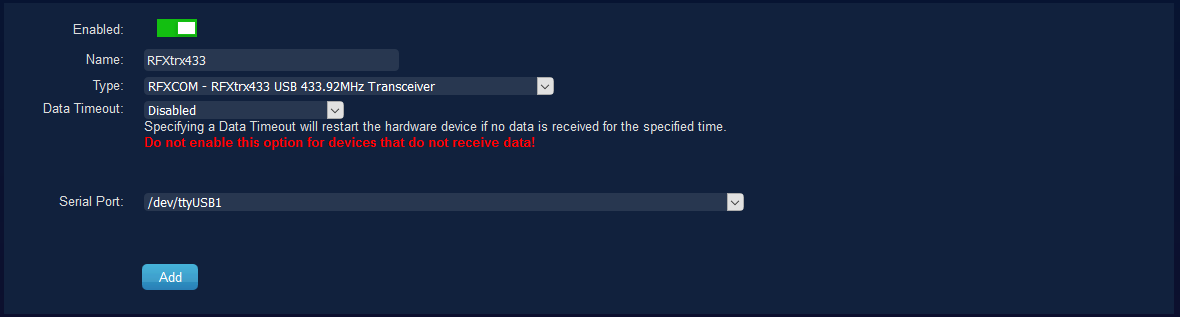
My setting of the RFXComm device:
Image

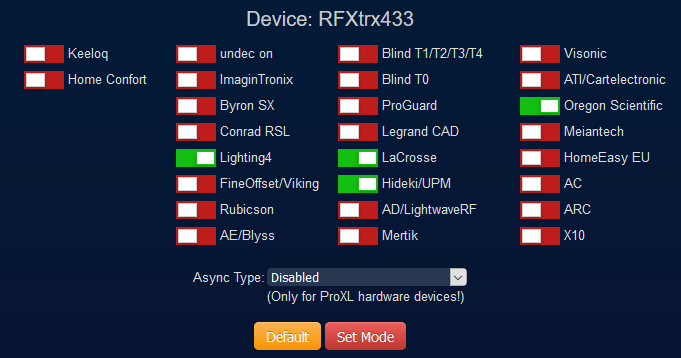
The mode settings of the RFXComm device:
Image
Domoticz 2020.2 - RPi3B+ - RFXtrx433XL - P1 - CC2531 - Somfy - Xiaomi - Hue - Omron - MQTT
User avatar
waaren
Posts: 6028
Joined: Tuesday 03 January 2017 14:18
Target OS: Linux
Domoticz version: Beta
Location: Netherlands
Contact:

Re: dzVents script runs but nothing happens

Post by waaren »

Hesitated wrote: Wednesday 25 December 2019 14:30 My logfile:

Code: Select all

2019-12-25 14:15:23.160 Status: User: Admin initiated a switch command (126/Rolluik studeerkamer/Off)
2019-12-25 14:21:00.036 (RFXtrx433) RFY (Unknown)
2019-12-25 14:21:00.030 Status: User: Admin initiated a switch command (126/Rolluik studeerkamer/On)
2019-12-25 14:21:00.113 Status: dzVents: Debug: Dumping domoticz data to /home/pi/domoticz/scripts/dzVents/domoticzData.lua
2019-12-25 14:21:00.144 Status: dzVents: Debug: Event triggers:
2019-12-25 14:21:00.145 Status: dzVents: Debug: - Timer 
this small script should dump attributes and more of device 126 when triggered by the JSON and every 5 minutes (just to be sure)
return

Code: Select all

{ 
    on = 
    {   devices = 
        { 
            126 -- change to idx of switch that controls your blind 
        }, 
        timer = 
        {
            'every 5 minutes'
        }
    },

    logging = 
    { 
        level = domoticz.LOG_DEBUG 
    },

execute = function(dz)
    _G.logMarker =  _G.moduleLabel
    dz.devices(126).dump()
end
}

my settings of the RFtrx433
Settings of RFtrx433
rdx.png (47.79 KiB) Viewed 1161 times
Debian buster, bullseye on RPI-4, Intel NUC.
dz Beta, Z-Wave, RFLink, RFXtrx433e, P1, Youless, Hue, Yeelight, Xiaomi, MQTT
==>> dzVents wiki
User avatar
Hesitated
Posts: 42
Joined: Monday 04 June 2018 21:40
Target OS: Raspberry Pi / ODroid
Domoticz version: V4.11665
Location: Ede
Contact:

Re: dzVents script runs but nothing happens

Post by Hesitated »

Change of settings of the RFtrx433 doesn't change anything, so that is not the problem here.

Sadly using the dashboard and your script enabled still gives only:
2019-12-26 13:44:09.363 (RFXtrx433) RFY (Unknown)
2019-12-26 13:44:09.361 Status: User: Admin initiated a switch command (126/Rolluik studeerkamer/On)
2019-12-26 13:44:12.741 (RFXtrx433) RFY (Unknown)
2019-12-26 13:44:12.737 Status: User: Admin initiated a switch command (126/Rolluik studeerkamer/Stop)
But the line `dz.devices(126).dump()` delivered:
2019-12-26 14:00:00.361 Status: dzVents: > _state: Stop
2019-12-26 14:00:00.361 Status: dzVents: > updateTempHumBaro()
2019-12-26 14:00:00.361 Status: dzVents: > hardwareName: RFXtrx433
2019-12-26 14:00:00.361 Status: dzVents: > updateTempBaro()
2019-12-26 14:00:00.361 Status: dzVents: > bState: false
2019-12-26 14:00:00.361 Status: dzVents: > armAway()
2019-12-26 14:00:00.361 Status: dzVents: > updateSoilMoisture()
2019-12-26 14:00:00.361 Status: dzVents: > _nValue: 0
2019-12-26 14:00:00.361 Status: dzVents: > disarm()
2019-12-26 14:00:00.361 Status: dzVents: > isHTTPResponse: false
2019-12-26 14:00:00.361 Status: dzVents: > hardwareType: RFXCOM - RFXtrx433 USB 433.92MHz Transceiver
2019-12-26 14:00:00.361 Status: dzVents: > levelVal: 0
2019-12-26 14:00:00.361 Status: dzVents: > setDiscoMode()
2019-12-26 14:00:00.361 Status: dzVents: > setNightMode()
2019-12-26 14:00:00.361 Status: dzVents: > updateCustomSensor()
2019-12-26 14:00:00.361 Status: dzVents: > setHex()
2019-12-26 14:00:00.361 Status: dzVents: > setIcon()
2019-12-26 14:00:00.361 Status: dzVents: > setRGB()
2019-12-26 14:00:00.361 Status: dzVents: > idx: 126
2019-12-26 14:00:00.361 Status: dzVents: > setColorBrightness()
2019-12-26 14:00:00.361 Status: dzVents: > decreaseBrightness()
2019-12-26 14:00:00.361 Status: dzVents: > increaseBrightness()
2019-12-26 14:00:00.361 Status: dzVents: > updatePercentage()
2019-12-26 14:00:00.362 Status: dzVents: > updatePressure()
2019-12-26 14:00:00.362 Status: dzVents: > name: Rolluik studeerkamer
2019-12-26 14:00:00.362 Status: dzVents: > setKelvin()
2019-12-26 14:00:00.362 Status: dzVents: > setVolume()
2019-12-26 14:00:00.362 Status: dzVents: > onkyoEISCPCommand()
2019-12-26 14:00:00.362 Status: dzVents: > volumeDown()
2019-12-26 14:00:00.362 Status: dzVents: > playFavorites()
2019-12-26 14:00:00.362 Status: dzVents: > updateGas()
2019-12-26 14:00:00.362 Status: dzVents: > setValues()
2019-12-26 14:00:00.362 Status: dzVents: > switchOff()
2019-12-26 14:00:00.362 Status: dzVents: > description:
2019-12-26 14:00:00.362 Status: dzVents: > isScene: false
2019-12-26 14:00:00.362 Status: dzVents: > baseType: device
2019-12-26 14:00:00.362 Status: dzVents: > updateCounter()
2019-12-26 14:00:00.362 Status: dzVents: > state: Stop
2019-12-26 14:00:00.362 Status: dzVents: > isGroup: false
2019-12-26 14:00:00.362 Status: dzVents: > updateSetPoint()
2019-12-26 14:00:00.362 Status: dzVents: > pause()
2019-12-26 14:00:00.362 Status: dzVents: > update()
2019-12-26 14:00:00.362 Status: dzVents: > kodiPlayFavorites()
2019-12-26 14:00:00.362 Status: dzVents: > usedByCamera: false
2019-12-26 14:00:00.362 Status: dzVents: > changed: false
2019-12-26 14:00:00.362 Status: dzVents: > setDescription()
2019-12-26 14:00:00.362 Status: dzVents: > unit: 1
2019-12-26 14:00:00.362 Status: dzVents: > setState()
2019-12-26 14:00:00.362 Status: dzVents: > updateWetness()
2019-12-26 14:00:00.362 Status: dzVents: > updateYouless()
2019-12-26 14:00:00.362 Status: dzVents: > stop()
2019-12-26 14:00:00.362 Status: dzVents: > _data:
2019-12-26 14:00:00.362 Status: dzVents: > deviceType: RFY
2019-12-26 14:00:00.362 Status: dzVents: > batteryLevel: 255
2019-12-26 14:00:00.362 Status: dzVents: > changed: false
2019-12-26 14:00:00.362 Status: dzVents: > subType: RFY2
2019-12-26 14:00:00.363 Status: dzVents: > lastLevel: 0
2019-12-26 14:00:00.363 Status: dzVents: > lastUpdate: 2019-07-02 21:43:29
2019-12-26 14:00:00.363 Status: dzVents: > switchType: Venetian Blinds EU
2019-12-26 14:00:00.363 Status: dzVents: > timedOut: true
2019-12-26 14:00:00.363 Status: dzVents: > name: Rolluik studeerkamer
2019-12-26 14:00:00.363 Status: dzVents: > data:
2019-12-26 14:00:00.363 Status: dzVents: > hardwareTypeValue: 1
2019-12-26 14:00:00.363 Status: dzVents: > _state: Stop
2019-12-26 14:00:00.363 Status: dzVents: > hardwareID: 8
2019-12-26 14:00:00.363 Status: dzVents: > levelVal: 0
2019-12-26 14:00:00.363 Status: dzVents: > unit: 1
2019-12-26 14:00:00.363 Status: dzVents: > usedByCamera: false
2019-12-26 14:00:00.363 Status: dzVents: > protected: false
2019-12-26 14:00:00.363 Status: dzVents: > icon: blinds
2019-12-26 14:00:00.363 Status: dzVents: > hardwareName: RFXtrx433
2019-12-26 14:00:00.363 Status: dzVents: > maxDimLevel: 0
2019-12-26 14:00:00.363 Status: dzVents: > _nValue: 0
2019-12-26 14:00:00.363 Status: dzVents: > hardwareType: RFXCOM - RFXtrx433 USB 433.92MHz Transceiver
2019-12-26 14:00:00.363 Status: dzVents: > rawData:
2019-12-26 14:00:00.363 Status: dzVents: > signalLevel: 0
2019-12-26 14:00:00.363 Status: dzVents: > description:
2019-12-26 14:00:00.363 Status: dzVents: > switchTypeValue: 15
2019-12-26 14:00:00.363 Status: dzVents: > baseType: device
2019-12-26 14:00:00.363 Status: dzVents: > id: 126
2019-12-26 14:00:00.363 Status: dzVents: > deviceID: 000003
2019-12-26 14:00:00.363 Status: dzVents: > dimTo()
2019-12-26 14:00:00.363 Status: dzVents: > updateElectricity()
2019-12-26 14:00:00.363 Status: dzVents: > isDevice: true
2019-12-26 14:00:00.363 Status: dzVents: > updateAirQuality()
2019-12-26 14:00:00.363 Status: dzVents: > updateUV()
2019-12-26 14:00:00.364 Status: dzVents: > deviceSubType: RFY2
2019-12-26 14:00:00.364 Status: dzVents: > setHotWater()
2019-12-26 14:00:00.364 Status: dzVents: > updateDistance()
2019-12-26 14:00:00.364 Status: dzVents: > startPlaylist()
2019-12-26 14:00:00.364 Status: dzVents: > isTimer: false
2019-12-26 14:00:00.364 Status: dzVents: > kodiSetVolume()
2019-12-26 14:00:00.364 Status: dzVents: > signalLevel: 0
2019-12-26 14:00:00.364 Status: dzVents: > cancelQueuedCommands()
2019-12-26 14:00:00.364 Status: dzVents: > updateHumidity()
2019-12-26 14:00:00.364 Status: dzVents: > icon: blinds
2019-12-26 14:00:00.364 Status: dzVents: > dump()
2019-12-26 14:00:00.364 Status: dzVents: > switchTypeValue: 15
2019-12-26 14:00:00.364 Status: dzVents: > rawData:
2019-12-26 14:00:00.364 Status: dzVents: Info: ------ Finished Dump script
BTW, what is the function the line in your script:

Code: Select all

_G.logMarker =  _G.moduleLabel
Domoticz 2020.2 - RPi3B+ - RFXtrx433XL - P1 - CC2531 - Somfy - Xiaomi - Hue - Omron - MQTT
User avatar
waaren
Posts: 6028
Joined: Tuesday 03 January 2017 14:18
Target OS: Linux
Domoticz version: Beta
Location: Netherlands
Contact:

Re: dzVents script runs but nothing happens

Post by waaren »

Hesitated wrote: Thursday 26 December 2019 13:58 what is the function the line in your script:

Code: Select all

_G.logMarker =  _G.moduleLabel
This will include the name of your script in log lines originated from the script.

If you could create a virtual switch with the name toggleBlind than the script below should control your blind based on the state of that switch when swiched On or Off.

Can you please try that ?

Code: Select all

return
{ 
    on = 
    {   devices = 
        { 
            'toggleBlind' 
        }, 
    
    },

    logging = 
    { 
        level = domoticz.LOG_DEBUG 
    },

execute = function(dz,item)
    _G.logMarker =  _G.moduleLabel

    blind = dz.devices(126)
    if blind.state ~= 'Off' then
        blind.switchOff()
    else
        blind.switchOn()
    end
end
}
Debian buster, bullseye on RPI-4, Intel NUC.
dz Beta, Z-Wave, RFLink, RFXtrx433e, P1, Youless, Hue, Yeelight, Xiaomi, MQTT
==>> dzVents wiki
User avatar
Hesitated
Posts: 42
Joined: Monday 04 June 2018 21:40
Target OS: Raspberry Pi / ODroid
Domoticz version: V4.11665
Location: Ede
Contact:

Re: dzVents script runs but nothing happens

Post by Hesitated »

This was the result after clicking the virtual switch twice:

Code: Select all

2019-12-26 19:56:28.262 (Virtual switches) Light/Switch (toggleBlind)
2019-12-26 19:56:28.255 Status: User: Admin initiated a switch command (391/toggleBlind/On)
2019-12-26 19:56:28.392 Status: dzVents: Info: ------ Start internal script: Script #3: Device: "toggleBlind (Virtual switches)", Index: 391
2019-12-26 19:56:28.393 Status: dzVents: Debug: Processing device-adapter for Rolluik studeerkamer: Switch device adapter
2019-12-26 19:56:28.394 Status: dzVents: Info: switchOff signal send
2019-12-26 19:56:28.394 Status: dzVents: Debug: Constructed timed-command: Off
2019-12-26 19:56:28.394 Status: dzVents: Info: ------ Finished Script #3
2019-12-26 19:56:28.395 Status: EventSystem: Script event triggered: /home/pi/domoticz/dzVents/runtime/dzVents.lua
2019-12-26 19:56:28.410 Error: Switch command not send!, Hardware device disabled or not found! 
So I added the line:

Code: Select all

    blind.dump()
Then the result was:

Code: Select all

2019-12-26 19:57:27.982 (Virtual switches) Light/Switch (toggleBlind)
2019-12-26 19:57:28.129 Status: dzVents: > dayAbbrOfWeek: tue
2019-12-26 19:57:28.129 Status: dzVents: > msAgo: 15290039989
2019-12-26 19:57:28.129 Status: dzVents: > secondsAgo: 15290039
2019-12-26 19:57:28.129 Status: dzVents: > millisecondsAgo: 15290039989
2019-12-26 19:57:28.129 Status: dzVents: > ruleIsOnDay()
2019-12-26 19:57:28.129 Status: dzVents: > ruleMatchesBetweenRange()
2019-12-26 19:57:28.129 Status: dzVents: > min: 43
2019-12-26 19:57:28.129 Status: dzVents: > ruleIsAfterCivilTwilightStart()
2019-12-26 19:57:28.129 Status: dzVents: > isToday: false
2019-12-26 19:57:28.129 Status: dzVents: > ruleIsAtCivilTwilightEnd()
2019-12-26 19:57:28.129 Status: dzVents: > ruleIsOnDate()
2019-12-26 19:57:28.129 Status: dzVents: > isUTC: false
2019-12-26 19:57:28.129 Status: dzVents: > sec: 29
2019-12-26 19:57:28.129 Status: dzVents: > current:
2019-12-26 19:57:28.129 Status: dzVents: > yday: 360
2019-12-26 19:57:28.129 Status: dzVents: > sec: 28
2019-12-26 19:57:28.130 Status: dzVents: > wday: 5
2019-12-26 19:57:28.130 Status: dzVents: > day: 26
2019-12-26 19:57:28.130 Status: dzVents: > isdst: false
2019-12-26 19:57:28.130 Status: dzVents: > hour: 19
2019-12-26 19:57:28.130 Status: dzVents: > min: 57
2019-12-26 19:57:28.130 Status: dzVents: > year: 2019
2019-12-26 19:57:28.130 Status: dzVents: > month: 12
2019-12-26 19:57:28.130 Status: dzVents: > ruleIsInWeek()
2019-12-26 19:57:28.130 Status: dzVents: > ruleIsAfterCivilTwilightEnd()
2019-12-26 19:57:28.130 Status: dzVents: > matchesRule()
2019-12-26 19:57:28.130 Status: dzVents: > ruleMatchesTimeRange()
2019-12-26 19:57:28.130 Status: dzVents: > year: 2019
2019-12-26 19:57:28.130 Status: dzVents: > ruleMatchesTime()
2019-12-26 19:57:28.130 Status: dzVents: > ruleIsAfterSunset()
2019-12-26 19:57:28.130 Status: dzVents: > ruleIsAfterSunrise()
2019-12-26 19:57:28.130 Status: dzVents: > getISO()
2019-12-26 19:57:28.130 Status: dzVents: > utils:
2019-12-26 19:57:28.130 Status: dzVents: > LOG_FORCE: 0.5
2019-12-26 19:57:28.130 Status: dzVents: > LOG_DEBUG: 4
2019-12-26 19:57:28.130 Status: dzVents: > LOG_ERROR: 1
2019-12-26 19:57:28.130 Status: dzVents: > print()
2019-12-26 19:57:28.130 Status: dzVents: > log()
2019-12-26 19:57:28.130 Status: dzVents: > LOG_INFO: 3
2019-12-26 19:57:28.130 Status: dzVents: > rgbToHSB()
2019-12-26 19:57:28.130 Status: dzVents: > urlEncode()
2019-12-26 19:57:28.130 Status: dzVents: > DZVERSION: 2.4.19
2019-12-26 19:57:28.130 Status: dzVents: > urlDecode()
2019-12-26 19:57:28.130 Status: dzVents: > toJSON()
2019-12-26 19:57:28.130 Status: dzVents: > fileExists()
2019-12-26 19:57:28.130 Status: dzVents: > osExecute()
2019-12-26 19:57:28.130 Status: dzVents: > hsbToRGB()
2019-12-26 19:57:28.130 Status: dzVents: > dumpTable()
2019-12-26 19:57:28.130 Status: dzVents: > stringSplit()
2019-12-26 19:57:28.131 Status: dzVents: > LOG_MODULE_EXEC_INFO: 2
2019-12-26 19:57:28.131 Status: dzVents: > fromJSON()
2019-12-26 19:57:28.131 Status: dzVents: > ruleIsBeforeSunset()
2019-12-26 19:57:28.131 Status: dzVents: > ruleIsAtDayTime()
2019-12-26 19:57:28.131 Status: dzVents: > hour: 21
2019-12-26 19:57:28.131 Status: dzVents: > milliSeconds: 0
2019-12-26 19:57:28.131 Status: dzVents: > ruleIsAtCivilDayTime()
2019-12-26 19:57:28.131 Status: dzVents: > wday: 3
2019-12-26 19:57:28.131 Status: dzVents: > ruleIsAtNight()
2019-12-26 19:57:28.131 Status: dzVents: > ruleIsAtSunset()
2019-12-26 19:57:28.131 Status: dzVents: > month: 7
2019-12-26 19:57:28.131 Status: dzVents: > ruleIsAtSunrise()
2019-12-26 19:57:28.131 Status: dzVents: > ruleMatchesHourSpecification()
2019-12-26 19:57:28.131 Status: dzVents: > hoursAgo: 4247
2019-12-26 19:57:28.131 Status: dzVents: > ruleIsBeforeCivilTwilightEnd()
2019-12-26 19:57:28.131 Status: dzVents: > rawDate: 2019-07-02
2019-12-26 19:57:28.131 Status: dzVents: > ruleIsBeforeCivilTwilightStart()
2019-12-26 19:57:28.131 Status: dzVents: > ruleIsAtCivilTwilightStart()
2019-12-26 19:57:28.131 Status: dzVents: > yday: 183
2019-12-26 19:57:28.131 Status: dzVents: > ruleMatchesMinuteSpecification()
2019-12-26 19:57:28.131 Status: dzVents: > rawTime: 21:43:29
2019-12-26 19:57:28.131 Status: dzVents: > compare()
2019-12-26 19:57:28.131 Status: dzVents: > week: 27
2019-12-26 19:57:28.131 Status: dzVents: > minutes: 43
2019-12-26 19:57:28.131 Status: dzVents: > day: 2
2019-12-26 19:57:28.131 Status: dzVents: > dDate: 1562096609
2019-12-26 19:57:28.131 Status: dzVents: > raw: 2019-07-02 21:43:29
2019-12-26 19:57:28.131 Status: dzVents: > minutesAgo: 254833
2019-12-26 19:57:28.131 Status: dzVents: > ruleIsBeforeSunrise()
2019-12-26 19:57:28.131 Status: dzVents: > isdst: true
2019-12-26 19:57:28.131 Status: dzVents: > ruleIsAtCivilNight()
2019-12-26 19:57:28.131 Status: dzVents: > milliseconds: 0
2019-12-26 19:57:28.131 Status: dzVents: > level: 0
2019-12-26 19:57:28.132 Status: dzVents: > deviceId: 000003
2019-12-26 19:57:28.132 Status: dzVents: > setRGB()
2019-12-26 19:57:28.132 Status: dzVents: > stop()
2019-12-26 19:57:28.132 Status: dzVents: > updateSetPoint()
2019-12-26 19:57:28.132 Status: dzVents: > hardwareName: RFXtrx433
2019-12-26 19:57:28.132 Status: dzVents: > isSecurity: false
2019-12-26 19:57:28.132 Status: dzVents: > updateGas()
2019-12-26 19:57:28.132 Status: dzVents: > icon: blinds
2019-12-26 19:57:28.132 Status: dzVents: > nValue: 0
2019-12-26 19:57:28.132 Status: dzVents: > updateDistance()
2019-12-26 19:57:28.132 Status: dzVents: > updateAirQuality()
2019-12-26 19:57:28.132 Status: dzVents: > isVariable: false
2019-12-26 19:57:28.132 Status: dzVents: > hardwareID: 8
2019-12-26 19:57:28.132 Status: dzVents: > rawData:
2019-12-26 19:57:28.132 Status: dzVents: Info: switchOff signal send
2019-12-26 19:57:28.132 Status: dzVents: Debug: Constructed timed-command: Off
2019-12-26 19:57:28.132 Status: dzVents: Info: ------ Finished Script #3
2019-12-26 19:57:28.133 Status: EventSystem: Script event triggered: /home/pi/domoticz/dzVents/runtime/dzVents.lua
2019-12-26 19:57:28.137 Error: Switch command not send!, Hardware device disabled or not found!
This dump is completely different from the one I posted earlier.

It appears that when the event is triggered based on time the correct item is found in the dump, but sending a command still fails.
But if it is triggered by clicking a switch even the dump fails... :?: :?: :?:

Based on a time trigger the log contains these lines:

Code: Select all

2019-12-26 20:25:00.228 Status: dzVents: > secondsAgo: 15291691
2019-12-26 20:25:00.228 Status: dzVents: > ruleIsInWeek()
2019-12-26 20:25:00.228 Status: dzVents: > ruleIsAfterCivilTwilightEnd()
2019-12-26 20:25:00.228 Status: dzVents: > ruleIsAtSunset()
2019-12-26 20:25:00.228 Status: dzVents: > ruleIsAtSunrise()
2019-12-26 20:25:00.228 Status: dzVents: > ruleIsAfterSunrise()
2019-12-26 20:25:00.228 Status: dzVents: > ruleIsBeforeCivilTwilightEnd()
2019-12-26 20:25:00.228 Status: dzVents: > milliSeconds: 0
2019-12-26 20:25:00.228 Status: dzVents: > ruleIsAtCivilTwilightEnd()
2019-12-26 20:25:00.228 Status: dzVents: > compare()
2019-12-26 20:25:00.228 Status: dzVents: > ruleIsAfterCivilTwilightStart()
2019-12-26 20:25:00.228 Status: dzVents: > msAgo: 15291691094
2019-12-26 20:25:00.228 Status: dzVents: > ruleIsOnDay()
2019-12-26 20:25:00.228 Status: dzVents: > day: 2
2019-12-26 20:25:00.228 Status: dzVents: > getISO()
2019-12-26 20:25:00.228 Status: dzVents: > current:
2019-12-26 20:25:00.228 Status: dzVents: > wday: 5
2019-12-26 20:25:00.228 Status: dzVents: > day: 26
2019-12-26 20:25:00.228 Status: dzVents: > min: 25
2019-12-26 20:25:00.228 Status: dzVents: > hour: 20
2019-12-26 20:25:00.228 Status: dzVents: > month: 12
2019-12-26 20:25:00.228 Status: dzVents: > isdst: false
2019-12-26 20:25:00.228 Status: dzVents: > sec: 0
2019-12-26 20:25:00.228 Status: dzVents: > yday: 360
2019-12-26 20:25:00.228 Status: dzVents: > year: 2019
2019-12-26 20:25:00.228 Status: dzVents: > isUTC: false
2019-12-26 20:25:00.228 Status: dzVents: > yday: 183
2019-12-26 20:25:00.228 Status: dzVents: > secondsSinceMidnight: 78209
2019-12-26 20:25:00.228 Status: dzVents: > min: 43
2019-12-26 20:25:00.229 Status: dzVents: > raw: 2019-07-02 21:43:29
2019-12-26 20:25:00.229 Status: dzVents: > millisecondsAgo: 15291691094
2019-12-26 20:25:00.229 Status: dzVents: > setWhiteMode()
2019-12-26 20:25:00.229 Status: dzVents: > hardwareType: RFXCOM - RFXtrx433 USB 433.92MHz Transceiver
2019-12-26 20:25:00.229 Status: dzVents: > switchType: Venetian Blinds EU
2019-12-26 20:25:00.229 Status: dzVents: > maxDimLevel: 0
2019-12-26 20:25:00.229 Status: dzVents: > setRGB()
2019-12-26 20:25:00.229 Status: dzVents: > updateCounter()
2019-12-26 20:25:00.229 Status: dzVents: > cancelQueuedCommands()
2019-12-26 20:25:00.229 Status: dzVents: > updatePressure()
2019-12-26 20:25:00.229 Status: dzVents: > onkyoEISCPCommand()
2019-12-26 20:25:00.229 Status: dzVents: > volumeDown()
2019-12-26 20:25:00.229 Status: dzVents: > setIcon()
2019-12-26 20:25:00.229 Status: dzVents: > switchOff()
2019-12-26 20:25:00.229 Status: dzVents: > startPlaylist()
2019-12-26 20:25:00.229 Status: dzVents: > deviceType: RFY
2019-12-26 20:25:00.229 Status: dzVents: > isHTTPResponse: false
2019-12-26 20:25:00.229 Status: dzVents: > state: Stop
2019-12-26 20:25:00.229 Status: dzVents: > unit: 1
2019-12-26 20:25:00.229 Status: dzVents: > _adapters:
2019-12-26 20:25:00.229 Status: dzVents: > 1: Switch device adapter
2019-12-26 20:25:00.229 Status: dzVents: > changed: false
2019-12-26 20:25:00.229 Status: dzVents: > deviceId: 000003
2019-12-26 20:25:00.229 Status: dzVents: > pause()
2019-12-26 20:25:00.229 Status: dzVents: > _data:
2019-12-26 20:25:00.229 Status: dzVents: > timedOut: true
2019-12-26 20:25:00.229 Status: dzVents: > data:
2019-12-26 20:25:00.229 Status: dzVents: > levelVal: 0
2019-12-26 20:25:00.229 Status: dzVents: > unit: 1
2019-12-26 20:25:00.229 Status: dzVents: > hardwareID: 8
2019-12-26 20:25:00.229 Status: dzVents: > protected: false
2019-12-26 20:25:00.229 Status: dzVents: > hardwareTypeValue: 1
2019-12-26 20:25:00.229 Status: dzVents: > hardwareName: RFXtrx433
2019-12-26 20:25:00.230 Status: dzVents: > maxDimLevel: 0
2019-12-26 20:25:00.230 Status: dzVents: > icon: blinds
2019-12-26 20:25:00.230 Status: dzVents: > usedByCamera: false
2019-12-26 20:25:00.230 Status: dzVents: > hardwareType: RFXCOM - RFXtrx433 USB 433.92MHz Transceiver
2019-12-26 20:25:00.230 Status: dzVents: > _nValue: 0
2019-12-26 20:25:00.230 Status: dzVents: > _state: Stop
2019-12-26 20:25:00.230 Status: dzVents: > signalLevel: 0
2019-12-26 20:25:00.230 Status: dzVents: > deviceType: RFY
2019-12-26 20:25:00.230 Status: dzVents: > name: Rolluik studeerkamer
2019-12-26 20:25:00.230 Status: dzVents: > changed: false
2019-12-26 20:25:00.230 Status: dzVents: > switchTypeValue: 15
2019-12-26 20:25:00.230 Status: dzVents: > deviceID: 000003
2019-12-26 20:25:00.230 Status: dzVents: > id: 126
2019-12-26 20:25:00.230 Status: dzVents: > lastUpdate: 2019-07-02 21:43:29
2019-12-26 20:25:00.230 Status: dzVents: > lastLevel: 0
2019-12-26 20:25:00.230 Status: dzVents: > batteryLevel: 255
2019-12-26 20:25:00.230 Status: dzVents: > switchType: Venetian Blinds EU
2019-12-26 20:25:00.230 Status: dzVents: > subType: RFY2
2019-12-26 20:25:00.230 Status: dzVents: > description:
2019-12-26 20:25:00.230 Status: dzVents: > rawData:
2019-12-26 20:25:00.230 Status: dzVents: > baseType: device
2019-12-26 20:25:00.230 Status: dzVents: > updateSetPoint()
2019-12-26 20:25:00.230 Status: dzVents: > setHex()
2019-12-26 20:25:00.230 Status: dzVents: > protected: false
2019-12-26 20:25:00.230 Status: dzVents: > id: 126
2019-12-26 20:25:00.230 Status: dzVents: > updateRain()
2019-12-26 20:25:00.230 Status: dzVents: > increaseBrightness()
2019-12-26 20:25:00.230 Status: dzVents: > setVolume()
2019-12-26 20:25:00.230 Status: dzVents: > hardwareName: RFXtrx433
2019-12-26 20:25:00.230 Status: dzVents: > active: false
2019-12-26 20:25:00.230 Status: dzVents: > isScene: false
2019-12-26 20:25:00.230 Status: dzVents: > setState()
2019-12-26 20:25:00.231 Status: dzVents: > description:
2019-12-26 20:25:00.231 Status: dzVents: > rawData:
2019-12-26 20:25:00.231 Status: dzVents: > _state: Stop
2019-12-26 20:25:00.231 Status: dzVents: Debug: Constructed timed-command: On
2019-12-26 20:25:00.231 Status: dzVents: Info: ------ Finished Dump script
2019-12-26 20:25:00.232 Status: EventSystem: Script event triggered: /home/pi/domoticz/dzVents/runtime/dzVents.lua
2019-12-26 20:25:00.264 Error: Switch command not send!, Hardware device disabled or not found!
Domoticz 2020.2 - RPi3B+ - RFXtrx433XL - P1 - CC2531 - Somfy - Xiaomi - Hue - Omron - MQTT
Post Reply

Who is online

Users browsing this forum: No registered users and 1 guest