Hi all,
Confused all over the place currently, I hope someone can give this CSS rookie some hints. I'm trying to add the Raspberry CPU (temp, usage etc)
to the dashboard. I have created the hardware device (Motherboard) and have the IDx's 347 and 348 assigned to these 2 devices.
I've added it to the dashboard successfully like this:
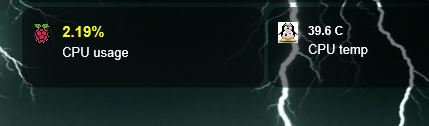
- Capture.JPG (14.74 KiB) Viewed 5059 times
CONFIG.js contains:
Code: Select all
// RPI Info //
blocks[347] = {}        // CPU %
blocks[347]['width'] = 6;
blocks[347]['title'] = 'CPU usage';
blocks[347]['image'] = 'rpi.png';

blocks[348] = {}        // CPU temp
blocks[348]['width'] = 6;
blocks[348]['title'] = 'CPU temp';
blocks[348]['image'] = 'tuxpi.jpg';
and a partial custom.css for block 347 looks like:
Code: Select all
.block_347 .title {
        text-align: center !important;
        vertical-align: middle;
        font-size: 15px !important;
        font-weight: 900 !important;
        color: yellow;
}
Question number 1:
I would think that the title of this block should contain 'CPU usage', like the CONFIG.js file mentions. However, it seems that this
.title property in the CSS file changes the behavior of the percentage!? The data part (percentage number) has now changed its color to yellow instead
of the 'CPU usage' text, which actually is supposed to be the title of the block...?
Does anyone know if this is expected or did I skip a step somewhere?
Question number 2:
How can I change the size of the image rpi.png in this block? I have tried several things in custom.css like:
Code: Select all
.block_347 .image {
        width: 200% !important;
}
or
Code: Select all
.block_347 .image {
        height: 50px !important;
        width: 50px !important;
}
But image size doesn't change one bit with those settings.
Can anyone provide a hint how I can change an image in a block? Is '.image' not the right property to adjust such image properties inside a block?
Many thanks,
Robert
EDIT: Question number 1 is solved. RTFM...: I just found the required setting for that:
This switches the title and data part of the block.
One down, one to go.


 .
.
