Watermeter lezen met raspberry en Inductieve NPN sensor Topic is solved
Moderators: leecollings, remb0
- philchillbill
- Posts: 400
- Joined: Monday 12 September 2016 13:47
- Target OS: Linux
- Domoticz version: beta
- Location: Eindhoven. NL
- Contact:
Re: Watermeter lezen met raspberry en Inductieve NPN sensor
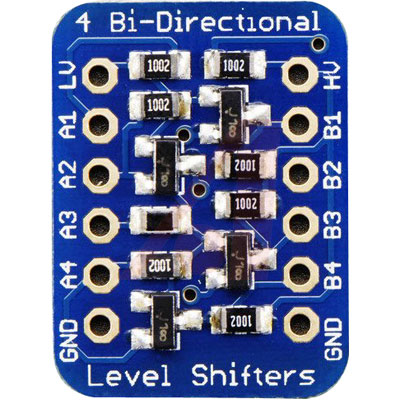
Instead of toying with zeners and resistors, has anybody used a proper level-shifter for this project? For example, this one from Adafruit (model 757) can be bought for about EUR 4 and actually has 4 level shifters implemented with MOSFETs. You can use up to 10V on the high-side (to supply the inductive-sensor) and down to 1.8V on the low-side for the pi. In other words, anything from 5-10V on the high side ('HV') is automatically taken care of and will always result in 3v3 logic levels for the pi - no need to worry about calculating anything (just connect the 3v3 from the pi board to the 'LV' pin on this thing). Sure you could solder up a pull-up and a BSS138 yourself for less money but for EUR 4 this is a rather neat solution.


Alexa skills author: EvoControl, Statereport, MediaServer, LMS-lite
-
pvangorp
- Posts: 70
- Joined: Tuesday 28 March 2017 10:18
- Target OS: Raspberry Pi / ODroid
- Domoticz version: Latest B
- Location: The Netherlands
- Contact:
Re: Watermeter lezen met raspberry en Inductieve NPN sensor
I used a zener because I had one. I mentioned a logic level converter. They are even cheaper https://www.tinytronics.nl/shop/nl/span ... arch=Level
- LouiS22
- Posts: 433
- Joined: Friday 27 February 2015 13:21
- Target OS: Raspberry Pi / ODroid
- Domoticz version: beta
- Location: Budapest, Hungary
- Contact:
Re: Watermeter lezen met raspberry en Inductieve NPN sensor
And that's it, really!pvangorp wrote: Monday 30 October 2017 4:32 I created a test environment for your situation.
As you can see in your dump something goes wrong!!!
I looked into it and ¶m is translated wrong by Domoticz. (type=command¶m=udevice)Code: Select all
2017-10-13 21:29:06.049 LUA: Water usage is still 173.005m3 2017-10-13 21:29:06.050 LUA: wget http://192.168.1.94:8080/json.htm?type=command¶m=udevice&idx=157&svalue=173005 -O /dev/null 2017-10-13 21:29:06.067 EventSystem: Script event triggered: /home/pi/domoticz/scripts/lua/script_device_Watermeter.lua
Change the order of the url parameters and use:and it will work.Code: Select all
json.htm?param=udevice&type=command&idx=......
Update: not, it's still not the right one: it's just doubled the actual value (142 is the acutal, but it's 284 at the Master PI).
-
pvangorp
- Posts: 70
- Joined: Tuesday 28 March 2017 10:18
- Target OS: Raspberry Pi / ODroid
- Domoticz version: Latest B
- Location: The Netherlands
- Contact:
Re: Watermeter lezen met raspberry en Inductieve NPN sensor
I created your situation and tested it today. Mine is working fine. Please validate your code again. It will work if your code is correct! Do you use the correct IP’s!
- philchillbill
- Posts: 400
- Joined: Monday 12 September 2016 13:47
- Target OS: Linux
- Domoticz version: beta
- Location: Eindhoven. NL
- Contact:
Re: Watermeter lezen met raspberry en Inductieve NPN sensor
Sure, that one will work fine if using 5V as the HV level but not sure if it's spec'd for up to 10V like the Adafruit one is in case anybody is using a higher voltage for the sensor (it is after all spec'd for 6V+ operation). Either way, I'd much rather be doing level conversion with a FET.pvangorp wrote: Monday 30 October 2017 15:03 I used a zener because I had one. I mentioned a logic level converter. They are even cheaper https://www.tinytronics.nl/shop/nl/span ... arch=Level
Alexa skills author: EvoControl, Statereport, MediaServer, LMS-lite
-
djreesing
- Posts: 16
- Joined: Friday 16 December 2016 15:25
- Target OS: Raspberry Pi / ODroid
- Domoticz version: stable
- Contact:
Re: Watermeter lezen met raspberry en Inductieve NPN sensor
I've got my setup working with pvangorp's lua script. However my watermeter device shows the wrong number, it's off by one decimal. With every liter the actual watermeter changes, the virtual one changes by 10 liters.
Any idea what I'm doing wrong here? The output from the lua script in the logfile shows the correct amount.
-
pvangorp
- Posts: 70
- Joined: Tuesday 28 March 2017 10:18
- Target OS: Raspberry Pi / ODroid
- Domoticz version: Latest B
- Location: The Netherlands
- Contact:
Re: Watermeter lezen met raspberry en Inductieve NPN sensor
Go to settings, meters and set the RFXMeter for water to 1000. Thats all
-
djreesing
- Posts: 16
- Joined: Friday 16 December 2016 15:25
- Target OS: Raspberry Pi / ODroid
- Domoticz version: stable
- Contact:
Re: Watermeter lezen met raspberry en Inductieve NPN sensor
Thanks, problem solved!
- LouiS22
- Posts: 433
- Joined: Friday 27 February 2015 13:21
- Target OS: Raspberry Pi / ODroid
- Domoticz version: beta
- Location: Budapest, Hungary
- Contact:
Re: Watermeter lezen met raspberry en Inductieve NPN sensor
Guys, I still haven't solved my inital issue, namely sending data from Slave PI to my Master PI. Please help me, it drives me crazy.
Here's the code from the slave:
it is set up as Lua, Device within Events. The supposed sending command is now set as print, and here's the log:
AS you can see from the above log, the svalue is changing, so it should be ok, but when I remove the print command and replace it to os.execute, the value won't be seen at master PI (however firing the the whole URL from browser works and Master PI's virtual counter gets updated).
Where's the bug? Any ideas?
Here's the code from the slave:
Code: Select all
commandArray = {}
-- Water usage
-- Retrieve value from water meter device:
sWaterUsage = otherdevices_svalues['Watermeter']
-- To have a better readable format, divide number by 1000:
sWaterUsagePrint = tonumber(sWaterUsage / 1000);
-- calculation is done with the unmodified water value
sWaterUsage = tonumber(sWaterUsage);
-- For Debuging
-- print("Water usage until now is " .. sWaterUsagePrint .. "m3 ")
-- print('GPIO Watermeter = '..otherdevices['Watermeter GPIO'])
function timedifference(s)
year = string.sub(s, 1, 4)
month = string.sub(s, 6, 7)
day = string.sub(s, 9, 10)
hour = string.sub(s, 12, 13)
minutes = string.sub(s, 15, 16)
seconds = string.sub(s, 18, 19)
t1 = os.time()
t2 = os.time{year=year, month=month, day=day, hour=hour, min=minutes, sec=seconds}
difference = os.difftime (t1, t2)
return difference
end
if (devicechanged['Watermeter GPIO'] == 'Off')
then
sWaterUsageTot = (sWaterUsage + 1)
print("Water usage is set to " .. sWaterUsageTot / 1000 .. "m3 ");
print('wget http://192.168.0.19:8080/json.htm?param=udevice&type=command&idx=3709&svalue='..sWaterUsageTot..' -O /dev/null')
commandArray['UpdateDevice'] = '6|0|'..sWaterUsageTot..''
else
-- Keep a live device
if (timedifference(otherdevices_lastupdate["Watermeter"]) > 300)
then
print("Water usage is still " .. sWaterUsage / 1000 .. "m3 ");
commandArray['UpdateDevice'] = '6|0|'..sWaterUsage..''
print('wget http://192.168.0.19:8080/json.htm?param=udevice&type=command&idx=3709&svalue='..sWaterUsage..' -O /dev/null')
end
end
return commandArrayCode: Select all
2017-11-14 18:21:39.345 LUA: wget http://192.168.0.19:8080/json.htm?param=udevice&type=command&idx=3709&svalue=71219 -O /dev/null
2017-11-14 18:21:39.351 EventSystem: Script event triggered: Watermeter
2017-11-14 18:21:45.026 Sysfs GPIO: gpio21 new state = on
2017-11-14 18:21:45.037 (Watermeter GPIO) Lighting 2 (Watermeter GPIO)
2017-11-14 18:21:49.635 Sysfs GPIO: gpio21 new state = off
2017-11-14 18:21:49.646 (Watermeter GPIO) Lighting 2 (Watermeter GPIO)
2017-11-14 18:21:49.651 LUA: Water usage is set to 71.22m3
2017-11-14 18:21:49.651 LUA: wget http://192.168.0.19:8080/json.htm?param=udevice&type=command&idx=3709&svalue=71220 -O /dev/null
2017-11-14 18:21:49.658 EventSystem: Script event triggered: Watermeter
2017-11-14 18:21:55.375 Sysfs GPIO: gpio21 new state = on
2017-11-14 18:21:55.388 (Watermeter GPIO) Lighting 2 (Watermeter GPIO)
2017-11-14 18:21:59.931 Sysfs GPIO: gpio21 new state = off
2017-11-14 18:21:59.944 (Watermeter GPIO) Lighting 2 (Watermeter GPIO)
2017-11-14 18:21:59.948 LUA: Water usage is set to 71.221m3
2017-11-14 18:21:59.948 LUA: wget http://192.168.0.19:8080/json.htm?param=udevice&type=command&idx=3709&svalue=71221 -O /dev/null
2017-11-14 18:21:59.955 EventSystem: Script event triggered: Watermeter
2017-11-14 18:22:05.678 Sysfs GPIO: gpio21 new state = on
2017-11-14 18:22:05.689 (Watermeter GPIO) Lighting 2 (Watermeter GPIO)
2017-11-14 18:22:10.240 Sysfs GPIO: gpio21 new state = off
2017-11-14 18:22:10.251 (Watermeter GPIO) Lighting 2 (Watermeter GPIO)
2017-11-14 18:22:10.256 LUA: Water usage is set to 71.222m3
2017-11-14 18:22:10.256 LUA: wget http://192.168.0.19:8080/json.htm?param=udevice&type=command&idx=3709&svalue=71222 -O /dev/null
2017-11-14 18:22:10.262 EventSystem: Script event triggered: Watermeter
2017-11-14 18:22:16.011 Sysfs GPIO: gpio21 new state = on
2017-11-14 18:22:16.027 (Watermeter GPIO) Lighting 2 (Watermeter GPIO)
2017-11-14 18:22:20.862 Sysfs GPIO: gpio21 new state = off
2017-11-14 18:22:20.873 (Watermeter GPIO) Lighting 2 (Watermeter GPIO)
2017-11-14 18:22:20.878 LUA: Water usage is set to 71.223m3
2017-11-14 18:22:20.879 LUA: wget http://192.168.0.19:8080/json.htm?param=udevice&type=command&idx=3709&svalue=71223 -O /dev/null
2017-11-14 18:22:20.885 EventSystem: Script event triggered: Watermeter
2017-11-14 18:22:27.166 Sysfs GPIO: gpio21 new state = on
2017-11-14 18:22:27.182 (Watermeter GPIO) Lighting 2 (Watermeter GPIO)
2017-11-14 18:22:32.232 Sysfs GPIO: gpio21 new state = off
2017-11-14 18:22:32.243 (Watermeter GPIO) Lighting 2 (Watermeter GPIO)
2017-11-14 18:22:32.248 LUA: Water usage is set to 71.224m3
2017-11-14 18:22:32.248 LUA: wget http://192.168.0.19:8080/json.htm?param=udevice&type=command&idx=3709&svalue=71224 -O /dev/null
2017-11-14 18:22:32.256 EventSystem: Script event triggered: Watermeter
2017-11-14 18:22:38.662 Sysfs GPIO: gpio21 new state = on
2017-11-14 18:22:38.674 (Watermeter GPIO) Lighting 2 (Watermeter GPIO)
2017-11-14 18:22:43.704 Sysfs GPIO: gpio21 new state = off
2017-11-14 18:22:43.722 (Watermeter GPIO) Lighting 2 (Watermeter GPIO)
2017-11-14 18:22:43.728 LUA: Water usage is set to 71.225m3
2017-11-14 18:22:43.728 LUA: wget http://192.168.0.19:8080/json.htm?param=udevice&type=command&idx=3709&svalue=71225 -O /dev/null
2017-11-14 18:22:43.736 EventSystem: Script event triggered: Watermeter
2017-11-14 18:22:50.086 Sysfs GPIO: gpio21 new state = onWhere's the bug? Any ideas?
-
pvangorp
- Posts: 70
- Joined: Tuesday 28 March 2017 10:18
- Target OS: Raspberry Pi / ODroid
- Domoticz version: Latest B
- Location: The Netherlands
- Contact:
Re: Watermeter lezen met raspberry en Inductieve NPN sensor
Use os.execute('wget http://...... instead of print. Print was for debugging!
- LouiS22
- Posts: 433
- Joined: Friday 27 February 2015 13:21
- Target OS: Raspberry Pi / ODroid
- Domoticz version: beta
- Location: Budapest, Hungary
- Contact:
Re: Watermeter lezen met raspberry en Inductieve NPN sensor
I mentioned before that print is now for testing purpose to see values are arriving. After that I specified that it's not working with os.execute, values aren't arriving to master pipvangorp wrote: Wednesday 15 November 2017 5:35 Use os.execute('wget http://...... instead of print. Print was for debugging!
-
pvangorp
- Posts: 70
- Joined: Tuesday 28 March 2017 10:18
- Target OS: Raspberry Pi / ODroid
- Domoticz version: Latest B
- Location: The Netherlands
- Contact:
Re: Watermeter lezen met raspberry en Inductieve NPN sensor
They will or the entered ip is wrong!
- LouiS22
- Posts: 433
- Joined: Friday 27 February 2015 13:21
- Target OS: Raspberry Pi / ODroid
- Domoticz version: beta
- Location: Budapest, Hungary
- Contact:
Re: Watermeter lezen met raspberry en Inductieve NPN sensor
IP is correct as also mentioned: copypasting the very same IP with value triggers Master PI and counter gets updated there
No other idea where it goes south.
-
Benneton
- Posts: 114
- Joined: Thursday 08 December 2016 9:46
- Target OS: Raspberry Pi / ODroid
- Domoticz version:
- Contact:
Re: Watermeter lezen met raspberry en Inductieve NPN sensor
Hi,
Last week the sensor arrived, yesterday I had some time to fiddle with it, Installation went smooth, add of 'watermeter' in Domoticz, loading script, Cron bit and the diverder to 1000. Then I rebooted and found it to work, great for one thing, having the sensor connected interfered with my RFXCOM on the USB port. I can use only one, the water meter or the RFXCOM.
My guess is that both use to much power. This post helped me in finding out.
My question is can I power the sensor with an external power supply not using the 5v from the PI and just connect the black to GPOI21 (pin40) to receive the pulses from the sensor?
Any other solution is welcomed to! Thanks for the support.
Bernard
Last week the sensor arrived, yesterday I had some time to fiddle with it, Installation went smooth, add of 'watermeter' in Domoticz, loading script, Cron bit and the diverder to 1000. Then I rebooted and found it to work, great for one thing, having the sensor connected interfered with my RFXCOM on the USB port. I can use only one, the water meter or the RFXCOM.
My guess is that both use to much power. This post helped me in finding out.
My question is can I power the sensor with an external power supply not using the 5v from the PI and just connect the black to GPOI21 (pin40) to receive the pulses from the sensor?
Any other solution is welcomed to! Thanks for the support.
Bernard
-
pvangorp
- Posts: 70
- Joined: Tuesday 28 March 2017 10:18
- Target OS: Raspberry Pi / ODroid
- Domoticz version: Latest B
- Location: The Netherlands
- Contact:
Re: Watermeter lezen met raspberry en Inductieve NPN sensor
Bernard, I use several devices on USB and GPIO watermeter and relais without any power issues, but I use the original Pi3 adapter with 2.5A. You can use a separate power supply, but than I would use a Level Converter (as discussed before in this topic).
-
Benneton
- Posts: 114
- Joined: Thursday 08 December 2016 9:46
- Target OS: Raspberry Pi / ODroid
- Domoticz version:
- Contact:
Re: Watermeter lezen met raspberry en Inductieve NPN sensor
Hi PvanGorp
Thanks for this hint! I have currently a 2.1A power supply, will swap it with an original PI power supply I have. Hopeful this will solve the power issue.
Otherwise it also could be cable length, approx 5meter.
Update 29/11/2017:
Got it figured out, cable was faulty, connected up new cable and now all is working fine for 3 days. Will check in a week or so how accurate the measurement will be.
Thanks to al who made this possible!
Bernard
Thanks for this hint! I have currently a 2.1A power supply, will swap it with an original PI power supply I have. Hopeful this will solve the power issue.
Otherwise it also could be cable length, approx 5meter.
Update 29/11/2017:
Got it figured out, cable was faulty, connected up new cable and now all is working fine for 3 days. Will check in a week or so how accurate the measurement will be.
Thanks to al who made this possible!
Bernard
Last edited by Benneton on Wednesday 29 November 2017 16:21, edited 1 time in total.
-
Draakje
- Posts: 140
- Joined: Thursday 22 October 2015 21:14
- Target OS: Linux
- Domoticz version: 4.11539
- Contact:
Re: Watermeter lezen met raspberry en Inductieve NPN sensor
Could you elaborate the ZenerDiode connection?pvangorp wrote: Friday 25 August 2017 10:45 Instead you can connect a 3.3v zener diode on the black wire and your GPIO's are safe. They are verry cheap and perfect for low power. https://www.kiwi-electronics.nl/zenerdiode-3v3-500ma.
For accurate measurement use a 9 or 12 volt adapter instead of 5v from the PI.
Do you mean putting the zener between black wire and GPIO pin ? And in what direction ? Kathode on ..... / anode on ....
Hardware: Raspberry Pi 3, OTGW, 433MHz Superheterodyne 3310 RF Link
Software: Ubuntu 16.04, Domoticz v3.5468, WiringPi, rc-switch
-
pvangorp
- Posts: 70
- Joined: Tuesday 28 March 2017 10:18
- Target OS: Raspberry Pi / ODroid
- Domoticz version: Latest B
- Location: The Netherlands
- Contact:
Re: Watermeter lezen met raspberry en Inductieve NPN sensor
Between black wire and GPIO. For direction I used a volt meter. If correct connected it give 3.3v instead of 5v. When wrong connected it gives 5v
-
Draakje
- Posts: 140
- Joined: Thursday 22 October 2015 21:14
- Target OS: Linux
- Domoticz version: 4.11539
- Contact:
Re: Watermeter lezen met raspberry en Inductieve NPN sensor
Thanks!pvangorp wrote: Friday 17 November 2017 15:36 Between black wire and GPIO. For direction I used a volt meter. If correct connected it give 3.3v instead of 5v. When wrong connected it gives 5v
Hardware: Raspberry Pi 3, OTGW, 433MHz Superheterodyne 3310 RF Link
Software: Ubuntu 16.04, Domoticz v3.5468, WiringPi, rc-switch
-
Draakje
- Posts: 140
- Joined: Thursday 22 October 2015 21:14
- Target OS: Linux
- Domoticz version: 4.11539
- Contact:
Re: Watermeter lezen met raspberry en Inductieve NPN sensor
Ok,pvangorp wrote: Friday 17 November 2017 15:36 Between black wire and GPIO. For direction I used a volt meter. If correct connected it give 3.3v instead of 5v. When wrong connected it gives 5v
So When I measure the voltage I have like 5,1V without the Zener and 1,7 With the zener.. (Are these similar to what you have?)
The meter does work in Domoticz but it is way off.. Just Flushing the toilet will increase the meter with 10 liters...... (No I do not have a very large toilet
I have set the meter setting to 1000.
Where should I check things over ?
Hardware: Raspberry Pi 3, OTGW, 433MHz Superheterodyne 3310 RF Link
Software: Ubuntu 16.04, Domoticz v3.5468, WiringPi, rc-switch
Who is online
Users browsing this forum: willemd and 1 guest