Page 1 of 1
#PRIORITY not set in settings>Notifications>CustomHTTP/Action
Posted: Friday 19 December 2025 15:04
by edgarhildering
Version: 2025.2
Build Hash: e63981b18
Compile Date: 2025-10-13 11:42:57
dzVents Version: 3.1.8
Python Version: 3.11.2 (main, Apr 28 2025, 14:11:48) [GCC 12.2.0]
Platform: Linux 6.6.31+rpt-rpi-v8 #1 SMP PREEMPT Debian 1:6.6.31-1+rpt1 (2024-05-29) aarch64 GNU/Linux
Description: a priority in the SendNotification string is not reflected in the #PRIORITY field of the customHTTP/Action settings.
commandArray[#commandArray+1] = {['SendNotification'] = '#Alert: testswitch turned off#4###http'}
I use a script to pick up the fields and send them to my ntfy-server, like this:
script://.../ntfy.sh --user #FIELD2 --topic #FIELD1 --server #TO --org "#FIELD4 #PRIORITY" --message "#MESSAGE" --prio 3
The priority is combined with #FIELD4. The expected result is "HZN 4", however this is the result:
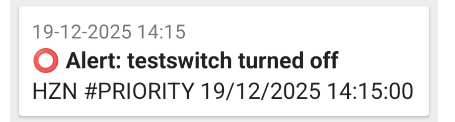
- Screenshot from 2025-12-19 14-53-46.png (24.63 KiB) Viewed 165 times
AFAIK the messge for SendNotification is build up as follows:
subject#message#priority#sound#extradata#subsystem
In case I'm wrong, let me know how to do it.
kind regards, --Edgar
Re: #PRIORITY not set in settings>Notifications>CustomHTTP/Action
Posted: Friday 19 December 2025 15:27
by waltervl
I am not a Domoticz lua script user but is seems I miss a subject field in your command
Code: Select all
commandArray[#commandArray+1] = {['SendNotification'] = '#Alert: testswitch turned off#4###http'}
Code: Select all
   commandArray['SendNotification']='subject#body#priority#sound#extradata#subsystem'
          -- Subject is .. the subject
          -- Body is the content of the message
          -- priority is a number from 0 (low) to 4 (emergency)
          -- sound is the sound you want to use if you use pushover
          -- extradata can be used by some of the notification.
          -- subsystem is one or more of: clickatell;email;fcm;http;kodi;lms;prowl;pushalot;pushbullet;pushover;pushsafer;telegram
So perhaps it should be something like
Code: Select all
commandArray[#commandArray+1] = {['SendNotification'] = 'Domoticz Alert#Alert: testswitch turned off#4###http'}
Re: #PRIORITY not set in settings>Notifications>CustomHTTP/Action
Posted: Friday 19 December 2025 15:43
by edgarhildering
Hi and thanks for the reply. I kept the subject empty. Even when I define a notification on a switch
- you can't set a subject, but you can set a message
- the result is exactly the same: #PRIORITY in the report as above, instead of the selected priority. (in my case: Emergency)
--Edgar
Re: #PRIORITY not set in settings>Notifications>CustomHTTP/Action
Posted: Friday 19 December 2025 15:58
by waltervl
I dont know if #Priority is meant for this way.
Perhaps check in discussion
viewtopic.php?p=304181&hilit=ntfy#p304181 how they handle notifications priority over ntfy.sh
with commandArray[#commandArray+1] = {['SendNotification'] = 'Subject#Alert: testswitch turned off#4###http'} you send something to the Domoticz http custom notification action. There you should be able to use it.
https://wiki.domoticz.com/Notifications
Edit: Now I get it...... in the first topic the script definition is used in the URL/Action field of the HTTP notification.
But did you try it with a subject added in the lua command? Does it give the same result?
Re: #PRIORITY not set in settings>Notifications>CustomHTTP/Action
Posted: Friday 19 December 2025 16:12
by waltervl
When I look in dzvents for the notify function the field subject is not an optional field...
notify(subject, message [,priority][,sound][,extra][,subsystem][,delay]):
Re: #PRIORITY not set in settings>Notifications>CustomHTTP/Action
Posted: Friday 19 December 2025 16:34
by edgarhildering
ok, i've added a subject to my notification:
commandArray[#commandArray+1] = {['SendNotification'] = 'MySubject#Alert: testswitch turned off#4###http'}
Unfortunately, there's no difference. And even when I send a test message from the customHTTP/action (test button), I don't see any priority.
The 'Hello' message is the result of turning the switch on. The Alert message is from the commandArray-call above (subject added). The test message is from the test button.
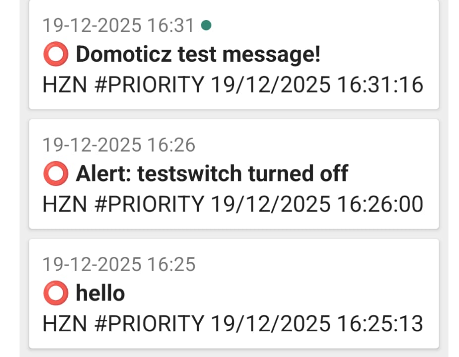
- Screenshot from 2025-12-19 16-32-43.png (69.59 KiB) Viewed 139 times
Re: #PRIORITY not set in settings>Notifications>CustomHTTP/Action
Posted: Friday 19 December 2025 16:54
by waltervl
Perhaps check in discussion
viewtopic.php?p=304181&hilit=ntfy#p304181 how they handle notifications priority over ntfy.sh
Re: #PRIORITY not set in settings>Notifications>CustomHTTP/Action
Posted: Friday 19 December 2025 17:03
by edgarhildering
It is not about using the priority in ntfy. That works fine. See my script where I use --prio 3. It is about getting the priority from Domoticz...
Re: #PRIORITY not set in settings>Notifications>CustomHTTP/Action
Posted: Friday 19 December 2025 19:14
by waltervl
When I test this with my telegram bot in the HTTP action field and try to send the priority I get a nice 0 returned as that is the default priority
Code: Select all
https://api.telegram.org/bot6xxxxxx:sbgwrbvgwevgfbbbbbbb/sendMessage?chat_id=#TO&text=#PRIORITY
When using below I get the text: 0Text in field4
But when I put quotes around it in the action field I get no response at all...
So perhaps try
Code: Select all
script://.../ntfy.sh --user #FIELD2 --topic #FIELD1 --server #TO --org #FIELD4#PRIORITY --message #MESSAGE --prio 3
Re: #PRIORITY not set in settings>Notifications>CustomHTTP/Action
Posted: Friday 19 December 2025 20:38
by edgarhildering
I did try #FIELD4#PRIORITY, no success...
Re: #PRIORITY not set in settings>Notifications>CustomHTTP/Action
Posted: Friday 19 December 2025 20:39
by edgarhildering
I've done some "finger exercises" with double quotes (with quotes, without quotes, escaped quotes, etc.). No matter what I try, I can't get #PRIORITY to be entered as a parameter. The #SUBJECT parameter does work: I receive the subject in this key and can also use it in the call to ntfy.
Regarding Telegram: I see that I can't call a script there and that 'FIELDS' aren't available either; lucky you that it works for Telegram.
I'm waiting for the next release of Domoticz and will test it again then... Any suggestion is welcome in the mean time...
--Edgar
Re: #PRIORITY not set in settings>Notifications>CustomHTTP/Action
Posted: Friday 19 December 2025 20:48
by madpatrick
Maybe this can be an option for you.
viewtopic.php?p=273355#p273355
This a script which reads out the log and send a message.
i've adjusted myself to send messages by Prowl
for example
Code: Select all
local SCRIPT_VAR = 'ErrorLogCallback'
local SCRIPT_NAME = 'ErrorLog'
local LOG_LEVEL = domoticz.LOG_STATUS -- zet op LOG_ERROR bij productie
return {
on = {
httpResponses = { SCRIPT_VAR },
timer = { "every hour" },
-- devices = { 290 },
},
logging = {
level = LOG_LEVEL,
marker = SCRIPT_NAME
},
data = {
lastlogtime = { initial = 0 }
},
execute = function(dz, item)
--------------------------------------------------------------------
-- Zoeken naar foutmeldingen in Domoticz log
--------------------------------------------------------------------
local searchTerms = { "Error", "Warning", "Failure" }
local ignoreStrings = {
"CheckAuthToken", "dzVents: Info:", "dzVents: !Info:", "dzVents: Debug:",
"transport", "http", "Discarding device", "CConnection_connect",
"PARSE", "KeyError", "nan"
}
local function isRelevant(str)
if not str or str == "" then return false end
for _, ignore in ipairs(ignoreStrings) do
if str:find(ignore) then return false end
end
for _, term in ipairs(searchTerms) do
if str:find(term) then return true end
end
return false
end
--------------------------------------------------------------------
-- Log opvragen (lastlogtime direct vastzetten!)
--------------------------------------------------------------------
local function requestLog()
local baseUrl = dz.settings['Domoticz url']
local previousTime = dz.data.lastlogtime
local now = os.time()
local url = string.format(
"%s/json.htm?type=command¶m=getlog&lastlogtime=%d&loglevel=4",
baseUrl,
previousTime
)
dz.openURL({ url = url, callback = SCRIPT_VAR })
-- BELANGRIJK: direct opslaan → crash-/restart-safe
dz.data.lastlogtime = now
end
--------------------------------------------------------------------
-- Extract recente logregels
--------------------------------------------------------------------
local function findLogMessage(json)
if json and json.result and type(json.result) == "table" then
for i = #json.result, 1, -1 do
local msg = json.result[i].message
if isRelevant(msg) then return msg end
end
end
return nil
end
--------------------------------------------------------------------
-- Timestamp loskoppelen van de rest
--------------------------------------------------------------------
local function splitAfterTimestamp(msg)
local prefix, suffix = msg:match(
"^(%d%d%d%d%-%d%d%-%d%d %d%d:%d%d:%d%d[^\n]-:%s)(.+)"
)
if prefix and suffix then return prefix, suffix end
return msg, ""
end
--------------------------------------------------------------------
-- Schoonmaken van foutmeldingen (zonder interpretatie)
--------------------------------------------------------------------
local function prettyMessage(msg)
if not msg or msg == "" then return "" end
local ts, rest = msg:match(
"^(%d%d%d%d%-%d%d%-%d%d %d%d:%d%d:%d%d.-:%s)(.+)"
)
ts = ts or ""
rest = rest or msg
rest = rest:gsub('b"[^"]*"', "[data]")
rest = rest:gsub("{[^}]*}", "[details]")
rest = rest:gsub("%s+", " "):gsub("^%s*(.-)%s*$", "%1")
return ts .. rest
end
--------------------------------------------------------------------
-- Fallback parsing als JSON stukgelopen is
--------------------------------------------------------------------
local function manualParseFromRaw(raw)
if not raw or raw == "" then return nil end
if not (raw:find('"LastLogTime"') or raw:find('"GetLog"')) then return nil end
local lastRelevant = nil
for line in raw:gmatch("[^\r\n]+") do
if line:find('"message"') then
local msg = line:match('"message"%s*:%s*"(.*)"%s*,?%s*$')
if msg and isRelevant(msg) then
lastRelevant = msg
end
end
end
return lastRelevant
end
--------------------------------------------------------------------
-- HOOFDLOGICA
--------------------------------------------------------------------
if item.isDevice or item.isTimer then
requestLog()
elseif item.isHTTPResponse then
if not item.ok then
dz.log(
"HTTP fout bij ophalen log. Statuscode: " ..
tostring(item.statusCode),
dz.LOG_ERROR
)
return
end
if item.json then
local found = findLogMessage(item.json)
if found then
local p1, p2 = splitAfterTimestamp(found)
local pretty = prettyMessage(p1 .. p2)
dz.log("Relevante foutmelding gevonden: " .. pretty, dz.LOG_FORCE)
dz.notify("Domoticz Foutmelding", pretty, dz.PRIORITY_HIGH)
end
else
local rawData = item.data or ""
if rawData:find("<!DOCTYPE html>") then
dz.log(
"HTML response (loginpagina). Voeg 127.0.0.1 toe aan 'Lokale Netwerken'.",
dz.LOG_ERROR
)
return
end
local manualMsg = manualParseFromRaw(rawData)
if manualMsg then
local pretty = prettyMessage(manualMsg)
dz.log("Relevante foutmelding (fallback): " .. pretty, dz.LOG_FORCE)
dz.notify("Domoticz Foutmelding", pretty, dz.PRIORITY_HIGH)
else
dz.log("HTTP response bevat geen geldige JSON.", dz.LOG_ERROR)
end
end
end
end
}
Re: #PRIORITY not set in settings>Notifications>CustomHTTP/Action
Posted: Saturday 20 December 2025 0:07
by waltervl
edgarhildering wrote: Friday 19 December 2025 20:39
I've done some "finger exercises" with double quotes (with quotes, without quotes, escaped quotes, etc.). No matter what I try, I can't get #PRIORITY to be entered as a parameter. The #SUBJECT parameter does work: I receive the subject in this key and can also use it in the call to ntfy.
Regarding Telegram: I see that I can't call a script there and that 'FIELDS' aren't available either; lucky you that it works for Telegram.
I'm waiting for the next release of Domoticz and will test it again then... Any suggestion is welcome in the mean time...
--Edgar
As said, if you create a telegram bot you can also use it with http command.
I used it with latest stable 2025.2 I do not think a lot in this has changed recently. My test proofed the http notification changes #PRIORITY into a number and uses that in the http command. So it also should work for you.
Re: #PRIORITY not set in settings>Notifications>CustomHTTP/Action
Posted: Monday 22 December 2025 17:17
by edgarhildering
The initial problem (passing the priority) hasn't worked yet. Here's an update.
waltervl wrote: Saturday 20 December 2025 0:07
My test proofed the http notification changes #PRIORITY into a number and uses that in the http command. So it also should work for you.
- It turns out the priority is indeed passed correctly when an http(s) call is used. I haven't been able to do this for a script call (script://).
- After some searching, I found a way to access the message server without using a script. It works like this:
Code: Select all
https://<message-server-address>/<topic>/publish?<key=value>&<key=value>...
- Unfortunately, the priorities of Domoticz and NTFY are not compatible; see the table below.
Code: Select all
domoticz prio | Domoticz code | NTFY equivalent |
--------------+---------------+-----------------+
   very low   |   -2          |   1             |
   low        |   -1          |   2             |
   normal     |    0          |   3             |
   high       |    1          |   4             |
   emergency  |    2          |   5             |
So, you can't use the domoticz code without some tricks. The NTFY server returns an error if the key 'priority=' is provided with an illegal value.
I'm still investigating how to use NGINX to change the value of the domoticz parameter (provided as domprio=...) to its NTFY equivalent and then add it to the URL. But at least I can get some messages now!
Re: #PRIORITY not set in settings>Notifications>CustomHTTP/Action
Posted: Monday 22 December 2025 19:34
by waltervl
You are right, the notify by script section in the source does not have a #PRIORITY translation like the http part has. So you could make a GitHub issue to get this corrected.
https://github.com/domoticz/domoticz/bl ... onHTTP.cpp