Page 1 of 1
How to start Domoticz with --no-cache in docker compose?
Posted: Thursday 20 November 2025 20:07
by BarryT
Hi all,
i do not want to use the cache function of domoticz at all, but i can't find a way to disable this.
I'm using domoticz from docker compose (portainer).
thanks!
Re: How to start Domoticz with --no-cache in docker compose?
Posted: Thursday 20 November 2025 20:23
by jvdz
You mean the parameters you can define for env variable EXTRA_CMD_ARG? Just check the docker wiki page.
Re: How to start Domoticz with --no-cache in docker compose?
Posted: Thursday 20 November 2025 20:51
by BarryT
jvdz wrote: Thursday 20 November 2025 20:23
You mean the parameters you can define for env variable EXTRA_CMD_ARG? Just check the docker wiki page.
Nice answer, i'll Check. Thanks!
Its for Docker, not Docker compose?
Re: How to start Domoticz with --no-cache in docker compose?
Posted: Thursday 20 November 2025 21:12
by jvdz
Docker/docker compose is the same thing, just a different way to configure the stack/Container, like you do with portainer.

Re: How to start Domoticz with --no-cache in docker compose?
Posted: Friday 21 November 2025 8:12
by BarryT
jvdz wrote: Thursday 20 November 2025 21:12
Docker/docker compose is the same thing, just a different way to configure the stack/Container, like you do with portainer.
I was hoping it was that easy, but:
Code: Select all
environment:
      - TZ=Europe/Amsterdam
      - WWW_PORT=80
      - SSL_PORT=0
      - loglevel=error
      - EXTRA_CMD_ARG=--no-cache
is not working

Re: How to start Domoticz with --no-cache in docker compose?
Posted: Friday 21 November 2025 8:51
by jvdz
BarryT wrote: Friday 21 November 2025 8:12
I was hoping it was that easy, but:
It is, but is the "-no-cache" a valid parameter? This is what the wiki states:
https://wiki.domoticz.com/Command_line_parameters.
Isn't the "-no-cache" a parameter for your browser on your the computer?
Re: How to start Domoticz with --no-cache in docker compose?
Posted: Friday 21 November 2025 17:43
by BarryT
jvdz wrote: Friday 21 November 2025 8:51
BarryT wrote: Friday 21 November 2025 8:12
I was hoping it was that easy, but:
It is, but is the "-no-cache" a valid parameter? This is what the wiki states:
https://wiki.domoticz.com/Command_line_parameters.
Isn't the "-no-cache" a parameter for your browser on your the computer?
No, Domoticz has an no-cache command line parameter, and all these commands are working correctly inside docker compose, but the no-cache is not working.
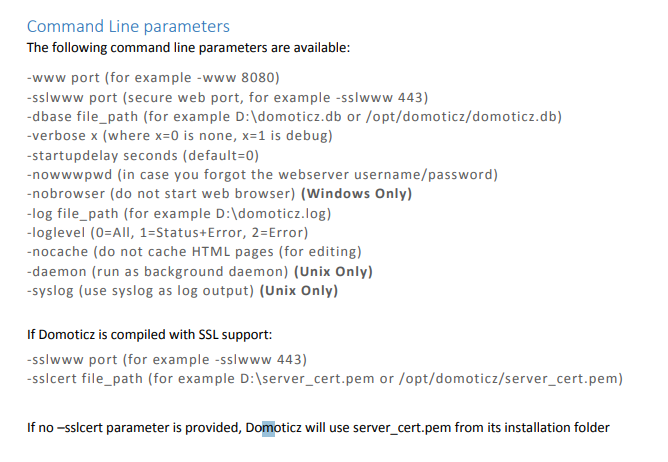
- {BE542200-BCF0-44B4-B4E3-FEC162C9D929}.png (95.78 KiB) Viewed 147 times
I tried -nocache, --nocache, -no-cache, but nothing works.
Our Docker is respecting all the parameters, except the nocache.:
Code: Select all
environment:
      - TZ=Europe/Amsterdam #WORKS
      - WWW_PORT=80 #WORKS
      - SSL_PORT=0 #WORKS
      - loglevel=error #WORKS
      - nocache #NOT WORKING
      - no-cache #NOT WORKING
      - --nocache #NOT WORKING
      - --no-cache #NOT WORKING
      - nocache=true #NOT WORKING
and so on....
Re: How to start Domoticz with --no-cache in docker compose?
Posted: Friday 21 November 2025 18:01
by BarryT
jvdz wrote: Friday 21 November 2025 8:51
BarryT wrote: Friday 21 November 2025 8:12
I was hoping it was that easy, but:
It is, but is the "-no-cache" a valid parameter? This is what the wiki states:
https://wiki.domoticz.com/Command_line_parameters.
Isn't the "-no-cache" a parameter for your browser on your the computer?
Ah, now its working with this environment:
How stupid...


Re: How to start Domoticz with --no-cache in docker compose?
Posted: Friday 21 November 2025 18:42
by waltervl
And the nocache option was added in the code in 2023 but not documented in the wiki, now it is....
Re: How to start Domoticz with --no-cache in docker compose?
Posted: Friday 21 November 2025 18:45
by BarryT
waltervl wrote: Friday 21 November 2025 18:42
And the nocache option was added in the code in 2023 but not documented in the wiki, now it is....
Great! Thats why i couldnt find..
Thanks both, have a good weekend