Page 1 of 1
Easy modbus solution for Marstek home Battery
Posted: Tuesday 29 July 2025 22:19
by RNEE
Have a modbus device like the Homebattery Marstek Venus V2 5,12 Kwh and want a direct connection not using the API ?
No more waiting until data synchronize or wondering where the data went.
Like this ?
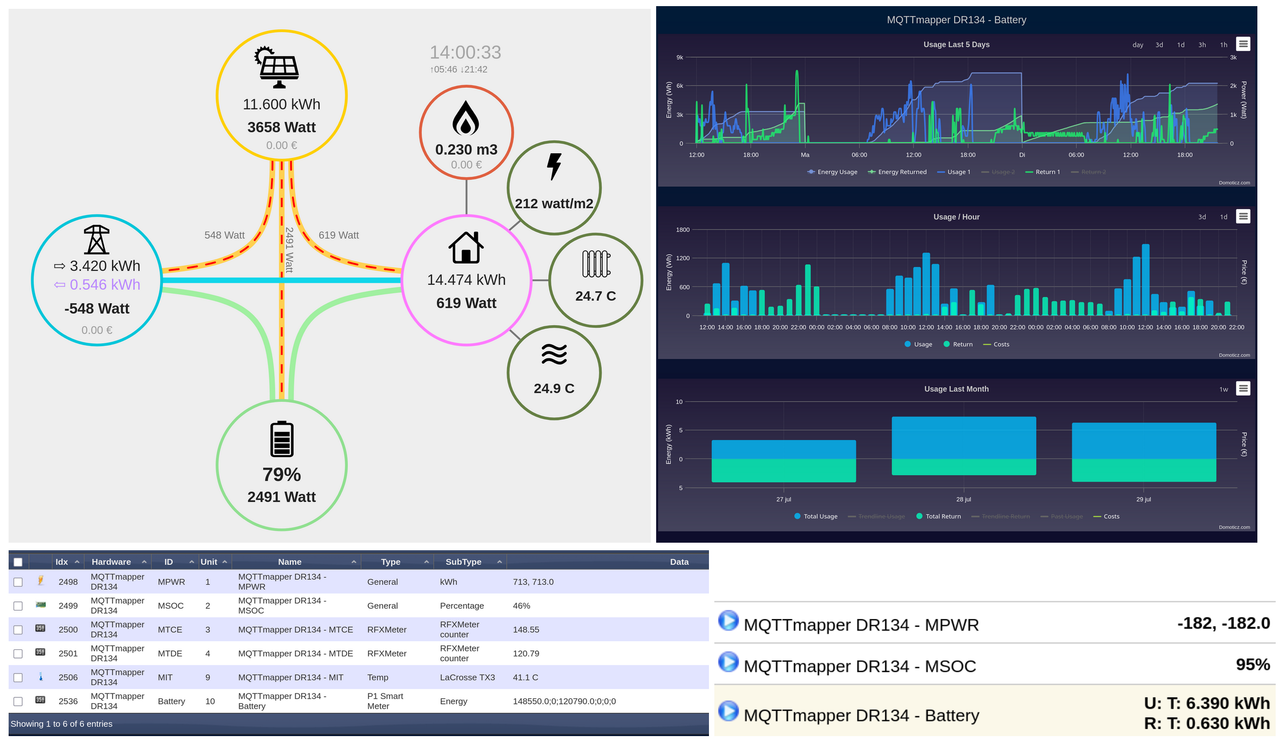
With just a few minutes of your time, a few easy steps and and only 108 configuration lines in just 2 .json files !
You can find my project on Github :
https://github.com/RneeJ/Domoticz-Marstek
More is easy possible, even controlling the device, also for other modbus devices, having a rs485 port, that store data in registers.
(you need the manual for these register#)
With only the use of the PUSER-DR134 (a € 15 device) and MqttMapper plugin (by Flyingdomotic) you can bypass programming, api's etc.
Thanx to Waltervl (who told me to report here) and Flyingdomotic for helping !
Re: Easy modbus solution
Posted: Wednesday 30 July 2025 6:41
by eddieb
Nice work @RNEE ...
Hope to receive my PUSER-DR134 soon and follow your work to get stuff going.
Re: Easy modbus solution
Posted: Friday 12 September 2025 12:20
by Henielma
This looks good. I have already the DR134 and the Marstek V2 is ordered. '
It seems to me that this Modbus sollution reads the status and data of the Marstek.
Is there an example how to control the Marstek using Domoticz and the DR134?
Re: Easy modbus solution
Posted: Saturday 13 September 2025 11:41
by RNEE
I currently don’t have time to work on controlling, nor do i have a need to change my current NOM workmode.
From what i know now it should not be to difficult:
You can write commands to a specific topic witch the DR134 reads.
Before someting can change you have to change the command setting in register 42000 first.
Re: Easy modbus solution
Posted: Saturday 13 September 2025 12:37
by Henielma
Thanks for the info. This helps me to get started in sending commands to the Mastek.
First wait on de delivery next week.
Re: Easy modbus solution
Posted: Sunday 28 September 2025 16:11
by Henielma
I have used the DR134 to readout the registers as RNEE described in this topic. Thanks for sharing this.
I made some changes in the MqttMapper.json file to add CellVoltage and CellPower.
Using the DR134 to send Modbus registers to the Marstek seems not possible.
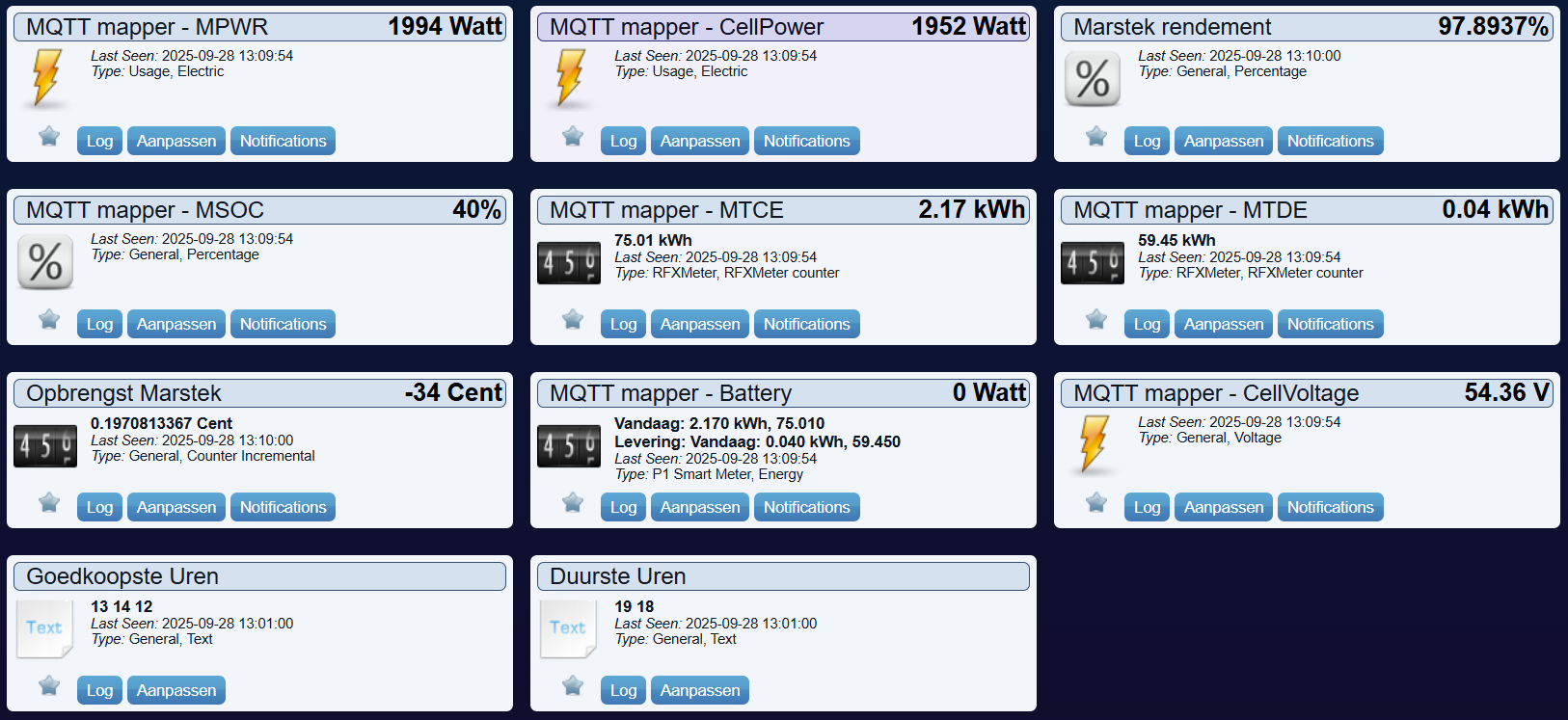
- DR134 velden.png (190.39 KiB) Viewed 1152 times
For sending registers to the Marstek using modbus I now use a Wemon mini D1 with EspEasy flashed into it. Additionally I connected an RS485 driver board to the serial port of the Wemos. Receiving binary data from the serial port is not working here for longers registers. But send registers to the Marstek via the Modbus works fine here. The EspEasy RS-485 bus is connected in parallel to the RS485 or the DR134.
So the DR134 is still used to read the registers and the EspEasy is used to send registers to the Marstek.
Hereafter a screenshot of the Devices that are created in Domoticz. The Selector switch is used to send http messages to the EspEasy. A short rule does the transmission to the Marstek.
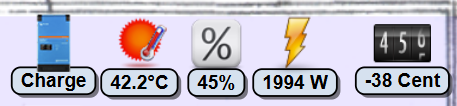
- Screenshot Marstek control.png (41.59 KiB) Viewed 1152 times
If people are interested I can post more details about this sollution to send registers to the Marstek Venus E V2.
Re: Easy modbus solution
Posted: Monday 29 September 2025 21:14
by eddieb
Can you please post de DR134.json and the mqttmapper.json you used ?
Re: Easy modbus solution
Posted: Monday 29 September 2025 21:49
by Henielma
eddieb wrote: Monday 29 September 2025 21:14
Can you please post de DR134.json and the mqttmapper.json you used ?
See the attachment.
Do not forget to change in the Domoticz Devices 'MQTT mapper - MTCE' and 'MQTT mapper - MTDE' the divider into 100 to get these values in kWh with two decimals.
Furthermore I changed the following Edge gateway settings but this is for your own choice:
Poll intervall 9000
Reporting interval into 60
This because the very fast update is not needed for my application. And the more quite Modbus gives more opportunity to send commands to the Marstek using the EspEasy.
Re: Easy modbus solution
Posted: Thursday 20 November 2025 1:09
by joostvanderlinde
Henielma wrote: Sunday 28 September 2025 16:11
...
Using the DR134 to send Modbus registers to the Marstek seems not possible.
....
It is definitely possible to control the Marstek Venus (at least v1 and V2, I have a V1) using the DR134.
I am running two Python3 scripts (so not using MQTTMapper):
One that runs every 5 seconds to update domoticz sensors based on modbus registers (ie. the equivalent of the MQTTMapper solution)
One that is triggered by Domoticz switches/selectors to control the Marstek via modbus.
This is my " set_marstek" script. You just have to modify the IP of your DR134 in the code an provide the correct parameters and it should work.
No warranty and use at your own risk!!!
Code: Select all
#!python3
# set-marstek
progname='set_marstek.py'
version = "v0.1"

from pyModbusTCP.client import ModbusClient
from pyModbusTCP import utils
import argparse
import sys

def set_mode(mode):
  if mode == 'manual':
     result = marstek.write_single_register(43000, 0) #0-manual/1-anti injection/2-trade
  elif mode == 'self':
     result = marstek.write_single_register(43000, 1) #0-manual/1-anti injection/2-trade
  elif mode == 'self_trade':
     result = marstek.write_single_register(43000, 2) #0-manual/1-anti injection/2-trade
  elif mode == 'charge':
     result = marstek.write_single_register(42010, 1) #0-stop/1-charge/2-discharge
  elif mode == 'discharge':
     result = marstek.write_single_register(42010, 2) #0-stop/1-charge/2-discharge
  elif mode == 'stop':
     result = marstek.write_single_register(42010, 0) #0-stop/1-charge/2-discharge
  else:
     result = False
  return result

def set_discharge_power(watts):
  result = marstek.write_single_register(42021, watts) # 0-2500W
  return result

def set_charge_power(watts):
  result = marstek.write_single_register(42020, watts) # 0-2500W
  return result

def set_soc_target(percentage):
  result = marstek.write_single_register(42011, percentage) # 10-100%
  return result

################################################################
#Initialize
################################################################
#Commandline arguments parsing
################################################################
parser = argparse.ArgumentParser(prog=progname, description='Set Marstek')
parser.add_argument("-m", "--mode", type=str, choices=['manual', 'self', 'self_trade', 'soc', 'discharge', 'charge', 'stop', 'reset'], required=True)
parser.add_argument("-v", "--value", type=int )
parser.add_argument("-u", "--unit", type=int, required=False, default=1)
args = parser.parse_args()
print(progname)
print('Connect to:' )
print('IP/port    : ' + '192.168.0.15' + '-' + ' 502' ) #<= Adapt to IP & port of the DR134
print('Modbus unit: ' + str(args.unit))

#setup connection & enable control mode
try:
    marstek = ModbusClient(host='192.168.0.15', port=502, unit_id=args.unit, auto_open=False, auto_close=False) #<= Adapt to IP & port of the DR134
except ValueError:
    sys.exit("Failed to establish connection (host or port params)")
if not marstek.open(): #open socket
   sys.exit("Failed to open connectione")
#    command_on: 21930 # 0x55AA in decimal
#    command_off: 21947 # 0x55BB in decimal
if not marstek.write_single_register(42000, 21930): #control mode enable
   sys.exit("Failed to enable control mode")

if args.mode == 'reset':  #<= Does not seem to work :-(
   if not marstek.write_single_register(41000, 21930):  # 21930 is 0x55AA in decimal
      print("Failed to reset")
   else:
      print("Reset succesful")

if args.mode in {'manual', 'self' , 'self_trade'}:
   if not set_mode(args.mode):
      print("Failed to set manual/self/self_trade mode")

if args.mode == 'soc':
   if not set_soc_target(args.value):
      print("Failed to set soc target")

if args.mode in { 'charge', 'discharge', 'stop'}:
   if args.mode == 'stop':
      if set_mode('stop'):
         print("Stop mode set")
      else: print("Failed to set stop mode")
   elif args.mode == 'charge':
      print("Try setting charge mode")
      if args.value:
         print("value found")
         if set_charge_power(args.value):
            print("Charge power set")
            if set_mode('charge'):
               print("Charge mode set")
            else: print("Failed to set charge mode")
         else: print("Failed to set charge value")
      elif set_mode('charge'):
           print("Charge mode set")
      else:
           print("Failed to set charge mode")
   elif args.mode == 'discharge':
      print("Try setting discharge")
      if args.value:
         print("value found")
         if set_discharge_power(args.value):
            print("Discharge power set")
            if set_mode('discharge'):
               print("Discharge mode set")
            else: print("Failed to set discharge mode")
         else: print("Failed to set discharge value")
      elif set_mode('discharge'):
           print("Discharge mode set")
      else:
           print("Failed to set discharge mode")

marstek.close()
Re: Easy modbus solution for Marstek home Battery
Posted: Thursday 20 November 2025 22:01
by Henielma
Good to see that it is possible to control the Marstek using the DR134 from Domoticz. For me it is not needed now because I use an EspEasy module for this. But for other people this sounds like an easy sollution.
Re: Easy modbus solution
Posted: Monday 22 December 2025 0:16
by bldewit
Joost, could you also post the script you run to update your Domoticz-sensors with values from the Marstek every 5 seconds?
And is there a link/post for the hardware/interfacing I need with the DR134?
Thx,
Bart
joostvanderlinde wrote: Thursday 20 November 2025 1:09
Henielma wrote: Sunday 28 September 2025 16:11
...
Using the DR134 to send Modbus registers to the Marstek seems not possible.
....
It is definitely possible to control the Marstek Venus (at least v1 and V2, I have a V1) using the DR134.
I am running two Python3 scripts (so not using MQTTMapper):
One that runs every 5 seconds to update domoticz sensors based on modbus registers (ie. the equivalent of the MQTTMapper solution)
One that is triggered by Domoticz switches/selectors to control the Marstek via modbus.
This is my " set_marstek" script. You just have to modify the IP of your DR134 in the code an provide the correct parameters and it should work.
No warranty and use at your own risk!!!
Code: Select all
#!python3
# set-marstek
progname='set_marstek.py'
version = "v0.1"

from pyModbusTCP.client import ModbusClient
from pyModbusTCP import utils
import argparse
import sys

def set_mode(mode):
  if mode == 'manual':
     result = marstek.write_single_register(43000, 0) #0-manual/1-anti injection/2-trade
  elif mode == 'self':
     result = marstek.write_single_register(43000, 1) #0-manual/1-anti injection/2-trade
  elif mode == 'self_trade':
     result = marstek.write_single_register(43000, 2) #0-manual/1-anti injection/2-trade
  elif mode == 'charge':
     result = marstek.write_single_register(42010, 1) #0-stop/1-charge/2-discharge
  elif mode == 'discharge':
     result = marstek.write_single_register(42010, 2) #0-stop/1-charge/2-discharge
  elif mode == 'stop':
     result = marstek.write_single_register(42010, 0) #0-stop/1-charge/2-discharge
  else:
     result = False
  return result

def set_discharge_power(watts):
  result = marstek.write_single_register(42021, watts) # 0-2500W
  return result

def set_charge_power(watts):
  result = marstek.write_single_register(42020, watts) # 0-2500W
  return result

def set_soc_target(percentage):
  result = marstek.write_single_register(42011, percentage) # 10-100%
  return result

################################################################
#Initialize
################################################################
#Commandline arguments parsing
################################################################
parser = argparse.ArgumentParser(prog=progname, description='Set Marstek')
parser.add_argument("-m", "--mode", type=str, choices=['manual', 'self', 'self_trade', 'soc', 'discharge', 'charge', 'stop', 'reset'], required=True)
parser.add_argument("-v", "--value", type=int )
parser.add_argument("-u", "--unit", type=int, required=False, default=1)
args = parser.parse_args()
print(progname)
print('Connect to:' )
print('IP/port    : ' + '192.168.0.15' + '-' + ' 502' ) #<= Adapt to IP & port of the DR134
print('Modbus unit: ' + str(args.unit))

#setup connection & enable control mode
try:
    marstek = ModbusClient(host='192.168.0.15', port=502, unit_id=args.unit, auto_open=False, auto_close=False) #<= Adapt to IP & port of the DR134
except ValueError:
    sys.exit("Failed to establish connection (host or port params)")
if not marstek.open(): #open socket
   sys.exit("Failed to open connectione")
#    command_on: 21930 # 0x55AA in decimal
#    command_off: 21947 # 0x55BB in decimal
if not marstek.write_single_register(42000, 21930): #control mode enable
   sys.exit("Failed to enable control mode")

if args.mode == 'reset':  #<= Does not seem to work :-(
   if not marstek.write_single_register(41000, 21930):  # 21930 is 0x55AA in decimal
      print("Failed to reset")
   else:
      print("Reset succesful")

if args.mode in {'manual', 'self' , 'self_trade'}:
   if not set_mode(args.mode):
      print("Failed to set manual/self/self_trade mode")

if args.mode == 'soc':
   if not set_soc_target(args.value):
      print("Failed to set soc target")

if args.mode in { 'charge', 'discharge', 'stop'}:
   if args.mode == 'stop':
      if set_mode('stop'):
         print("Stop mode set")
      else: print("Failed to set stop mode")
   elif args.mode == 'charge':
      print("Try setting charge mode")
      if args.value:
         print("value found")
         if set_charge_power(args.value):
            print("Charge power set")
            if set_mode('charge'):
               print("Charge mode set")
            else: print("Failed to set charge mode")
         else: print("Failed to set charge value")
      elif set_mode('charge'):
           print("Charge mode set")
      else:
           print("Failed to set charge mode")
   elif args.mode == 'discharge':
      print("Try setting discharge")
      if args.value:
         print("value found")
         if set_discharge_power(args.value):
            print("Discharge power set")
            if set_mode('discharge'):
               print("Discharge mode set")
            else: print("Failed to set discharge mode")
         else: print("Failed to set discharge value")
      elif set_mode('discharge'):
           print("Discharge mode set")
      else:
           print("Failed to set discharge mode")

marstek.close()