Page 1 of 1
Is there a Dynamic DNS script?
Posted: Tuesday 26 December 2023 10:50
by BarryT
Hi all, is there a (freedns) script around that will update a dynamic dns url and push data into domoticz?
I have a direct url wich only needs to be opened to update my dynamic dns wan ip, it would be great to do this from inside domoticz.
Thanks a lot!
Merry Christmas
Re: Is there a Dynamic DNS script?
Posted: Tuesday 26 December 2023 13:46
by habahabahaba
If you need only to open known url you can use dzvents script that will make it by timer as often as you need
by using
domoticz.openURL('<YOUR_URL>')
Re: Is there a Dynamic DNS script?
Posted: Tuesday 26 December 2023 13:51
by BarryT
So, only curling an url is not the thing, i want also a virtual device with wan ip and when it has updated.. any examples? Pardon me, maybe i was not clear enough. Thanks!
Re: Is there a Dynamic DNS script?
Posted: Tuesday 26 December 2023 14:02
by habahabahaba
Still not sure what do you want.
Any notifyer with you current ip ?
Re: Is there a Dynamic DNS script?
Posted: Tuesday 26 December 2023 16:14
by BarryT
I want domoticz let do my dynamic dns update and update an virtual device as well when the ip has changed and updated


Re: Is there a Dynamic DNS script?
Posted: Tuesday 26 December 2023 18:42
by habahabahaba
So, first you need to know what is your IP now (for example
here)
Then you can push it where you want
Re: Is there a Dynamic DNS script?
Posted: Tuesday 26 December 2023 18:43
by BarryT
I know, but that is still not a script

I was hoping that someone has some script or similar already

Re: Is there a Dynamic DNS script?
Posted: Tuesday 26 December 2023 19:25
by habahabahaba
Code: Select all
-- 123

return {
	on = {
		timer = {
			'every minute' -- just an example to trigger the request
		},
		httpResponses = {
			'GettingIP' -- название должно совпадать с методом Callback ниже
		}
	},
	logging = {
		level = domoticz.LOG_INFO,
		marker = 'GettingIP',
	},
	execute = function(domoticz, item)

	    local ip_url = 'https://api.ipify.org/?format=json'

		if (item.isTimer) then
			domoticz.openURL({
			    method = 'GET',
				url = ip_url,
				callback = 'GettingIP', -- see httpResponses above.
			}).afterSec(1)
		end

		if (item.isHTTPResponse) then

			if (item.ok) then
				if (item.isJSON) then

				    local jsonParser = require('JSON')
					local json1 = jsonParser:decode(item.data)

                       local currentIP = json1['ip'] --

                        local devIdx = 40 -- idx of your text device with current ip
                        domoticz.devices(devIdx).updateText('Current ip: '..currentIP)
                        domoticz.log('Current IP: '.. currentIP, domoticz.LOG_INFO)

                        --- uncomment and put your data
                        --[[domoticz.openURL({
            			    method = 'POST',
            				url = '<YOUR POST URL WITH CUR IP>',
            				callback = 'Updating IP', -- see httpResponses above.
            			  }).afterSec(1)]]--

				end
		else
		        --OOOPS
				domoticz.log('ERROR', domoticz.LOG_ERROR)
				domoticz.log(item, domoticz.LOG_ERROR)
        end

		end

	end
}
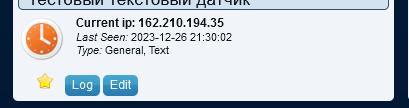
- 2023-12-26_21-30-12.png (7.68 KiB) Viewed 2901 times
Re: Is there a Dynamic DNS script?
Posted: Wednesday 27 December 2023 10:15
by BarryT
habahabahaba wrote: Tuesday 26 December 2023 19:25
Code: Select all
-- 123

return {
	on = {
		timer = {
			'every minute' -- just an example to trigger the request
		},
		httpResponses = {
			'GettingIP' -- название должно совпадать с методом Callback ниже
		}
	},
	logging = {
		level = domoticz.LOG_INFO,
		marker = 'GettingIP',
	},
	execute = function(domoticz, item)

	    local ip_url = 'https://api.ipify.org/?format=json'

		if (item.isTimer) then
			domoticz.openURL({
			    method = 'GET',
				url = ip_url,
				callback = 'GettingIP', -- see httpResponses above.
			}).afterSec(1)
		end

		if (item.isHTTPResponse) then

			if (item.ok) then
				if (item.isJSON) then

				    local jsonParser = require('JSON')
					local json1 = jsonParser:decode(item.data)

                       local currentIP = json1['ip'] --

                        local devIdx = 40 -- idx of your text device with current ip
                        domoticz.devices(devIdx).updateText('Current ip: '..currentIP)
                        domoticz.log('Current IP: '.. currentIP, domoticz.LOG_INFO)

                        --- uncomment and put your data
                        --[[domoticz.openURL({
            			    method = 'POST',
            				url = '<YOUR POST URL WITH CUR IP>',
            				callback = 'Updating IP', -- see httpResponses above.
            			  }).afterSec(1)]]--

				end
		else
		        --OOOPS
				domoticz.log('ERROR', domoticz.LOG_ERROR)
				domoticz.log(item, domoticz.LOG_ERROR)
        end

		end

	end
}
2023-12-26_21-30-12.png
Great!! Thank you very much! Going to try tonight


