Page 1 of 1
Zigate - Aqara Smart Plug power measurement problem
Posted: Wednesday 07 June 2023 22:19
by deve87
Hi.
Domoticz: 2023.1 (build 15255)
Zigate USB firmware: 3.23
Zigate plugin: 4.11.017
After paring, I got 3 devices:
- Light/Switch
- Power
- Power with kWh
Power do not update until enabling "pollingLumiPower" in plugin.
kWh is OK, but power is one decimal off.
Domoticz device: 6573W actual 657,3W
Re: Zigate - Aqara Smart Plug power measurement problem
Posted: Thursday 08 June 2023 18:48
by pipiche
deve87 wrote: Wednesday 07 June 2023 22:19
Hi.
Domoticz: 2023.1 (build 15255)
Zigate USB firmware: 3.23
Zigate plugin: 4.11.017
After paring, I got 3 devices:
- Light/Switch
- Power
- Power with kWh
Power do not update until enabling "pollingLumiPower" in plugin.
kWh is OK, but power is one decimal off.
Domoticz device: 6573W actual 657,3W
please open and issue here
https://github.com/zigbeefordomoticz/Do ... .md&title= and kindly provide the requested informations.
Thanks
Re: Zigate - Aqara Smart Plug power measurement problem
Posted: Saturday 10 June 2023 11:14
by deve87
Will do
Thank you
Re: Zigate - Aqara Smart Plug power measurement problem
Posted: Saturday 10 February 2024 17:12
by WouterO
Latest stable Domotics 2024.4 / Z4D plugin 7.1.008 / RPi 4 Bullseye
I'm even less successful as deve87: I connected the Aqara Smart Plug (lumi.plug.maeu01) on a Conbee II (and as test also on a Sonoff E). Pairing is successful: Switch, energy and power are listed as new devices. The switch functions fine, but the power / energy reading stays at 0 all the time, irrespective of the load connected to the plug.
In the first post, deve87 suggests to enable the power update in the plugin. I do not know where/how to do that.
Can you help me enabling the power/energy reading in the Aqara Smart Plug?
Thanks!
Re: Zigate - Aqara Smart Plug power measurement problem
Posted: Saturday 10 February 2024 17:20
by pipiche
can you share logs ? as well as the List of Devices RAW ?
Re: Zigate - Aqara Smart Plug power measurement problem
Posted: Saturday 10 February 2024 17:55
by WouterO
Thanks for your very fast reply. Attached are the files, I hope these are the correct ones.
So, the Smart Plug is paired successfully, as 3 devices, but energy and power stay zero all the time.
Re: Zigate - Aqara Smart Plug power measurement problem
Posted: Sunday 11 February 2024 10:20
by pipiche
can you please drop this file under the
folder ?
You'll have to unzip it.
then you restart the plugin,
you enable Pairing debug parameter
and you redo the pairing from scratch (make sure that the device is fully removed - no widgets in domoticz and nothing in plugin device management WebUI)
Re: Zigate - Aqara Smart Plug power measurement problem
Posted: Sunday 11 February 2024 10:34
by pipiche
would be great if you can tell me where did you buy it ?
Re: Zigate - Aqara Smart Plug power measurement problem
Posted: Sunday 11 February 2024 11:50
by WouterO
Hi pipiche
I did what you asked. I now got 4 (instead of 3) new devices after re-pairing. One is the switch on/off (is fine). And there is a new device 'power' which according to me correctly displays the consumed power. Thank you!
I hope I attached the correct files for you (I don't know where to enable the Pairing debug parameter).
I bought the Aqara smart plug in a shop that is near me (Elektramat
https://www.elektramat.nl/aqara-smart-plug-eu-sp-euc01/ ), but you can get these quite popular smart plug in many webshops here in The Netherlands.
Thank you once more for your fast and reply. The power now is correctly displayed. Domoticz can probably display the energy by integrating the power over time.
Re: Zigate - Aqara Smart Plug power measurement problem
Posted: Sunday 11 February 2024 11:57
by WouterO
I forgot to tell you: the two other devices (‘current’ and ‘electric’) still stay zero all the time. But I am happy that the new device now correctly displays the power in Watt.
Re: Zigate - Aqara Smart Plug power measurement problem
Posted: Sunday 11 February 2024 14:10
by pipiche
I have some fundings available and so purchase one (will always find a usage

I'll fiune tune the integration when receiving the product.
I guess indeed the device do no provide Current. I was expecting some other information, but looks like the device do not report it.
In between you can keep it like that.
Re: Zigate - Aqara Smart Plug power measurement problem
Posted: Sunday 11 February 2024 14:15
by WouterO
Great, thanks. I can now play with the 'power' as reported by the Smart Plug and hope to update later to the fine-tuned version of your Z4D plugin. Thanks again.
Re: Zigate - Aqara Smart Plug power measurement problem
Posted: Thursday 22 February 2024 22:13
by pipiche
Hi just pushed an update of the config file [4.224] which would required to on a specific plugin branch until I release it
you can simply do :
Code: Select all
git pull
git checkout wip-stable7.1.009
sudo python3 -m pip install -r requirements.txt --upgrade
Unfortunatly you'll have to redo a pairing and remove the existing widget created.(removing the plug from Domoticz and the plugin)
You'll get the following widget information on top of the Switch On/off
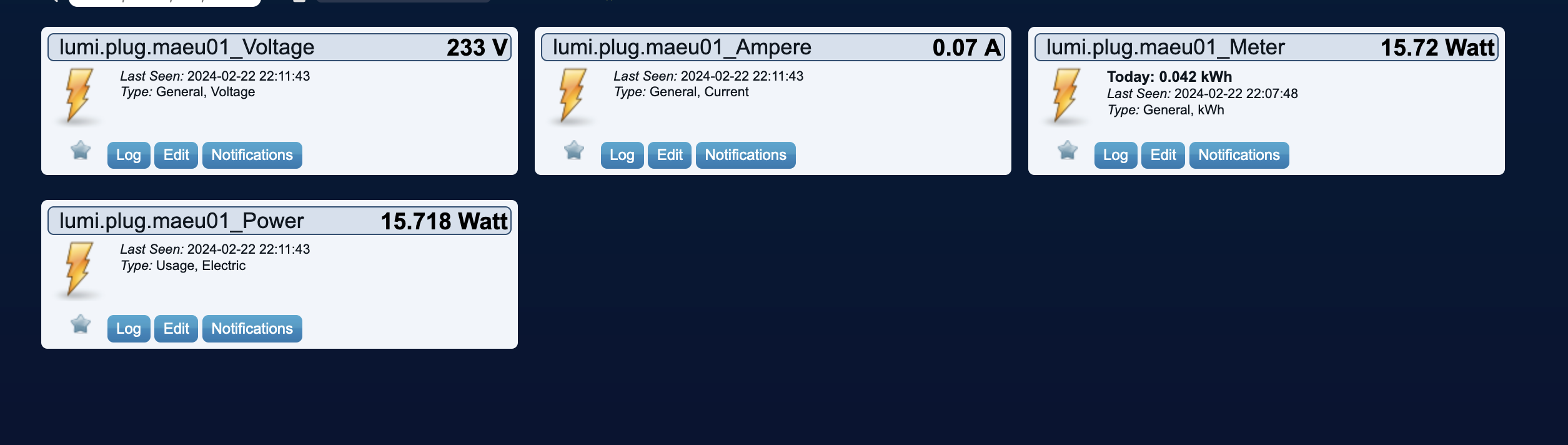
- Screenshot 2024-02-22 at 22.12.44.png (174.04 KiB) Viewed 1959 times
Re: Zigate - Aqara Smart Plug power measurement problem
Posted: Thursday 22 February 2024 22:20
by pipiche
I'll keep you posted when releasing 7.1.009
And make sure also to remove the previous config file from Conf/Local-Devices otherwise the plugin will always take that one
Re: Zigate - Aqara Smart Plug power measurement problem
Posted: Saturday 24 February 2024 17:22
by WouterO
Dear pipiche,
Thank you! I just did everything you mentioned in your post. I tried it on my test-system. And now I can switch on/off, read the power and also read the voltage and current. Great job!
I’ll wait until the next release for installing this in my “production” domoticz system. Thanks!
Re: Zigate - Aqara Smart Plug power measurement problem
Posted: Sunday 25 February 2024 9:55
by pipiche
FYI we have release 7.1.009, to switch
Code: Select all
git checkout stable7
git pull
sudo python3 -m pip install -r requirements.txt --upgrade
And then restart the plugin