Page 1 of 1
Selector: issue with off mode
Posted: Tuesday 11 May 2021 0:14
by Number8
Hello
Say Level 2 is selected (hence the bulb is on). Then click on the bulb: it switches to Off but selector Level 2 remains selected instead of being set to Off (see attachment) which seems to me what one could expect. Any thoughts?
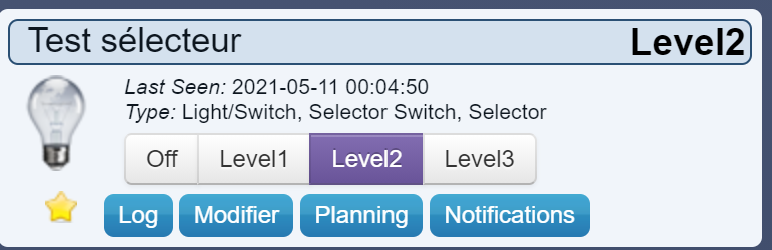
- Selecteur.png (51.45 KiB) Viewed 741 times
Running 2020.2 12485
Thank you
Re: Selector: issue with off mode
Posted: Tuesday 11 May 2021 1:35
by waaren
Number8 wrote: Tuesday 11 May 2021 0:14
Hello
Say Level 2 is selected (hence the bulb is on). Then click on the bulb: it switches to Off but selector Level 2 remains selected instead of being set to Off) which seems to me what one could expect. Any thoughts?
This is by design. Check
this topic
Re: Selector: issue with off mode
Posted: Tuesday 11 May 2021 7:36
by Number8
Thanks @waaren. OK I got it, but what I want is to get the selection action attached to level 0 executed. When .silent() is removed an infinite loop is created. How to get it executed only once?
Re: Selector: issue with off mode [Solved]
Posted: Tuesday 11 May 2021 9:41
by waaren
Number8 wrote: Tuesday 11 May 2021 7:36
Thanks @waaren. OK I got it, but what I want is to get the selection action attached to level 0 executed. When .silent() is removed an infinite loop is created. How to get it executed only once?
Use something like below
Code: Select all
return
{
    on =
    {
        devices =
        {
            'mySelector'
        },
    },

    logging =
    {
        level = domoticz.LOG_DEBUG ,
        marker = 'selector',
    },

    execute = function(dz, item)
        if item.nValue == 0 and item.level ~= 0 then
           item.switchSelector('Off')
           dz.log('Action required (nValue == 0 and level left at '.. item.level ..')' ,dz.LOG_DEBUG)
        elseif item.nValue == 0 then
             dz.log('No action required (nValue and level both 0)' ,dz.LOG_DEBUG)
        else
            dz.log('No action required (nValue ~= 0) ',dz.LOG_DEBUG)
        end

    end
}
Re: Selector: issue with off mode
Posted: Tuesday 11 May 2021 10:11
by Number8
Thank you