Page 1 of 1
New Raspberry Domoticz installation with Aeotec stick - No Devices
Posted: Tuesday 30 June 2020 14:25
by rgroothuis
Hi All,
Doing a brand new Domoticz installation with an Aeotec Z-Wave stick. Using the Aeotec Z-Wave stick (when removed from the Raspberry) I can remove and add a Fibaro device. When inserting the device back into the Raspberry the device just added to the stick doesn't show up in the list. Also I can remember that the Aeotec stick should also appear on the list, but also the stick itself is not in the list.
The driver version info:
OpenZWave USB - Version: 1.6-1033-g3661f170
When I select the Zwave Stick in de Devices list and press "Update" I see the following error message:
2020-06-30 14:24:17.538 Error: OpenZWave: Type_Notification, NodeID not found internally!. HomeID: 0, NodeID: 255 (0xff)
Any suggestion what is going on? Why I cannot get this stick to work?
Re: New Raspberry Domoticz installation with Aeotec stick - No Devices
Posted: Tuesday 30 June 2020 14:33
by EddyG
Did you select the right USB port in hardware?
You can check by pull the stick and insert it back again and then run
Check if the port in dmesg is the same as in Domoticz hardware and restart Domoticz.
The best way: you should use Domoticz to add new nodes.
Re: New Raspberry Domoticz installation with Aeotec stick - No Devices
Posted: Tuesday 30 June 2020 14:40
by rgroothuis
EddyG wrote: Tuesday 30 June 2020 14:33
Did you select the right USB port in hardware?
You can check by pull the stick and insert it back again and then run
Check if the port in dmesg is the same as in Domoticz hardware and restart Domoticz.
The best way: you should use Domoticz to add new nodes.
I did the following
Which gave me the following outcome:
Code: Select all
pi@Domoticz:~ $ dmesg | grep tty
[    0.000000] Kernel command line: coherent_pool=1M 8250.nr_uarts=0 cma=64M snd_bcm2835.enable_compat_alsa=0 snd_bcm2835.enable_hdmi=1 snd_bcm2835.enable_headphones=1 cma=256M  smsc95xx.macaddr=DC:A6:32:9A:8C:46 vc_mem.mem_base=0x3ec00000 vc_mem.mem_size=0x40000000  console=ttyS0,115200 console=tty1 root=/dev/mmcblk0p7 rootfstype=ext4 elevator=deadline fsck.repair=yes rootwait
[    0.000719] console [tty1] enabled
[    0.435185] fe201000.serial: ttyAMA0 at MMIO 0xfe201000 (irq = 34, base_baud = 0) is a PL011 rev2
[    3.723088] usb 1-1.2: FTDI USB Serial Device converter now attached to ttyUSB0
pi@Domoticz:~ $
Based on this I concluded that the stick is on port: ttyAMA0 as the other port is my P1 "Slimme Meter".
Is this correct what I'm doing? Is my conclusion correct?
Re: New Raspberry Domoticz installation with Aeotec stick - No Devices
Posted: Tuesday 30 June 2020 15:11
by EddyG
Yes, it looks that way. I cannot pull my plug to see if the logging is the same.
But if your P1 is on /dev/ttyUSB0 then your stick should be on /dev/ttyAMA0
You should look at
https://www.domoticz.com/wiki/PersistentUSBDevices to make you USB always on the same device after a reboot.
Re: New Raspberry Domoticz installation with Aeotec stick - No Devices
Posted: Tuesday 30 June 2020 16:39
by FireWizard
Hi,
Can you tell, which type of Raspberry Pi, you use?
It looks, that your Aeotec Z stick is not recognized.
/dev/ttyAMA0 is not your USB port and so it is not your device.
/dev/ttyAMA0 is the internal serial port.
Could you check this:
https://www.raspberrypi.org/forums/view ... 1#p1508436
Regards
Re: New Raspberry Domoticz installation with Aeotec stick - No Devices
Posted: Tuesday 30 June 2020 17:15
by rgroothuis
FireWizard wrote: Tuesday 30 June 2020 16:39
Hi,
Can you tell, which type of Raspberry Pi, you use?
It looks, that your Aeotec Z stick is not recognized.
/dev/ttyAMA0 is not your USB port and so it is not your device.
/dev/ttyAMA0 is the internal serial port.
Could you check this:
https://www.raspberrypi.org/forums/view ... 1#p1508436
Regards
Raspberry 4 4Gb.
Thanks for the feedback, I will check the links and see if it solves the problem
Re: New Raspberry Domoticz installation with Aeotec stick - No Devices
Posted: Tuesday 30 June 2020 17:36
by rgroothuis
Seems that there are different versions of the stick, see:
https://aeotec.freshdesk.com/support/so ... fications-
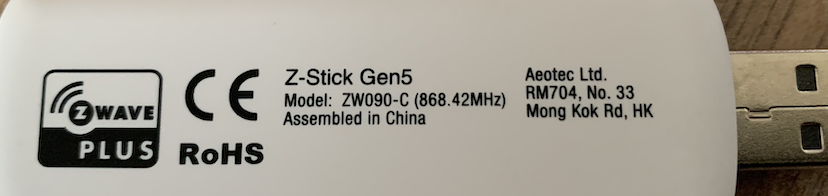
I'm not sure yet which HW version I've. I've included a picture of the back of the stick.
- Screenshot 2020-06-30 at 17.35.52.png (206.86 KiB) Viewed 3595 times
Reading further, seems that with the old Z-Stick you need an external powered USB HUB to get this working.
Re: New Raspberry Domoticz installation with Aeotec stick - No Devices
Posted: Tuesday 30 June 2020 17:48
by EddyG
FireWizard wrote: Tuesday 30 June 2020 16:39
Hi,
Can you tell, which type of Raspberry Pi, you use?
It looks, that your Aeotec Z stick is not recognized.
/dev/ttyAMA0 is not your USB port and so it is not your device.
/dev/ttyAMA0 is the internal serial port.
Could you check this:
https://www.raspberrypi.org/forums/view ... 1#p1508436
Regards
Sorry to mention, but my Gen 5 stick worked fine with /dev/ttyAMA0 on a Pi 4B and Pi 3B+
https://www.raspberrypi.org/documentati ... on/uart.md
Re: New Raspberry Domoticz installation with Aeotec stick - No Devices
Posted: Tuesday 30 June 2020 17:53
by rgroothuis
EddyG wrote: Tuesday 30 June 2020 17:48
FireWizard wrote: Tuesday 30 June 2020 16:39
Hi,
Can you tell, which type of Raspberry Pi, you use?
It looks, that your Aeotec Z stick is not recognized.
/dev/ttyAMA0 is not your USB port and so it is not your device.
/dev/ttyAMA0 is the internal serial port.
Could you check this:
https://www.raspberrypi.org/forums/view ... 1#p1508436
Regards
Sorry to mention, but my Gen 5 stick worked fine with /dev/ttyAMA0 on a Pi 4B and Pi 3B+
Which HW version of the stick do you have? There are 3 different versions. I've included a picture of my stick which I think is older HW.
See also:
https://aeotec.freshdesk.com/support/so ... fications-
Code: Select all
Z-Stick Gen5 SDK and firmware:
Z-Stick Gen5

RPi4 compatible: Not without unpowered USB Adapter

Recommended USB Adapter with RPi4: Sabrent or Anker unpowered USB hub (2.0 or 3.0)

Firmware Version: V1.00 or V1.01

SDK Version: V6.51.02 or V6.51.10

New Z-Stick Gen5

RPi4 compatible: Yes

Firmware Version: V1.01

SDK Version: V6.51.10

Z-Stick Gen5+

RPi4 compatible: Yes

Firmware Version: V1.02

SDK Version: V6.81.06
Re: New Raspberry Domoticz installation with Aeotec stick - No Devices
Posted: Tuesday 30 June 2020 17:55
by rgroothuis
rgroothuis wrote: Tuesday 30 June 2020 17:53
EddyG wrote: Tuesday 30 June 2020 17:48
FireWizard wrote: Tuesday 30 June 2020 16:39
Hi,
Can you tell, which type of Raspberry Pi, you use?
It looks, that your Aeotec Z stick is not recognized.
/dev/ttyAMA0 is not your USB port and so it is not your device.
/dev/ttyAMA0 is the internal serial port.
Could you check this:
https://www.raspberrypi.org/forums/view ... 1#p1508436
Regards
Sorry to mention, but my Gen 5 stick worked fine with /dev/ttyAMA0 on a Pi 4B and Pi 3B+
Which HW version of the stick do you have? There are 3 different versions. I've included a picture of my stick which I think is older HW.
See also:
https://aeotec.freshdesk.com/support/so ... fications-
Z-Stick Gen5 SDK and firmware:
Z-Stick Gen5
RPi4 compatible: Not without unpowered USB Adapter
Recommended USB Adapter with RPi4: Sabrent or Anker unpowered USB hub (2.0 or 3.0)
Firmware Version: V1.00 or V1.01
SDK Version: V6.51.02 or V6.51.10
New Z-Stick Gen5
RPi4 compatible:
Yes
Firmware Version: V1.01
SDK Version: V6.51.10
Z-Stick Gen5+
RPi4 compatible:
Yes
Firmware Version: V1.02
SDK Version: V6.81.06
Re: New Raspberry Domoticz installation with Aeotec stick - No Devices
Posted: Tuesday 30 June 2020 17:55
by rgroothuis
rgroothuis wrote: Tuesday 30 June 2020 17:55
rgroothuis wrote: Tuesday 30 June 2020 17:53
EddyG wrote: Tuesday 30 June 2020 17:48
Sorry to mention, but my Gen 5 stick worked fine with /dev/ttyAMA0 on a Pi 4B and Pi 3B+
Which HW version of the stick do you have? There are 3 different versions. I've included a picture of my stick which I think is older HW.
See also:
https://aeotec.freshdesk.com/support/so ... fications-
Z-Stick Gen5 SDK and firmware:
Z-Stick Gen5
RPi4 compatible: Not without unpowered USB Adapter
Recommended USB Adapter with RPi4: Sabrent or Anker unpowered USB hub (2.0 or 3.0)
Firmware Version: V1.00 or V1.01
SDK Version: V6.51.02 or V6.51.10
New Z-Stick Gen5
RPi4 compatible:
Yes
Firmware Version: V1.01
SDK Version: V6.51.10
Z-Stick Gen5+
RPi4 compatible:
Yes
Firmware Version: V1.02
SDK Version: V6.81.06
Re: New Raspberry Domoticz installation with Aeotec stick - No Devices
Posted: Tuesday 30 June 2020 17:56
by rgroothuis
Which HW version of the stick do you have? There are 3 different versions. I've included a picture of my stick which I think is older HW.
See also:
https://aeotec.freshdesk.com/support/so ... fications-
Z-Stick Gen5 SDK and firmware:
Z-Stick Gen5
RPi4 compatible: Not without unpowered USB Adapter
Recommended USB Adapter with RPi4: Sabrent or Anker unpowered USB hub (2.0 or 3.0)
Firmware Version: V1.00 or V1.01
SDK Version: V6.51.02 or V6.51.10
New Z-Stick Gen5
RPi4 compatible:
Yes
Firmware Version: V1.01
SDK Version: V6.51.10
Z-Stick Gen5+
RPi4 compatible:
Yes
Firmware Version: V1.02
SDK Version: V6.81.06
Re: New Raspberry Domoticz installation with Aeotec stick - No Devices
Posted: Tuesday 30 June 2020 18:32
by FireWizard
Hi,
@EddyG wrote:
Sorry to mention, but my Gen 5 stick worked fine with /dev/ttyAMA0 on a Pi 4B and Pi 3B+
I do not own a ZWave stick, so I cannot confirm the port, because of practical use.
/dev/ttyAMA0 is standard available on the Pi.
In the provided link, you will find that other users are connected to /dev/ttyACM0
I suggest to try it with an external powered USB hub and see, if that works.
Regards
Re: New Raspberry Domoticz installation with Aeotec stick - No Devices
Posted: Tuesday 30 June 2020 19:35
by AllesVanZelf
I did a fresh install on my rpi3b today, and in the hardware tab, when I select the openzwave hardware, I can choose which usb device to take.

Normally it is /dev/serial/by-id/usb-number. See above picture. Is this not the same on the rpi4?
Re: New Raspberry Domoticz installation with Aeotec stick - No Devices
Posted: Tuesday 30 June 2020 20:20
by rgroothuis
AllesVanZelf wrote: Tuesday 30 June 2020 19:35
I did a fresh install on my rpi3b today, and in the hardware tab, when I select the openzwave hardware, I can choose which usb device to take.
Normally it is /dev/serial/by-id/usb-number. See above picture. Is this not the same on the rpi4?
Not sure if it is the same or not. But that is not the issue. There is a HW compatibility issue with an older Z-Stick and Raspberry 4. That is clear. Newer sticks should work, older versions need an external powered USB hub. See also posts above.
Re: New Raspberry Domoticz installation with Aeotec stick - No Devices
Posted: Tuesday 30 June 2020 20:28
by FireWizard
Hi,
@AllesVanZelf
The way the USB hardware is designed is different on the RPi4, compared with the previous versions. See:
https://www.raspberrypi.org/documentati ... /README.md
The way you create persistent USB is the same.
You see also that /dev/ttyACM0 has been created. The problem with the ZWave stick is typically a RPi4 issue, and it also seems ZWave stick version specific.
Regards