Page 1 of 1
Set initial brightness level of Yeelight RGBWW bulb
Posted: Tuesday 24 March 2020 23:24
by gschmidt
Hi,
I have added a Yeelight RGBWW bulb to domoticz as an RGBWW Color Switch.
I want to control the brightness level of the switch.
On the domoticz/yeelight page I found a LUA script which I use:
Code: Select all
return {
    active = true,
    on = {
        devices = { 'Tafel Lamp'}
    },
    execute = function(domoticz, device)
        port = '55443'
        yeelights = {'192.168.1.54'}
        for ix, ipadress in ipairs(yeelights) do
            if (device.state == 'Off') then
                domoticz.log('Turning light off')
                runcommand = "sudo echo -ne '{\"id\":1,\"method\":\"set_power\", \"params\":[\"off\", \"smooth\", 500]}\\r\\n' | nc -w1 " ..ipadress.." " ..port..""
                os.execute(runcommand)
            else
                domoticz.log('Changing brightness level')
                brightvalue = (device.level - 1);
                runcommand = "sudo echo -ne '{\"id\":1, \"method\":\"set_scene\",\"params\":[\"ct\",2950, " .. brightvalue .. "]}\\r\\n' | nc -w1 " ..ipadress.." " ..port..""
                os.execute(runcommand)
            end
        end
    end
}
I guess this command returns the dimmer value to the bulb?:
As a workaround I have created a Group, and added the bulb with a certain dimming value.
Is it also possible to set an initial dimmer value of e.g. 5% i this script?
Re: Set initial brightness level of Yeelight RGBWW bulb
Posted: Wednesday 25 March 2020 7:57
by waaren
gschmidt wrote: Tuesday 24 March 2020 23:24
Is it also possible to set an initial dimmer value of e.g. 5% i this script?
I am not sure where / when you want this command in the script but these lines will set the bulb to a brightness of 5%
Code: Select all
runcommand = "sudo echo -ne '{\"id\":1, \"method\":\"set_bright\",\"params\":[5,\"sudden\",0 ]}\\r\\n' | nc -w1 " ..ipadress.." " ..port..""
os.execute(runcommand)
Re: Set initial brightness level of Yeelight RGBWW bulb
Posted: Wednesday 25 March 2020 19:08
by gschmidt
waaren wrote: Wednesday 25 March 2020 7:57
gschmidt wrote: Tuesday 24 March 2020 23:24
Is it also possible to set an initial dimmer value of e.g. 5% i this script?
I am not sure where / when you want this command in the script but these lines will set the bulb to a brightness of 5%
Code: Select all
runcommand = "sudo echo -ne '{\"id\":1, \"method\":\"set_bright\",\"params\":[5,\"sudden\",0 ]}\\r\\n' | nc -w1 " ..ipadress.." " ..port..""
os.execute(runcommand)
I made a mistake, this script is meant for a virtual dimmer switch, the wiki page says:
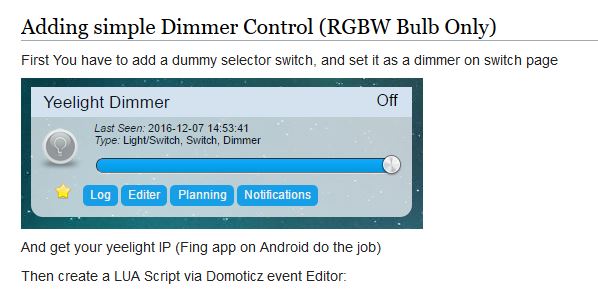
- Knipsel.JPG (42.13 KiB) Viewed 744 times
The script is working however,
When I turn the virtual dimmer switch on, I want it to set to an initial dimmer value of 5%
By the way I turn the virtual dimmer switch on with an KAKU remote and the remote learned on/off switch (with voice)
Re: Set initial brightness level of Yeelight RGBWW bulb
Posted: Wednesday 25 March 2020 20:07
by waaren
gschmidt wrote: Wednesday 25 March 2020 19:08
When I turn the virtual dimmer switch on, I want it to set to an initial dimmer value of 5%
If you use dz.devices('Yeelight Dimmer').dimTo(5) you will switch on the virtual dimmer and set the level to 5%
Re: Set initial brightness level of Yeelight RGBWW bulb
Posted: Thursday 26 March 2020 22:31
by gschmidt
waaren wrote: Wednesday 25 March 2020 20:07
gschmidt wrote: Wednesday 25 March 2020 19:08
When I turn the virtual dimmer switch on, I want it to set to an initial dimmer value of 5%
If you use dz.devices('Yeelight Dimmer').dimTo(5) you will switch on the virtual dimmer and set the level to 5%
I tested this line in the dimmer script, but every time I change the dimmer value (e.g. with voice control), the level is set back to 5.
How can I let the dimmer start from off to on at an intial dimmer value, and still be able to change the value once the bulb is on?
Re: Set initial brightness level of Yeelight RGBWW bulb
Posted: Friday 27 March 2020 0:06
by waaren
gschmidt wrote: Thursday 26 March 2020 22:31
I tested this line in the dimmer script, but every time I change the dimmer value (e.g. with voice control), the level is set back to 5.
How can I let the dimmer start from off to on at an intial dimmer value, and still be able to change the value once the bulb is on?
something like
Code: Select all
local yeelight = dz.devices('Yeelight Dimmer')
if yeelight.state == 'Off' then
	yeelight.dimTo(5)
end
Re: Set initial brightness level of Yeelight RGBWW bulb
Posted: Saturday 28 March 2020 9:58
by gschmidt
waaren wrote: Friday 27 March 2020 0:06
gschmidt wrote: Thursday 26 March 2020 22:31
I tested this line in the dimmer script, but every time I change the dimmer value (e.g. with voice control), the level is set back to 5.
How can I let the dimmer start from off to on at an intial dimmer value, and still be able to change the value once the bulb is on?
something like
Code: Select all
local yeelight = dz.devices('Yeelight Dimmer')
if yeelight.state == 'Off' then
	yeelight.dimTo(5)
end
In the virtual dimmer script I have, “Tafel Lamp” is the virtual dimmer, there is a line: if (device.state == ‘Off’) then
If I place there device.dimTo(5), then the light first is set to off but then it turns on again to dimlevel 5%
Where should I place this then?
Code: Select all
 return {
    active = true,
    on = {
        devices = { 'Tafel Lamp'}
    },
    execute = function(domoticz, device)
        port = '55443'
        yeelights = {'192.168.1.54'}
        for ix, ipadress in ipairs(yeelights) do
            if (device.state == 'Off') then
                domoticz.log('Turning light off')
                runcommand = "sudo echo -ne '{\"id\":1,\"method\":\"set_power\", \"params\":[\"off\", \"smooth\", 500]}\\r\\n' | nc -w1 " ..ipadress.." " ..port..""
                os.execute(runcommand)
            else
                domoticz.log('Changing brightness level')
                brightvalue = (device.level - 1);
                runcommand = "sudo echo -ne '{\"id\":1, \"method\":\"set_scene\",\"params\":[\"ct\",2950, " .. brightvalue .. "]}\\r\\n' | nc -w1 " ..ipadress.." " ..port..""
                os.execute(runcommand)
            end
        end
    end
}
Re: Set initial brightness level of Yeelight RGBWW bulb
Posted: Saturday 28 March 2020 23:23
by waaren
gschmidt wrote: Saturday 28 March 2020 9:58
In the virtual dimmer script I have, “Tafel Lamp” is the virtual dimmer, there is a line: if (device.state == ‘Off’) then
If I place there device.dimTo(5), then the light first is set to off but then it turns on again to dimlevel 5%
Where should I place this then?
If you use device.state then you check the state of the virtual dimmer. What I meant was to check the state of the Yeelight bulb itself assuming you have them configured in domoticz as a separate device.
Re: Set initial brightness level of Yeelight RGBWW bulb
Posted: Sunday 29 March 2020 9:42
by gschmidt
waaren wrote: Saturday 28 March 2020 23:23
gschmidt wrote: Saturday 28 March 2020 9:58
In the virtual dimmer script I have, “Tafel Lamp” is the virtual dimmer, there is a line: if (device.state == ‘Off’) then
If I place there device.dimTo(5), then the light first is set to off but then it turns on again to dimlevel 5%
Where should I place this then?
If you use device.state then you check the state of the virtual dimmer. What I meant was to check the state of the Yeelight bulb itself assuming you have them configured in domoticz as a separate device.
Got it...thanx!