Page 1 of 2
Time delay tag reader to set alarm
Posted: Friday 22 November 2019 11:57
by AllesVanZelf
I have searched on the internet and found out that it is probably not possible to set an delay in lua.
Is this true, or have this been changed?
In my case I have the following script:
Code: Select all
commandArray = {}
 if (devicechanged['Tag-reader-Alarm-Away'] == 'On') then
    commandArray['Domoticz Security Panel'] = 'Arm Away'
--     print('### SecPanel: status changed to ' .. globalvariables['Security'])
 end
 if (devicechanged['Tag-reader-Alarm-Away'] == 'Off') then
    commandArray['Domoticz Security Panel'] = 'Disarm'
--     print('### SecPanel: status changed to ' .. globalvariables['Security'])
 end
return commandArray
This is working well, except that the alarm is set immidiatly. That will give some problems when leaving the house and motion is detected

Is there a smart way to give the Arm setting a delay?
Re: Time delay tag reader to set alarm
Posted: Friday 22 November 2019 13:35
by waaren
AllesVanZelf wrote: Friday 22 November 2019 11:57
I have searched on the internet and found out that it is probably not possible to set an delay in lua.
Is this true, or have this been changed?
This is partially true. (Virtual) switches can be set with a delay; so if you create a virtual device alarmTrigger and let the Tag-reader switch the alarmTrigger with a delay and let the delayed alarmTrigger trigger security panel you can create the required effect.
.
Re: Time delay tag reader to set alarm
Posted: Friday 22 November 2019 13:49
by AllesVanZelf
Thank you Waaren, for this quick respons.
So the precedure would be:
tag on tagreader - set virtual switch 'alarm on' with a delay - ?
But then the virtual switch has to trigger the 'Domoticz Security Panel' to Arm Away. Not sure how to do that.
But I wil give it a try and report you back.
Re: Time delay tag reader to set alarm
Posted: Friday 22 November 2019 14:19
by waaren
AllesVanZelf wrote: Friday 22 November 2019 13:49
Thank you Waaren, for this quick respons.
So the precedure would be:
tag on tagreader - set virtual switch 'alarm on' with a delay - ?
But then the virtual switch has to trigger the 'Domoticz Security Panel' to Arm Away. Not sure how to do that.
But I wil give it a try and report you back.
If it's ok to do this in dzVents I can help and send something to you later today.
Re: Time delay tag reader to set alarm
Posted: Friday 22 November 2019 14:22
by AllesVanZelf
I've never used DzEvents. If you could do that, great!
Re: Time delay tag reader to set alarm
Posted: Friday 22 November 2019 17:10
by waaren
AllesVanZelf wrote: Friday 22 November 2019 14:22
I've never used dzVents. If you could do that, great!
When not yet familiar with dzVents please start with reading
Get started Before implementing (~ 5 minutes). Special attention please for "In Domoticz go to Setup > Settings > Other and in the section EventSystem make sure the checkbox 'dzVents disabled' is not checked. Also make sure that in the Security section in the settings you allow 127.0.0.1 to not need a password. dzVents uses that port to send certain commands to Domoticz. Finally make sure you have set your current location in Setup > Settings > System > Location, otherwise there is no way to determine nighttime/daytime state."
Please test below script
Code: Select all
return
{
    on = { devices = { 'Tag-reader-Alarm-Away' }},

    logging = { level = domoticz.LOG_DEBUG },

    execute = function(dz, item)
        _G.logMarker =  _G.moduleLabel

        delay = 30 -- domoticz adds another 30 seconds to this it so you will have  ~60 seconds
        security = dz.devices('Domoticz Security Panel')

        if item.state == 'On' then
            security.armAway().afterSec(delay)
        else
            security.cancelQueuedCommands()
            security.disarm()
        end

    end
}
Re: Time delay tag reader to set alarm
Posted: Friday 22 November 2019 17:27
by AllesVanZelf
Waaren, This is perfect.
There is no extra delay after the set delay in the script. Domoticz only uses the delay set in settings, when the security panel is used. That was the problem earlier.
Is it possible to execute a bash command right after the tag, and before the delay counts down? Maybe with os.execute(/home/pi/bin/countdown.sh) ?
I want to sent a countdown (sound) to a speaker, direct when arm away is pushed/tagged on the tagreader.
Re: Time delay tag reader to set alarm
Posted: Friday 22 November 2019 17:40
by waaren
AllesVanZelf wrote: Friday 22 November 2019 17:27
Waaren, This is perfect.
There is no extra delay after the set delay in the script. Domoticz only uses the delay set in settings, when the security panel is used. That was the problem earlier.
You can set this in [setup][settings][systems]
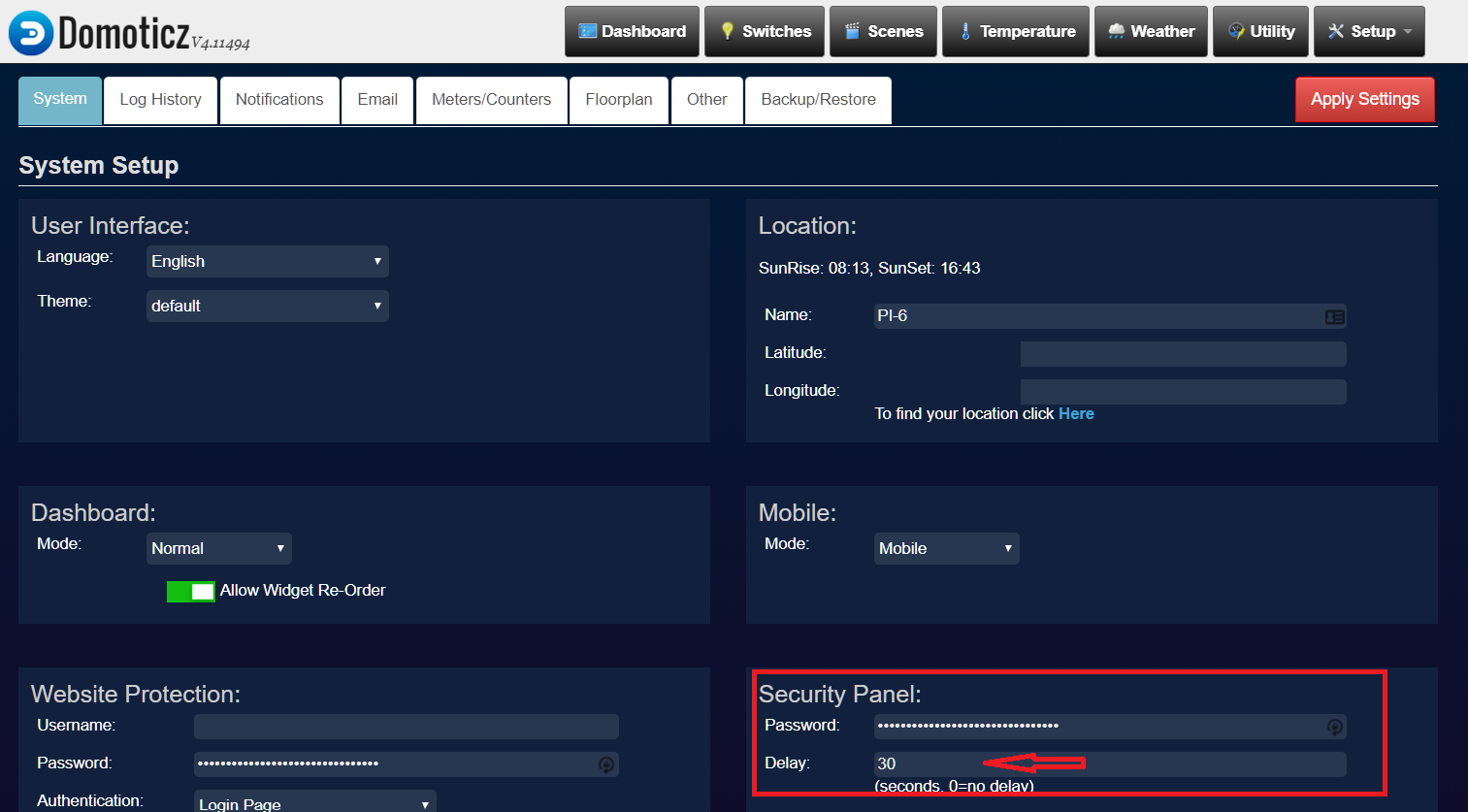
- Security.png (110.54 KiB) Viewed 1188 times
Is it possible to execute a bash command right after the tag, and before the delay counts down? Maybe with os.execute(/home/pi/bin/countdown.sh) ?
I want to sent a countdown (sound) to a speaker, direct when arm away is pushed/tagged on the tagreader.
That is possible but you also put this in the On action field
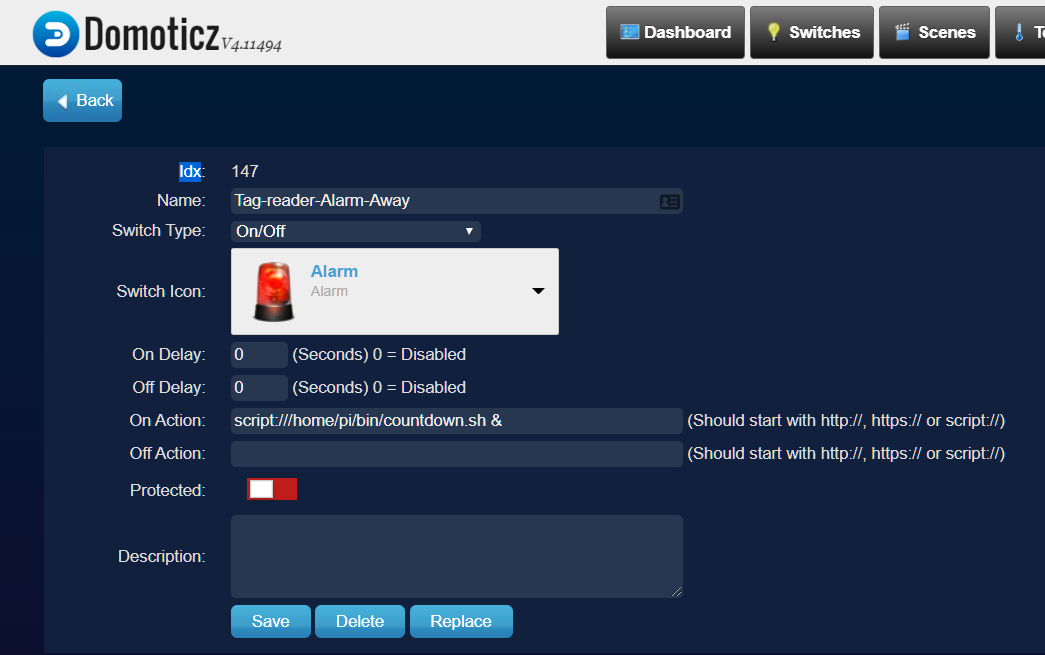
- onSection.png (69.73 KiB) Viewed 1188 times
Re: Time delay tag reader to set alarm
Posted: Friday 22 November 2019 17:53
by AllesVanZelf
Yes, I know that. In settings, the delay is default set to 30 seconds. But this 30 seconds are not working when the security panel is triggered in the background (and not via the securitypanel page).
The problem if I set an script:// action , this script is executed after the switch went on and after the delay. I want it to be triggered, immidiatly, before the delay. Or am I wrong here in how it is working?
Re: Time delay tag reader to set alarm
Posted: Friday 22 November 2019 18:01
by waaren
AllesVanZelf wrote: Friday 22 November 2019 17:53
Yes, I know that. In settings, the delay is default set to 30 seconds. But this 30 seconds are not working when the security panel is triggered in the background (and not via the securitypanel page).
It is working on my system but I am on a recent Beta so maybe that is the explanation for the different behavior.
The problem if I set an script:// action , this script is executed after the switch went on and after the delay. I want it to be triggered, immidiatly, before the delay. Or am I wrong here in how it is working?
There is no delay in the update of the tag-reader status. The delay is applied to the state Change command of the security panel itself. So the On action set on the tag-reader should start immediately.
Re: Time delay tag reader to set alarm
Posted: Friday 22 November 2019 18:25
by AllesVanZelf
waaren wrote: Friday 22 November 2019 18:01
It is working on my system but I am on a recent Beta so maybe that is the explanation for the different behavior.
I'm on 4.11501, and here the 30 seconds are not added to the 20 seconds I have just set in this dzevents script. Strange.
There is no delay in the update of the tag-reader status. The delay is applied to the state Change command of the security panel itself. So the On action set on the tag-reader should start immediately.
Very good. You're right.
Re: Time delay tag reader to set alarm
Posted: Friday 22 November 2019 18:27
by AllesVanZelf
Thanks a lot Waaren, you're great!
I almost not dare to ask, but could you make this delay for this remote control button also?
Code: Select all
commandArray = {}
 if (devicechanged['Remote-1'] == 'On') then
    commandArray['Domoticz Security Panel'] = 'Arm Away'
 end
 if (devicechanged['Remote-2'] == 'On') then
    commandArray['Domoticz Security Panel'] = 'Arm Home'
 end
 if (devicechanged['Remote-3'] == 'On') then
    commandArray['Domoticz Security Panel'] = 'Disarm'
 end

return commandArray
Re: Time delay tag reader to set alarm
Posted: Friday 22 November 2019 19:12
by waaren
AllesVanZelf wrote: Friday 22 November 2019 18:27
Could you make this delay for this remote control button also?
I am not sure I completely understand what you mean but can you have a look (and test) below script ?
Code: Select all
return
{
    on =
    {     devices =
        {
            'Tag-reader-Alarm-Away',
            'Remote-1',
            'Remote-2',
            'Remote-3',
        }
    },

    logging = { level = domoticz.LOG_DEBUG },

    execute = function(dz, item)
        _G.logMarker =  _G.moduleLabel

        delay = 3 -- domoticz adds another 30 seconds to this it so you will have  ~60 seconds
        security = dz.devices('Domoticz Security Panel')

        if item.state == 'On' then
            if item.name == 'Tag-reader-Alarm-Away' or item.name == 'Remote-1' then
                security.armAway().afterSec(delay)
            elseif item.name == 'Remote-2' then
                security.armHome().afterSec(delay)
            elseif item.name == 'Remote-3' then
                security.cancelQueuedCommands()
                security.disarm()
            end
        elseif item.name == 'Tag-reader-Alarm-Away' then
            security.cancelQueuedCommands()
            security.disarm()
        end
    end
}
Re: Time delay tag reader to set alarm
Posted: Friday 22 November 2019 19:52
by AllesVanZelf
Thank you!!
I can not check if it is working right now. But Remote 1 (Arm Away) and remote 2 (Arm Home) should have a delay before start.
It looks like you have added that as afterSec(delay)
I'll report you back later after I was able to check.
Re: Time delay tag reader to set alarm
Posted: Sunday 24 November 2019 13:55
by AllesVanZelf
He Waaren,
Thanks again. very good. A lot of progress here.
This last script is working well. Remote 1 sets Arm Away, Remote-2 Arm Home and Remote-3 Disable. Thats very good.
But Tag-reader-Alarm-Away is not set like in the tag reader script. So, the "script:///home/pi/bin/countdown.sh &" is not started. That is a pitty. I really like the countdown.
Is this easy to change for you?
By the way, I have a Aeotec remote keyfob and BeNext tagreader


Re: Time delay tag reader to set alarm
Posted: Sunday 24 November 2019 14:57
by waaren
AllesVanZelf wrote: Sunday 24 November 2019 13:55
But Tag-reader-Alarm-Away is not set like in the tag reader script. So, the "script:///home/pi/bin/countdown.sh &" is not started. That is a pitty. I really like the countdown.
Below script will handle the start of the countdown. You need to remove the On action line to prevent that the script wil be started twice.
Code: Select all
return
{
    on =
    {     devices =
        {
            'Tag-reader-Alarm-Away',
            'Remote-1',
            'Remote-2',
            'Remote-3',
        }
    },

    logging = { level = domoticz.LOG_DEBUG },

    execute = function(dz, item)
        _G.logMarker =  _G.moduleLabel

        delay = 30 -- domoticz adds another 30 seconds to this it so you will have  ~60 seconds
        security = dz.devices('Domoticz Security Panel')

        local function osCommandInBackground(cmd)
            dz.log('Executing Command: ' .. cmd,dz.LOG_DEBUG)
            local fileHandle = assert(io.popen(cmd .. ' &' , 'r'))
            fileHandle:close()
        end

        if item.state == 'On' then
            if item.name == 'Tag-reader-Alarm-Away' or item.name == 'Remote-1' then
                security.armAway().afterSec(delay)
                osCommandInBackground('sudo /home/pi/bin/countdown.sh')
            elseif item.name == 'Remote-2' then
                security.armHome().afterSec(delay)
                osCommandInBackground('sudo /home/pi/bin/countdown.sh')
            elseif item.name == 'Remote-3' then
                security.cancelQueuedCommands()
                security.disarm()
            end
        elseif item.name == 'Tag-reader-Alarm-Away' then
            security.cancelQueuedCommands()
            security.disarm()
        end
    end
}
Re: Time delay tag reader to set alarm
Posted: Monday 25 November 2019 11:40
by AllesVanZelf
Hello Waaren,
fantastic. Everything is working great now. Very good.
If I set the alarm via tag reader (Arm Away), or Remote (Arm Away, Arm Home) a countdown starts (peep), and after 22 seconds the alarm is on!
Almost ready for operantional use. Now some testing with the actually alarm and shutdown in case of false alarm
Edit: I had a look at the code for the remote controller.
Code: Select all
return
{
    on =
    {     devices =
        {
            'RemoteTagReaderAlarmAway',
            'Remote-1',
            'Remote-2',
            'Remote-3',
        }
    },

    logging = { level = domoticz.LOG_DEBUG },

    execute = function(dz, item)
        _G.logMarker =  _G.moduleLabel

        delay = 20 -- domoticz adds another 30 seconds to this it so you will have  ~60 seconds
        security = dz.devices('Domoticz Security Panel')

        local function osCommandInBackground(cmd)
            dz.log('Executing Command: ' .. cmd,dz.LOG_DEBUG)
            local fileHandle = assert(io.popen(cmd .. ' &' , 'r'))
            fileHandle:close()
        end

        if item.state == 'On' then
            if item.name == 'RemoteTagReaderAlarmAway' or item.name == 'Remote-1' then
                security.armAway().afterSec(delay)
                osCommandInBackground('sudo /home/pi/bin/countdown.sh')
            elseif item.name == 'Remote-2' then
                security.armHome().afterSec(delay)
                osCommandInBackground('sudo /home/pi/bin/countdown.sh')
            elseif item.name == 'Remote-3' then
                security.cancelQueuedCommands()
                security.disarm()
            end
        elseif item.name == 'RemoteTagReaderAlarmAway' then
            security.cancelQueuedCommands()
            security.disarm()
        end
    end
}
Is the RemoteTagReaderAlarmAway in this script still required? It looks to me as if it has no function anymore. Since you implemted the timeout in another way.
ps. I used the Digital alarm watch sound from BBC sound archives:
link as countdown sound.
Re: Time delay tag reader to set alarm
Posted: Monday 25 November 2019 16:06
by waaren
AllesVanZelf wrote: Monday 25 November 2019 11:40
Is the RemoteTagReaderAlarmAway in this script still required? It looks to me as if it has no function anymore. Since you implemted the timeout in another way.
Thx for the feedback and good to hear the script is working as expected. If the RemoteTagReader is only set by the remote it can be removed from the script.
Re: Time delay tag reader to set alarm
Posted: Monday 25 November 2019 16:12
by AllesVanZelf
RemoteTagReaderAlarmAway was used to start the countdown script. But this is handled in this script direct now.
Can I just rmeove the device and "item.name == 'RemoteTagReaderAlarmAway' or" from the line:
Code: Select all
if item.name == 'TagReaderAlarmAway' or item.name == 'Remote-1' then
Like:
Code: Select all
return
{
    on =
    {     devices =
        {
            'Remote-1',
            'Remote-2',
            'Remote-3',
        }
    },

    logging = { level = domoticz.LOG_DEBUG },

    execute = function(dz, item)
        _G.logMarker =  _G.moduleLabel

        delay = 20 -- domoticz adds another 30 seconds to this it so you will have  ~60 seconds
        security = dz.devices('Domoticz Security Panel')

        local function osCommandInBackground(cmd)
            dz.log('Executing Command: ' .. cmd,dz.LOG_DEBUG)
            local fileHandle = assert(io.popen(cmd .. ' &' , 'r'))
            fileHandle:close()
        end

        if item.state == 'On' then
            if item.name == 'Remote-1' then
                security.armAway().afterSec(delay)
                osCommandInBackground('sudo /home/pi/bin/countdown.sh')
            elseif item.name == 'Remote-2' then
                security.armHome().afterSec(delay)
                osCommandInBackground('sudo /home/pi/bin/countdown.sh')
            elseif item.name == 'Remote-3' then
                security.cancelQueuedCommands()
                security.disarm()
            end
        elseif item.name == 'RemoteTagReaderAlarmAway' then
            security.cancelQueuedCommands()
            security.disarm()
        end
    end
}
If I do that I get an unexpected end in the log.
Sorry I'm not really a coder.
Re: Time delay tag reader to set alarm
Posted: Monday 25 November 2019 16:52
by waaren
AllesVanZelf wrote: Monday 25 November 2019 16:12
If I do that I get an unexpected end in the log.
Sorry I'm not really a coder.
I don't see any obvious errors but you can try this one.
If you get errors on this one please include the loglines with the error in your reply. That will make it easier to help.
Code: Select all
return
{
    on =
    {     devices =
        {
            'Remote-1',
            'Remote-2',
            'Remote-3',
        }
    },

    logging = { level = domoticz.LOG_DEBUG },

    execute = function(dz, item)
        _G.logMarker =  _G.moduleLabel

        local delay = 20 -- domoticz adds another 30 seconds to this it so you will have  ~60 seconds
        local security = dz.devices('Domoticz Security Panel')

        local function osCommandInBackground(cmd)
            dz.log('Executing Command: ' .. cmd,dz.LOG_DEBUG)
            local fileHandle = assert(io.popen(cmd .. ' &' , 'r'))
            fileHandle:close()
        end

        if item.state == 'On' then
            if item.name == 'Remote-1' then
                security.armAway().afterSec(delay)
                osCommandInBackground('sudo /home/pi/bin/countdown.sh')
            elseif item.name == 'Remote-2' then
                security.armHome().afterSec(delay)
                osCommandInBackground('sudo /home/pi/bin/countdown.sh')
            elseif item.name == 'Remote-3' then
                security.cancelQueuedCommands()
                security.disarm()
            end
        end
    end
}