Page 1 of 2
Interesting thermometer to share a website.
Posted: Tuesday 17 September 2019 7:59
by laco
Source Code:
https://github.com/MultiTricker/TMEP
Demo page:
http://www.roudnice.eu/index.php?ja=en&je=C
Can anyone create a script to send the domoticz temperature to the TMEP SQL database?
Re: Interesting thermometer to share a website.
Posted: Tuesday 17 September 2019 11:27
by waaren
laco wrote: Tuesday 17 September 2019 7:59
Can anyone create a script to send the domoticz temperature to the TMEP SQL database?
How do you add your temperatures now to the database ? Is that a manual action on a webpage or an OS script or something else ?
You need to provide more information to enable forum members to help you.
Re: Interesting thermometer to share a website.
Posted: Tuesday 17 September 2019 14:56
by laco
Must be downloaded from
https://github.com/MultiTricker/TMEP clone or download.
Copy the app directory to your WebServer and you can rename it for example to temperatur
Example:
http://yourdomena.com/temperatur/
I have my thermometer here:
https://cottage.kkweb.sk/teplota/
Create a TMEP database on the server and import the mysql-db-full.sql file
Set the database login name and password in the config.php file
When everything is done correctly the website is displayed.
That's all about installing the program.
I need to send temperature data from domoticz to sql TMEP database. Can someone help me?
Re: Interesting thermometer to share a website.
Posted: Friday 20 September 2019 13:48
by laco
Database name: TEMP (example)
Table: tme
kdy = when day and time (example 2019-09-20 13:15:00 )
teplota = temperature °C (example 10.9 )
vlhkost = humidity (example 60.8 )
I created a database and a website for the test, to which I need to send data from domoticz.
My IDX =11 Temp + Humidity + Baro THB1 - BTHR918, BTHGN129 12.8 C, 35 %, 1025 hPa
https://kkweb.sk/teplota/
Could someone please create a script?
Re: Interesting thermometer to share a website.
Posted: Friday 20 September 2019 15:10
by waaren
laco wrote: Friday 20 September 2019 13:48
Database name: TEMP (example)
Table: tme
Is your database on the same server as domoticz ?
Re: Interesting thermometer to share a website.
Posted: Friday 20 September 2019 17:23
by laco
waaren wrote: Friday 20 September 2019 15:10
laco wrote: Friday 20 September 2019 13:48
Database name: TEMP (example)
Table: tme
Is your database on the same server as domoticz ?
Yes
Re: Interesting thermometer to share a website.
Posted: Friday 20 September 2019 22:19
by waaren
Looks very nice but I hope you do know that domoticz also have graphs voor temperature and humidity

?
Can you try this ?
Code: Select all
local scriptVersion = '0.201909201700'
local scriptVar  =  'TMEP_' .. scriptVersion

--[[

This dzVents script is used to send temperature and humidity data to a TMEP database
see  https://github.com/MultiTricker/TMEP for details on how to use and setup.

The script use os.popen to trigger a mySQL insert statement
It also tested and works for a remote system if the system with the TMEP database
can be accessed by the user that is running the domoticz service, via password-less
SSH (with public / private key setup)

Be aware that even if domoticz runs as root it will not behave the same
as from the command line because it can use a different OS environment.
That can imply that if you can access the database from the command line without password
you still need to use that when access from the domoticz program.

Before activating the script:
    Read the GETTING STARTED section of the dzVents wiki.
    Change the values in the script to reflect your setup, including
    the names / ID s of your humidity and temperature devices.

]]--

return
{
    on =
    {
         timer = { 'every 5 minutes' },  -- Set to required frequnecy
    },

    logging =
    {
        level = domoticz.LOG_DEBUG, -- set to LOG_ERROR when tested and OK
        marker = scriptVar,
    },

   execute = function(dz)

        local db = {
                        name = 'TMEP',             -- database name
                        user = 'waaren',           -- change to your database username
                        userPassword = 'blabla',   -- set userPassword = false (without quotes) when you can access the database without
                        remoteHost = false,        -- set remoteHost = 'remote hostname' when database is remote
                        sudoRequired = false,      -- set true or false
                        temperatureDevice = 'abc', -- change to your temperature sensor "name" or idx
                        humidityDevice = 123,      -- change to your humidity sensor "name" or idx

                        table = 'tme',           -- these table- and fieldnames probably do not need to change
                        dateTime = 'kdy',
                        temperature = 'teplota',
                        humidity = 'vlhkost',
                    }
        -- =======================================================================
        --               NO changes required below this line
        -- =======================================================================
        local temperature = dz.utils.round(dz.devices(db.temperatureDevice).temperature,1)
        local humidity = dz.utils.round(dz.devices(db.humidityDevice).humidity,1)
        local function osCommand(cmd)
            dz.log('Executing Command: ' .. cmd,dz.LOG_DEBUG)

            local fileHandle = assert(io.popen(cmd, 'r'))
            local commandOutput = assert(fileHandle:read('*a'))
            local returnTable = {fileHandle:close()}

            dz.log("ReturnCode: " .. returnTable[3] .. "\ncommandOutput:\n" .. commandOutput, dz.LOG_DEBUG)

            if returnTable[3] ~= 0 then
                dz.log("ReturnCode: " .. returnTable[3] .. "\ncommandOutput:\n" .. commandOutput, dz.LOG_ERROR)
            end

            return commandOutput,returnTable[3] -- rc[3] contains returnCode
        end

        local function buildCommand(temperature, humidity)
            local sshBOL =  ( db.remoteHost and "ssh "  .. db.remoteHost .. " \'" ) or ''
            local sshEOL =  ( db.remoteHost and ";\'" ) or ';'
            local password = ( db.userPassword and " -p" .. db.userPassword .. " "  ) or ''
            local sudo = (db.sudoRequired and "sudo " ) or ''

            local cmd = sshBOL ..
                        sudo .. " echo \" INSERT INTO " ..
                        db.table .. "(" ..
                        db.dateTime .. ", " ..
                        db.temperature .. ", " ..
                        db.humidity .. ")" .. "VALUES (NOW(), " ..
                        temperature .. ", " ..
                        humidity .. ") \" | mysql -v -u " ..
                        db.user ..
                        password .. " " ..
                        db.name ..
                        sshEOL
            return cmd
        end

        osCommand(buildCommand(temperature , humidity))
    end
}
Re: Interesting thermometer to share a website.
Posted: Saturday 21 September 2019 11:12
by laco
It works great. Thank you very much.
Here's the result:
https://kkweb.sk/teplota/
Re: Interesting thermometer to share a website.
Posted: Saturday 21 September 2019 12:15
by laco
One more question.
I only have a temperature sensor.
And I don't want to send moisture.
Re: Interesting thermometer to share a website.
Posted: Saturday 21 September 2019 15:48
by waaren
laco wrote: Saturday 21 September 2019 12:15
One more question.
I only have a temperature sensor.
And I don't want to send moisture.
Replace line
Code: Select all
local humidity = dz.utils.round(dz.devices(db.humidityDevice).humidity,1)
with these 2
Code: Select all
-- local humidity = dz.utils.round(dz.devices(db.humidityDevice).humidity,1)
local humidity = 0
If you click in the legend area on humidity then you will only see the temperature line. (See below)
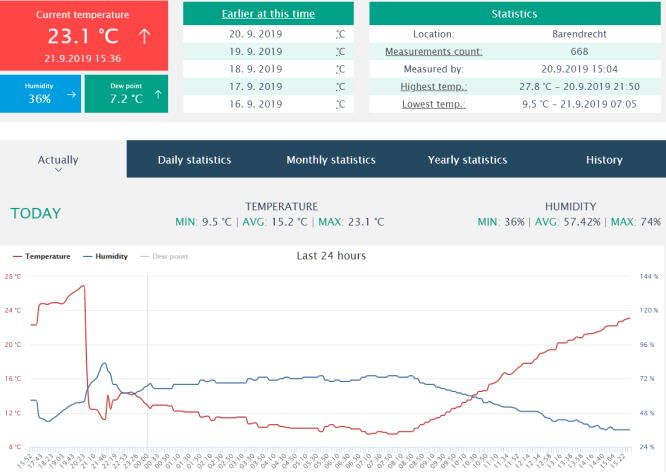
- before.png (84.3 KiB) Viewed 1511 times
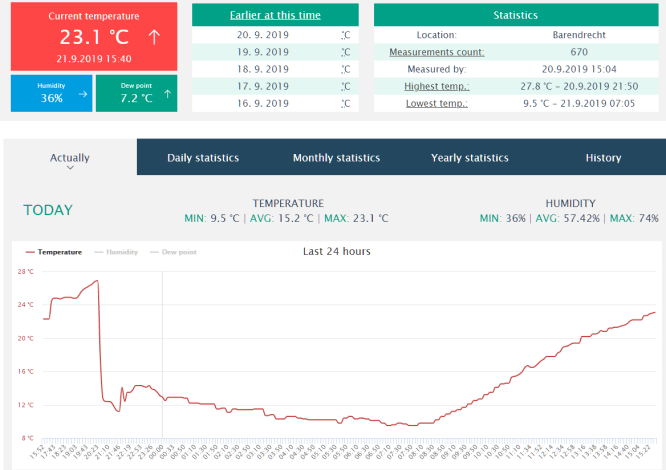
- after.png (73.24 KiB) Viewed 1511 times
Re: Interesting thermometer to share a website.
Posted: Tuesday 29 December 2020 11:45
by laco
I have 2 databases on the Synology server
MariaDB 5 port: 3306 and MariaDB 10 port: 3307
writes this setting to localhost 3306 by default,
how can i change an entry to localhost 3307?
Thanks
Re: Interesting thermometer to share a website.
Posted: Tuesday 29 December 2020 12:22
by waaren
laco wrote: Tuesday 29 December 2020 11:45
I have 2 databases on the Synology server
The script does not access the database via a http port but it does use a Secure shell to access a database using its name.
The easiest way to update another database with the same or other sensor value is to duplicate the script and change database name and (when applicable) the temperature sensor in the duplicate.
Re: Interesting thermometer to share a website.
Posted: Tuesday 29 December 2020 17:01
by JuanUil
nice looking graphs
Re: Interesting thermometer to share a website.
Posted: Saturday 02 January 2021 19:26
by laco
waaren wrote: Tuesday 29 December 2020 12:22
laco wrote: Tuesday 29 December 2020 11:45
I have 2 databases on the Synology server
The script does not access the database via a http port but it does use a Secure shell to access a database using its name.
The easiest way to update another database with the same or other sensor value is to duplicate the script and change database name and (when applicable) the temperature sensor in the duplicate.
I did it and I get this error:
Code: Select all
2021-01-02 19:21:00.364 Status: dzVents: Info: TMEP_0.201909201700: ------ Start internal script: Script # TME MARIA 10:, trigger: "every 1 minutes"
2021-01-02 19:21:00.376 Status: dzVents: Debug: TMEP_0.201909201700: Processing device-adapter for Mučeníkov 1: Temperature+humidity device adapter
2021-01-02 19:21:00.376 Status: dzVents: Debug: TMEP_0.201909201700: Executing Command: echo " INSERT INTO tme(kdy, teplota, vlhkost)VALUES (NOW(), 1.8, 89.0) " | mysql -v -u root -pheslo TEPLOTAKK;
2021-01-02 19:21:00.391 Status: dzVents: Debug: TMEP_0.201909201700: ReturnCode: 1
2021-01-02 19:21:00.391 commandOutput:
2021-01-02 19:21:00.391
2021-01-02 19:21:00.391 Status: dzVents: Info: TMEP_0.201909201700: ------ Finished Script # TME MARIA 10
2021-01-02 19:21:00.391 Error: dzVents: Error: (3.0.17) TMEP_0.201909201700: ReturnCode: 1
2021-01-02 19:21:00.391 commandOutput:
2021-01-02 19:21:00.391
Re: Interesting thermometer to share a website.
Posted: Saturday 02 January 2021 21:16
by waaren
laco wrote: Saturday 02 January 2021 19:26
I did it and I get this error:
The error you show here is not generated by dzVents but dzVents just passes the returnCode from the Shell command.
What do you see if you give the exact below command as the user that executes domoticz?
Code: Select all
echo " INSERT INTO tme(kdy, teplota, vlhkost)VALUES (NOW(), 1.8, 89.0) " | mysql -v -u root -pheslo TEPLOTAKK;
Re: Interesting thermometer to share a website.
Posted: Saturday 02 January 2021 23:30
by laco
ERROR 1049 (42000): Unknown database 'TEPLOTAKK'
Re: Interesting thermometer to share a website.
Posted: Sunday 03 January 2021 2:10
by waaren
laco wrote: Saturday 02 January 2021 23:30
ERROR 1049 (42000): Unknown database 'TEPLOTAKK'
Can you try again with
echo " INSERT INTO tme(kdy, teplota, vlhkost)VALUES (NOW(), 1.8, 89.0) " | mysql --port=3307 -v -u root -pheslo TEPLOTAKK;
If that does not work either; do you have any idea why this database is not known on your system?
Re: Interesting thermometer to share a website.
Posted: Sunday 03 January 2021 15:46
by laco
I tried to turn off MariaDb 5 and left only MariaDB 10
Here is the result:
-sh: mysql: command not found
All websites work with the MariaDB10 database
I'm using Synology Server
Re: Interesting thermometer to share a website.
Posted: Sunday 03 January 2021 18:13
by laco
I had to give back MariaDB 5.
That's where it works.
Synology is preparing a new software and MariaDB5 will no longer be there, so I wanted to set everything to MariaDB10
Re: Interesting thermometer to share a website.
Posted: Sunday 03 January 2021 20:20
by waaren
laco wrote: Sunday 03 January 2021 18:13
I had to give back MariaDB 5.
That's where it works.
Synology is preparing a new software and MariaDB5 will no longer be there, so I wanted to set everything to MariaDB10
Sorry but If it does not work on the command line dzVents cannot do it either.
Once you fixed it on the command line you can get it into the script.