Page 1 of 1
Won't switch off script
Posted: Tuesday 13 August 2019 17:39
by Solderbro
This is my first dzVents and it instead switching of the light after 5 mins, it stays always on or switch off when the PIR is triggered again. What's the error inside? Got nothing curious in the protocol from it.
Code: Select all
return {
	active = true,
	on = {
		devices = {
		    'Kue PIR Sensor',
		    'Kue PIR Lux'
		    }
		},
		execute = function(domoticz, device)
        hell = 50 -- ab dann Licht an

     		    if (domoticz.devices('Kue PIR Sensor').state == 'On')
		    and (domoticz.devices('Kue PIR Lux').lux < hell) then
			        domoticz.devices('Kue LED RGB').dimTo(80)
			            if (domoticz.devices('Kue PIR Sensor').lastUpdate.minutesAgo > 5) then
			            domoticz.devices ('Kue LED RGB').switchOff()
	            end
		    end
end
}
Solderbro
Re: Won't switch off script
Posted: Tuesday 13 August 2019 18:50
by waaren
Solderbro wrote: Tuesday 13 August 2019 17:39
This is my first dzVents and it instead switching of the light after 5 mins, it stays always on or switch off when the PIR is triggered again. What's the error inside? Got nothing curious in the protocol from it.
Your script will switch off the light if the conditions 'Kue PIR Sensor'.state == 'On' and 'Kue PIR Lux'.lux < hell and 'Kue PIR Sensor'.lastUpdate.minutesAgo > 5 and either the PIR or the Lux changed state. If any or more of these conditions is/ are not true, the light will not switch off.
I use something like below for these combined requirements.
Code: Select all
return
{
    active = true,

    on =
    {
        devices =
        {
            'Kue PIR Sensor',
        }
    },

    execute = function(domoticz, item)
        local hell = 50 -- ab dann Licht an

        local motion = item.active
        local dark = domoticz.devices('Kue PIR Lux').lux < hell
        local light = domoticz.devices('Kue LED RGB')

        if motion and dark then
            light.dimTo(80)
            light.cancelQueuedCommands() -- will cancel any scheduled command for light
            light.switchOff().afterSec(300)
        end
    end
}
Re: Won't switch off script
Posted: Wednesday 14 August 2019 15:50
by Solderbro
Okay thanks. Have to learn to use more variables to keep the lines shorter.
Your script does not turn on the lamp, maybe there is some kind of race condition. If the light turns up, the lux will also come up a bit.
Solderbro
Re: Won't switch off script
Posted: Wednesday 14 August 2019 16:05
by waaren
Solderbro wrote:Okay thanks. Have to learn to use more variables to keep the lines shorter.
Your script does not turn on the lamp, maybe there is some kind of race condition. If the light turns up, the lux will also come up a bit.
Solderbro
Best to add some domoticz log statements to the script to see what happens when.
There cannot be any race condition here. Once the light has been initially switched on the luxlevel is not considered again until the next time the PIR is activated
Re: Won't switch off script
Posted: Wednesday 14 August 2019 21:39
by Solderbro
Now it can be seen, the timer is ignored and the light switched out the same millisecond.
2019-08-14 21:21:42.910 Status: dzVents: Info: ------ Start internal script: DZ Kueche RGBW: Device: "Kue PIR Sensor (Aeotech C5)", Index: 1950
2019-08-14 21:21:42.912 Status: dzVents: Variablen gesetzt
2019-08-14 21:21:42.912 Status: dzVents: Licht einschalten
2019-08-14 21:21:42.912 Status: dzVents: Licht wieder aus, fertig
2019-08-14 21:21:42.912 Status: dzVents: Info: ------ Finished DZ Kueche RGBW
print('Variablen gesetzt')
if motion and dark then
print('Licht einschalten')
light.dimTo(80)
light.cancelQueuedCommands() -- will cancel any scheduled command for light
light.switchOff().afterSec(300)
print('Licht wieder aus, fertig')
Such timers work perfectly here in blockly, no clue...
Re: Won't switch off script
Posted: Wednesday 14 August 2019 23:40
by waaren
Solderbro wrote: Wednesday 14 August 2019 21:39
Now it can be seen, the timer is ignored and the light switched out the same millisecond.
Thx.
The last print command does not add valid information; it will only tell that the code logic passed the switchOff().afterSec(300) command. The scheduled switchOff() is send to domoticz and dzVents will have no influence after that on the execution of that command other then by canceling all scheduled commands for that device.
If you turn on debug logging for dzVents you will see the commands it sends to domoticz.
What could be the case here is that the light is handled via a plugin that does not process the delay domoticz sends. If you look at the devices tab, to what hardware is the light connected ?
Re: Won't switch off script
Posted: Saturday 17 August 2019 11:18
by Solderbro
Okay tried to get debug from the script, there is a Set Level 80, Off, Off after 300 seconds in a row. How different is dzVents from blockly where the script waits until an action becomes true. Here not a single flicker for the light can be seen, it stays off.
2019-08-17 11:07:51.777 Status: dzVents: Debug: - Device: Kue Burglar 7 (0x07)
2019-08-17 11:07:51.848 Status: dzVents: Debug: Dumping domoticz data to /home/domoticz/domoticz/scripts/dzVents/domoticzData.lua
2019-08-17 11:07:51.915 Status: dzVents: Debug: Processing device-adapter for Kue PIR Sensor: Switch device adapter
2019-08-17 11:07:51.916 Status: dzVents: Debug: dzVents version: 2.4.19
2019-08-17 11:07:51.916 Status: dzVents: Debug: Event triggers:
2019-08-17 11:07:51.916 Status: dzVents: Debug: - Device: Kue PIR Sensor
2019-08-17 11:07:51.945 Status: dzVents: Info: Handling events for: "Kue PIR Sensor", value: "On"
2019-08-17 11:07:51.945 Status: dzVents: Info: ------ Start internal script: DZ Kueche RGBW: Device: "Kue PIR Sensor (Aeotech C5)", Index: 1950
2019-08-17 11:07:51.947 Status: dzVents: Debug: Processing device-adapter for Kue PIR Lux: Lux device adapter
2019-08-17 11:07:51.948 Status: dzVents: Debug: Processing device-adapter for Kue LED RGB: RGB(W) device adapter
2019-08-17 11:07:51.948 Status: dzVents: Debug: Processing device-adapter for Kue LED RGB: Switch device adapter
2019-08-17 11:07:51.948 Status: dzVents: Variablen gesetzt
2019-08-17 11:07:51.948 Status: dzVents: Licht einschalten
2019-08-17 11:07:51.948 Status: dzVents: Debug: Constructed timed-command: Set Level 80
2019-08-17 11:07:51.949 Status: dzVents: Debug: Constructed timed-command: Off
2019-08-17 11:07:51.949 Status: dzVents: Debug: Constructed timed-command: Off AFTER 300 SECONDS
2019-08-17 11:07:51.949 Status: dzVents: Licht wieder aus, fertig
2019-08-17 11:07:51.949 Status: dzVents: Info: ------ Finished DZ Kueche RGBW
2019-08-17 11:07:51.949 Status: dzVents: Debug: Commands sent to Domoticz:
2019-08-17 11:07:51.949 Status: dzVents: Debug: - Kue LED RGB = Set Level 80
2019-08-17 11:07:51.949 Status: dzVents: Debug: - Cancel = {["idx"]=2015, ["type"]="device"}
2019-08-17 11:07:51.949 Status: dzVents: Debug: - Kue LED RGB = Off AFTER 300 SECONDS
2019-08-17 11:07:51.949 Status: dzVents: Debug: =====================================================
Re: Won't switch off script
Posted: Saturday 17 August 2019 16:13
by waaren
=Solderbro post_id=221799 time=1566033515 user_id=21532]
Okay tried to get debug from the script, there is a Set Level 80, Off, Off after 300 seconds in a row.
These are here the relevant loglines as they show what commands are actually send from dzVents to domoticz.
Code: Select all
2019-08-17 11:07:51.949 Status: dzVents: Debug: Commands sent to Domoticz:
2019-08-17 11:07:51.949 Status: dzVents: Debug: - Kue LED RGB = Set Level 80
2019-08-17 11:07:51.949 Status: dzVents: Debug: - Cancel = {["idx"]=2015, ["type"]="device"}
2019-08-17 11:07:51.949 Status: dzVents: Debug: - Kue LED RGB = Off AFTER 300 SECONDS
How different is dzVents from blockly where the script waits until an action becomes true. Here not a single flicker for the light can be seen, it stays off.
Can you please show your Blockly and also to what hardware type the Kue LED RGB is connected ?
Re: Won't switch off script
Posted: Saturday 17 August 2019 22:02
by Solderbro
Okay the device is a FIBARO System FGRGBWM441 RGBW Controller
My blockly use also a night dimming function, here the timeout works pretty well.
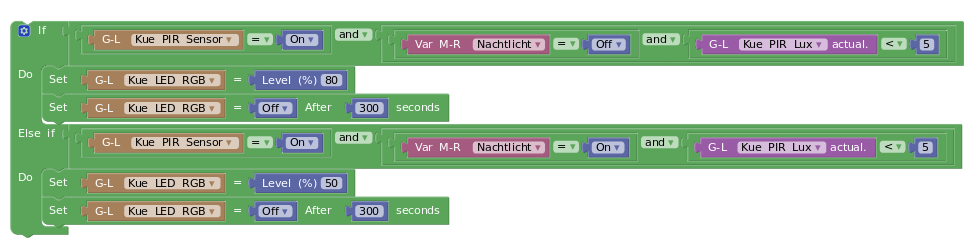
- kuechenlicht.png (43.17 KiB) Viewed 4204 times
Re: Won't switch off script
Posted: Saturday 17 August 2019 23:41
by waaren
Solderbro wrote: Saturday 17 August 2019 22:02
My blockly use also a night dimming function, here the timeout works pretty well.
Thx! the delayed Off command in this Blockly should send the same commands to domoticz as the dzVents script. If it does send other commands I am clueless to what and why.
If you are interested you could check both with a virtual RGBW device and see if you get the same (unexpected) results. I did test both with a virtual device and do see the expected behavior.
Re: Won't switch off script
Posted: Monday 19 August 2019 19:58
by Solderbro
That's incredible, have worked with triggered script for my heating and these work well. But here is another try, did adopt the script to my floor lamp with qbino switch. Result: Does never turn on.
019-08-19 19:42:43.690 Status: dzVents: Info: ------ Start internal script: DZ Flurlicht Qbino: Device: "Flur PIR Sensor (Aeotech C5)", Index: 231
2019-08-19 19:42:43.694 Status: dzVents: Variablen gesetzt
2019-08-19 19:42:43.694 Status: dzVents: Licht einschalten
2019-08-19 19:42:43.694 Status: dzVents: Licht wieder aus, fertig
2019-08-19 19:42:43.694 Status: dzVents: Info: ------ Finished DZ Flurlicht Qbino
2019-08-19 19:42:43.696 Status: EventSystem: Script event triggered: /home/domoticz/domoticz/dzVents/runtime/dzVents.lua
So i tried something different and this ones work like expected.
if motion and dark then
print('Licht einschalten')
light.switchOn().checkFirst()
-- light.cancelQueuedCommands() -- will cancel any scheduled command for light
light.switchOff().afterSec(300)
print('Licht wieder aus, fertig')
end
Is it possible that the cancelQueued commands delete the switchOn command?
Solderbro
Re: Won't switch off script
Posted: Monday 19 August 2019 22:59
by waaren
Solderbro wrote: Monday 19 August 2019 19:58
Is it possible that the cancelQueued commands delete the switchOn command?
Sorry my mistake. Glad you nailed it !!
the light.cancelQueuedCommands() should come before the light.switchOn() or light.dimTo(xx) command or it will also cancel these commands before they are executed by domoticz.
Re: Won't switch off script
Posted: Thursday 22 August 2019 11:20
by benitoDomo
Hello everyone,
I'm using this topic for a similar issue I have.
I want to schedule devices in a series with following loop
Code: Select all
for i, deviceName in pairs(devicesToControl) do
    local device = domoticz.devices(deviceName)
    local delayTimeMinute = (i-1)*TIME_DURATION
    -- reset device commands --
    device.cancelQueuedCommands()
    device.switchOff()
    -- place new request --
    device.switchOn().afterMin(delayTimeMinute).forMin(TIME_DURATION)
end
To avoid described issue in DzVents Wiki
Important note when using forXXX() I placed a cancelQueuedCommands() and a switchOff() before switchOn() order. It seems to be useless, if device if already ON, then it won't turn OFF after the delay.
Maybe these three actions in a single execution doesn't work properly.
Any idea ? Thanks !
Re: Won't switch off script
Posted: Thursday 22 August 2019 11:35
by waaren
benitoDomo wrote:Hello everyone,
I'm using this topic for a similar issue I have.
I want to schedule devices in a series with following loop
Any idea ? Thanks !
Please add a log statement to show i. I cannot see from this snippet what the value of i is.
Re: Won't switch off script
Posted: Thursday 22 August 2019 14:04
by benitoDomo
waaren wrote: Thursday 22 August 2019 11:35
benitoDomo wrote:Hello everyone,
I'm using this topic for a similar issue I have.
I want to schedule devices in a series with following loop
Any idea ? Thanks !
Please add a log statement to show i. I cannot see from this snippet what the value of i is.
Hello Waaren,
Here follows Domoticz log:
Code: Select all
2019-08-22 14:01:00.435 Status: dzVents: Info: Valve: ------ Start external script: switch_valve.lua:, trigger: at 14:01
2019-08-22 14:01:00.435 Status: dzVents: Info: Valve: ***Valve Scheduling***
2019-08-22 14:01:00.440 Status: dzVents: Info: Valve: i: 1
2019-08-22 14:01:00.440 Status: dzVents: Info: Valve: deviceName: TestValve1
2019-08-22 14:01:00.440 Status: dzVents: Info: Valve: delayTimeMinute: 0
2019-08-22 14:01:00.440 Status: dzVents: Info: Valve: i: 2
2019-08-22 14:01:00.440 Status: dzVents: Info: Valve: deviceName: TestValve2
2019-08-22 14:01:00.440 Status: dzVents: Info: Valve: delayTimeMinute: 2
2019-08-22 14:01:00.440 Status: dzVents: Info: Valve: --> Valve scheduled
2019-08-22 14:01:00.440 Status: dzVents: Info: Valve: ------ Finished switch_Valve.lua
Re: Won't switch off script
Posted: Thursday 22 August 2019 19:10
by waaren
benitoDomo wrote: Thursday 22 August 2019 11:20
I'm using this topic for a similar issue I have.
I want to schedule devices in a series with following loop
@benitoDomo, sorry but I am still confused what you want to achieve.
If you want the device to switchOn for some time and switchOff after that then use
Code: Select all
for i, deviceName in pairs(devicesToControl) do
    local device = domoticz.devices(deviceName)
    local delayTimeMinute = (i)*TIME_DURATION
    -- cancel any scheduled (afterXXX) commands  for this device--
    device.cancelQueuedCommands()
    -- place new request --
    device.switchOn()
    -- and schedule switchOff command --
    device.switchOff().afterMin(delayTimeMinute)
end
Re: Won't switch off script
Posted: Thursday 22 August 2019 20:18
by benitoDomo
waaren wrote:benitoDomo wrote: Thursday 22 August 2019 11:20
I'm using this topic for a similar issue I have.
I want to schedule devices in a series with following loop
@benitoDomo, sorry but I am still confused what you want to achieve.
If you want the device to switchOn for some time and switchOff after that then use
Code: Select all
for i, deviceName in pairs(devicesToControl) do
    local device = domoticz.devices(deviceName)
    local delayTimeMinute = (i)*TIME_DURATION
    -- cancel any scheduled (afterXXX) commands  for this device--
    device.cancelQueuedCommands()
    -- place new request --
    device.switchOn()
    -- and schedule switchOff command --
    device.switchOff().afterMin(delayTimeMinute)
end
Hello,
I hope this will make things more clear.


Re: Won't switch off script [Solved]
Posted: Thursday 22 August 2019 20:27
by waaren
benitoDomo wrote: Thursday 22 August 2019 20:18
I hope this will make think more clear.
It does. If I understand your drawing correctly, below code snippet should do just that.
Code: Select all
for i, deviceName in pairs(devicesToControl) do
    local device = domoticz.devices(deviceName)
    local startTimeMinute = (i-1)*TIME_DURATION
    -- cancel any scheduled (afterXXX) commands  for this device--
    device.cancelQueuedCommands() -- Is this really needed ? (Depends on the rest of the scrip logic)
    -- place new request --
    device.switchOn().afterMin(startTimeMinute)
    -- and schedule switchOff command --
    device.switchOff().afterMin(startTimeMinute + TIME_DURATION)
end
Re: Won't switch off script
Posted: Sunday 25 August 2019 10:56
by benitoDomo
Hi,
It works great. I didn't think about not using forXXX().
Thanks!!!
