Page 1 of 1
time variable in script causing strange problem
Posted: Monday 10 June 2019 17:44
by Gravityz
Hello,
i have been using a timestamp in my script which works perfectly for a while now
i upgraded to Version 4.10882 and got something strange which puzzles me (because i can see nothing wrong)
on 16:10(time in synology, domoticz and domoticz log) a script was activated which does 2 things
update a text device with a message and timestamp
send that message through telegram to an iphone
for sending a message to telegram i use
os.execute('curl --data chat_id=xxxxx --data parse_mode=Markdown --data-urlencode "text='..line..'" "
https://api.telegram.org/botblablabla/sendMessage"')
the time displayed in the text device is 2:20 (should be 16:10)
the time the message was received on the iphone was 2:20 (should be local time iphone 16:10)
so howcome the time variable was wrong while the current time was someting else.
could it be i am using time as a variable which is perhaps reserved.
Re: time variable in script causing strange problem
Posted: Monday 10 June 2019 17:58
by waaren
Gravityz wrote: Monday 10 June 2019 17:44
i upgraded to Version 4.10882 and got something strange which puzzles me (because i can see nothing wrong)
on 16:10(time in synology, domoticz and domoticz log) a script was activated which does 2 things
the time displayed in the text device is 2:20 (should be 16:10)
the time the message was received on the iphone was 2:20 (should be local time iphone 16:10)
Kind of hard to tell what's wrong with only one line of code. I just double checked with version 4.10882 and cannot reproduce the issue.
For my Synology architecture version 4.10882 is not yet @jadahls so I assume you build it yourself or did you test on RPI ?
Do you compile locally or do you use the download ?
Re: time variable in script causing strange problem
Posted: Monday 10 June 2019 18:21
by Gravityz
no i used jadahls version.
the time variable however is in a global helper in the global_data script
i renamed it to timestamp(more logical) to make sure it is not influenced .
still it is strange that this worked for months and right after the upgrade to v4.10882 things changed.
Re: time variable in script causing strange problem
Posted: Monday 10 June 2019 18:58
by waaren
Gravityz wrote: Monday 10 June 2019 18:21
no i used jadahls version.
the time variable however is in a global helper in the global_data script
i renamed it to timestamp(more logical) to make sure it is not influenced .
still it is strange that this worked for months and right after the upgrade to v4.10882 things changed.
Again, please share your code so we can investigate with you what could be causing your issue
Re: time variable in script causing strange problem
Posted: Monday 10 June 2019 19:56
by Gravityz
Here it is but the problem is related to the time variable which, at least 1 time, seem to be different then the current time.
Code: Select all
    return {
	-- global persistent data
    data = {
	    laststatus = { initial = "notset" },
	    EerderAan = { initial = false },
	    batteryLevels = { initial = {} },
	},

	-- global helper functions
	helpers = {
		addRollingTextLine = function(domoticz, textDevice, line, maxLines)
			-- code
		local time=domoticz.time.rawTime
                time=time..' -- '
		    local function stringSplit(str)
                local lines = {}
                for s in str:gmatch("[^\r\n]+") do
                    table.insert(lines, s)
                end
                return lines
            end

            local function checkParms()
                if not textDevice or ( type(textDevice) ~= "string" and type(textDevice) ~= "table" ) then
                    domoticz.log("textDevice should be of type table or string; now: " .. (tostring(textDevice) or type(textDevice)),domoticz.LOG_ERROR)
                    return false
                elseif type(textDevice) == "string" then
                    textDevice = domoticz.devices(textDevice)
                end
                if not line then
                    domoticz.log("No text supplied",domoticz.LOG_ERROR)
                    return true
                end
                if not maxLines then maxLines = 5 end          -- default
                return true
            end
            -- domoticz.globalData.laststatus wordt gebruikt om dubbele meldingen te voorkomen
            if (checkParms() and domoticz.globalData.laststatus ~= line) then
                local lines = textDevice.text or ""
                lines = stringSplit(lines)
                domoticz.globalData.laststatus = line
                os.execute('curl --data chat_id=12345678 --data parse_mode=Markdown --data-urlencode "text='..line..'"  "https://api.telegram.org/bot123456789:AAAAA-BBBBB/sendMessage"')
                line=time..line
                lines[0] = line
                local newText = ""
                for i = 0, ( maxLines - 1) do
                    newText = newText ..  ( lines[i] or "" ) .. "\r\n"
                end
                textDevice.updateText(newText)
            else
                return false
            end
    end
		}
}
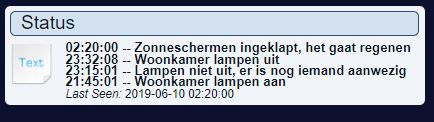
this is what the output looks like when written to a text device
the 2:20 should have been 16:10
- status.JPG (23.7 KiB) Viewed 2608 times
this what was in the log at that time
Code: Select all
2019-06-10 16:10:00.507  Status: EventSystem: Script event triggered: /usr/local/domoticz/dzVents/runtime/dzVents.lua
2019-06-10 16:10:00.516  Status: LUA: BuienRadar module
2019-06-10 16:10:00.709  Status: EventSystem: Script event triggered: /usr/local/domoticz/var/scripts/lua/script_time_buienradar.lua
2019-06-10 16:10:00.741  (Dummy) Light/Switch (HetGaatRegenen)
2019-06-10 16:10:00.809  Status: EventSystem: Script event triggered: /usr/local/domoticz/dzVents/runtime/dzVents.lua
2019-06-10 16:10:00.822  Activating Scene/Group: [Zonneschermen]
2019-06-10 16:10:00.823  Activating Scene/Group Device: Zonnescherm 1 (Off)
2019-06-10 16:10:00.827  (RFXtrx433XL) RFY (Zonnescherm 1)
2019-06-10 16:10:00.877  Activating Scene/Group Device: Zonnescherm 2 (Off)
2019-06-10 16:10:00.903  (RFXtrx433XL) RFY (Zonnescherm 2)
2019-06-10 16:10:00.954  Activating Scene/Group Device: Zonnescherm 3 (Off)
2019-06-10 16:10:00.976  (RFXtrx433XL) RFY (Zonnescherm 3)
2019-06-10 16:10:01.026  Activating Scene/Group Device: Zonnescherm 4 (Off)
2019-06-10 16:10:01.052  (RFXtrx433XL) RFY (Zonnescherm 4)
Re: time variable in script causing strange problem
Posted: Monday 10 June 2019 20:54
by waaren
Gravityz wrote: Monday 10 June 2019 19:56
Here it is but the problem is related to the time variable which, at least 1 time, seem to be different then the current time.
Code: Select all
2019-06-10 16:10:00.516  Status: LUA: BuienRadar module
2019-06-10 16:10:00.709  Status: EventSystem: Script event triggered: /usr/local/domoticz/var/scripts/lua/script_time_buienradar.lua
Thx, I don't see the start / stop of the dzVents script that calls domoticz.helpers.addRollingTextLine and that must pass the domoticz object to this function. It is relevant here because time.rawTime is an attribute in this passed object.
(I do see a standard Lua script "script_time_buienradar.lua" . Could that in any way related ? )
Re: time variable in script causing strange problem
Posted: Monday 10 June 2019 20:58
by Gravityz
script_time_buienradar.lua is not related. it tells me when it is going to rain
this is the call to the function.
the time variable is local and is only used within the helper function. it is not a global variable
Code: Select all
local results = domoticz.helpers.addRollingTextLine(domoticz, 'Status', 'Zonneschermen ingeklapt, het gaat regenen', '4')
Re: time variable in script causing strange problem
Posted: Monday 10 June 2019 21:17
by waaren
Gravityz wrote: Monday 10 June 2019 20:58
this is the call to the function.
Code: Select all
local results = domoticz.helpers.addRollingTextLine(domoticz, 'Status', 'Zonneschermen ingeklapt, het gaat regenen', '4')
Sorry to be such a pain. (I am just trying to help). I don't see the calling script starting in the log. Do you still have the log of 02:20 ?
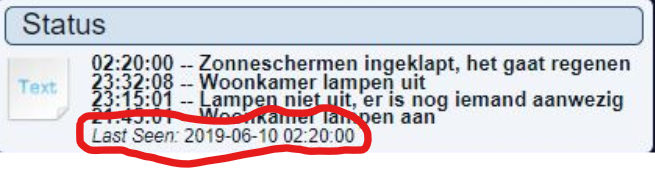
Reason I am asking is that the last update time of the text device is also 02:20 leading to my assumption that the system- and domoticz time was 02:20 the moment the text device was last seen
- lastSeen.png (148.54 KiB) Viewed 2596 times
Dzvents has no access to that attribute so either the system time was wrong or the text device was actually updated at 02:20.
Re: time variable in script causing strange problem
Posted: Monday 10 June 2019 21:28
by Gravityz
oh man, how dumb can i be.
here is the log of that moment
the script skips double messages
at the time i was watching the screen(16:10) i noticed that the sunscreens went to the OFF position. checked the textdevice and thought the time was wrong.
it never occured to me that the first time it triggered was at 2:20 and that the second time at 16:10 (which is skipped)
well thanks for the help.
Glad nothing is wrong.
ps, thanks for this script because most part of it came from you.
Code: Select all
2019-06-10 02:20:00.184  Status: EventSystem: Script event triggered: /usr/local/domoticz/dzVents/runtime/dzVents.lua
2019-06-10 02:20:00.193  Status: LUA: BuienRadar module
2019-06-10 02:20:00.426  Status: EventSystem: Script event triggered: /usr/local/domoticz/var/scripts/lua/script_time_buienradar.lua
2019-06-10 02:20:00.454  (Dummy) Light/Switch (HetGaatRegenen)
2019-06-10 02:20:00.645  Status: EventSystem: Script event triggered: /usr/local/domoticz/dzVents/runtime/dzVents.lua
2019-06-10 02:20:00.655  Activating Scene/Group: [Zonneschermen]
2019-06-10 02:20:00.656  Activating Scene/Group Device: Zonnescherm 1 (Off)
2019-06-10 02:20:00.660  (RFXtrx433XL) RFY (Zonnescherm 1)
2019-06-10 02:20:00.711  Activating Scene/Group Device: Zonnescherm 2 (Off)
2019-06-10 02:20:00.734  (RFXtrx433XL) RFY (Zonnescherm 2)
2019-06-10 02:20:00.785  Activating Scene/Group Device: Zonnescherm 3 (Off)
2019-06-10 02:20:00.808  (RFXtrx433XL) RFY (Zonnescherm 3)
2019-06-10 02:20:00.859  Activating Scene/Group Device: Zonnescherm 4 (Off)
Re: time variable in script causing strange problem [Solved]
Posted: Monday 10 June 2019 22:07
by waaren
Gravityz wrote: Monday 10 June 2019 21:28
the script skips double messages
at the time i was watching the screen(16:10) i noticed that the sunscreens went to the OFF position. checked the text device and thought the time was wrong. it never occurred to me that the first time it triggered was at 2:20 and that the second time at 16:10 (which is skipped)
Glad nothing is wrong.

Thx for the feedback. Happy that it was not a problem with the latest dzVents update. (2.4.23)
Re: time variable in script causing strange problem
Posted: Tuesday 11 June 2019 2:41
by waaren
Gravityz wrote: Monday 10 June 2019 21:28
The addRollingTextLine function skips double messages and this was not noticed.
To prevent this I modified the function a bit. It will now put the last date/time and the number of repetitions in the text when a repetition of a message occur. Still without rolling up the messages in case of a repetition.
Also moved the telegram part to it own helpers function so it can also be used by other scripts.
Please note that telegram is now also a native dzVents notification subsystem and can be called using domoticz.notify
Code: Select all
return
{
    -- global persistent data
    data =
    {
        laststatus = { initial = "notset" },
        EerderAan = { initial = false },
        batteryLevels = { initial = {} },
    },

	-- global helper functions
	helpers =
    {
        sendTelegram = function(message) -- By putting it here it can be used from every script by calling domoticz.helpers.sendTelegram(message)
            os.execute('curl --data chat_id=12345678 --data parse_mode=Markdown --data-urlencode "text=' .. message ..'" "https://api.telegram.org/bot123456789:AAAAA-BBBBB/sendMessage"')
        end,

        addRollingTextLine = function(dz, textDevice, line, maxLines)

            local function checkParms()
                if not textDevice then
                    dz.log("textDevice not passed to helper function",dz.LOG_ERROR)
                    return false
                elseif type(textDevice) ~= "table" then
                    textDevice = dz.devices(textDevice)
                end
                if not line then
                    dz.log("No text supplied",dz.LOG_ERROR)
                end
                if not maxLines then maxLines = 5 end          -- default
                return true
            end

            if checkParms() then
                local lines = dz.utils.stringSplit(textDevice.text or "", '\r\n') -- split string at LF and store splitted chunks in table lines
                local textLine = '(' .. dz.time.rawDate:sub(9,10) .. '/' .. dz.time.rawDate:sub(6,7) .. ') ' .. dz.time.rawTime ..  ' -- ' .. line:gsub('*','#') -- compose textLine
                if dz.globalData.laststatus ~= line then -- check for double messages (excluding timestamp)
                    table.insert(lines, 1, textLine) -- (rolling up) lines[1] will shift to lines[2], lines[2] to lines[3] , etc. and TextLine will be stored in lines[1]
                    dz.globalData.laststatus = line -- line without timeStamp
                    dz.helpers.sendTelegram(textLine)
                else -- repetition detected
                    local repetition = tonumber(lines[1]:match('%*(%d*)') or 1) -- get repetitions (min 1)
                    textLine = textLine:gsub("(.*)%*.*$","%1") -- strip repetition
                    textLine = textLine .. ' *' .. repetition + 1 -- and add the new repetition counter
                    lines[1] =  textLine  -- replace first line
                end
                textDevice.updateText(table.concat(lines, '\r\n', 1, math.min(maxLines, #lines))) -- create string from table
            end
        end,
	}
}
 Thx for the feedback. Happy that it was not a problem with the latest dzVents update. (2.4.23)