Page 1 of 1
RFlink - toggle swich - one gang
Posted: Saturday 26 January 2019 16:15
by Kamil
Version: 4.10364
Platform: RPi
Plugin/Hardware: RFLink USB GW
Hello all,
This is my first post so I would like to say
Hi everyone!

I have a problem with the lamp switch (toggle switch).
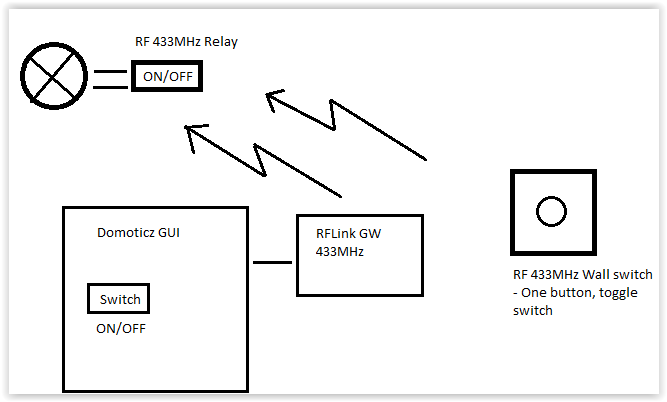
Scheme layout below:

I would like to control the lamp in two ways: using the switch on the wall (one gang) or using the button in the GUI Domoticz.
The switch on the wall is one-button(toggle).
I would also like that after pressing the switch on the wall, the status of the lamp (on / off) changed on the switch in the GUI Domoticz.
Is anyone able to help?
I've tried Blocky, DZvents, LUA scripts, unfortunately without success, the scripts only work partially (eg they do not update the status of the switch in Domoticz).
Thank You in advance for any help!
- Screen Shot 01-26-19 at 03.41 PM.PNG (13.18 KiB) Viewed 417 times
Re: RFlink - toggle swich - one gang
Posted: Saturday 26 January 2019 16:44
by waaren
Kamil wrote: Saturday 26 January 2019 16:15
I have a problem with the lamp switch (toggle switch).
I would like to control the lamp in two ways: using the switch on the wall (one gang) or using the button in the GUI Domoticz.
The switch on the wall is one-button(toggle).
I would also like that after pressing the switch on the wall, the status of the lamp (on / off) changed on the switch in the GUI Domoticz.
I've tried Blocky, DZvents, LUA scripts, unfortunately without success, the scripts only work partially (eg they do not update the status of the switch in Domoticz).
What are the device id's in domoticz ? Can you show what you already have in dzVents ?
Re: RFlink - toggle swich - one gang
Posted: Saturday 26 January 2019 16:57
by Kamil
@waaren sure:
Code: Select all
commandArray = {}

print ("All based event fired");
-- loop through all the devices
if (devicechanged['Lamp'] == 'On') and (uservariables['Lamp_variable'] == 'OFF') then
commandArray['Lamp_1']='On'
commandArray['Variable:Lamp_variable']='ON'

print ("Przełacznik on zmienna off przelacznik na On zmiennana on");

elseif (devicechanged['Lamp'] == 'On') and (uservariables['Lamp_variable'] == 'ON') then
commandArray['Lamp_1']='Off'
commandArray['Variable:Lamp_variable']='OFF'

print ("Przełacznik on zmienna on przelacznik na Off zmienna na off");
end

return commandArray
Where:
"Lamp" - my switch added from RFLink (toggle button)
"Lamp_1" - my Domoticz helping switch
"Lamp_variable" - my variable to counting lamp state
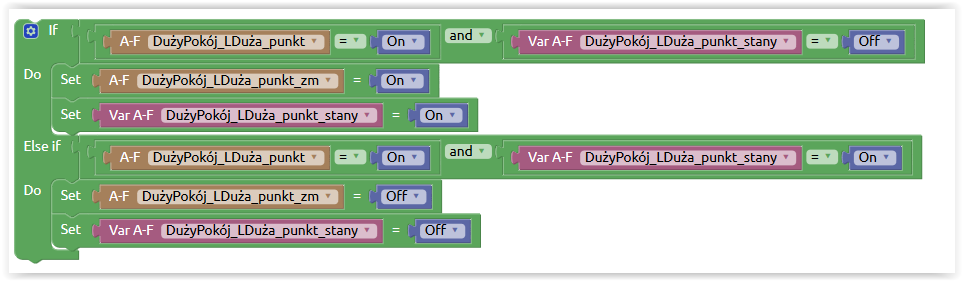
and Blocky:
- Screen Shot 01-26-19 at 04.52 PM.PNG (34.54 KiB) Viewed 406 times
Where:
"DużyPokój_LDuża_punkt" = "Lamp"
"DużyPokój_LDuża_punkt_zm" = "Lamp_1"
"DużyPokój_LDuża_punkt_stany" = "Lamp_variable"
I also tried in different combinations with the triggers on the buttons (json trigers), unfortunately without successes

Re: RFlink - toggle swich - one gang
Posted: Monday 28 January 2019 19:24
by Kamil
waaren wrote: Saturday 26 January 2019 16:44
What are the device id's in domoticz ? Can you show what you already have in dzVents ?
I used the script from my previous post, but I think I should write small correction:
I need a script that will synchronize the ON / OFF indication in the Domoticz GUI regardless of whether the light has been switched on via the website, the application on the mobile phone or using a button on the wall. The button itself works, but the status icon of the button does not change when the light is switched on by pressing the button (on the wall).

Can anyone help?