Page 1 of 2
Problem with times due to placement of nodes
Posted: Monday 23 July 2018 20:53
by Varazir
Hello,
I'm having problem with nodes timing out.
I think it's due to the environment due t if I place the node in the same room as the controller it works just fine ( after I re-add it ).
This is how my nodes is placed.
I have problem with the node in Rum 1 ( top left ) and the the one in Rum 2
The controller is placed in Vardagsrum down right corner

This is the network/group is now.

*Esxi is the lamp in Rum 1
I need advice on how to make this work better.
I have read the wiki on network/groups but I don't understand it.
Re: Problem with times due to placement of nodes
Posted: Tuesday 24 July 2018 3:12
by fargle
Hi. I only see two nodes connected to the controller, I would expect to see more, considering the distances look quite short.
Re the groups, they aren't needed for successful operation.
From what I can make out, the Razberry boards work better with an external antenna. The internal one can pick up rfi from the pi board itself. I would try a Z-Stick, preferably connected with a USB extension to get it away from the pi itself.
I have a Razberry that I intend to use as a second controller, but have already bought the external antenna and cable assy.
Re: Problem with times due to placement of nodes
Posted: Tuesday 24 July 2018 8:25
by Varazir
fargle wrote: Tuesday 24 July 2018 3:12
Hi. I only see two nodes connected to the controller, I would expect to see more, considering the distances look quite short.
Re the groups, they aren't needed for successful operation.
From what I can make out, the Razberry boards work better with an external antenna. The internal one can pick up rfi from the pi board itself. I would try a Z-Stick, preferably connected with a USB extension to get it away from the pi itself.
I have a Razberry that I intend to use as a second controller, but have already bought the external antenna and cable assy.
Hmm, it should be 4 nodes connected.
I know newer Razberry boards have a extended antenna. Don't like to pay another ~60€ for a new one.
PS , how do I remove the Solved status ? Ds
Re: Problem with times due to placement of nodes
Posted: Tuesday 24 July 2018 8:33
by Varazir
@fargle Do you think it would work to add a gpio-cable to move the razberry board from the raspberry pi ?
Re: Problem with times due to placement of nodes
Posted: Tuesday 24 July 2018 19:05
by fargle
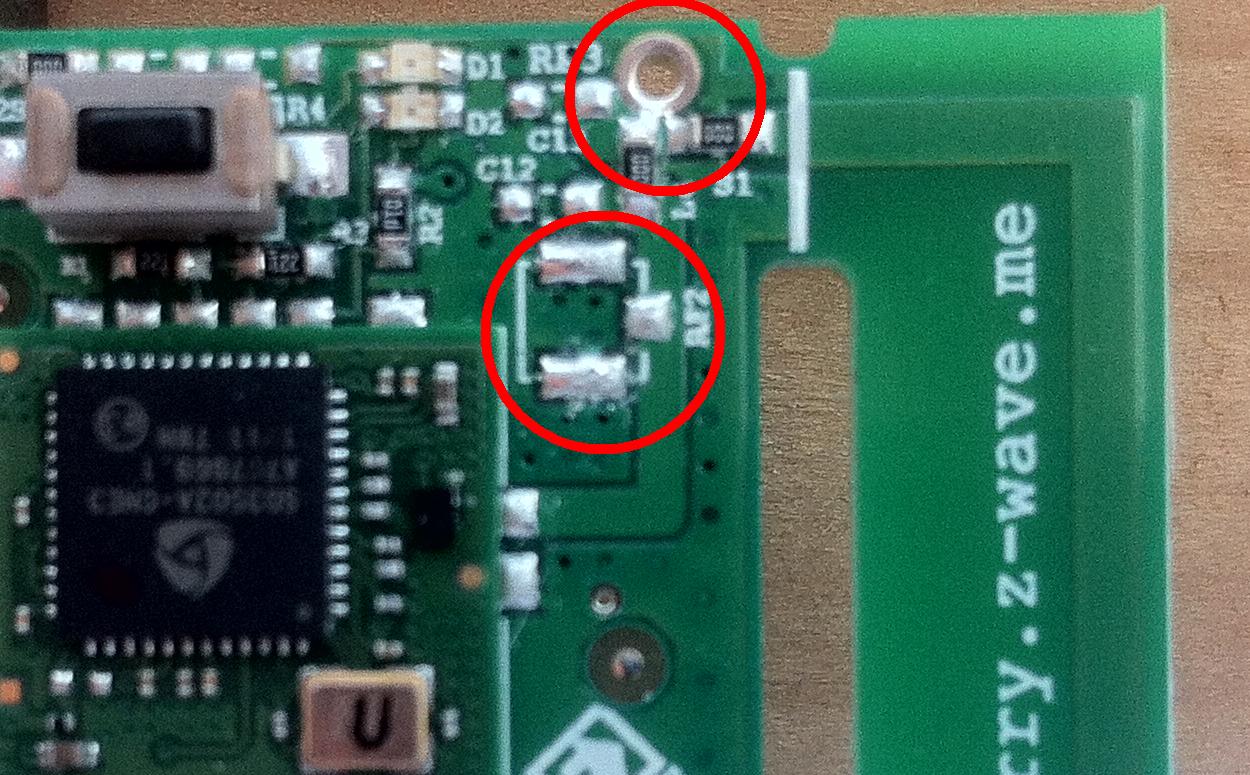
An I/O cable may be worth a shot, it certainly cant hurt, 30cm is about the max length I would try.
Alternatively there are places on the Razberry with provision for soldering either a mini coax connector (not easy) or an antenna coax cable (a bit easier)
- IMG_1171a.jpg (200.84 KiB) Viewed 1795 times
Re: Problem with times due to placement of nodes
Posted: Wednesday 25 July 2018 8:49
by Varazir
fargle wrote: Tuesday 24 July 2018 19:05
An I/O cable may be worth a shot, it certainly cant hurt, 30cm is about the max length I would try.
Alternatively there are places on the Razberry with provision for soldering either a mini coax connector (not easy) or an antenna coax cable (a bit easier)
IMG_1171a.jpg
The light on the razberry flashes when the RPi starts but Domoticz can't find it. I can see the device if I do ls /dev/tty*
The cable is 19 cm
It get extremely hot as well.
I have the older model of the razberry with out the extended antenna.
Re: Problem with times due to placement of nodes
Posted: Thursday 26 July 2018 21:45
by Varazir
fargle wrote: Tuesday 24 July 2018 3:12
Hi. I only see two nodes connected to the controller, I would expect to see more, considering the distances look quite short.
Re the groups, they aren't needed for successful operation.
From what I can make out, the Razberry boards work better with an external antenna. The internal one can pick up rfi from the pi board itself. I would try a Z-Stick, preferably connected with a USB extension to get it away from the pi itself.
I have a Razberry that I intend to use as a second controller, but have already bought the external antenna and cable assy.
Soon as I moved the node into the room it stopped working. When I hade in the same room as the RPi it just worked fine.
Re: Problem with times due to placement of nodes
Posted: Thursday 26 July 2018 22:52
by bjacobse
It seems that the device number 8 (green colour) isn't connected to anything. Have this device been included properly to/with the controller?
The ESXI number 13 (red colour) is forwarding to TVrum device number 6 (orange colour), then device 6 is then connected to your controller.
I would try to ensure that the green 8 and then afterwards try to heal network
Re: Problem with times due to placement of nodes
Posted: Friday 27 July 2018 8:27
by Varazir
bjacobse wrote: Thursday 26 July 2018 22:52
It seems that the device number 8 (green colour) isn't connected to anything. Have this device been included properly to/with the controller?
The ESXI number 13 (red colour) is forwarding to TVrum device number 6 (orange colour), then device 6 is then connected to your controller.
I would try to ensure that the green 8 and then afterwards try to heal network
How? How ever I set the groups I can't get them to connect.
When trying to add 6 to number 18's group 2 nothing happens.

Re: Problem with times due to placement of nodes
Posted: Friday 27 July 2018 9:30
by bjacobse
You shall not use the group stuff to connect them together. this is as far as I know, only used if for instance a PIR sensor connect DIRECTLY to a wall switch - without using a controller, as in a stand alone system
You shall include device 8 to your controller. Device 8 must have a manual that explains how to include (normally there is a button you hold down or click 3 times and then de device are in inclusion mode), then have this approx. 1 meter from your controller. in Domoticz you shall then include new devices, and then your device shall appear
Problem with times due to placement of nodes
Posted: Friday 27 July 2018 9:34
by bjacobse
Maybe you can exclude device 8, and include it again and then check that is connected to your controller.
Here is a guidance I found that shows how to include:
http://www.yellington.com/adding-a-z-wa ... -domoticz/
Re: Problem with times due to placement of nodes
Posted: Friday 27 July 2018 11:24
by Varazir
bjacobse wrote: Friday 27 July 2018 9:30
You shall not use the group stuff to connect them together. this is as far as I know, only used if for instance a PIR sensor connect DIRECTLY to a wall switch - without using a controller, as in a stand alone system
You shall include device 8 to your controller. Device 8 must have a manual that explains how to include (normally there is a button you hold down or click 3 times and then de device are in inclusion mode), then have this approx. 1 meter from your controller. in Domoticz you shall then include new devices, and then your device shall appear
Ok, I thought it was the wheel showed the groups
Well the device 8 works just fine. it's 18 that fails and when it has I have to exclude and include it again.
Re: Problem with times due to placement of nodes
Posted: Friday 27 July 2018 12:45
by bjacobse
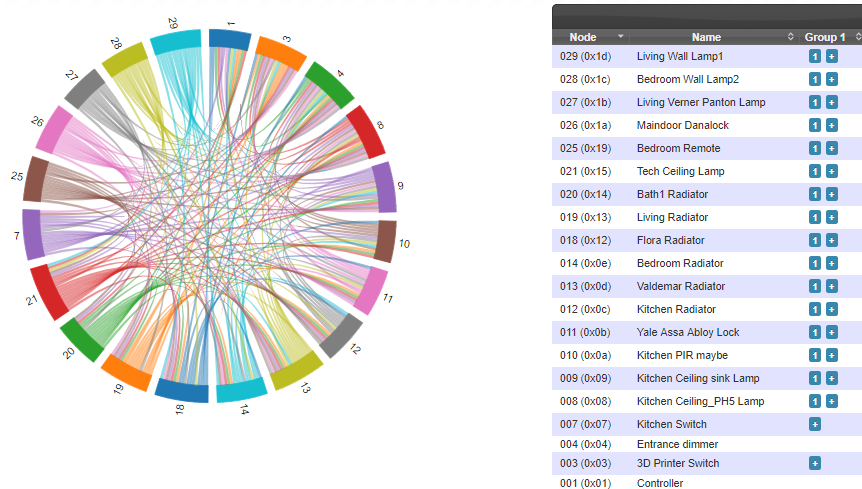
Your setup is still not ok, I think it's symptom that device 8 works and 18 fails. The round wheel with colours shows that your devices are not connected as they are supposed
Look at my wheel - yes I have more device, but your setup should have similar "connections" to each other, and they don't
Did you try to "heal" network?
Maybe you need to explain in details each device; number x: manufacture model
My wheel:
- domo_zwave_network_groups.PNG (229.91 KiB) Viewed 1659 times
Re: Problem with times due to placement of nodes
Posted: Friday 27 July 2018 12:47
by bjacobse
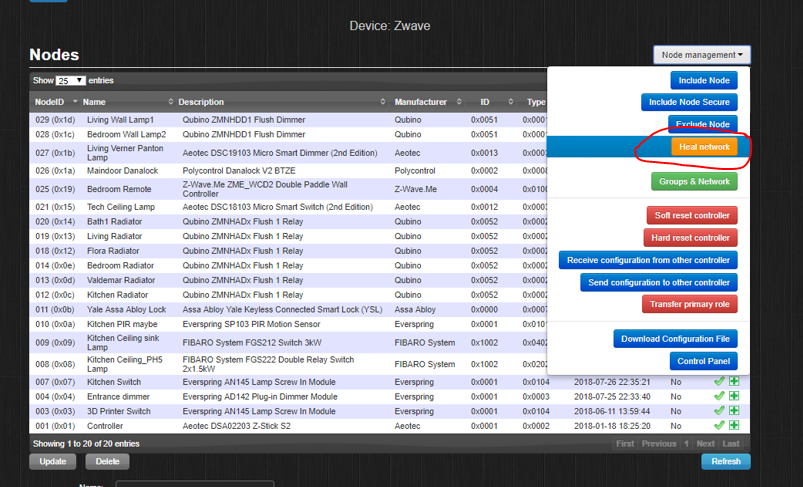
try to heal network, be patient and wait some time, not sure how long maybe 30min or less
- domo_heal.PNG (282.42 KiB) Viewed 1659 times
Re: Problem with times due to placement of nodes
Posted: Friday 27 July 2018 13:53
by Varazir
bjacobse wrote: Friday 27 July 2018 12:47
try to heal network, be patient and wait some time, not sure how long maybe 30min or less
This my list, I have run a heal network several times, I have set it to heal each night as well but still node 018 fail

Code: Select all
2018-07-27 13:51:40.025 Detail, Node018, Polling: COMMAND_CLASS_SWITCH_BINARY index = 0 instance = 1 (poll queue has 0 messages)
2018-07-27 13:51:40.025 Detail, Node018, Queuing (Poll) SwitchBinaryCmd_Get (Node=18): 0x01, 0x09, 0x00, 0x13, 0x12, 0x02, 0x25, 0x02, 0x25, 0x4d, 0xba
2018-07-27 13:51:40.027 Error, Node018, ERROR: Dropping command because node is presumed dead
2018-07-27 13:51:40.031 Always,
2018-07-27 13:51:40.031 Always, Dumping queued log messages
2018-07-27 13:51:40.031 Always,
2018-07-27 13:51:40.032 Always,
2018-07-27 13:51:40.032 Always, End of queued log message dump
2018-07-27 13:51:40.032 Always,
2018-07-27 13:51:40.032 Detail, Node018, Removing current message
Re: Problem with times due to placement of nodes
Posted: Friday 27 July 2018 20:23
by bjacobse
can you try to exclude node 18, and then include it again? potentially node 18 could actually also be faulty and broken
Re: Problem with times due to placement of nodes
Posted: Friday 27 July 2018 23:50
by Varazir
bjacobse wrote: Friday 27 July 2018 20:23
can you try to exclude node 18, and then include it again? potentially node 18 could actually also be faulty and broken
I never manage to exclude the device but I can include it again.


Re: Problem with times due to placement of nodes
Posted: Saturday 28 July 2018 8:57
by Varazir
Connected it to the wall yesterday in the computer room and now it's reported dead again.
Re-adding it and letting it be in the same room as the RPi ( last time it was OK for days )
Re: Problem with times due to placement of nodes
Posted: Saturday 28 July 2018 9:21
by bjacobse
maybe the node 18 can't reach your controller, can you try to add a node nearby so it can relay/forward data? (and this shall not be a battery operated node as they don't relay/forward)
Re: Problem with times due to placement of nodes
Posted: Saturday 28 July 2018 13:54
by Varazir
bjacobse wrote: Saturday 28 July 2018 9:21
maybe the node 18 can't reach your controller, can you try to add a node nearby so it can relay/forward data? (and this shall not be a battery operated node as they don't relay/forward)
Node 13 and 18 is in the same room
