Page 1 of 1
Volume control
Posted: Friday 12 January 2018 20:38
by Gerwin
I would like to change the volume in domoticz
I have a tablet on the wall where I play the music ( headphone Jack)then I would go to the USB soundcard mic input, and then go to the line in from the radio
Can someone tell me how I can do that (script) I like the dimmer like picture
I have speakers in the hole house i can set them on and off with Domoticz
But i like to change the volume in Domoticz
Is that possible ?????
I have a Raspberry Pi
With stable domoticz latest version
Gerwin


Verstuurd vanaf mijn HTC Desire 650 met Tapatalk
Re: Volume control
Posted: Friday 02 March 2018 7:37
by Gerwin
Nobody can tell me how to do????
Gerwin
Re: Volume control
Posted: Friday 02 March 2018 9:11
by Xztraz
you can control the playback volume of kodi(media player) from domoticz. could that be a part of the solution for you?
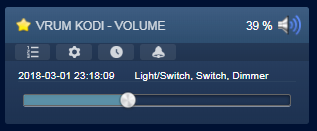
- volume_kodi.PNG (10.35 KiB) Viewed 1900 times
Re: Volume control
Posted: Friday 02 March 2018 9:36
by emme
quite difficult to understand your settings...
How you setup the volume in the actual ooms? (manually I assume..)
try to look to a possible solution: I'm using volumio on raspberry as a multiroom system... and Domoticz can handle playlist (a selection of), radio (a selection of) and volume as well, plus a text device that reflect the actual playing status
My system work with some scripts in domoticz and a service that (using websocket) update domoticz
ciao
M
Re: Volume control
Posted: Friday 02 March 2018 19:32
by Gerwin
We have special applications that run on the tablet on the wall for my son, if there is an alarm goes off and you're radio listening on the tablet the radio goes off, so you will always hear the alarm, so kodi or something else is not useful because everything on this tablet runs When we go to bed we push on the button sleep, as lamps in certain places are go out, speakers go out in the House, and into the bedroom go on , but sometimes i forget the volume of the tablet set right , and so I would like to control the volume in domoticz.
Re: Volume control
Posted: Saturday 03 March 2018 19:56
by Gerwin
I found a simple solution using just ALSA and uses little CPU - around 3-5% on RPi 3 using latest Jessie build and a USB Audio Device
It appears that recent builds all come with ALSA's dmix plugin built-in. This allows you to share and output audio output stream
Create New .asoundrc
pi@raspberrypi:~ $ sudo nano .asoundrc
Copy/Paste this based on USB Audio Device is the second card in system
pcm.LineOut {
type dmix # Kernel PCM
ipc_key 1112233 # Any Unique Number Number
slave {
pcm "hw:1,0" # Card # of USB Audio from aplay -l
period_time 0
period_size 1024
buffer_size 8192
rate 48000
#periods 128
}
}
pcm.!default {
type hw
card 1
}
ctl.!default {
type hw
card 1
}
Modify ALSA settings to make the USB Audio device the default using
alsamixer
<F6>
Select the USB Sound Card
Change Inout to Line if you have a high end Audio device, otherwise leave as Mic
Modify volumes to 40-50%
On exit, save settings
alsactl store
Start the stream playback from Audio In direct to Audio Out (& will return to command line)
arecord -f dat | aplay -D "LineOut" &
<CR>
Reduce volume of line input:
amixer set Line,0 0%
Use dmix shared pcm device to insert wav file previously recorded from line in:
aplay -D LineOut -R 48000 hiVol.wav
When it's all done restore the volume back to normal:
amixer set Line,0 50%


