Page 1 of 1
CPU usage after migrating RPi2 Wheezy to RPi3 Stretch
Posted: Monday 13 November 2017 23:36
by Nautilus
I recently upgraded my Raspberry Pi running Domoticz from version 2 to version 3 an wanted to update the OS at the same time to a more recent version. The update / migration went pretty smoothly and Domoticz seems clearly more responsive and e.g. loading the web GUI screens is now clearly faster.
However, I was wondering about the CPU usage as it has on average about doubled and the setup should be exactly the same except for the changed OS (Wheezy -> Stretch) and RPi platform (2 -> 3). I would have expected the opposite, but how should it be in the real life, is there some explanation to this? Are there some general RPi setup tricks I might have applied to the original installation of Domoticz (was done via the image) that I could now try to replicate to the new RPi3? Well, I think the CPU usage is still on very acceptable level and I have noticeable improvements in performance so this is not in any way a key issue for me to solve, it is more on the lines "would be nice to know the reason"...

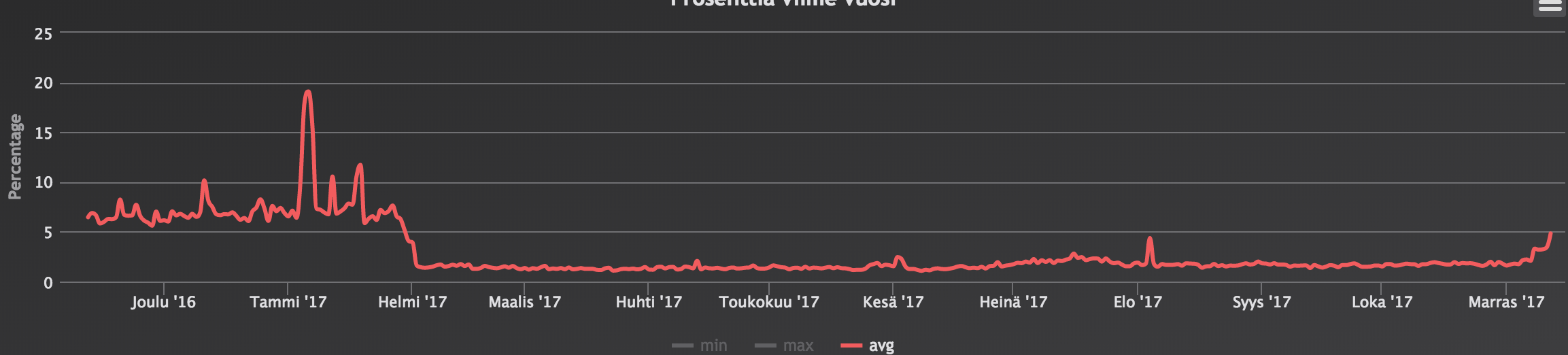
The time of update is pretty clear on the screenshots. Average now is 3,1-3,4% and it was 1,5-1,7% so it has quite accurately doubled:
- Screen Shot 2017-11-12 at 0.35.30.png (268.28 KiB) Viewed 1405 times

- Screen Shot 2017-11-14 at 0.37.29.png (144.45 KiB) Viewed 1404 times
Re: CPU usage after migrating RPi2 Wheezy to RPi3 Stretch
Posted: Tuesday 14 November 2017 9:40
by lost
Nautilus wrote: Monday 13 November 2017 23:36
Average now is 3,1-3,4% and it was 1,5-1,7% so it has quite accurately doubled:
On a PI3 using Stretch, I'm mostly in the 0.1/0.3 range with some peaks at 3. It only goes higher, up to 20%, during distro updates.
But it's a minimal install (headless => no desktop environment/graphic support ; I access it through ssh only & on X11 side, only a minimal frame buffer version, xvfb, is installed just to be able to use graphical editors etc through ssh X11 forwarding, as I'm full Linux even on my desktop).
Did not noticed change between Jessie & Stretch.
Re: CPU usage after migrating RPi2 Wheezy to RPi3 Stretch
Posted: Tuesday 14 November 2017 12:46
by Nautilus
Hmm, not a lot of scripts / events in use I assume? I think the CPU was around that after I had first installed Domoticz and before I migrated the old database, scripts etc. Then it went up to this 3% range.
As the basis I'm also using minimal Stretch image without desktop and accessing via SSH. What do you mean with:
lost wrote:only a minimal frame buffer version, xvfb, is installed just to be able to use graphical editors
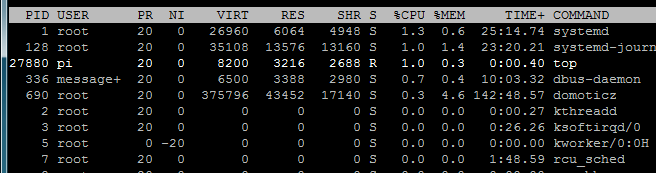
I also have running there e.g. Homebridge, Mosquitto, dtgbot etc. but nothing additional as compared to the old setup. Not sure what these other processes that take a litlle CPU are doing:
- Capture.PNG (14.34 KiB) Viewed 1373 times
Of course, one thing that also got updated was Domoticz as the beta on RPi2 Wheezy was from a couple of months ago (couldn't update due to the libssl1.0.0 and other issues present on that platform) and now it is latest.
I tried to troubleshoot a bit by disabling e.g. the event system but to my surprise the web GUI is showing this very strange. Whatever I input there, the boxes remain empty...

(more info on this here:
viewtopic.php?f=6&t=20325&p=157652#p157652)
Re: CPU usage after migrating RPi2 Wheezy to RPi3 Stretch
Posted: Tuesday 14 November 2017 16:54
by Siewert308SW
CPU in my Pi3 with a lot of Lua/bash/python script has the following stats:
Avg: 0.48
High: 1.51
Low: 0.25
Clearly your migration went tits up.
Something is keeping your Pi3 busy.
Did you just put your SD from the Pi2 into the Pi3?
If so, did you try a fresh OS installation with Domoticz to see if it solves the issue.
To me it looks like (if you just swapped cards) that the Pi3 is struggling with some old Pi2 setup.
Re: CPU usage after migrating RPi2 Wheezy to RPi3 Stretch
Posted: Tuesday 14 November 2017 17:06
by Nautilus
Siewert308SW wrote: Tuesday 14 November 2017 16:54
CPU in my Pi3 with a lot of Lua/bash/python script has the following stats:
Avg: 0.48
High: 1.51
Low: 0.25
Clearly your migration went tits up.
Something is keeping your Pi3 busy.
Did you just put your SD from the Pi2 into the Pi3?
If so, did you try a fresh OS installation with Domoticz to see if it solves the issue.
To me it looks like (if you just swapped cards) that the Pi3 is struggling with some old Pi2 setup.
Thanks for the reference stats. As mentioned it is a fresh install based on minimal Stretch image. CPU was at "normal" level before migrating the old database and scripts. I tried disabling the event system but that did not seem to have an effect on the CPU usage. Do you or anyone else know what those systemd, systemd-journal and dbus-daemon are doing? It seems they add 2-3% easily but of course that is just a snapshot and might not be giving a realistic view of the situation.
But yes, the fact that CPU usage has doubled in comparison to what it was with RPi2 / Wheezy probably means something strange is going on with my RPi3...
Re: CPU usage after migrating RPi2 Wheezy to RPi3 Stretch
Posted: Tuesday 14 November 2017 17:22
by Siewert308SW
Do you run Domoticz beta?
If not then try the Beta and see if it helps.
I say this because Domoticz stable doesn't support Stretch while beta does.
Could be compatible issue or if you fiddled with Stretch it also could be a services issue.
As systemd-journal and dbus-daemon are trying something without result.
Hard to tell and beyond my expertise

Re: CPU usage after migrating RPi2 Wheezy to RPi3 Stretch
Posted: Tuesday 14 November 2017 20:04
by Nautilus
Siewert308SW wrote: Tuesday 14 November 2017 17:22
Do you run Domoticz beta?
If not then try the Beta and see if it helps.
I say this because Domoticz stable doesn't support Stretch while beta does.
Could be compatible issue or if you fiddled with Stretch it also could be a services issue.
As systemd-journal and dbus-daemon are trying something without result.
Hard to tell and beyond my expertise
Yes, running latest beta. Will try to check what is going on there with the systemd, I have a hunch it might be related to Mosquitto as I had all kinds of troubles in installing it...
Re: CPU usage after migrating RPi2 Wheezy to RPi3 Stretch
Posted: Thursday 16 November 2017 23:09
by Nautilus
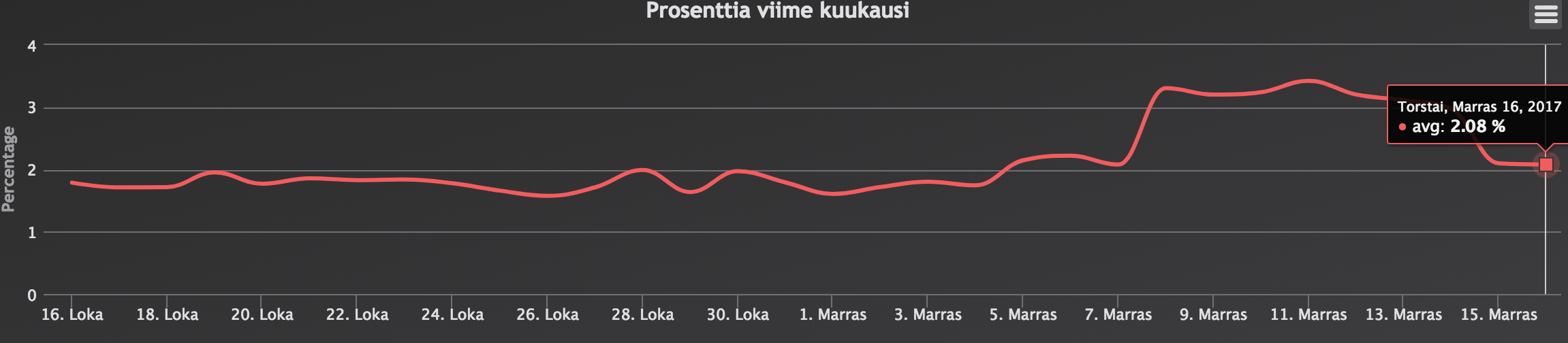
After removing mosquitto from systemctl things are (at least close) back to normal. The CPU usage is now pretty much on the same level as with RPi2, but I guess there shouldn't be any kind of big effect in any case. Probably there is still something (newer OS, newer Domoticz version, newer versions of other software etc.) on the new installation that hogs a bit more of the CPU than in the legacy installation, but so be it...
- Screen Shot 2017-11-16 at 23.35.01.png (267.04 KiB) Viewed 1298 times
Re: CPU usage after migrating RPi2 Wheezy to RPi3 Stretch
Posted: Friday 17 November 2017 6:07
by lost
Nautilus wrote: Tuesday 14 November 2017 12:46
As the basis I'm also using minimal Stretch image without desktop and accessing via SSH. What do you mean with:
lost wrote:only a minimal frame buffer version, xvfb, is installed just to be able to use graphical editors
Hello,
I mean the GPU side of the PI is not used to drive a screen with a full desktop environment, but for convenience (ability to start other xterms, or it's lightweigh counterpart, rxvt=urxvt-unicode ; simple graphical editors like nedit, always better than nano...) I have a frame buffer X11 server (aka xvfb package and it's dependencies) on the PI. Combined with ssh able to tunnel X11 in a single connection, this allow working more comfortably on the PI from the network when scripting & configuring things. Otherwise that's opening several ssh connections to work with text tools only.
A single "ssh -XC user@PI_IP" then launching graphical terms or apps in background mod, like "rxvt &", "nedit toto.txt &" is more convenient.