Page 1 of 1
First Blockly
Posted: Friday 27 October 2017 20:13
by dextm80
Hi guys, i'm trying my firts blockly
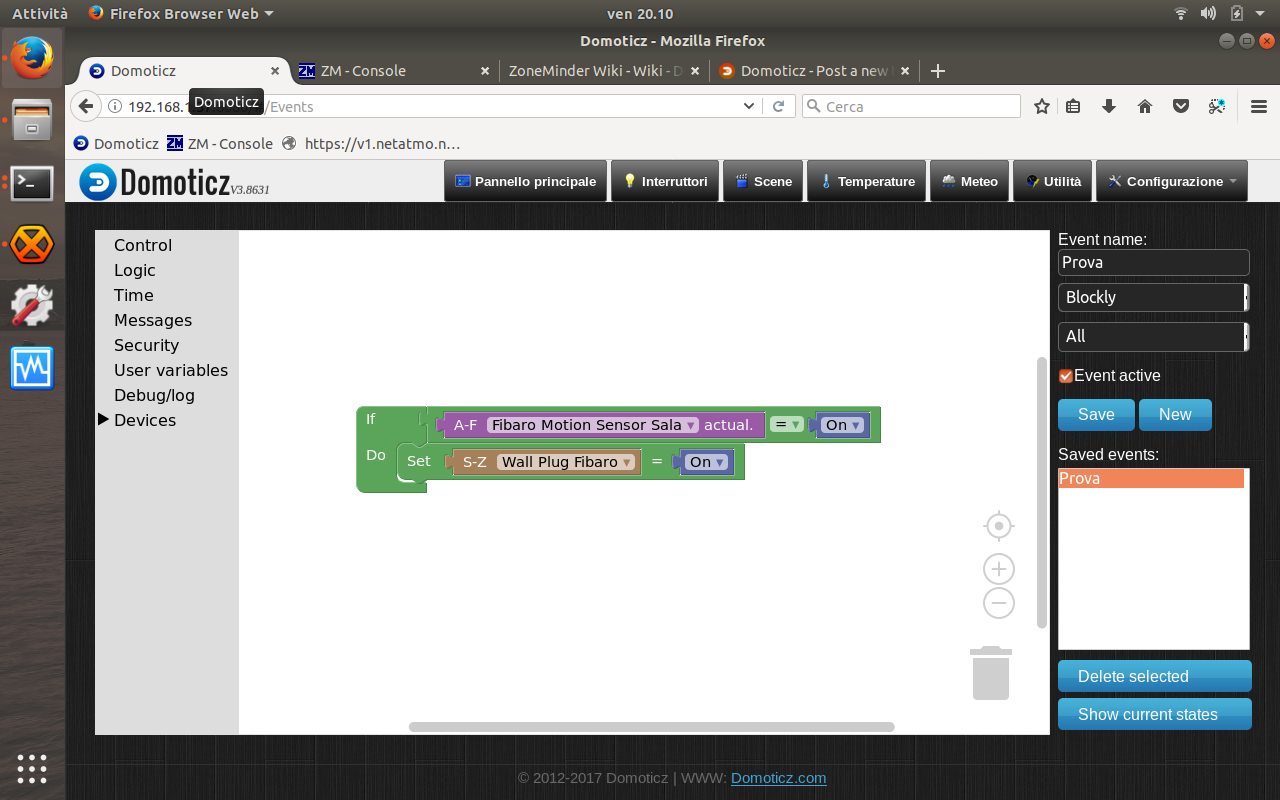
- Schermata da 2017-10-27 20-10-48.png (225.6 KiB) Viewed 1488 times
bun nothing happens
why?
tnx a lot
Re: First Blockly
Posted: Friday 27 October 2017 21:02
by SweetPants
Try changing 'All' to 'Device'
Re: First Blockly
Posted: Sunday 29 October 2017 18:23
by dextm80
SweetPants wrote: Friday 27 October 2017 21:02
Try changing 'All' to 'Device'
nothing change...
log write : 2017-10-29 18:22:40.670 EventSystem: reset all events...
Re: First Blockly
Posted: Sunday 29 October 2017 18:58
by DutchHans
What does the 'current status' say about the sensor?.. thats the value you need to switch. And what about the light turning off.. you can't switch a light on that is already turned on.
Cheers, Hans
Re: First Blockly
Posted: Sunday 29 October 2017 19:01
by dextm80
DutchHans wrote: Sunday 29 October 2017 18:58
What does the 'current status' say about the sensor?.. thats the value you need to switch. And what about the light turning off.. you can't switch a light on that is already turned on.
Cheers, Hans
Hi Hans,
current status is on/off both, the light start off and i want to switch on

- Schermata 2017-10-29 alle 19.01.47.png (46.23 KiB) Viewed 1439 times
Re: First Blockly
Posted: Sunday 29 October 2017 19:40
by cogliostrio
The motion sensor switch is wrong. Your using a utility switch (purple), you need to use the switch under Devices --> Switches.
Re: First Blockly
Posted: Sunday 29 October 2017 19:47
by dextm80
cogliostrio wrote: Sunday 29 October 2017 19:40
The motion sensor switch is wrong. Your using a utility switch (purple), you need to use the switch under Devices --> Switches.
Thank you so much, now i understand the problem and all is ok!!!!!!!

Re: First Blockly
Posted: Sunday 29 October 2017 20:05
by DutchHans
Hi, i meant cuttent status in the blockly environment. (The button on the bottom-right) You can see there what the value is when its idle and when the sensor is active.. depending on the type it could be on, motion or alarm etc...
Cheers,Hans
Re: First Blockly
Posted: Monday 30 October 2017 11:59
by dextm80
Hi guys,
i'm implementig the blocky with other functions.....
i want that light switch on when motion sensor is on AND after SUNSET...
Now event don't do, without sunset function all is ok.
Any suggestion?
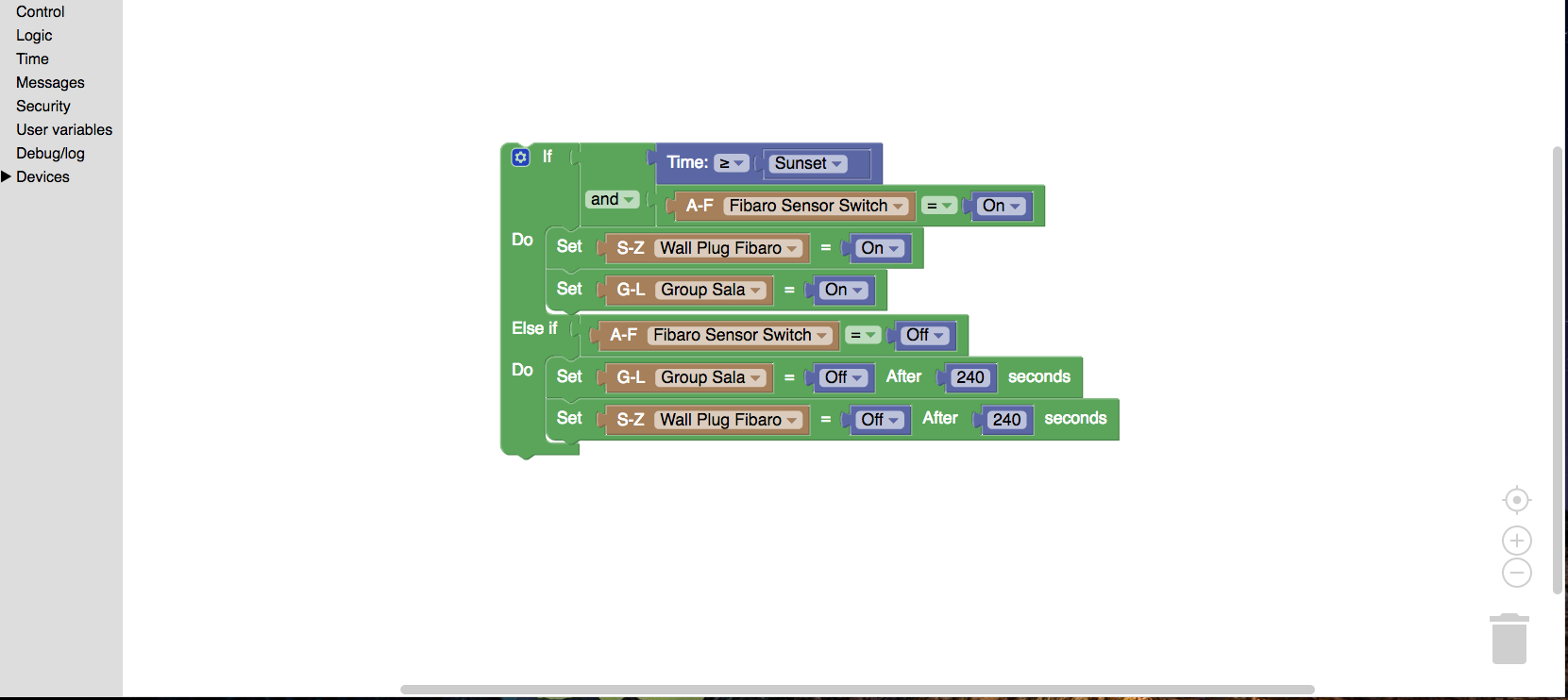
- Screenshot 2017-10-30 11.49.40.png (129.62 KiB) Viewed 1389 times
Thanks so much
Re: First Blockly
Posted: Monday 30 October 2017 14:54
by StanHD
dextm80 wrote: Monday 30 October 2017 11:59
Hi guys,
i'm implementig the blocky with other functions.....
i want that light switch on when motion sensor is on AND after SUNSET...
Now event don't do, without sunset function all is ok.
Any suggestion?
Screenshot 2017-10-30 11.49.40.png
Thanks so much
Hi,
I think you need "After Sunset" followed by "AND < 22:00" or perhaps for all night:- "OR Before Sunrise" so there is a distinct period for the condition.