Page 1 of 2
Telegram custom keyboards
Posted: Tuesday 17 October 2017 16:29
by bigpea
Hi all,
I'm trying to create a custom keyboard with telegram in order to have a simple way to do more action.
Like this (detail:
https://core.telegram.org/bots#keyboards):
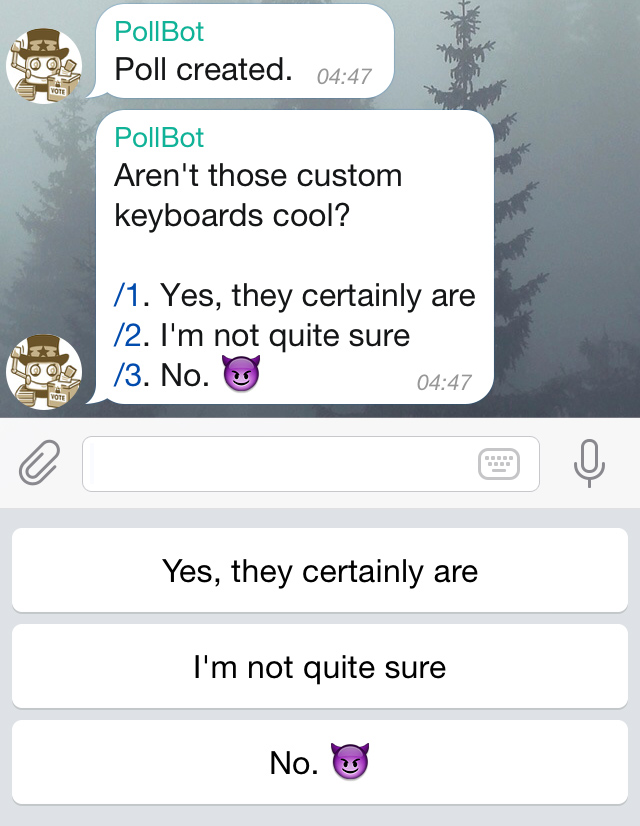
In detail if I use this link to send a message all works fine:
Code: Select all
https://api.telegram.org/botMyToken/sendMessage?chat_id=myId&text=test
But if I try to add the custom keuboard with this URL (adding only this part "&reply_markup={"keyboard":[[{%20text:%20"Si"%20}]]}"):
Code: Select all
https://api.telegram.org/botMyToken/sendMessage?chat_id=myId&text=test&reply_markup={"keyboard":[[{%20text:%20"Si"%20}]]}
I receive this error:
{"ok":false,"error_code":400,"description":"Bad Request: can't parse reply keyboard markup JSON object"}
I tryied also with serialized JSON but the result is the same.
Somebody use this function in telegram?
Thanks.
Re: Telegram custom keyboards
Posted: Tuesday 17 October 2017 16:43
by jvdz
You mean like this?
http://www.domoticz.com/forum/viewtopic ... enu#p52245
This is implemented in DTGBOT.

Jos
Re: Telegram custom keyboards
Posted: Tuesday 17 October 2017 17:20
by bigpea
yes, I had seen this script, but I just wanted to have the correct url string.
But in the code you indicated I can not find the url track.
Re: Telegram custom keyboards
Posted: Tuesday 17 October 2017 17:48
by jvdz
There is no one single answer to your question as it depends on the functionality you want but generically this is the format i've used:
Code: Select all
reply_markup={"keyboard":[["opt 1","opt 2","opt 3"],["menu"]],"resize_keyboard":true}
The url syntax is defined in the telegram website and I've used that to develop all LUA script functions:
https://core.telegram.org/bots/api#replykeyboardmarkup
There is also a version of DTGBOT available that uses the inline keyboard option.
Jos
Re: Telegram custom keyboards
Posted: Tuesday 17 October 2017 17:55
by bigpea
The inline version works fine, for example:
https://api.telegram.org/bot/sendMessag ... e_keyboard":[[{"text":"Visualizza spoiler!","url":"
http://google.com/"}]]}
But when I try a replykeyboardmarkup, for example your url I receive this error:
{"ok":false,"error_code":400,"description":"Bad Request: inline keyboard expected"}
Re: Telegram custom keyboards
Posted: Tuesday 17 October 2017 18:17
by jvdz
Show me the total URL (without the personal info like API key) so I can have a look please.
Jos
Re: Telegram custom keyboards
Posted: Wednesday 18 October 2017 9:34
by bigpea
Yes, sure, the link is:
Code: Select all
https://api.telegram.org/botToken/sendMessage?chat_id=-1&text=Choose&reply_markup={"keyboard":[[{"Yes"}],[{"No"}]]}
Re: Telegram custom keyboards
Posted: Wednesday 18 October 2017 9:39
by jvdz
I can't test it untill the evening, but shouldn't that be like this?:
Code: Select all
https://api.telegram.org/botToken/sendMessage?chat_id=-1&text=Choose&reply_markup={"keyboard":[["Yes"],["No"]]}
Jos
Re: Telegram custom keyboards
Posted: Wednesday 18 October 2017 10:15
by bigpea
The message is sent but the keyboard not appear.
Re: Telegram custom keyboards
Posted: Wednesday 18 October 2017 19:33
by jvdz
Just tried your modified command from my previous post with only putting in my bottoken and chat_ID and it shows the Yes/No buttons nicely underneath each other.
Not sure why it doesn't for you.
Jos
Re: Telegram custom keyboards
Posted: Thursday 19 October 2017 19:10
by bigpea
I have am IPhone, and you? Maine the problem is this.
Re: Telegram custom keyboards
Posted: Thursday 19 October 2017 19:36
by jvdz
I opened the URL to send the telegram in a Chrome browser on my win10 laptop and run Telegram on multiple platforms, but honestly that shouldn't really matter I would think.
Jos
Re: Telegram custom keyboards
Posted: Thursday 19 October 2017 21:09
by bigpea
Mmhh ok I will try tomorrow. Thanks for your time.
Re: Telegram custom keyboards
Posted: Saturday 15 August 2020 10:42
by hoeby
Sorry for putting up this older thread.
But i want to use the HTTP api
I know that there is dtgbot.
But i don't get it to work. I find it to difficult to setup. Can't find a way to get it to work.
Maybe someone has a great manual, how to do this step by step.
I the meantime i have taken another route.
The route with ESP8266 with telegram. I got it working. But would love to use the option reply keyboard.
But on the esp it didn't work. So i went looking for a HTTP api, just to test and see. But the api also doesn't work and gives this error back
Code: Select all
{"ok":false,"error_code":400,"description":"Bad Request: inline keyboard expected"}
I used this line and filled in the token and chat id
Code: Select all
https://api.telegram.org/botToken/sendMessage?chat_id=-1&text=Choose&reply_markup={"keyboard":[["Yes"],["No"]]}
Is the reply keyboard not supported anymore?
I am sending it to a telegram group, could that be the problem. That with groups this function isn't supported?
Re: Telegram custom keyboards
Posted: Saturday 15 August 2020 11:37
by jvdz
hoeby wrote: Saturday 15 August 2020 10:42
I know that there is dtgbot.
But i don't get it to work. I find it to difficult to setup. Can't find a way to get it to work.
Maybe someone has a great manual, how to do this step by step.
I am sure I can help you with that.

hoeby wrote: Saturday 15 August 2020 10:42
I the meantime i have taken another route.
The route with ESP8266 with telegram. I got it working. But would love to use the option reply keyboard.
But on the esp it didn't work. So i went looking for a HTTP api, just to test and see. But the api also doesn't work and gives this error back
Code: Select all
{"ok":false,"error_code":400,"description":"Bad Request: inline keyboard expected"}
I used this line and filled in the token and chat id
Code: Select all
https://api.telegram.org/botToken/sendMessage?chat_id=-1&text=Choose&reply_markup={"keyboard":[["Yes"],["No"]]}
Is the reply keyboard not supported anymore?
I am sending it to a telegram group, could that be the problem. That with groups this function isn't supported?
That url works fine for me when I use my ID or a test group. When using it with a group you need to check the privacy mode for the group: (From the Telegram FAQ page
https://core.telegram.org/bots/faq#will ... he-bot-api )
What messages will my bot get?
1. All bots, regardless of settings, will receive:
All service messages.
All messages from private chats with users.
All messages from channels where they are a member.
2. Bot admins and bots with privacy mode disabled will receive all messages except messages sent by other bots.
3. Bots with privacy mode enabled will receive:
Commands explicitly meant for them (e.g., /command@this_bot).
General commands from users (e.g. /start) if the bot was the last bot to send a message to the group.
Messages sent via this bot.
Replies to any messages implicitly or explicitly meant for this bot.
Note that each particular message can only be available to one privacy-enabled bot at a time, i.e., a reply to bot A containing an explicit command for bot B or sent via bot C will only be available to bot A. Replies have the highest
Jos
Re: Telegram custom keyboards
Posted: Saturday 15 August 2020 11:54
by hoeby
I enabled and disabled the privacy mode for group.
Do i have to wait a X-periode?
Because in both privacy modes it doesn't work, still the same error returns
Re: Telegram custom keyboards
Posted: Saturday 15 August 2020 12:13
by jvdz
As far as I remember setting the group privacy is a onetime thing working immediately....but it is a long time ago I did that.
Have you tried the url from the browser just to see what happens? That is what I did and is working fine with my BOTTOKEN & GroupID.
Does the URL work with your own chat_id?
Jos
Re: Telegram custom keyboards
Posted: Saturday 15 August 2020 12:20
by hoeby
at this moment i only have the group id, not a non group id. With a minus in front.
With that it doesn't work. When i post the url in the webbrowser i get the response that it expects an inline command
Re: Telegram custom keyboards
Posted: Saturday 15 August 2020 12:24
by jvdz
Nah ... you do have your own phone's chat_id or else you couldn't use Telegram on your phone.
Re: Telegram custom keyboards
Posted: Saturday 15 August 2020 12:49
by hoeby
Yes my chat-id i have.
But simple change the chat-id in the url didn't work.
Do you also know the url api for inline keyboard?