Page 1 of 1
Heating control Script not switching
Posted: Thursday 13 July 2017 18:28
by jkimmel
Here comes my script which I thought is quite close to dannyblue's example.
Code: Select all
-- assumptions:

local BOILER_DEVICE = 'FB 41 Heizkreis Gaestebad' -- switch device
local SETPOINT_DEVICE = 'Setpoint Gaestebad' -- selector dummy device
local TEMPERATURE_SENSOR = 'Gaestebad'
local HYSTERESIS = 0.5 -- temp has to drop this value below setpoint before boiler is on again
local SMOOTH_FACTOR = 3
local LOGGING = true

return {
	on = {
		['timer'] = {
			'every minute',
		},
		devices = {
			TEMPERATURE_SENSOR,
			SETPOINT_DEVICE
		}
	},
	data = {
		temperatureReadings = { history = true, maxItems = SMOOTH_FACTOR }
	},
	active = true,
	execute = function(domoticz, device, triggerInfo)

		local avgTemp
		local temperatureReadings = domoticz.data.temperatureReadings

		-- first check if the sensor got a new reading or the setpoint was changed:
		if (triggerInfo.type == domoticz.EVENT_TYPE_DEVICE) then

			local sensor = domoticz.devices(TEMPERATURE_SENSOR)
			local setpoint =  domoticz.devices(SETPOINT_DEVICE)
			if (sensor.changed) then
				-- sensor just reported a new reading
				-- add it to the readings table

				local tcurrent = sensor.temperature
                if LOGGING then domoticz.log('tcurrent = ' .. tcurrent) end
				if (tcurrent ~= 0 and tcurrent ~= nil) then
					temperatureReadings.add(tcurrent)

				else
					-- no need to be here, weird state detected
					domoticz.log('Strange sensor reading.. skiping', domoticz.LOG_ERROR)
					return
				end

			elseif (setpoint.changed) then
				-- a new setpoint was set
				local scurrent = setpoint.setPoint
				if LOGGING then domoticz.log('Setpoint was set to ' .. scurrent) end
			else
				-- no business here, bail out...
				return
			end
		end

		-- now determine what to do

		local boiler = domoticz.devices(BOILER_DEVICE)

		if (scurrent == nil or scurrent == 0) then
			boiler.switchOff()
			return -- we're done here
		end


		-- determine at which temperature the boiler should be
		-- switched on
		local switchOnTemp = scurrent - HYSTERESIS

		-- don't use the current reading but average it out over
		-- the past <SMOOTH_FACTOR> readings (data smoothing) to get rid of noise, wrong readings etc
		local avgTemp = temperatureReadings.avg(1, SMOOTH_FACTOR)

		if LOGGING then
			domoticz.log('Average: ' .. avgTemp, domoticz.LOG_INFO)
			domoticz.log('Setpoint: ' .. scurrent, domoticz.LOG_INFO)
			domoticz.log('Current boiler state: ' .. boiler.state, domoticz.LOG_INFO)
			domoticz.log('Switch-on temperature: ' .. switchOnTemp, domoticz.LOG_INFO)
		end

		if (avgTemp >= scurrent and boiler.state == 'On') then
			if LOGGING then domoticz.log('Target temperature reached, boiler off') end
			boiler.switchOff()
		end

		if (avgTemp < scurrent and boiler.state == 'Off') then
			if (avgTemp < switchOnTemp) then
				if LOGGING then domoticz.log('Heating is required, boiler switched on') end
				boiler.switchOn()
			else
				if LOGGING then domoticz.log('Average temperature below setpoint but within hysteresis range, waiting for temperature to drop to ' .. switchOnTemp) end
			end
		end
	end
}
Re: Heating control Script not switching
Posted: Friday 14 July 2017 9:02
by dannybloe
Yes, that's also fixed in the next pull request

Sorry again for that. This is the updated code:
Code: Select all
-- assumptions:
-- the setpoint is set by a selector dummy device where the values are numeric temperatures
-- but you can easily change it to a setpoint device

local BOILER_DEVICE = 'Boiler' -- switch device
local SETPOINT_DEVICE = 'Setpoint' -- selector dummy device
local TEMPERATURE_SENSOR = 'Temperature'
local HYSTERESIS = 0.5 -- temp has to drop this value below setpoint before boiler is on again
local SMOOTH_FACTOR = 3
local LOGGING = true

return {
	on = {
		['timer'] = {
			'every minute',
		},
		devices = {
			TEMPERATURE_SENSOR,
			SETPOINT_DEVICE
		}
	},
	data = {
		temperatureReadings = { history = true, maxItems = SMOOTH_FACTOR }
	},
	active = true,
	execute = function(domoticz, device, triggerInfo)

		local avgTemp
		local temperatureReadings = domoticz.data.temperatureReadings
		local sensor = domoticz.devices(TEMPERATURE_SENSOR)
		local current = sensor.temperature
		local boiler = domoticz.devices(BOILER_DEVICE)
		local setpoint = domoticz.devices(SETPOINT_DEVICE)

		-- first check if the sensor got a new reading or the setpoint was changed:
		if (triggerInfo.type == domoticz.EVENT_TYPE_DEVICE) then

			if (sensor.changed) then
				-- sensor just reported a new reading
				-- add it to the readings table

				if (current ~= 0 and current ~= nil) then
					temperatureReadings.add(current)
				else
					-- no need to be here, weird state detected
					domoticz.log('Strange sensor reading.. skiping', domoticz.LOG_ERROR)
					return
				end

			elseif (domoticz.devices(SETPOINT_DEVICE).changed) then
				-- a new setpoint was set
				if LOGGING then domoticz.log('Setpoint was set to ' .. device.state) end
			else
				-- no business here, bail out...
				return
			end
		end

		-- now determine what to do
		if (setpoint.state == nil or setpoint.state == 'Off') then
			boiler.switchOff()
			return -- we're done here
		end

		local setpointValue = tonumber(setpoint.state)

		-- determine at which temperature the boiler should be
		-- switched on
		local switchOnTemp = setpointValue - HYSTERESIS

		-- don't use the current reading but average it out over
		-- the past <SMOOTH_FACTOR> readings (data smoothing) to get rid of noise, wrong readings etc
		local avgTemp = temperatureReadings.avg(1, SMOOTH_FACTOR, current) -- fallback to current when history is empty

		if LOGGING then
			domoticz.log('Average: ' .. avgTemp, domoticz.LOG_INFO)
			domoticz.log('Setpoint: ' .. setpointValue, domoticz.LOG_INFO)
			domoticz.log('Current boiler state: ' .. boiler.state, domoticz.LOG_INFO)
			domoticz.log('Switch-on temperature: ' .. switchOnTemp, domoticz.LOG_INFO)
		end

		if (avgTemp >= setpointValue and boiler.state == 'On') then
			if LOGGING then domoticz.log('Target temperature reached, boiler off') end
			boiler.switchOff()
		end

		if (avgTemp < setpointValue and boiler.state == 'Off') then
			if (avgTemp < switchOnTemp) then
				if LOGGING then domoticz.log('Heating is required, boiler switched on') end
				boiler.switchOn()
			else
				if LOGGING then domoticz.log('Average temperature below setpoint but within hysteresis range, waiting for temperature to drop to ' .. switchOnTemp) end
			end
		end
	end
}
Try to find the differences

Re: Heating control Script not switching
Posted: Saturday 15 July 2017 7:18
by jkimmel
Only difference I found is about averaging. So because I didn't understand the logic behind I deleted averaging.
I also changed from dummy selector to thermostat hoping this won't spoil anything.
Anyway there still is no switching, log entries don't show up as well as debugging (using MS Edge)
Seems to me I haven't seen the differences

Code: Select all
local BOILER_DEVICE = 'FB 21 Heizkreis Salon' -- switch device
local SETPOINT_DEVICE = 'Setpoint Salon' -- Setpoint thermostat
local TEMPERATURE_SENSOR = 'Salon'
local HYSTERESIS = 0.5 -- temp has to drop this value below setpoint before boiler is on again
local SMOOTH_FACTOR = 3
local LOGGING = true

return {
   on = {
      ['timer'] = {
         'every minute',
      },
      devices = {
         TEMPERATURE_SENSOR,
         SETPOINT_DEVICE
      }
   },

   active = true,
   execute = function(domoticz, device, triggerInfo)

      local sensor = domoticz.devices(TEMPERATURE_SENSOR)
      local tcurrent --= sensor.temperature
      local boiler = domoticz.devices(BOILER_DEVICE)
      local setpoint --= domoticz.devices(SETPOINT_DEVICE)

      -- first check if the sensor got a new reading or the setpoint was changed:
      if (triggerInfo.type == domoticz.EVENT_TYPE_DEVICE) then

         if (sensor.changed) then
            -- sensor just reported a new reading
       		tcurrent = sensor.temperature
			domoticz.log('Temp was set to ' .. tcurrent)

         elseif (setpoint.changed) then
            -- a new setpoint was set
		scurrent = setpoint.setPoint
             domoticz.log('Setpoint was set to ' .. scurrent)
         else
            -- no business here, bail out...
            return
         end
      end

      -- now determine what to do
      if (scurrent == nil ) then
         boiler.switchOff()
         return -- we're done here
      end

      -- determine at which temperature the boiler should be
      -- switched on
      local switchOnTemp = scurrent - HYSTERESIS


      if LOGGING then

         domoticz.log('Setpoint: ' .. scurrent, domoticz.LOG_INFO)
         domoticz.log('Current boiler state: ' .. boiler.state, domoticz.LOG_INFO)
         domoticz.log('Switch-on temperature: ' .. switchOnTemp, domoticz.LOG_INFO)
      end

      if (tcurrent >= scurrent and boiler.state == 'On') then
         if LOGGING then domoticz.log('Target temperature reached, boiler off') end
         boiler.switchOff()
      end

      if (tcurrent < scurrent and boiler.state == 'Off') then
         if (tcurrent < switchOnTemp) then
            if LOGGING then domoticz.log('Heating is required, boiler switched on') end
            boiler.switchOn()
         else
            if LOGGING then domoticz.log(' temperature below setpoint but within hysteresis range, waiting for temperature to drop to ' .. switchOnTemp) end
         end
      end
   end
}
Edit:
Is this
still allowed?
Obviously scurrent is nil although I used
Code: Select all
Thermostat set point[edit]
setPoint: Number.
from the Wiki, because when I change
Code: Select all
if (scurrent == nil or scurrent == 0) then
			boiler.switchOff()
to
Code: Select all
if (scurrent == nil and boiler.state == 'On' ) then
			boiler.switchOff()
there is no permanent swichOff command anymore as I realized in the log of the switches
Re: Heating control Script not switching
Posted: Saturday 05 August 2017 17:29
by jkimmel
This one is switching now, tried to be closer to danyblue's example
Code: Select all
local BOILER_DEVICE = 'FB 21 Heizkreis Salon' -- switch device
local TEMPERATURE_SENSOR = 'Salon'
local RUECKLAUF_SENSOR = 'WP Ruecklauf'
local SMOOTH_FACTOR = 3
local HYSTERESIS = 0.005
local LOGGING = true

return {
	on = {
		timer = {
			'every 1 minute',
		},
		devices = {
			TEMPERATURE_SENSOR,
			}
	},
	data = {
		temperatureReadings = { history = true, maxItems = SMOOTH_FACTOR }
	},
	active = true,
	execute = function(domoticz, device, triggerInfo)

	  local avgTemp
      local temperatureReadings = domoticz.data.temperatureReadings
      local sensor = domoticz.devices(TEMPERATURE_SENSOR)
      local current = sensor.temperature
      local boiler = domoticz.devices(BOILER_DEVICE)
	  local ruecklauf = domoticz.devices(RUECKLAUF_SENSOR)
      -- experimenting with ruecklauf.temperature purpose avoiding wet walls
      local ruecklaufT = ruecklauf.temperature + 2

		-- first check if the sensor got a new reading or the setpoint was changed:
		if (triggerInfo.type == domoticz.EVENT_TYPE_DEVICE) then

		if (sensor.changed) then
            -- sensor just reported a new reading
            -- add it to the readings table

            if (current ~= 0 and current ~= nil) then
               temperatureReadings.add(current)
            else
               -- no need to be here, weird state detected
               domoticz.log('Strange sensor reading.. skiping', domoticz.LOG_ERROR)
               return
            end

		-- now determine what to do

			local dewpoint = sensor.dewPoint

		-- determine at which temperature the boiler should be
		-- switched on
		local switchOnTemp = dewpoint + HYSTERESIS

		-- don't use the current reading but average it out over
		-- the past <SMOOTH_FACTOR> readings (data smoothing) to get rid of noise, wrong readings etc
		local avgTemp = temperatureReadings.avg(1, SMOOTH_FACTOR, current)

		if LOGGING then
			domoticz.log('Average: ' .. avgTemp, domoticz.LOG_INFO)
			domoticz.log('Current boiler state: ' .. boiler.state, domoticz.LOG_INFO)
			domoticz.log('Switch-on temperature: ' .. switchOnTemp, domoticz.LOG_INFO)
			domoticz.log('Dewpoint: ' ..dewpoint, domoticz.LOG_INFO)

		end

		if ((avgTemp <= dewpoint or ruecklaufT <= dewpoint) and boiler.state == 'On') then
			if LOGGING then domoticz.log('Target temperature reached, boiler off') end
			boiler.switchOff()

        else
            boiler.switchOn()
            	if LOGGING then domoticz.log('Temperature to high cooling, boiler on') end

				end
		end
	end
end
}
Re: Heating control Script not switching
Posted: Monday 13 May 2019 23:01
by HvdW
Hi,
I tried the original script from
Github.
It stumbles on line 30 of the script.
I did try the script @dannybloe posted 3 posts before (Friday 14 July 2017 8:02 )
Then I changed
Code: Select all
on = {
		['timer'] = 'every minute',
		TEMPERATURE_SENSOR,
		SETPOINT_DEVICE
},
to
Code: Select all
on = {
        devices = {TEMPERATURE_SENSOR, SETPOINT_DEVICE},
        timer = {'every 10 minutes'}
    },
(don't even know if this change is necessary for dzVents 2.4)
It's running perfect now.
Code: Select all
 2019-05-13 23:27:41.651 Status: EventSystem: reset all device statuses...
2019-05-13 23:27:41.748 Status: dzVents: Info: Handling events for: "Thermostaat-setpoint", value: "20.80"
2019-05-13 23:27:41.748 Status: dzVents: Info: ------ Start internal script: Verwarming: Device: "Thermostaat-setpoint (Dummy)", Index: 184
2019-05-13 23:27:41.750 Status: dzVents: Info: Setpoint was set to 20.80
2019-05-13 23:27:41.750 Status: dzVents: Info: Average: 20.89999961853
2019-05-13 23:27:41.750 Status: dzVents: Info: Setpoint: 20.8
2019-05-13 23:27:41.750 Status: dzVents: Info: Current boiler state: On
2019-05-13 23:27:41.750 Status: dzVents: Info: Switch-on temperature: 20.3
2019-05-13 23:27:41.750 Status: dzVents: Info: Target temperature reached, boiler off
2019-05-13 23:27:41.751 Status: dzVents: Info: ------ Finished Verwarming
2019-05-13 23:27:41.752 Status: EventSystem: Script event triggered: /home/pi/domoticz/dzVents/runtime/dzVents.lua
Thankyous and praises given hereby to @dannyblue
Re: Heating control Script not switching
Posted: Monday 13 May 2019 23:52
by HvdW
Hi,
Now that @dannybloe's thermostat is running fine I want to ask for some help.
I checked this project because I want to make our 20 year old Nefit Ecomline HR a 'smart' boiler.
A VPN connection from outside is established and then Domoticz is accessed.
Editing the Thermostat setpoint every time to switch on or off the boiler is a bit difficult.
How can the code be adapted or the Thermostat setpoint be changed that I can switch off the boiler easily.
A slider or some presets like 12, 14, 16, 18, 19, 20, 21, 22 would be perfect.
Re: Heating control Script not switching
Posted: Saturday 23 January 2021 11:04
by rrozema
You have probably figured it out by now, but for anyone still looking how to make the thermostat script 'look and feel' as good as it controls your boiler: Add a dummy thermostat setpoint to your domoticz devices and use this from the script. Here are the steps:
1 - Add the 'Dummy' hardware (if you haven't got it installed yet):
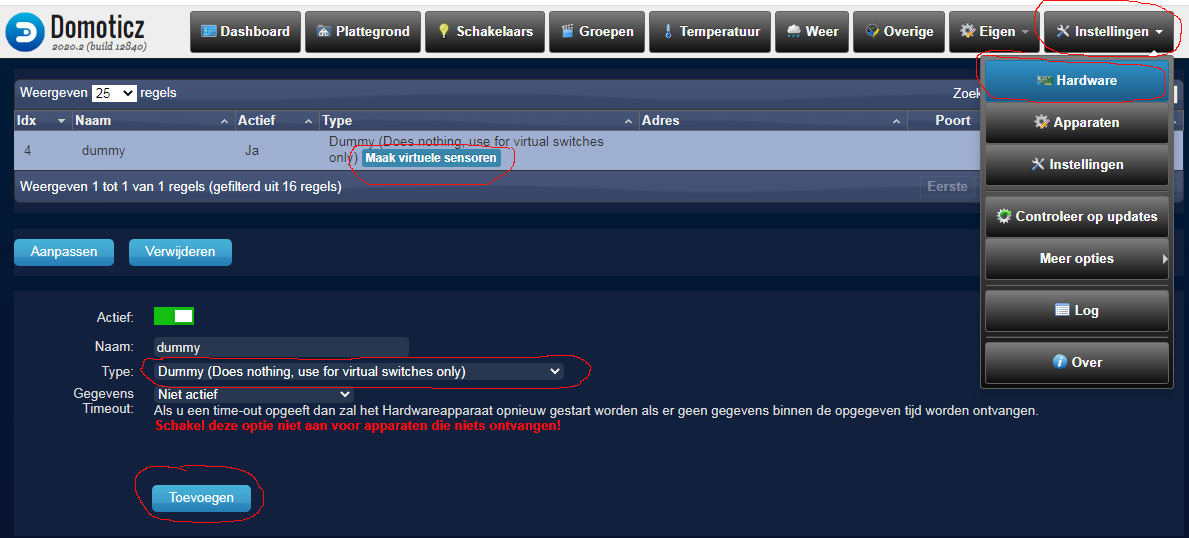
- Add dummy hardware & start adding a dummy device.png (81.28 KiB) Viewed 584 times
- Click Instellingen (Setup)
- Click Hardware
- If your hardware list already contains the Dummy hardware, go to (2). You only need it installed once.
- In the bottom half of the screen, enter a name for your hardware. I suggest to use 'Dummy'.
- Behind 'Type', select "Dummy (Does nothing, use for virtual switches only)".
- Click the Toevoegen (Add) button.
2 - Add a thermostat setpoint device
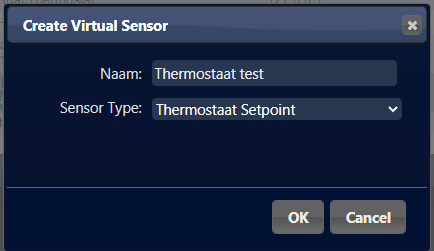
- Add dummy thermostat setpoint device.png (12.23 KiB) Viewed 584 times
- On the hardware list, find the line for your Dummy hardware.
- Click the button 'Maak virtuele sensoren' (Create virtual sensor). A dialog 'Create Virtual Sensor' opens.
- In the "Naam:" (Name) field, enter a name for your setpoint device. Remember this name -exactly, including any capitals and spaces-. You'll need it in your script later on.
- In the "Sensor Type" field, select "Thermostat Setpoint".
- Click "OK"
3 - Use your new device in the script

- Thermostat device name.png (3.48 KiB) Viewed 584 times
- On the line that says "local SETPOINT_DEVICE = 'Setpoint'", change the text SetPoint into the name you entered for your virtual sensor.
- Click the "Opslaan" (Save) button
4 - Change the temperature for your room/house
- Click the "Overige" (Others) tab
- Find your thermostat device (It's probably in the bottom if you haven't dragged it yet)
- Click the flame icon
- Enter the new value or use the up and down arrows to select one
- Click "Instellen" (Set)