Page 1 of 1
remove value
Posted: Wednesday 10 May 2017 13:06
by ropske
Hi,
i know you need to press the SHIFT key + mouseclick to remove a value from database if you are in the log of a device.
But when i do this, i'm getting a windows: are you sure to remove, i press yes and the value is still there.
Someone knows how this comes?
Thank you and sorry if someone already asked this question -10points for me then

Re: remove value
Posted: Wednesday 10 May 2017 13:34
by bbqkees
If you are referring to removing an incorrect power measurement; if it's the P1 port output, there are up to 4 plot lines in the the graph.
So if you remove a value, you only remove one single value from one line. So you might need to remove the value at the same point more than once in order to remove the one you are after.
Re: remove value
Posted: Wednesday 10 May 2017 17:04
by ropske
no, its a counter value that is extremely high and must be removed, but it is still there when i 'removed' it
Re: remove value
Posted: Wednesday 07 January 2026 13:36
by janpep
This is a very old thread, but I'm running into the same problem. I confirm the deletion, but the value remains visible. What is the best solution to get this removed?
Re: remove value
Posted: Wednesday 07 January 2026 15:01
by lost
I also saw recently this looks not working anymore: I have a zwave temp sensor that sometimes returns false 0°C values for some time and I cannot erase these values anymore. This at least lasts since my (still) current 2025.1.
I I'm currently still using this version as trying to make a brand new SD with up to date raspbian (because ssl3) and Domoticz 2025.2 leads to a complete/brutal system hang at domoticz startup when zwave/zigbee sticks are attached (without this, it starts). And so sudden I could not get any logs so completely in the dark for the root-cause...
Re: remove value
Posted: Wednesday 07 January 2026 16:54
by eluxia
Looks like the deletion doesn’t fully sync with the database—maybe a manual DB edit is needed for stubborn values


Re: remove value
Posted: Wednesday 07 January 2026 17:12
by waltervl
You currently have to refresh the page after each deletion, seems to be some kind of bug....
Re: remove value
Posted: Wednesday 07 January 2026 18:04
by habahabahaba
I noticed on my system:
keep the SHIFT button pressed until you confirm deleting and page refresh
Re: remove value
Posted: Wednesday 07 January 2026 19:49
by janpep
It is an Electric (Instant+counter). First value very high.
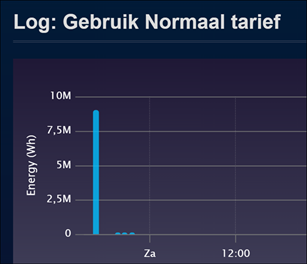
- HighValue.png (28.82 KiB) Viewed 87 times
Both refresh page and holding shift did not do the tric.
I guess I have to go into the database and see how and where it is stored.
Actually it would be a nice feature, when there is an option to delete all data of a selected device in a given timeframe.
For some other devices I see a past of may years ago. Sometimes interesting, but it also sometimes makes it less clear with data that I am no longer interested in. Then it would be nice to be able to selectively remove it.
Re: remove value
Posted: Wednesday 07 January 2026 23:05
by waltervl
For me removing an incorrect value only works in the week, month or year graphs. Not in the day graph. But it could also depend on the type of device, not sure.
Re: remove value
Posted: Wednesday 07 January 2026 23:56
by janpep
waltervl wrote: Wednesday 07 January 2026 23:05
For me removing an incorrect value only works in the week, month or year graphs. Not in the day graph. But it could also depend on the type of device, not sure.
Ah, maybe that is the solution. (But in that case it is strange that a popup appears to confirm the removal!!)
I managed to remove it from the monthly overview. I will see what happens to the daily value as time goes by. Thanks so far.