Page 1 of 2
http/https poller
Posted: Sunday 18 September 2016 14:18
by Machielw
Somebody knows how the
http/https poller works? I cannot find a Wiki of anything.
I Would like to read my
Enphase Solar with it, But I have not enought information on how the poller works
this Url:
http://IP/api/v1/production
gives this output:
{
"wattHoursToday": 8872,
"wattHoursSevenDays": 100888,
"wattHoursLifetime": 954584,
"wattsNow": 2199
}
http/https poller
Posted: Sunday 18 September 2016 15:24
by mvzut
Machielw wrote:Somebody knows how the
http/https poller works? I cannot find a Wiki of anything.
I Would like to read my
Enphase Solar with it, But I have not enought information on how the poller works
this Url:
http://IP/api/v1/production
gives this output:
{
"wattHoursToday": 8872,
"wattHoursSevenDays": 100888,
"wattHoursLifetime": 954584,
"wattsNow": 2199
}
I also don't know exactly how the poller works, but I doubt if it will automatically do what you want.
If you want to process json data (which your device seems to produce) on a periodical basis, you'll probably have to write your own code for it. It's fairly easy to do with a time-based (lua) script containing a curl command followed by a json:decode and subsequent updating of some dummy devices. There are quite a few examples in this forum and on the wiki to help you get started. But it's not plug and play, if that's what you were hoping...
Re: http/https poller
Posted: Monday 19 September 2016 11:59
by pj-r
http/https poller
Posted: Monday 19 September 2016 23:16
by mvzut
Ah, nice to see an example of how the poller works. Even (slightly) simpler than writing a full script including the curl and json:decode parts.
Maybe a bit off-topic, but what I wonder is: what if you would have more of these pollers running? Which data will s = request['content'] then contain?
Re: http/https poller
Posted: Thursday 22 September 2016 8:11
by pj-r
mvzut wrote:Maybe a bit off-topic, but what I wonder is: what if you would have more of these pollers running? Which data will s = request['content'] then contain?
Take a look at this:
https://github.com/domoticz/domoticz/pull/626
HTTP/HTTPS client with several parameters: url, login, password, refresh rate and script name (command).
So it looks like you can define what script you want to use for parsing the data.
And for reference of rest of reading this thread:
- - scripts folder for parsers is: scripts/lua_parsers/
- in command parameter it looks like you have provide full name of the script. for example: example_xml.lua
http/https poller
Posted: Thursday 22 September 2016 8:57
by mvzut
pj-r wrote:mvzut wrote:Maybe a bit off-topic, but what I wonder is: what if you would have more of these pollers running? Which data will s = request['content'] then contain?
Take a look at this:
https://github.com/domoticz/domoticz/pull/626
HTTP/HTTPS client with several parameters: url, login, password, refresh rate and script name (command).
So it looks like you can define what script you want to use for parsing the data.
And for reference of rest of reading this thread:
- - scripts folder for parsers is: scripts/lua_parsers/
- in command parameter it looks like you have provide full name of the script. for example: example_xml.lua
Ah, I read that but couldn't find the field for script name. Now I see this is apparently what the "Command" field is intended for. Initially I assumed that the url field should only contain the address, and the command field should contain the /json?... etc. part. of the url. Assumptions... (are...)
Still don't completely see the advantage over creating a normal time script and adding a few curl and json:decode lines in the top. But maybe that's just me.
Re: http/https poller
Posted: Thursday 22 September 2016 15:37
by pj-r
As I know normal time script runs on main thread and domoticz wont do anything else while the script is running. Poller runs on separate thread so the http call wont block whole domoticz.
Re: http/https poller
Posted: Friday 23 September 2016 18:01
by Machielw
who can help me then? What is wrong?
And thanks for help above!
link in poller:
Output link:
{
"wattHoursToday": 14566,
"wattHoursSevenDays": 84452,
"wattHoursLifetime": 1022584,
"wattsNow": 2277
}
Lua: test_json.lua in scripts/lua_parsers
script:
-- Retrieve the request content
s = request['content'];
-- Update some devices (index are here for this example)
local id = 113
local s = domoticz_applyJsonPath(s,'.wattHoursToday')
domoticz_updateDevice(id,'',s)
Output in log:
2016-09-23 17:58:26.069 CLuaHandler (updateDevice from LUA) : idx=113 nvalue= svalue=16661 invalue=0 signallevel=12 batterylevel=255
Virtual device idx=113 is not updated. (http poller = hardware id =7)
any help would be appreciated!
Re: http/https poller
Posted: Thursday 29 September 2016 18:33
by farhanito
Machielw wrote:who can help me then? What is wrong?
Output in log:
2016-09-23 17:58:26.069 CLuaHandler (updateDevice from LUA) : idx=113 nvalue= svalue=16661 invalue=0 signallevel=12 batterylevel=255
Virtual device idx=113 is not updated. (http poller = hardware id =7)
any help would be appreciated!
any update on this?
i have the same issue... the device isn't updating.
Re: http/https poller
Posted: Friday 30 September 2016 13:13
by pj-r
Does it work if instead of
you try json api?
Code: Select all
os.execute('curl http://localhost/json.htm?type=command¶m=udevice&idx='..id..'&nvalue=0&svalue='..s')
Its not the best way but might work

Re: http/https poller
Posted: Saturday 01 October 2016 19:18
by farhanito
took me a while to get this to work.
really confusing at first. the URL works with browser, but not with curl.
finally found out that i need to quote the URL to get curl to work..
so, my line is..
Code: Select all
os.execute('curl "http://localhost/json.htm?type=command¶m=udevice&idx='..id..'&nvalue=0&svalue='..s..'"')
thanks for the pointer
Re: http/https poller
Posted: Thursday 13 October 2016 18:55
by Zinken
Maybe I'm not understanding but where is the http poller? Shouldn't I start with adding a hardware device?
Or is or only available in beta release?
Sent from my MI 5 using Tapatalk 2
Re: http/https poller
Posted: Thursday 20 October 2016 21:44
by Machielw
It is working with Enphase Envoy this way: (I hope if production starts again tomorrow)
Code: Select all
-- Retrieve the request content
s = request['content'];
local id = 14
local wattHoursToday = domoticz_applyJsonPath(s,'.wattHoursToday')
local wattsNow = domoticz_applyJsonPath(s,'.wattsNow')
local wattHoursLifetime = domoticz_applyJsonPath(s,'.wattHoursLifetime')

domoticz_updateDevice(id,'',wattsNow .. ";" .. wattHoursLifetime)
I used the Virtual Teller / Counter device. Generation today I could not use from the enphase, since it is not in the virtual device.
I hope the wattsHourToday will be calculated by domoticz tomorrow (dark now, so no production),
@Zinken: you need the latest beta: (domoticz_updateDevice is fixed there, thanks to FrBoulli and gizmocuz )
https://github.com/domoticz/domoticz/issues/924
Re: http/https poller
Posted: Thursday 05 January 2017 21:00
by Veikko
Hi! I have a very easy solution going to url and will get one number.
I need to insert this value to domotics so I could see this under some device.
What I am talking about is energy price on the market.
Could somebody help me?
Re: http/https poller
Posted: Monday 04 December 2017 21:39
by teo1966
i have this output
"wattHoursToday": 3,
"wattHoursSevenDays": 21,
"wattHoursLifetime": 80940,
"wattsNow": 0
Re: http/https poller
Posted: Tuesday 05 December 2017 20:39
by teo1966
i have here info over enphase
https://thecomputerperson.wordpress.com ... -scraping/
here from this site
I’ve recently had to interface with an EnPhase Envoy Solar PV system. The annoying thing is the lack of documentation.
The API for the “cloud service” exists and is well documented but the API for the local device itself doesn’t seem to exist.
There is one tiny one page document that seems to suggest you can get some data from the device. The information gleaned from their example API ”
http://device.ip.address.here/api/v1/production ” is poor.
First.. it gives far LESS information than you can just retrieve from the main web page for the device on the LAN. Secondly the wattsNow field doesn’t seem to match the information displayed on the main page of the device. The wattsHoursSevenDays is also slightly off. Third.. it doesn’t even update regularly. You can’t have a system that detects dips in production due to cloud cover etc.
However. I did find some other sensible sources for information – and information that updates at an even more regular rate than the devices main website!
When you visit the site on the device running firmware D4.2.27 it makes the following requests:
http://10.0.0.177/backbone/application. ... n=04.02.43
This URL contains a lot of references to other json files that I need to research. See further down in this post for the other URLs exposed.
http://10.0.0.177/home.json
This json file contains the Database size / utilisation, date and time on the device, connection status and settings and update status.
http://10.0.0.177/production.json
Contains most useful information.. Production and (if fitted) consumption data!
http://10.0.0.177/inventory.json
Also contains some very useful information. Detailed status about the state of each micro-inverter. So far I’ve seen the following states:
Re: http/https poller
Posted: Monday 03 September 2018 20:43
by groetg
There is a possibillity to add a Enphase hardware item in Dotmoticz, but with wich portnumber do I have to add this device? Already tried 80 and 8080, won't work. Making a script is to difficult for me.
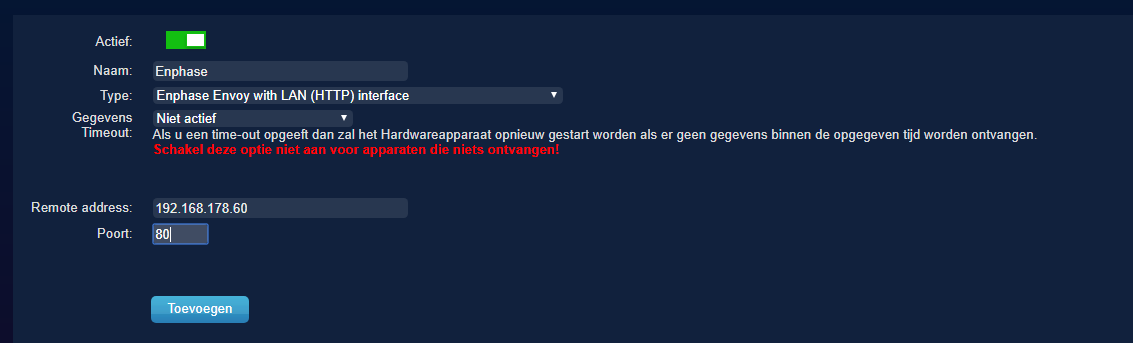
- enphase.PNG (16.09 KiB) Viewed 12111 times
Re: http/https poller
Posted: Friday 07 September 2018 17:58
by peerke72
I get 2 extra devices (apparaten) when I add the Envoy in the Hardware' section with port 80.
These devices show thetotal kWh production and the current W's for all solarpanels together.
I'm not sure if these are the only devices I should get or if there should also be devices for individual panels. There is a JSON call that shows the current W's for individual panels. It would be great when more detailed information becomes available in domoticz also.
Is there information/documentation about this domoticz hardware?
Btw, maybe you have to enable 'accept new hardware' in the settings temporary. Otherwise the device aren't added automatically.
Re: http/https poller
Posted: Sunday 09 September 2018 22:13
by Jumper3126
I also have enphase converters underneath my solar panels. After installation I was disappointed of the lack of information that the app and website give, as there is no info on the production per individual panel. I think this info is only supplied to the installer account. I was able to get the password for it, but i dont think that the domoticz enphase hardware device is able to get the info per pannel.
I should however be possible to get it through via an events script, or HTTP/HTTPS poller. Perhaps someone already has got this up and running, otherwise I'll see if I can figure something out.
Re: http/https poller
Posted: Sunday 09 September 2018 23:05
by Jumper3126
I'm able to update a virtual sensor with the http/https poller instructions of Machielw. But this is only the total production of all pannels.
The data per pannel is reachable through
http://192.168.1.76/api/v1/production/inverters
However, you need to password of the installer account. Only if I login to
http://192.168.1.76/installer/setup/home#overview, I can use
http://192.168.1.76/api/v1/production/inverters, which than gives me:
Code: Select all
[
  {
    "serialNumber": "12180201xxxy",
    "lastReportDate": 1536516524,
    "devType": 1,
    "lastReportWatts": 0,
    "maxReportWatts": 257
  },
  {
    "serialNumber": "12180201xxxx",
    "lastReportDate": 1536516485,
    "devType": 1,
    "lastReportWatts": 0,
    "maxReportWatts": 264
  }
]
(deleted all but 2 pannels)
If I use
http://192.168.1.76/api/v1/production for the URL in HTTP/HTTPS poller and the installer login and password, I keep on getting
Code: Select all
Error: Http: Error getting data from url "http://192.168.1.76/api/v1/production/inverters"
I think this has to do with the accesibility and the login/password