Page 27 of 28
Re: Dashticz - Bug report
Posted: Sunday 20 October 2019 11:05
by Lokonli
If you have created the all day event in the GMT timezone, and you use the calendar in the Amsterdam timezone then all day events will start at 2am, which is correct.
Can you check the timezone of your all day events?
Do the other events have the correct start time?
I'll check the timezone handling for iCloud later tonight.
Sent from my SM-A320FL using Tapatalk
Re: Dashticz - Bug report
Posted: Sunday 20 October 2019 11:53
by Stepdes
Lokonli wrote: Sunday 20 October 2019 11:05
If you have created the all day event in the GMT timezone, and you use the calendar in the Amsterdam timezone then all day events will start at 2am, which is correct.
Can you check the timezone of your all day events?
Do the other events have the correct start time?
Ok, now i understand.
Well all of my systems are now on Brussels timezone and i made a few new all day events, now i have 1am as start hour, so it has definitely something to do with the correct timezone.(winter/summer time?) All my other events are shown at the correct start time
Thnx for your help!
Re: Dashticz - Bug report
Posted: Monday 21 October 2019 8:39
by Lokonli
Stepdes wrote: Sunday 20 October 2019 11:53
Lokonli wrote: Sunday 20 October 2019 11:05
If you have created the all day event in the GMT timezone, and you use the calendar in the Amsterdam timezone then all day events will start at 2am, which is correct.
Can you check the timezone of your all day events?
Do the other events have the correct start time?
Ok, now i understand.
Well all of my systems are now on Brussels timezone and i made a few new all day events, now i have 1am as start hour, so it has definitely something to do with the correct timezone.(winter/summer time?) All my other events are shown at the correct start time
Thnx for your help!
I was able to reproduce some of the issues when I change the timezone of the Dashticz server. However, I cannot explain everything I see. Also in your case I don't understand how the all day events have an incorrect start time, while your normal events have the correct start time. The timezone interpretation happens on several places, and is pretty difficult to follow.
As a work around, I will add two parameters to calendar block definition:
These can be used to adjust the time zone, by defining an offset in hours. If needed (like in your case) you can use the second parameter to adjust the AllDay events only.
Re: Dashticz - Bug report
Posted: Monday 21 October 2019 9:24
by Stepdes
I was able to reproduce some of the issues when I change the timezone of the Dashticz server. However, I cannot explain everything I see. Also in your case I don't understand how the all day events have an incorrect start time, while your normal events have the correct start time. The timezone interpretation happens on several places, and is pretty difficult to follow.
As a work around, I will add two parameters to calendar block definition:
These can be used to adjust the time zone, by defining an offset in hours. If needed (like in your case) you can use the second parameter to adjust the AllDay events only.
Hi Lokonli, thanks for your efforts already.
This calendar is a shared one and all events are allday events, now i see that depending the person who ads a allday event, the start hour is changing, thats because of the timezone settings of the creator of the event. So the offset parameter will not work for every event. Is it possible to add a parameter to the block definition that avoid showing the start hour? So only date and event like 29/10 - this is an event ?
Regards,
Stephan
Re: Dashticz - Bug report
Posted: Monday 21 October 2019 21:46
by magicduck
Lokonli wrote: Wednesday 16 October 2019 16:52
magicduck wrote: Wednesday 16 October 2019 10:42
Hi !
Seems there is an issue with sonarr and images.
Is this the result of a Dashticz version update?
Seems so... But I didn't noticed that until recently... I was thinking it was "cors" problems (well I fucked the php so it was not working).
Do you use the beta or master branch? If beta: Could you test master as well?
On which version it was still working?
(I've never used Sonarr...)
I use the beta branch, but my try on the master branch give the same results.
So this is somewhere and my knowledge of javascript is a bit limited ... :/
Re: Dashticz - Bug report
Posted: Monday 21 October 2019 23:10
by Lokonli
magicduck wrote: Monday 21 October 2019 21:46
Lokonli wrote: Wednesday 16 October 2019 16:52
magicduck wrote: Wednesday 16 October 2019 10:42
Hi !
Seems there is an issue with sonarr and images.
Is this the result of a Dashticz version update?
Seems so... But I didn't noticed that until recently... I was thinking it was "cors" problems (well I fucked the php so it was not working).
Do you use the beta or master branch? If beta: Could you test master as well?
On which version it was still working?
(I've never used Sonarr...)
I use the beta branch, but my try on the master branch give the same results.
So this is somewhere and my knowledge of javascript is a bit limited ... :/
Then probably it's not the result of a recent change.
I'll contact you by PM to discuss how to test.
Re: Dashticz - Bug report
Posted: Monday 21 October 2019 23:25
by Lokonli
Stepdes wrote: Monday 21 October 2019 9:24
I was able to reproduce some of the issues when I change the timezone of the Dashticz server. However, I cannot explain everything I see. Also in your case I don't understand how the all day events have an incorrect start time, while your normal events have the correct start time. The timezone interpretation happens on several places, and is pretty difficult to follow.
As a work around, I will add two parameters to calendar block definition:
These can be used to adjust the time zone, by defining an offset in hours. If needed (like in your case) you can use the second parameter to adjust the AllDay events only.
Hi Lokonli, thanks for your efforts already.
This calendar is a shared one and all events are allday events, now i see that depending the person who ads a allday event, the start hour is changing, thats because of the timezone settings of the creator of the event. So the offset parameter will not work for every event. Is it possible to add a parameter to the block definition that avoid showing the start hour? So only date and event like 29/10 - this is an event ?
Regards,
Stephan
ok, I'll add that parameter as well. (fixAllDay)
Re: Dashticz - Bug report
Posted: Tuesday 22 October 2019 0:04
by Stepdes
Lokonli wrote: Monday 21 October 2019 23:25
ok, I'll add that parameter as well. (fixAllDay)
Great thnx!
Re: Dashticz - Bug report
Posted: Wednesday 23 October 2019 21:21
by Lokonli
Stepdes wrote: Tuesday 22 October 2019 0:04
Lokonli wrote: Monday 21 October 2019 23:25
ok, I'll add that parameter as well. (fixAllDay)
Great thnx!
Could you test the calendar layout changes in the latest beta? Preferably for calFormat:0 as well as calFormat:1
Re: Dashticz - Bug report
Posted: Thursday 24 October 2019 7:59
by Stepdes
Lokonli wrote: Wednesday 23 October 2019 21:21
Could you test the calendar layout changes in the latest beta? Preferably for calFormat:0 as well as calFormat:1
Thnx for the update!
As you can see, first image calFomat 0, second calFormat 1.
The allday events now show without start hour
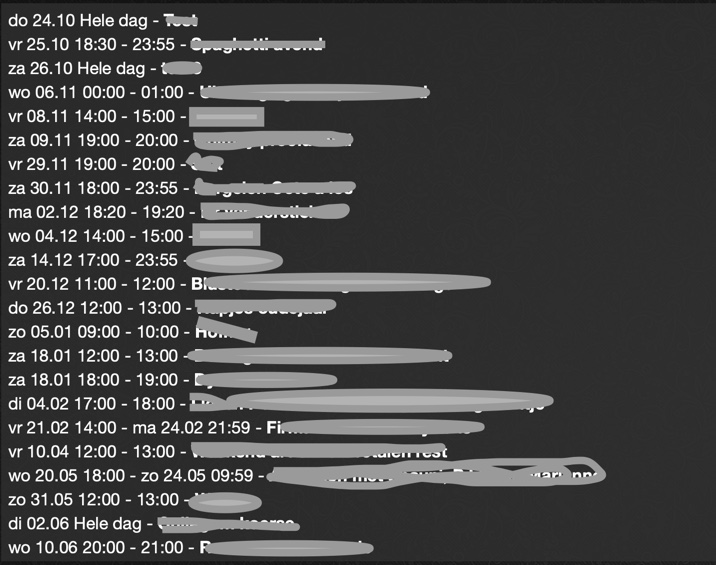
- Foto 24-10-19 om 07.48.jpg (132.44 KiB) Viewed 15235 times
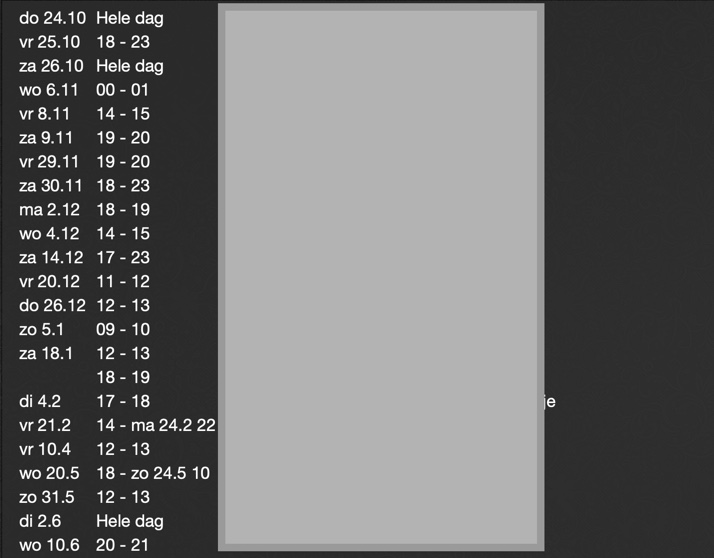
- Foto 24-10-19 om 07.51.jpg (65.63 KiB) Viewed 15235 times
Re: Dashticz - Bug report
Posted: Thursday 24 October 2019 8:15
by Lokonli
Perfect. Thanks for testing.
Re: Dashticz - Bug report
Posted: Friday 15 November 2019 9:27
by rtfmjoey
Hi,
I'm using the latest beta and am trying to create a dashboard.
When using the buttons.buienradar example from read the docs, I get no picture displayed.
Code: Select all
buttons.buienradar = {width:12, isimage:true, refreshimage:60000, image: 'http://api.buienradar.nl/image/1.0/RadarMapNL?w=285&h=256', url: 'http://www.weer.nl/verwachting/nederland/son/189656/'}
Results in the following:
Code: Select all
<img src="img/http://api.buienradar.nl/image/1.0/RadarMapNL?w=285&h=256" class="icon">
The image locations shows the whole path:
Code: Select all
http://dashticz.localhost/img/http://api.buienradar.nl/image/1.0/RadarMapNL?w=285&h=256
Is this a bug or am I doing something wrong?
Re: Dashticz - Bug report
Posted: Friday 15 November 2019 9:33
by jaaap
It must be btnimage. Make it:
Code: Select all
buttons.buienradar = {width:12, isimage:true, refreshimage:60000, btnimage: 'http://api.buienradar.nl/image/1.0/RadarMapNL?w=285&h=256', url: 'http://www.weer.nl/verwachting/nederland/son/189656/'}
Does that help?
Re: Dashticz - Bug report
Posted: Friday 15 November 2019 9:37
by Lokonli
Re: Dashticz - Bug report
Posted: Friday 15 November 2019 10:50
by rtfmjoey
The btnimage works, thanks!
My username reminds me to rtfm before asking

Re: Dashticz - Bug report
Posted: Tuesday 26 November 2019 2:04
by ben53252642
freakshock wrote: Tuesday 24 April 2018 21:22
Not sure if this is a Dashticz bug, but I hope someone can help with this.
I use the buienradar image with a buienalarm url, to show a graph of the coming rain.
Lately however this is not working anymore. When the url is opened independently of dashticz (not within a frame) it works.
For instance this url:
http://www.buienalarm.nl/widget/graphic ... lor=4395c7
This is my code in config.js:
Code: Select all
var buttons = {}
buttons.buienradar = {width:12, isimage:true, refreshimage:60000, image: 'http://api.buienradar.nl/image/1.0/RadarMapNL?w=285&h=256', url: 'http://www.buienalarm.nl/widget/graphic?lat=51.692134&lon=5.290004&title=Den%20Bosch&color=4395c7'}
When clicking the buienradar image it just shows an empty frame. Anyone?

Did you find a solution for this?
I'm trying to display an image snapshot from my Foscam from the url:
Code: Select all
http://192.168.0.61/cgi-bin/CGIProxy.fcgi?cmd=snapPicture2&usr=admin&pwd=password
CONFIG.js
Code: Select all
var buttons = {}
buttons.webcam = {
  image:"//192.168.0.61/cgi-bin/CGIProxy.fcgi?cmd=snapPicture2&usr=admin&pwd=password",
  url:"//192.168.0.61/cgi-bin/CGIProxy.fcgi?cmd=snapPicture2&usr=admin&pwd=password",
  isimage:true,
  width: 12,
  refresh: 2000
}
It displays the image fine but when I click on it I get this error message in Chrome:
"This content can't be shown in a frame"
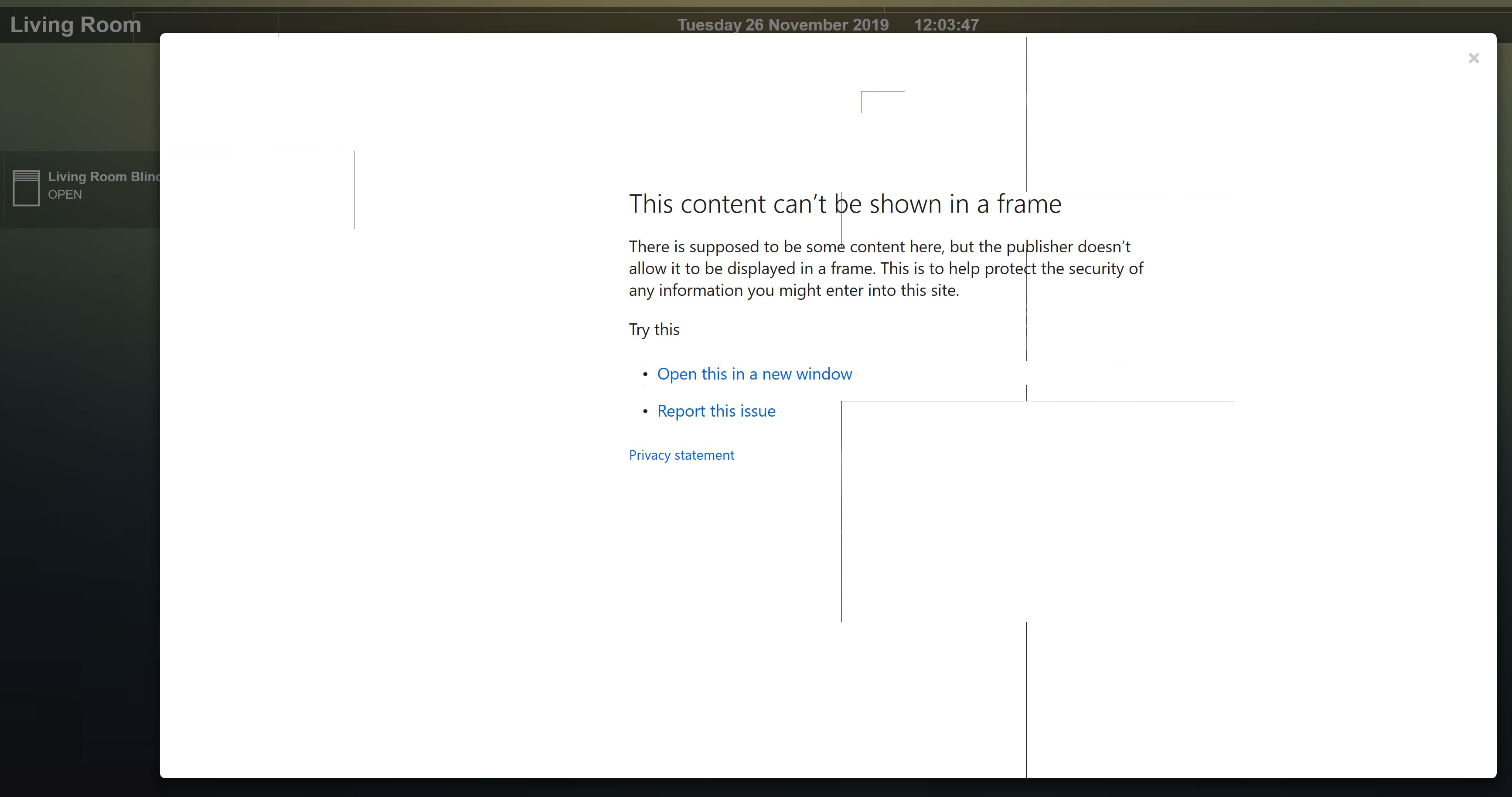
- error994.JPG (215.88 KiB) Viewed 15138 times
Re: Dashticz - Bug report
Posted: Tuesday 26 November 2019 13:12
by HansieNL
@ben53252642 : Some pages will not load in a frame because the publisher of the webpage doesn't allow that. The only thing you can try is to load that page in an own webpage and link to that page.
Re: Dashticz - Bug report
Posted: Tuesday 26 November 2019 15:57
by Lokonli
HansieNL wrote: Tuesday 26 November 2019 13:12
@ben53252642 : Some pages will not load in a frame because the publisher of the webpage doesn't allow that. The only thing you can try is to load that page in an own webpage and link to that page.
In this case the url points to an image, not an html page, I guess.
What we could do is open the image directly, not within an iframe. We could show it as a popup window.
Would that be useful?
Re: Dashticz - Bug report
Posted: Tuesday 26 November 2019 19:26
by Lokonli
HansieNL wrote: Tuesday 26 November 2019 13:12
@ben53252642 : Some pages will not load in a frame because the publisher of the webpage doesn't allow that. The only thing you can try is to load that page in an own webpage and link to that page.
The normal buienalarm url works pretty well in an iframe. For instance:
Code: Select all
buttons.buienradar = {
        width:12, refreshimage:1000*60*15,
        btnimage: 'http://api.buienradar.nl/image/1.0/RadarMapNL?w=360&h=300',
        url:'https://www.buienalarm.nl/venlo-limburg-nederland/51.36234,6.18802',
    }
(Dashticz v3.2.0 beta. For older versions replace btnimage with image, and add isimage: true)
Re: Dashticz - Bug report
Posted: Tuesday 26 November 2019 19:55
by ben53252642
I've managed to work around the issue using a combination of a php cors proxy hosted on my local Apache server and a dedicated html page.
Thanks
