Page 22 of 32
Re: Testers wanted!
Posted: Tuesday 15 August 2017 21:45
by Bluelightcrew
Thanks!!! I spend a hole night to find the problem,today i read your post and try it. It really works
Re: Testers wanted!
Posted: Friday 18 August 2017 9:08
by roblom
In the Domoticz App I try to use the mydomoticz remote access. The problem is that I can't get it to work. Somebody know what the URL and portsetting should be?
Re: Testers wanted!
Posted: Saturday 26 August 2017 17:57
by gerardosamara
Hi ,
The title should be changed to my.domoticz
I was able to setup the configuration in domoticz and in the my.domoticz portal (registration)
But since 3 days , impossible to connect to the portal , as per the domoticz log and screenshot
.
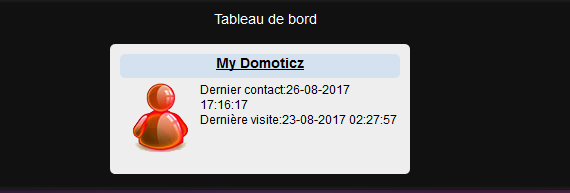
- my domoticz.PNG (15.65 KiB) Viewed 4167 times
Re: Testers wanted!
Posted: Thursday 31 August 2017 11:44
by chimit
roblom wrote: Friday 18 August 2017 9:08
In the Domoticz App I try to use the mydomoticz remote access. The problem is that I can't get it to work. Somebody know what the URL and portsetting should be?
I don't think any Domoticz app supports my.domoticz.com yet.
Support for that is on the road map, but there's no date attached to it.
== Rene
Re: Testers wanted!
Posted: Thursday 31 August 2017 11:44
by chimit
What does your Domoticz log file say?
gerardosamara wrote: Saturday 26 August 2017 17:57
Hi ,
The title should be changed to my.domoticz
I was able to setup the configuration in domoticz and in the my.domoticz portal (registration)
But since 3 days , impossible to connect to the portal , as per the domoticz log and screenshot
.
my domoticz.PNG
Service / Site down?
Posted: Wednesday 27 September 2017 18:58
by panser
Not able to access
https://my.domoticz.com/ anymore. ??
Re: Testers wanted!
Posted: Friday 29 September 2017 9:26
by chimit
Thanks for the heads up. I restarted.
Re: Testers wanted!
Posted: Friday 29 September 2017 9:37
by panser
chimit wrote: Friday 29 September 2017 9:26
Thanks for the heads up. I restarted.
Thanks a lot. It is back up running now. Grate service!

Appreciate the effort

Re: Testers wanted!
Posted: Monday 02 October 2017 17:24
by kkc1983
chimit wrote: Friday 29 September 2017 9:26
Thanks for the heads up. I restarted.
looks like it's down/crashed.... working again
Re: Testers wanted!
Posted: Tuesday 03 October 2017 12:15
by quirk
Hello,
First of all, thanks for this really cool feature!
I have a cottage in the mountains with an unreliable 3G connection. I have a rasp pi running domoticz and I use MyDomoticz service to administrate it remotely like turning on heaters before I arrive. But from time to time, I'm not able to connect it anymore from MyDomoticz.
In the Log file :
PROXY: Authenticate result: success. (many lines)
PROXY: Authenticate result: Maxinstances reached.
The main solution I've found for the moment is to restart Domoticz service every night to be sure I can connect it again.
Any way to enable/disable the MyDomotics setting? Or instead of stopping MyDomoticz service, just suspend it for 1 hour?
Any ideas ?
Thanks for your help.
Re: Testers wanted!
Posted: Monday 06 November 2017 22:14
by ArnoudCommandeur
bbos wrote: Monday 24 July 2017 11:27
Hi Pandy,
This is how I solved the issue:
I installed the program SQLiteDatabaseBrowserPortable.exe on my laptop.
Following I made a backup of my domoticz database.
After that I edited the database file using the SQLiteDatabaseBrowserPortable.exe tool.
In the database file I went in to the preferences part and there I removed all data which mentions MyDomoticz.
Following I loaded the modified database file in Domoticz.
Lastly I filled in the instance ID from MyDomoticz in the preferences of Domoticz (which previously was removed during the editing of the database file). And after that I started working again for me.
*note: make sure you keep a copy of the original database file, just in case something goes wrong.
Hi bbos, can you give me some tips how I can connect to the database? Have you installed SQLiteDatabaseBrowserPortable.exe on a Windows computer? How did you connect to the database?
Thanks,
Arnoud
Re: Testers wanted!
Posted: Monday 13 November 2017 18:47
by michaldobrotka
Hi Guys,
I switched from Raspi 2 to 3. I just switched the sd card and adjusted static ip for wifi (reason I switched to 3). Since then I cant connect via my.domoticz.com. My icon was red, but domoticz was running properly. I restarted everything. Still no change. After restart of router the new IP occured in my.domoticz settings, but still getting errors:
Code: Select all
 PROXY: Authenticate result: wrong password for apikey/instanceid combination.
 Error: PROXY: timeout occurred, reconnecting
Any clue that to do?
I am daily user of this feature and really missing it.
Thanks
Re: Testers wanted!
Posted: Monday 13 November 2017 20:35
by chimit
Try to enter your api key and password anew in the Domoticz settings screen.
michaldobrotka wrote: Monday 13 November 2017 18:47
Hi Guys,
I switched from Raspi 2 to 3. I just switched the sd card and adjusted static ip for wifi (reason I switched to 3). Since then I cant connect via my.domoticz.com. My icon was red, but domoticz was running properly. I restarted everything. Still no change. After restart of router the new IP occured in my.domoticz settings, but still getting errors:
Code: Select all
 PROXY: Authenticate result: wrong password for apikey/instanceid combination.
 Error: PROXY: timeout occurred, reconnecting
Any clue that to do?
I am daily user of this feature and really missing it.
Thanks
Re: MyDomoticz - Testers wanted!
Posted: Tuesday 14 November 2017 6:40
by michaldobrotka
@chimit
I did that, even registered new account om my.domoticz.com. In Settings of my Domoticz device is still the old instance No.
Re: MyDomoticz - Testers wanted!
Posted: Wednesday 15 November 2017 23:18
by matsv
You need to wipe out old instance id in domoticz.db. Look at previous posts in this subject.
Re: Testers wanted!
Posted: Friday 17 November 2017 21:54
by bbos
ArnoudCommandeur wrote: Monday 06 November 2017 22:14
bbos wrote: Monday 24 July 2017 11:27
Hi Pandy,
This is how I solved the issue:
I installed the program SQLiteDatabaseBrowserPortable.exe on my laptop.
Following I made a backup of my domoticz database.
After that I edited the database file using the SQLiteDatabaseBrowserPortable.exe tool.
In the database file I went in to the preferences part and there I removed all data which mentions MyDomoticz.
Following I loaded the modified database file in Domoticz.
Lastly I filled in the instance ID from MyDomoticz in the preferences of Domoticz (which previously was removed during the editing of the database file). And after that I started working again for me.
*note: make sure you keep a copy of the original database file, just in case something goes wrong.
Hi bbos, can you give me some tips how I can connect to the database? Have you installed SQLiteDatabaseBrowserPortable.exe on a Windows computer? How did you connect to the database?
Thanks,
Arnoud
Hi Arnoud,
Yes, I installed SQLiteDatabaseBrowserPortable.exe on a Windows computer.
you can use the backup and repair system of domoticz to get the .db file (the database). Load that file in the program, modify it and then use it to repair domoticz.
tip: make sure you keep a copy of the original db file. Just in case...
Re: MyDomoticz - Testers wanted!
Posted: Monday 20 November 2017 11:48
by michaldobrotka
Hi Guys, please how to erase instance from domoticz. My. domoticz Icon is gone, but in domoticz settings still old instance No.
Thanks
Re: MyDomoticz - Testers wanted!
Posted: Saturday 25 November 2017 1:58
by Cees
Is it me or does
https://my.domoticz.com/mydomoticz/login gives an
ERR_CONNECTION_TIMED_OUT error?
(tried on wifi and 4G)
Re: MyDomoticz - Testers wanted!
Posted: Saturday 25 November 2017 4:02
by RedRaven
Same here. Since yesterday, not able to reach my.domoticz.com.
Edit:
Site seems to intermittently come online but gives errors:
XML Parsing Error: no root element found Location:
http://my.domoticz.com/ Line Number 1, Column 1:
or
500 Internal Server Error
Re: MyDomoticz - Testers wanted!
Posted: Saturday 25 November 2017 13:17
by chimit
Apologies people. A server configuration issue occurred after doing security updates.
Specifically monit kept wanting to reboot the server over and over again.
This has been fixed again. Your domoticz instance might need to be restarted in order to connect to mydomoticz again.