Page 2 of 2
Re: How to send notifications with a delay
Posted: Wednesday 08 April 2020 23:48
by gschmidt
waaren wrote: Wednesday 08 April 2020 22:52
gschmidt wrote: Wednesday 08 April 2020 21:19
I have another question, maybe you have an answer.
I also use
node-red-contrib-cast nodes to send audio notifications for the "Frietpan" Switch to my google home speakers.
Now this is working when I turn the "Frietpan" switch ON or OFF, but the 2 delay notifications I have a problem with:
the Switch ON/OFF message is published through the MQTT node:
domoticz/out into the node-red flow, but is it also possible to publish a "domoticz" log message to the MQTT node? Then I could use the domoticz "frietpan" delay messages to send the audio messages parallel
using os.execute dzVents can send any MQTT message to any topic. Only thing needed is installed mosquitto on the domoticz system.
Just let me know what you want to send to which topic and when and I will have a look.
The node-red flow at the moment is:
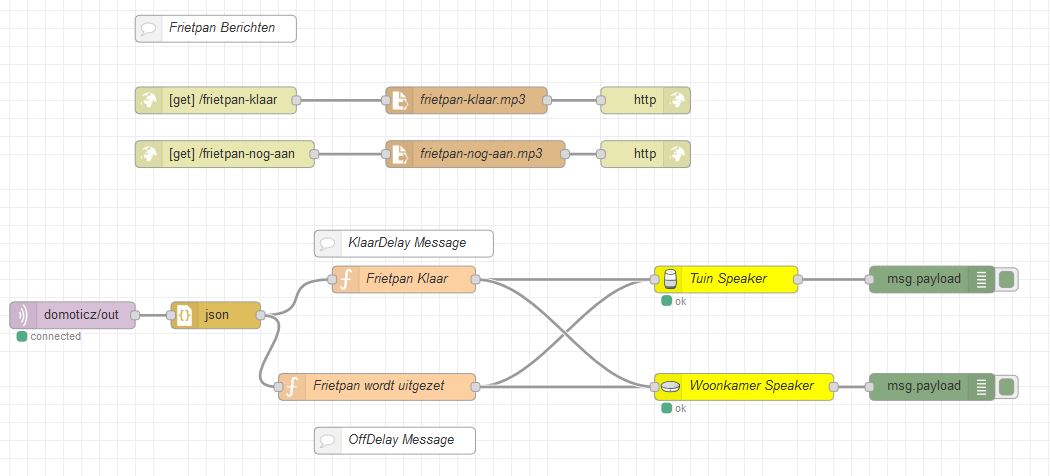
- Knipsel.JPG (75.1 KiB) Viewed 1337 times
The white comment nodes I have added to show which domoticz notification message should be used.
The ''Frietpan" ON and OFF messages are already spoken by the Google Home speakers of course, so there is no need for an extra audio message
Only the 2 delayed messages I want to use as an audio message
In the current flow the Function node "Frietpan Klaar" is based on the state of the domoticz Frietpan Switch "idx=283":
Code: Select all
var msgFrietpanKlaar = {
    "url": "http://192.168.1.51:1880/frietpan-klaar",
    "contentType": "audio/mp3",
    "volume": 60
}

var msgVolumeBack = {
    "volume": 30
}

if (msg.payload.idx == '283') {
    if (msg.payload.nvalue == '1') {

      node.send(msgFrietpanKlaar);

      setTimeout(function(){
        node.send(msgVolumeBack);
      }, 7000);

     }
}
But I want to use the "KlaarDelay" Message instead or in combination with the Switch msg.payload.nvalue status:
Code: Select all
if (msg.payload.klaarDelay == 'Frietpan is klaar om te frituren') --this is the 15minutes later message
The same for the OffDelay message (this is the 60 - 15 minutes later message)
Note: Node-Red and MQTT/Domoticz are running on different Raspberry Pi's
I hope the question is clear to you
Re: How to send notifications with a delay
Posted: Thursday 09 April 2020 1:03
by waaren
gschmidt wrote: Wednesday 08 April 2020 23:48
I hope the question is clear to you
Sorry but no.
I don't use nodered and I have no immediate intention to start with it. Until now I always managed to do the things I need without it.
So the only thing I need to know from you is
What MQTT message do you want to send from the script to which topic and when.
And if applicable: You can also send information to the script with a customEvent embedded in an MQTT message. Send an MQTT
{"command":"customevent", "event":"MyEvent","data":"myData"} and scripts with customEvents = "MyEvent" will trigger.
Re: How to send notifications with a delay
Posted: Friday 10 April 2020 17:25
by gschmidt
waaren wrote: Thursday 09 April 2020 1:03
gschmidt wrote: Wednesday 08 April 2020 23:48
I hope the question is clear to you
Sorry but no.
I don't use nodered and I have no immediate intention to start with it. Until now I always managed to do the things I need without it.
So the only thing I need to know from you is
What MQTT message do you want to send from the script to which topic and when.
And if applicable: You can also send information to the script with a customEvent embedded in an MQTT message. Send an MQTT
{"command":"customevent", "event":"MyEvent","data":"myData"} and scripts with customEvents = "MyEvent" will trigger.
Ok fair enough. I want the frietpan messages that your DzVents script sends to Telegram, also send to Mqtt and with the same delay time. Send it to mqtt topic: domoticz/out.
Re: How to send notifications with a delay
Posted: Friday 10 April 2020 18:42
by waaren
gschmidt wrote: Friday 10 April 2020 17:25
I want the frietpan messages that your DzVents script sends to Telegram, also send to Mqtt and with the same delay time. Send it to mqtt topic: domoticz/out.
This script will do that.
Code: Select all
-- Frietpan dzVents script

local myDevicename = 'Test'
local myEvent = 'Friet'

return
{
    on =
    {
        devices =
        {
            myDevicename,
        },
        customEvents =
        {
            myEvent,
        },
    },

    logging =
    {
        level = domoticz.LOG_DEBUG,  -- change to LOG_ERROR when ok
        marker = 'Test Schakelaar',
    },

    execute = function(dz, item)

        local myDevice = dz.devices(myDevicename)

        local msgAan = 'De frietpan is aangezet!'
        local msgKlaar = 'De frietpan is klaar om te frituren!'
        local msgWordt = 'De frietpan staat nog aan en wordt nu uitgezet!'
        local msgUit = 'De frietpan is uitgezet!'

        local klaarDelay = 15
        local OffDelay = 60 - klaarDelay


        local function osCommand(cmd, foreGround)
            local foreGround = foreGround and '' or ' &'
            local cmd = cmd .. foreGround

            dz.log('Executing Command: ' .. cmd,dz.LOG_DEBUG)

            local fileHandle = assert(io.popen(cmd .. ' 2>&1 || echo ::ERROR::', 'r'))
            local commandOutput = assert(fileHandle:read('*a'))
            local returnTable = {fileHandle:close()}

            if commandOutput:find '::ERROR::' then     -- something went wrong
                dz.log('Error ==>> ' .. tostring(commandOutput:match('^(.*)%s+::ERROR::') or ' ... but no error message ' ) ,dz.LOG_DEBUG)
            else -- all is fine!!
                dz.log('ReturnCode: ' .. returnTable[3] .. '\ncommandOutput:\n' .. commandOutput, dz.LOG_DEBUG)
            end

            return commandOutput,returnTable[3] -- rc[3] contains returnCode
        end


        local function sendMQTT(message, topic)
            local MQTTTopic = topic or 'domoticz/out'
            local json = {} json.msg = message
            json = dz.utils.toJSON(json)

            osCommand ( 'mosquitto_pub' ..  ' -t '  .. MQTTTopic .. " -m '" .. json .. "'")
        end

        local function sendMessage(message, emitMinutes)

            local subject = (dz.moduleLabel or 'frietpan'):gsub('#','')
            dz.notify(subject, message, dz.PRIORITY_MEDIUM, dz.SOUND_PERSISTENT, nil, dz.NSS_TELEGRAM)

            sendMQTT(message)

            dz.log(message,dz.LOG_DEBUG)
            if emitMinutes ~= nil then dz.emitEvent(myEvent, emitMinutes).afterMin(emitMinutes) end
            -- if emitMinutes ~= nil then dz.emitEvent(myEvent, emitMinutes).afterSec(emitMinutes) end -- for test only
        end

        if item.isDevice and item.state == 'On' then
            sendMessage(msgAan, klaarDelay)

        elseif item.isCustomEvent and myDevice.state == 'On' and tonumber(item.data) == klaarDelay then
            sendMessage(msgKlaar, OffDelay)

        elseif item.isCustomEvent and myDevice.state == 'On' and tonumber(item.data) == OffDelay then
            myDevice.switchOff().silent()
            sendMessage(msgWordt)

        elseif item.isDevice and item.state == 'Off' then
            sendMessage(msgUit)

        end
    end
}
Re: How to send notifications with a delay
Posted: Sunday 12 April 2020 8:30
by gschmidt
waaren wrote: Friday 10 April 2020 18:42
gschmidt wrote: Friday 10 April 2020 17:25
I want the frietpan messages that your DzVents script sends to Telegram, also send to Mqtt and with the same delay time. Send it to mqtt topic: domoticz/out.
This script will do that.
Code: Select all
-- Frietpan dzVents script

local myDevicename = 'Test'
local myEvent = 'Friet'

return
{
    on =
    {
        devices =
        {
            myDevicename,
        },
        customEvents =
        {
            myEvent,
        },
    },

    logging =
    {
        level = domoticz.LOG_DEBUG,  -- change to LOG_ERROR when ok
        marker = 'Test Schakelaar',
    },

    execute = function(dz, item)

        local myDevice = dz.devices(myDevicename)

        local msgAan = 'De frietpan is aangezet!'
        local msgKlaar = 'De frietpan is klaar om te frituren!'
        local msgWordt = 'De frietpan staat nog aan en wordt nu uitgezet!'
        local msgUit = 'De frietpan is uitgezet!'

        local klaarDelay = 15
        local OffDelay = 60 - klaarDelay


        local function osCommand(cmd, foreGround)
            local foreGround = foreGround and '' or ' &'
            local cmd = cmd .. foreGround

            dz.log('Executing Command: ' .. cmd,dz.LOG_DEBUG)

            local fileHandle = assert(io.popen(cmd .. ' 2>&1 || echo ::ERROR::', 'r'))
            local commandOutput = assert(fileHandle:read('*a'))
            local returnTable = {fileHandle:close()}

            if commandOutput:find '::ERROR::' then     -- something went wrong
                dz.log('Error ==>> ' .. tostring(commandOutput:match('^(.*)%s+::ERROR::') or ' ... but no error message ' ) ,dz.LOG_DEBUG)
            else -- all is fine!!
                dz.log('ReturnCode: ' .. returnTable[3] .. '\ncommandOutput:\n' .. commandOutput, dz.LOG_DEBUG)
            end

            return commandOutput,returnTable[3] -- rc[3] contains returnCode
        end


        local function sendMQTT(message, topic)
            local MQTTTopic = topic or 'domoticz/out'
            osCommand( 'mosquitto_pub' ..  ' -t '  .. MQTTTopic .. " -m '" .. message .. "'")
        end

        local function sendMessage(message, emitMinutes)

            local subject = (dz.moduleLabel or 'frietpan'):gsub('#','')
            dz.notify(subject, message, dz.PRIORITY_MEDIUM, dz.SOUND_PERSISTENT, nil, dz.NSS_TELEGRAM)

            sendMQTT(message)

            dz.log(message,dz.LOG_DEBUG)
            if emitMinutes ~= nil then dz.emitEvent(myEvent, emitMinutes).afterMin(emitMinutes) end
            -- if emitMinutes ~= nil then dz.emitEvent(myEvent, emitMinutes).afterSec(emitMinutes) end -- for test only
        end

        if item.isDevice and item.state == 'On' then
            sendMessage(msgAan, klaarDelay)

        elseif item.isCustomEvent and myDevice.state == 'On' and tonumber(item.data) == klaarDelay then
            sendMessage(msgKlaar, OffDelay)

        elseif item.isCustomEvent and myDevice.state == 'On' and tonumber(item.data) == OffDelay then
            myDevice.switchOff().silent()
            sendMessage(msgWordt)

        elseif item.isDevice and item.state == 'Off' then
            sendMessage(msgUit)

        end
    end
}
Thanx! Working, in node red the mqtt node return the “message” but also returns 4 errors:
Code: Select all
Unexpected token D in JSON at position 0
Could it be that the message is expected in JSON format?
Edit:
I already figured it out.
the domoticz/out topic is default topic in the MQTT domoticz plugin.
All device messages send to this topic are in JSON format by default.
the messages send by this script to this topic are in a String format. which causes the error in node-red.
Is it possible to send only the messages to mqtt in this JSON format :
Code: Select all
local msgAan = '{"msg": "De frietpan is aangezet!"}'
Re: How to send notifications with a delay
Posted: Sunday 12 April 2020 14:18
by waaren
gschmidt wrote: Sunday 12 April 2020 8:30
Is it possible to send only the messages to mqtt in this JSON format :
Code: Select all
local msgAan = '{"msg": "De frietpan is aangezet!"}'
Yes. If you replace function sendMQTT in the script with this snippet it should do just that.
Code: Select all
        local function sendMQTT(message, topic)
            local MQTTTopic = topic or 'domoticz/out'
            local json = {} json.msg = message
            json = dz.utils.toJSON(json)

            osCommand ( 'mosquitto_pub' ..  ' -t '  .. MQTTTopic .. " -m '" .. json .. "'")
        end
Re: How to send notifications with a delay [Solved]
Posted: Sunday 12 April 2020 15:42
by gschmidt
waaren wrote: Sunday 12 April 2020 14:18
gschmidt wrote: Sunday 12 April 2020 8:30
Is it possible to send only the messages to mqtt in this JSON format :
Code: Select all
local msgAan = '{"msg": "De frietpan is aangezet!"}'
Yes. If you replace function sendMQTT in the script with this snippet it should do just that.
Code: Select all
        local function sendMQTT(message, topic)
            local MQTTTopic = topic or 'domoticz/out'
            local json = {} json.msg = message
            json = dz.utils.toJSON(json)

            osCommand ( 'mosquitto_pub' ..  ' -t '  .. MQTTTopic .. " -m '" .. json .. "'")
        end
Correctomundo, thanx!