Page 8 of 16
Re: Is it gonna rain within the next X minutes?
Posted: Saturday 03 December 2016 15:21
by happyman
Hi,
I add an line so the log is more compleet.
Code: Select all
print('Regen verwacht: '..regen..' mm binnen '..minuten..' minuten.')
..regen.. is the function from your script.
The last time the script gives an strange result:
2016-12-03 15:15:00.854 LUA: Regen verwacht: nan mm binnen 20 minuten.
And the switch in continuos ON.
I cannot found where the
nan is generated. Any ideas?
Re: Is it gonna rain within the next X minutes?
Posted: Saturday 03 December 2016 15:59
by jvdz
What is the content of the file downloaded by the script? (rain.txt)
Jos
Re: Is it gonna rain within the next X minutes?
Posted: Sunday 04 December 2016 7:22
by mikeoo
happyman wrote:Hi,
I add an line so the log is more compleet.
Code: Select all
print('Regen verwacht: '..regen..' mm binnen '..minuten..' minuten.')
..regen.. is the function from your script.
The last time the script gives an strange result:
2016-12-03 15:15:00.854 LUA: Regen verwacht: nan mm binnen 20 minuten.
And the switch in continuos ON.
I cannot found where the
nan is generated. Any ideas?
I think the nan is because the value is 0 when there is no rain predicts.
https://en.wikipedia.org/wiki/NaN
Re: Is it gonna rain within the next X minutes?
Posted: Saturday 10 December 2016 17:33
by happyman
Here is the complete code
Code: Select all
----------------------------------------------------------------------------------------------------------------
-- IsItGonnaRain( int minutesinfuture)
-- returns: int avarage rainfall for the next minutesinfuture
--
-- Function to get rain prediction from Buienradar.nl (dutch)
--
-- http://gratisweerdata.buienradar.nl/#Buienradar You may use their free service for non-commercial purposes.
--
-- Written in LUA by Hans van der Heijden (h4nsie @ gmail.com)
-- Spring 2015
-- 28-03-2015 v0.3 bug: quotes around url added.
-- 27-03-2015 v0.2 return value is now average for next time
-- 26-03-2015 v0.1 Initial release
-- todo: some error checking on http and file handling (tmp file)
----------------------------------------------------------------------------------------------------------------
function IsItGonnaRain( minutesinfuture )
-- config ---------------------------------------------------------
  lat='52.65160'   -- example lat/lon for Den Haag
  lon='5.10954'
  debug=false
  tempfilename = '/var/tmp/rain.tmp' -- can be anywhere writeable
-- config ---------------------------------------------------------

  url='http://gadgets.buienradar.nl/data/raintext?lat='..lat..'&lon='..lon
  if debug then print(url) end
  read = os.execute('curl -s -o '..tempfilename..' "'..url..'"')
  file = io.open(tempfilename, "r")
  totalrain=0
  rainlines=0
  -- now analyse the received lines, format is like 000|15:30 per line.
  while true do
     line = file:read("*line")
     if not line then break end
     if debug then print('Line:'..line) end
     linetime=string.sub(tostring(line), 5, 9)
     if debug then print('Linetime: '..linetime) end

        -- Linetime2 holds the full date calculated from the time on a line
        linetime2 = os.time{year=os.date('%Y'), month=os.date('%m'), day=os.date('%d'), hour=string.sub(linetime,1,2), min=string.sub(linetime,4,5), sec=os.date('%S')}
        difference = os.difftime (linetime2,os.time())

     -- When a line entry has a time in the future AND is in the given range, then totalize the rainfall
     if ((difference > 0) and (difference<=minutesinfuture*60)) then
        if debug then print('Line in time range found') end
        rain=tonumber(string.sub(tostring(line), 0, 3))
        totalrain = totalrain+rain
        rainlines=rainlines+1
        if debug then print('Rain in timerange: '..rain) end
        if debug then print('Total rain now: '..totalrain) end
     end

  end
  file:close()

  -- Returned value is average rain fall for next time
  -- 0 is no rain, 255 is very heavy rain
  -- When needed, mm/h is calculated by 10^((value -109)/32) (example: 77 = 0.1 mm/hour)
  averagerain=totalrain/rainlines

return(averagerain)
end

commandArray = {}

time = os.date("*t")
if ((time.min % 15)==0) then

   ----- REGEN ------
   minuten=15
   regen = IsItGonnaRain(minuten)
   print('Regen verwacht: '..regen..' mm binnen '..minuten..' minuten.')

    if regen > 70 and otherdevices['Rain expected']=='Off' then
      commandArray['SendNotification']='Regenscript#Regen verwacht'
      commandArray['Rain expected']='On'
    end
    if regen == 0 and otherdevices['Rain expected']=='On' then
       commandArray['SendNotification']='Regenscript#Geen regen meer verwacht'
       commandArray['Rain expected']='Off'
    end

end

return commandArray
I'm not at home right now so I cannot view the rain.txt file. Will follow.
When I enter the url in explorer there is data.
Code: Select all
http://gadgets.buienradar.nl/data/raintext?lat=52.65160&lon=5.10954

000|17:35
000|17:40
000|17:45
000|17:50
035|17:55
057|18:00
057|18:05
070|18:10
057|18:15
057|18:20
080|18:25
070|18:30
057|18:35
035|18:40
035|18:45
035|18:50
035|18:55
000|19:00
000|19:05
000|19:10
000|19:15
000|19:20
000|19:25
000|19:30
Re: Is it gonna rain within the next X minutes?
Posted: Sunday 11 December 2016 22:50
by MaffeMuis
Put debug on to TRUE
Also I think your URL need to be:
http://gadgets.buienradar.nl/data/raint ... 5&lon=5.11
Set your
lat to 52.65
and
lon to 5.11
I think they changed something, you get an MOVE PAGE is you used the more advaned lat en lon.
Re: Is it gonna rain within the next X minutes?
Posted: Tuesday 03 January 2017 0:49
by Domoticzfun
I tried this script today and got it working after a change. Thanks for the nice work!
As already been said the URL needed has been changed,
It is changed to this one:
url='
http://gpsgadget.buienradar.nl/data/rai ... 5&lon=5.11'
(tried it in the webbrowser and checked the file, this is working now as I see values for one hour for every 5 minutes in /var/tmp/rain.tmp)
lat and lon are auto rounded in 2 decimals so more decimals in the variables are useless.
Rob
Re: Is it gonna rain within the next X minutes?
Posted: Wednesday 22 February 2017 23:27
by Brutus
sander815 wrote:i am not getting this to work anymore.
Url is working, but my virtaul switch Rain expected remains 0mm
/var/tmp/rain.txt is looking ok
112|13:30
117|13:35
106|13:40
106|13:45
087|13:50
087|13:55
087|14:00
057|14:05
057|14:10
057|14:15
057|14:20
057|14:25
070|14:30
035|14:35
000|14:40
035|14:45
000|14:50
000|14:55
000|15:00
and in teh log i see this:
2017-02-22 13:30:01.531 LUA: Regen verwacht: 109.66666666667 mm binnen 15 minuten.
what am i doing wrong?
Maybe you can post your script?
Re: Is it gonna rain within the next X minutes?
Posted: Thursday 23 February 2017 17:52
by Brutus
sander815 wrote:Code: Select all
----------------------------------------------------------------------------------------------------------------
-- IsItGonnaRain( int minutesinfuture)
-- returns: int avarage rainfall for the next minutesinfuture
--
-- Function to get rain prediction from Buienradar.nl (dutch)
--
-- http://gratisweerdata.buienradar.nl/#Buienradar You may use their free service for non-commercial purposes.
--
-- Written in LUA by Hans van der Heijden (h4nsie @ gmail.com)
-- Spring 2015
-- 28-03-2015 v0.3 bug: quotes around url added.
-- 27-03-2015 v0.2 return value is now average for next time
-- 26-03-2015 v0.1 Initial release
-- todo: some error checking on http and file handling (tmp file)
----------------------------------------------------------------------------------------------------------------
function IsItGonnaRain( minutesinfuture )
-- config ---------------------------------------------------------
  lat='51.70'   -- example lat/lon for Den Haag
  lon='5.98'
  debug=false
  tempfilename = '/var/tmp/rain.tmp' -- can be anywhere writeable
-- config ---------------------------------------------------------

  url='http://gadgets.buienradar.nl/data/raintext?lat='..lat..'&lon='..lon
  if debug then print(url) end
  read = os.execute('curl -s -o '..tempfilename..' "'..url..'"')
  file = io.open(tempfilename, "r")
  totalrain=0
  rainlines=0
  -- now analyse the received lines, format is like 000|15:30 per line.
  while true do
     line = file:read("*line")
     if not line then break end
     if debug then print('Line:'..line) end
     linetime=string.sub(tostring(line), 5, 9)
     if debug then print('Linetime: '..linetime) end

        -- Linetime2 holds the full date calculated from the time on a line
        linetime2 = os.time{year=os.date('%Y'), month=os.date('%m'), day=os.date('%d'), hour=string.sub(linetime,1,2), min=string.sub(linetime,4,5), sec=os.date('%S')}
        difference = os.difftime (linetime2,os.time())

     -- When a line entry has a time in the future AND is in the given range, then totalize the rainfall
     if ((difference > 0) and (difference<=minutesinfuture*60)) then
        if debug then print('Line in time range found') end
        rain=tonumber(string.sub(tostring(line), 0, 3))
        totalrain = totalrain+rain
        rainlines=rainlines+1
        if debug then print('Rain in timerange: '..rain) end
        if debug then print('Total rain now: '..totalrain) end
     end

  end
  file:close()

  -- Returned value is average rain fall for next time
  -- 0 is no rain, 255 is very heavy rain
  -- When needed, mm/h is calculated by 10^((value -109)/32) (example: 77 = 0.1 mm/hour)
  averagerain=totalrain/rainlines

return(averagerain)
end

commandArray = {}

time = os.date("*t")
if ((time.min % 15)==0) then

   ----- REGEN ------
   minuten=15
   regen = IsItGonnaRain(minuten)
   print('Regen verwacht: '..regen..' mm binnen '..minuten..' minuten.')

    if regen > 70 and otherdevices['Rain expected']=='Off' then
      commandArray['SendNotification']='Regenscript#Regen verwacht'
      commandArray['Rain expected']='On'
    end
    if regen == 0 and otherdevices['Rain expected']=='On' then
       commandArray['SendNotification']='Regenscript#Geen regen meer verwacht'
       commandArray['Rain expected']='Off'
    end

end

return commandArray
You say that you "Rain Expected" Virtual Switch remains 0mm. Its a Switch so you can only set it "On" or "Off". As the script does at the bottom.
When was the last time this switch has changed in the log?
Re: Is it gonna rain within the next X minutes?
Posted: Friday 10 March 2017 12:35
by EldigoR
FYI
I saw errors like these in the logging from time to time..
Code: Select all
Error: EventSystem: Warning!, lua script Lua Rain Expected has been running for more than 10 seconds
So I added a 5 seconds timeout to the curl command.
Code: Select all
read = os.execute('curl --connect-timeout 5 -s -o '..tempfilename..' "'..url..'"')
Re: Is it gonna rain within the next X minutes?
Posted: Thursday 13 April 2017 8:46
by zicht
I noticed that you use a temp file to write data to.

Just to make you aware that this is not needed at all i post my sollution around that ...

( I hate writing temp files for obvious reasons)
function to read directly any page into a string

:
Code: Select all
function os.capture(cmd, raw)				-- os.command uitvoeren en resultaat daarvan lezen in string
  local f = assert(io.popen(cmd, 'r'))
  local s = assert(f:read('*a'))
  f:close()
  if raw then return s end
  s = string.gsub(s, '^%s+', '')
  s = string.gsub(s, '%s+$', '')
  s = string.gsub(s, '[\n\r]+', ' ')
  return s
end
And then in you following code you can do (just an example) :
Code: Select all
       -- construct the request URL
        local url = 'http://gadgets.buienradar.nl/data/raintext/ -F lat=51.0 -F lon=5.51'
	content = os.capture("Curl "..url)
Content will contain all data that you will need to split into a table to manipulate.

In the table rain {} you will find rain, In the table rtime{} you will find corresponding times.
Code: Select all
sep = "%s"
	local rain={}
	local rtime={}
	i=1
	        for str in string.gmatch(content, "([^"..sep.."]+)") do
                rain[i]=string.sub(str, 1, 3)
				rtime[i]=string.sub(str, 5, 10)
				if (tonumber(rain[i]) > 0) then
					if (eersteregen == "" ) then eersteregen = rtime[i] end
					totalrain=totalrain + tonumber(rain[i])
					rainlines=rainlines + 1
					alletijden=alletijden .. " " .. rtime[i]
				end
			i = i + 1
			end
	averagerain = round(totalrain /rainlines,2)
	averagerain = round(10^((averagerain-109)/32),1)
Hope it helps you all to avoid writing unneeded files

Re: Is it gonna rain within the next X minutes?
Posted: Friday 14 April 2017 9:51
by gielie
Can someone explain how to create a text switch with rain expected, i can't get it to work. I use the latest script but i only have an on/off switch and a print in the log but i want this in a text switch.
Re: Is it gonna rain within the next X minutes?
Posted: Monday 17 April 2017 16:34
by BarryT
Code: Select all
local RainTextIDX = 19   -- your domoticz text device
debug = false -- enable or disable debug output
tempfilename = '/home/pi/domoticz/scripts/barry/rain.tmp' -- be sure this is in the correct map, and give it chmod 0666
totalrain = 0
rainlines = 0

function IsItGonnaRain( minutesinfuture )
   url='http://gadgets.buienradar.nl/data/raintext/?lat=1.1&lon=1.1' -- this is important!! change the lat and lon to your needs!!
   if debug then print(url) end
   read = os.execute('curl -s -o '..tempfilename..' "'..url..'"')
   file = io.open(tempfilename, "r")

   while true do
      line = file:read("*line")
      if not line then break end
      if debug then print('Line:'..line) end
      linetime=string.sub(tostring(line), 5, 9)
      if debug then print('Linetime: '..linetime) end

      linetime2 = os.time{year=os.date('%Y'), month=os.date('%m'), day=os.date('%d'), hour=string.sub(linetime,1,2), min=string.sub(linetime,4,5), sec=os.date('%S')}
      difference = os.difftime (linetime2,os.time())

      if ((difference > 0) and (difference<=minutesinfuture*60)) then
         if debug then print('Line in time range found') end
         rain=tonumber(string.sub(tostring(line), 0, 3))
         totalrain = totalrain+rain
         rainlines=rainlines+1
         if debug then print('Rain in timerange: '..rain) end
         if debug then print('Total rain now: '..totalrain) end
      end

   end
   file:close()

   averagerain=totalrain/rainlines
   return(averagerain)
end

function round(num, idp)
   local mult = 10^(idp or 0)
   return math.floor(num * mult + 0.5) / mult
end

commandArray = {}
   minuten=30
   RainPrediction = IsItGonnaRain(minuten)
   RainmmHour=10^((RainPrediction-109)/32)

   if (RainPrediction > 20  ) then
      verw = 3
      RainPredictionText=('('..round(RainmmHour, 1)..' mm) regen verwacht!')
   else
      verw = 2
      RainPredictionText=('Voorlopig blijft het droog!')
   end

   commandArray[2] = {['UpdateDevice'] = RainTextIDX .. '|0|' .. tostring(RainPredictionText)}

return commandArray
I have included this script in events system @lua and works perfect

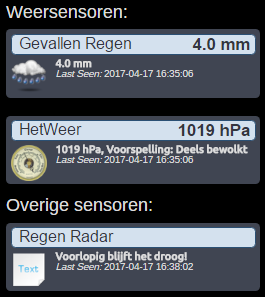
- r3.png (21.46 KiB) Viewed 3264 times
Re: Is it gonna rain within the next X minutes?
Posted: Monday 17 April 2017 17:32
by SwordFish
BarryT wrote:Code: Select all
local RainTextIDX = 19   -- your domoticz text device
debug = false -- enable or disable debug output
tempfilename = '/home/pi/domoticz/scripts/barry/rain.tmp' -- be sure this is in the correct map, and give it chmod 0666
totalrain = 0
rainlines = 0

function IsItGonnaRain( minutesinfuture )
   url='http://gadgets.buienradar.nl/data/raintext/?lat=1.1&lon=1.1' -- this is important!! change the lat and lon to your needs!!
   if debug then print(url) end
   read = os.execute('curl -s -o '..tempfilename..' "'..url..'"')
   file = io.open(tempfilename, "r")

   while true do
      line = file:read("*line")
      if not line then break end
      if debug then print('Line:'..line) end
      linetime=string.sub(tostring(line), 5, 9)
      if debug then print('Linetime: '..linetime) end

      linetime2 = os.time{year=os.date('%Y'), month=os.date('%m'), day=os.date('%d'), hour=string.sub(linetime,1,2), min=string.sub(linetime,4,5), sec=os.date('%S')}
      difference = os.difftime (linetime2,os.time())

      if ((difference > 0) and (difference<=minutesinfuture*60)) then
         if debug then print('Line in time range found') end
         rain=tonumber(string.sub(tostring(line), 0, 3))
         totalrain = totalrain+rain
         rainlines=rainlines+1
         if debug then print('Rain in timerange: '..rain) end
         if debug then print('Total rain now: '..totalrain) end
      end

   end
   file:close()

   averagerain=totalrain/rainlines
   return(averagerain)
end

function round(num, idp)
   local mult = 10^(idp or 0)
   return math.floor(num * mult + 0.5) / mult
end

commandArray = {}
   minuten=30
   RainPrediction = IsItGonnaRain(minuten)
   RainmmHour=10^((RainPrediction-109)/32)

   if (RainPrediction > 20  ) then
      verw = 3
      RainPredictionText=('('..round(RainmmHour, 1)..' mm) regen verwacht!')
   else
      verw = 2
      RainPredictionText=('Voorlopig blijft het droog!')
   end

   commandArray[2] = {['UpdateDevice'] = RainTextIDX .. '|0|' .. tostring(RainPredictionText)}

return commandArray
I have included this script in events system @lua and works perfect
r3.png
But how do we use this?
Is this instead of script_time_rain?
Re: Is it gonna rain within the next X minutes?
Posted: Monday 17 April 2017 17:43
by SwordFish
SwordFish wrote:BarryT wrote:Code: Select all
local RainTextIDX = 19   -- your domoticz text device
debug = false -- enable or disable debug output
tempfilename = '/home/pi/domoticz/scripts/barry/rain.tmp' -- be sure this is in the correct map, and give it chmod 0666
totalrain = 0
rainlines = 0

function IsItGonnaRain( minutesinfuture )
   url='http://gadgets.buienradar.nl/data/raintext/?lat=1.1&lon=1.1' -- this is important!! change the lat and lon to your needs!!
   if debug then print(url) end
   read = os.execute('curl -s -o '..tempfilename..' "'..url..'"')
   file = io.open(tempfilename, "r")

   while true do
      line = file:read("*line")
      if not line then break end
      if debug then print('Line:'..line) end
      linetime=string.sub(tostring(line), 5, 9)
      if debug then print('Linetime: '..linetime) end

      linetime2 = os.time{year=os.date('%Y'), month=os.date('%m'), day=os.date('%d'), hour=string.sub(linetime,1,2), min=string.sub(linetime,4,5), sec=os.date('%S')}
      difference = os.difftime (linetime2,os.time())

      if ((difference > 0) and (difference<=minutesinfuture*60)) then
         if debug then print('Line in time range found') end
         rain=tonumber(string.sub(tostring(line), 0, 3))
         totalrain = totalrain+rain
         rainlines=rainlines+1
         if debug then print('Rain in timerange: '..rain) end
         if debug then print('Total rain now: '..totalrain) end
      end

   end
   file:close()

   averagerain=totalrain/rainlines
   return(averagerain)
end

function round(num, idp)
   local mult = 10^(idp or 0)
   return math.floor(num * mult + 0.5) / mult
end

commandArray = {}
   minuten=30
   RainPrediction = IsItGonnaRain(minuten)
   RainmmHour=10^((RainPrediction-109)/32)

   if (RainPrediction > 20  ) then
      verw = 3
      RainPredictionText=('('..round(RainmmHour, 1)..' mm) regen verwacht!')
   else
      verw = 2
      RainPredictionText=('Voorlopig blijft het droog!')
   end

   commandArray[2] = {['UpdateDevice'] = RainTextIDX .. '|0|' .. tostring(RainPredictionText)}

return commandArray
I have included this script in events system @lua and works perfect
r3.png
But how do we use this?
Is this instead of script_time_rain?
Edit;
Get it working
Re: Is it gonna rain within the next X minutes?
Posted: Monday 17 April 2017 22:49
by Siewert308SW
Thx for the script.
In addition to the previous posted i added 2 extra virtual rain expectation widgets.
-> 30 minutes -> 60 minutes -> 120 minutes
And set the script to update every 30minutes.
Code: Select all
-- Get System Time
time = os.date("*t")

local m = os.date('%M')

--
-- **********************************************************
-- Buienradar
-- **********************************************************
--

	local RainTextIDX = 192   --your domoticz text device
	local Rain60TextIDX = 193   --your domoticz text device
	local Rain120TextIDX = 194   --your domoticz text device
	tempfilename = '/mnt/storage/domoticz_scripts/logging/buienradar/rain.tmp' -- be sure this is in the correct map, and give it chmod 0666
	totalrain = 0
	rainlines = 0


	function IsItGonnaRain( minutesinfuture )
	   url='http://gadgets.buienradar.nl/data/raintext/?lat=1.1&lon=1.1' -- this is important!! change the lat and lon to your needs!!
	   read = os.execute('curl -s -o '..tempfilename..' "'..url..'"')
	   file = io.open(tempfilename, "r")

	   while true do
		  line = file:read("*line")
		  if not line then break end
		  linetime=string.sub(tostring(line), 5, 9)

		  linetime2 = os.time{year=os.date('%Y'), month=os.date('%m'), day=os.date('%d'), hour=string.sub(linetime,1,2), min=string.sub(linetime,4,5), sec=os.date('%S')}
		  difference = os.difftime (linetime2,os.time())

		  if ((difference > 0) and (difference<=minutesinfuture*60)) then
			 rain=tonumber(string.sub(tostring(line), 0, 3))
			 totalrain = totalrain+rain
			 rainlines=rainlines+1
		  end

	   end
	   file:close()

	   averagerain=totalrain/rainlines
	   return(averagerain)
	end

	function round(num, idp)
	   local mult = 10^(idp or 0)
	   return math.floor(num * mult + 0.5) / mult
	end

commandArray = {}

if (m % 30 == 0) then -- run once in 30 min

	   minuten=30
	   minuten60=60
	   minuten120=100

	   RainPrediction = IsItGonnaRain(minuten)
	   RainmmHour=10^((RainPrediction-109)/32)

--
-- **********************************************************
-- Buienradar - Update virtual text device
-- **********************************************************
--

	   if (RainPrediction > 5  ) then
		  verw = 3
		RainPredictionText=('Komende 30min wordt er een buitje verwacht!')
			RainPredictionText60=('Komende uur wordt er een buitje verwacht!')
				RainPredictionText120=('Na het komende uur word er een buitje verwacht!')
	   elseif (RainPrediction > 12  ) then
		  verw = 2
		RainPredictionText=('Komende 30min ('..round(RainmmHour, 1)..' mm) regen verwacht!')
			RainPredictionText60=('Komende uur ('..round(RainmmHour, 1)..' mm) regen verwacht!')
				RainPredictionText120=('Na het komende uur word er ('..round(RainmmHour, 1)..' mm) regen verwacht!')

	   else
		  verw = 1
		RainPredictionText=('Komende 30min blijft het voorlopig droog!')
		  	RainPredictionText60=('Komende uur blijft het voorlopig droog!')
				RainPredictionText120=('Na het komende uur blijft het voorlopig droog!')
	   end


	   commandArray[1] = {['UpdateDevice'] = RainTextIDX .. '|0|' .. tostring(RainPredictionText)}
	   commandArray[2] = {['UpdateDevice'] = Rain60TextIDX .. '|0|' .. tostring(RainPredictionText60)}
	   commandArray[3] = {['UpdateDevice'] = Rain120TextIDX .. '|0|' .. tostring(RainPredictionText120)}

end

return commandArray

- domo_rain.png (33.82 KiB) Viewed 3231 times
edited:
optimised script
Re: Is it gonna rain within the next X minutes?
Posted: Tuesday 18 April 2017 21:09
by gielie
I have a problem with my rain script, especially with the text switch which never changes.
this is my code.
Code: Select all
 -- =============================================================================================================
-- IsItGonnaRain( int minutesinfuture)
-- returns: int avarage rainfall for the next minutesinfuture
-- =============================================================================================================
-- Function to get rain prediction from Buienradar.nl (dutch)
-- Original script here: https://www.domoticz.com/wiki/Is_it_gonna_rain
--
-- Written in LUA by Hans van der Heijden (h4nsie @ gmail.com)
-- Spring 2015
-- 28-03-2015 v0.3 bug: quotes around url added.
-- 27-03-2015 v0.2 return value is now average for next time
-- 26-03-2015 v0.1 Initial release
-- todo: some error checking on http and file handling (tmp file)
----------------------------------------------------------------------------------------------------------------
-- Marco van Wijngaarden
-- 30-08-2016 v1.0 Adopted and updated the above scripts
-- 30-08-2016 v1.1 Updated the request URL, apparently buienrader is redirecting to different url
-- 30-08-2016 v1.2 Updated CURL to follow redirect and reverted (back to documented) request URL
--
----------------------------------------------------------------------------------------------------------------
-- Buienradar.nl --
---------------------
-- Gratis Weerdata --
--
-- Buienradar stelt gratis weerdata beschikbaar voor particulieren en bedrijven (website/intranet).
-- Het gebruik van onderstaande weerdata is alleen toegestaan voor niet-commerciële doeleinden.
-- Het gebruik voor mobiele toepassingen of commerciële doeleinden vereist toestemming van Buienradar, zie ook de Disclaimer.
-- Vraag hier toestemming aan voor het gebruik van de weerdata: http://www.buienradar.nl/overbuienradar/contact
-- Vragen, suggesties of een leuk idee? Neem contact met ons op en bouw mee aan Buienradar!
--
------------------------------------------------------------
-- Buienradar widget - Neerslagdata op basis van coördinaten
------------------------------------------------------------
--
-- Op basis van de door u gewenste coördinaten (latitude en longitude) kunt u de neerslag tot twee uur vooruit ophalen in tekstvorm.
-- De data wordt iedere 5 minuten geüpdatet.
-- Op deze pagina kunt u de neerslag in tekst vinden: http://gps.buienradar.nl/getrr.php?lat=51&lon=3
-- De waarde 0 geeft geen neerslag aan (droog), de waarde 255 geeft zware neerslag aan.
-- Gebruik de volgende formule voor het omrekenen naar de neerslagintensiteit in de eenheid millimeter per uur (mm/u):
-- Neerslagintensiteit = 10^((waarde-109)/32)
-- Ter controle: een waarde van 77 is gelijk aan een neerslagintensiteit van 0,1 mm/u.
--
-- =============================================================================================================
-- config ------------------------------------------------------------------------------------------------------
-- =============================================================================================================
--
-- Set your local position (latitude and longitude)
local latitude                  = '52.65'             -- your home latitude, set as a user variable
local longitude                 = '4.77'             -- your home longtitude, set as a user variable
-- timewindow for prediction
local minutesinfuture           = 30                                -- (int) minutes in future to calculate rain
-- threshold for switch (when do we actually call it rain and want to act accordingly)
local switchthreshold           = 70                                -- (int) value to toggle virtual switch
-- Rain switch (ON when rain above threshold, else OFF)
local rainswitchname            = "Regen verwacht"                  -- (str) name for switch to toggle
-- Virtual device (txt) displays textual result
local idxRegenmmUur             = 370                               -- IDX for virtual (text) sensor
-- Show results in log
local debug                     = 1                                 -- 1 = ON or 0 = OFF
-- NMA notifications (only during the day)
local notify                    = false                             -- (bool) set 'false' or 'true'
-- URL for data rewquest
local requesturl                = "http://gadgets.buienradar.nl/data/raintext?lat='..lat..'&lon='..lon"
-- redirects to "http://gadgets.buienradar.nl/data/raintext"
-- Where do we store the data (tmp) file
local tempfilename              = "/home/pi/domoticz/scripts/tmp/rain.tmp"
-- default to activate script (set 'false' to run once every 5 minutes or 'true' to run every minute)
local active                    = false                             -- (bool) set 'false' or 'true'
--
-- =============================================================================================================
--
-- No edit required below this line
--
-- =============================================================================================================
--
-- execute (activate) every 5 minutes
local time = os.date("*t")
if ((time.min % 5)==0) then
    -- set to active
    active = true
end
--
-- =============================================================================================================
-- Functions ---------------------------------------------------------------------------------------------------
-- =============================================================================================================

-- function to split a string --
function splitString(str, delim, maxNb)
    -- Eliminate bad cases...
    if string.find(str, delim) == nil then
        return { str }
    end

    if maxNb == nil or maxNb < 1 then
        maxNb = 0    -- No limit
    end

    local result = {}
    local pat = "(.-)" .. delim .. "()"
    local nb = 0
    local lastPos
    for part, pos in string.gmatch(str, pat) do
        nb = nb + 1
        result[nb] = part
        lastPos = pos
        if nb == maxNb then break end
    end
    -- Handle the last field
    if nb ~= maxNb then
        result[nb + 1] = string.sub(str, lastPos)
    end

    return result
end

-- function to request rain data
function IsItGonnaRain(requesturl,latitude,longitude,tempfilename,minutesinfuture,debug)

    local averagerain = 0
    local totalrain = 0
    local rainlines = 0

    -- construct the request URL
    local url = requesturl..'?lat='..latitude..'&lon='..longitude

    -- print to log
    if (debug == 1) then print("| Request URL .............. : " .. url) end

    -- now get the data
    local trigger_action = 'curl -Lo '..tempfilename..' "'..url..'"'
    -- CURL options:    -s for Silent (no error messages)
    --                  -o for Write output to file instead of stdout.
    --                  -L Follow redirects if the server reports that the requested page has moved (indicated with a Location: header and a 3XX response code)
    handle = os.execute(trigger_action)

    -- print request result to log
    if (debug == 1) then
        if handle then
            print("| CURL Data request ........ : Success")
        else
            print("! CURL Data request ........ : Failed")
        end
    end

    -- open file and process data
    file = io.open(tempfilename, "r")

        -- count datalines
        local linenbr = 0

        -- now analyse the received lines
        while true do
            line = file:read("*line")
            if not line then break end

            -- count received lines
            linenbr = linenbr+1

            -- line/data format is like 000|15:30 per line, we need to split the string
            raindata    = splitString(line,"|")
            rain        = tonumber(raindata[1])
            linetime    = raindata[2]

            -- Linetime2 holds the full date calculated from the time on each line
            linetime2   = os.time{year=os.date('%Y'), month=os.date('%m'), day=os.date('%d'), hour=string.sub(linetime,1,2), min=string.sub(linetime,4,5), sec=os.date('%S')}
            -- calculate the time difference between data/line and os time
            difference  = os.difftime (linetime2,os.time())

            -- When a line entry has a time in the future AND is within the given range, then add/totalize the rainfall
            if ((difference >= 0) and (difference <= minutesinfuture*60)) then

                -- print (relevant) data to log
                if (debug == 1) then print("| Rain data (line) ......... : " .. line) end

                -- calculate totals
                totalrain = totalrain+rain
                rainlines = rainlines+1
            end
        end
    -- close the file
    file:close()

    -- Returned value is average rain fall for next (int) minutes
    -- 0 is no rain, 255 is very heavy rain
    -- When needed, mm/h is calculated by 10^((value -109)/32) (example: 77 = 0.1 mm/hour)
    averagerain = totalrain/rainlines

    -- print summary to log
    if (debug == 1) then
        print("| Rain data received # lines : " .. linenbr)
        print("| In timerange # lines ..... : " .. rainlines)
        print("| Total rain ............... : " .. totalrain)
        print("| Average rain calculated .. : " .. averagerain)
    end

    return(averagerain)

end

-- Functions to round a number to the given number of decimal places
-- returns result as string (text)
function round(num, idp)
  return string.format("%." .. (idp or 0) .. "f", num)
end
-- returns result as a number
function round2number(num, idp)
  return tonumber(string.format("%." .. (idp or 0) .. "f", num))
end

-- Note: If the number is rounded in order to be printed (as text) use function "round" (removed the tonumber function)
-- Converting to number then back to string would reintroduce rounding errors, so for numbers use "round2number" function

-- =============================================================================================================
-- Process -----------------------------------------------------------------------------------------------------
-- =============================================================================================================

commandArray = {}
-- start numbering at 1
indexArray=1

-- executes when active (every 5 minutes)
if (active) then

    -- when debugging set to 1, writing to log starts here
    if (debug == 1) then
        print("+--------------------------------------------------+")
        print("| =============== IS IT GONNA RAIN =============== |")
        print("+--------------------------------------------------+")
    end

    -- rain variables
    local regen = 0
    local regenmmUur = 0
    local rainstr = ""

    -- execute function (for given future minutes)
    regen = IsItGonnaRain(requesturl,latitude,longitude,tempfilename,minutesinfuture,debug)

    -- round result
    if (regen > 0) then
        regen = round2number(regen, 0)
    end

    -- convert rain to mm/uur
    if (regen > 0) then
        regenmmUur = 10^((regen-109)/32)
        regenmmUur = round(regenmmUur, 3)
    end

    -- textual result
    if (regen > 0) then
        rainstr = tostring("Regen verwacht: "..regen.." (".. regenmmUur.." mm/uur) binnen "..minutesinfuture.." minuten")
    else
        rainstr = tostring("Geen regen verwacht binnen komende "..minutesinfuture.." minuten")
    end

    -- write value to virtual (text) sensor
    if ((idxRegenmmUur) and (regenmmUur)) then
        commandArray[indexArray] = {['UpdateDevice'] = tostring(idxRegenmmUur)..'|0|'..rainstr}
        indexArray=indexArray+1
    end

    -- when debugging set to 1, write to log
    if (debug == 1) then
        print("| Rain text ................ : " .. rainstr)
    end

    -- toggle switch ON
    if regen > switchthreshold and otherdevices[rainswitchname]=='Off' then

        -- send notification during the day
        if (timeofday['Daytime']) and (notify) then
            commandArray[indexArray] = {['SendNotification']=rainstr}
            indexArray=indexArray+1
        end

        -- change switch to ON
        commandArray[indexArray] = {[rainswitchname]='On'}
        indexArray=indexArray+1
    end

    -- toggle switch OFF
    if regen == 0 and otherdevices[rainswitchname] =='On' then

        -- send notification during the day
        if (timeofday['Daytime']) and (notify) then
            commandArray[indexArray] = {['SendNotification']=rainstr}
            indexArray=indexArray+1
        end

        -- change switch to OFF
        commandArray[indexArray] = {[rainswitchname]='Off'}
        indexArray=indexArray+1
    end

    -- logging end
    if (debug == 1) then
        print("+--------------------------------------------------+")
        print("| --------------------- END ---------------------- |")
        print("+--------------------------------------------------+")
    end

end

return commandArray
this is my error
Code: Select all
2017-04-18 21:05:00.479 Error: EventSystem: in /home/pi/domoticz/scripts/lua/script_time_rain.lua: /home/pi/domoticz/scripts/lua/script_time_rain.lua:165: bad argument #1 to 'sub' (string expected, got nil)
Does someone have any idea how to solve this?
Re: Is it gonna rain within the next X minutes?
Posted: Tuesday 18 April 2017 21:31
by BarryT
gielie wrote:I have a problem with my rain script, especially with the text switch which never changes.
this is my code.
Code: Select all
 -- =============================================================================================================
-- IsItGonnaRain( int minutesinfuture)
-- returns: int avarage rainfall for the next minutesinfuture
-- =============================================================================================================
-- Function to get rain prediction from Buienradar.nl (dutch)
-- Original script here: https://www.domoticz.com/wiki/Is_it_gonna_rain
--
-- Written in LUA by Hans van der Heijden (h4nsie @ gmail.com)
-- Spring 2015
-- 28-03-2015 v0.3 bug: quotes around url added.
-- 27-03-2015 v0.2 return value is now average for next time
-- 26-03-2015 v0.1 Initial release
-- todo: some error checking on http and file handling (tmp file)
----------------------------------------------------------------------------------------------------------------
-- Marco van Wijngaarden
-- 30-08-2016 v1.0 Adopted and updated the above scripts
-- 30-08-2016 v1.1 Updated the request URL, apparently buienrader is redirecting to different url
-- 30-08-2016 v1.2 Updated CURL to follow redirect and reverted (back to documented) request URL
--
----------------------------------------------------------------------------------------------------------------
-- Buienradar.nl --
---------------------
-- Gratis Weerdata --
--
-- Buienradar stelt gratis weerdata beschikbaar voor particulieren en bedrijven (website/intranet).
-- Het gebruik van onderstaande weerdata is alleen toegestaan voor niet-commerciële doeleinden.
-- Het gebruik voor mobiele toepassingen of commerciële doeleinden vereist toestemming van Buienradar, zie ook de Disclaimer.
-- Vraag hier toestemming aan voor het gebruik van de weerdata: http://www.buienradar.nl/overbuienradar/contact
-- Vragen, suggesties of een leuk idee? Neem contact met ons op en bouw mee aan Buienradar!
--
------------------------------------------------------------
-- Buienradar widget - Neerslagdata op basis van coördinaten
------------------------------------------------------------
--
-- Op basis van de door u gewenste coördinaten (latitude en longitude) kunt u de neerslag tot twee uur vooruit ophalen in tekstvorm.
-- De data wordt iedere 5 minuten geüpdatet.
-- Op deze pagina kunt u de neerslag in tekst vinden: http://gps.buienradar.nl/getrr.php?lat=51&lon=3
-- De waarde 0 geeft geen neerslag aan (droog), de waarde 255 geeft zware neerslag aan.
-- Gebruik de volgende formule voor het omrekenen naar de neerslagintensiteit in de eenheid millimeter per uur (mm/u):
-- Neerslagintensiteit = 10^((waarde-109)/32)
-- Ter controle: een waarde van 77 is gelijk aan een neerslagintensiteit van 0,1 mm/u.
--
-- =============================================================================================================
-- config ------------------------------------------------------------------------------------------------------
-- =============================================================================================================
--
-- Set your local position (latitude and longitude)
local latitude                  = '52.65'             -- your home latitude, set as a user variable
local longitude                 = '4.77'             -- your home longtitude, set as a user variable
-- timewindow for prediction
local minutesinfuture           = 30                                -- (int) minutes in future to calculate rain
-- threshold for switch (when do we actually call it rain and want to act accordingly)
local switchthreshold           = 70                                -- (int) value to toggle virtual switch
-- Rain switch (ON when rain above threshold, else OFF)
local rainswitchname            = "Regen verwacht"                  -- (str) name for switch to toggle
-- Virtual device (txt) displays textual result
local idxRegenmmUur             = 370                               -- IDX for virtual (text) sensor
-- Show results in log
local debug                     = 1                                 -- 1 = ON or 0 = OFF
-- NMA notifications (only during the day)
local notify                    = false                             -- (bool) set 'false' or 'true'
-- URL for data rewquest
local requesturl                = "http://gadgets.buienradar.nl/data/raintext?lat='..lat..'&lon='..lon"
-- redirects to "http://gadgets.buienradar.nl/data/raintext"
-- Where do we store the data (tmp) file
local tempfilename              = "/home/pi/domoticz/scripts/tmp/rain.tmp"
-- default to activate script (set 'false' to run once every 5 minutes or 'true' to run every minute)
local active                    = false                             -- (bool) set 'false' or 'true'
--
-- =============================================================================================================
--
-- No edit required below this line
--
-- =============================================================================================================
--
-- execute (activate) every 5 minutes
local time = os.date("*t")
if ((time.min % 5)==0) then
    -- set to active
    active = true
end
--
-- =============================================================================================================
-- Functions ---------------------------------------------------------------------------------------------------
-- =============================================================================================================

-- function to split a string --
function splitString(str, delim, maxNb)
    -- Eliminate bad cases...
    if string.find(str, delim) == nil then
        return { str }
    end

    if maxNb == nil or maxNb < 1 then
        maxNb = 0    -- No limit
    end

    local result = {}
    local pat = "(.-)" .. delim .. "()"
    local nb = 0
    local lastPos
    for part, pos in string.gmatch(str, pat) do
        nb = nb + 1
        result[nb] = part
        lastPos = pos
        if nb == maxNb then break end
    end
    -- Handle the last field
    if nb ~= maxNb then
        result[nb + 1] = string.sub(str, lastPos)
    end

    return result
end

-- function to request rain data
function IsItGonnaRain(requesturl,latitude,longitude,tempfilename,minutesinfuture,debug)

    local averagerain = 0
    local totalrain = 0
    local rainlines = 0

    -- construct the request URL
    local url = requesturl..'?lat='..latitude..'&lon='..longitude

    -- print to log
    if (debug == 1) then print("| Request URL .............. : " .. url) end

    -- now get the data
    local trigger_action = 'curl -Lo '..tempfilename..' "'..url..'"'
    -- CURL options:    -s for Silent (no error messages)
    --                  -o for Write output to file instead of stdout.
    --                  -L Follow redirects if the server reports that the requested page has moved (indicated with a Location: header and a 3XX response code)
    handle = os.execute(trigger_action)

    -- print request result to log
    if (debug == 1) then
        if handle then
            print("| CURL Data request ........ : Success")
        else
            print("! CURL Data request ........ : Failed")
        end
    end

    -- open file and process data
    file = io.open(tempfilename, "r")

        -- count datalines
        local linenbr = 0

        -- now analyse the received lines
        while true do
            line = file:read("*line")
            if not line then break end

            -- count received lines
            linenbr = linenbr+1

            -- line/data format is like 000|15:30 per line, we need to split the string
            raindata    = splitString(line,"|")
            rain        = tonumber(raindata[1])
            linetime    = raindata[2]

            -- Linetime2 holds the full date calculated from the time on each line
            linetime2   = os.time{year=os.date('%Y'), month=os.date('%m'), day=os.date('%d'), hour=string.sub(linetime,1,2), min=string.sub(linetime,4,5), sec=os.date('%S')}
            -- calculate the time difference between data/line and os time
            difference  = os.difftime (linetime2,os.time())

            -- When a line entry has a time in the future AND is within the given range, then add/totalize the rainfall
            if ((difference >= 0) and (difference <= minutesinfuture*60)) then

                -- print (relevant) data to log
                if (debug == 1) then print("| Rain data (line) ......... : " .. line) end

                -- calculate totals
                totalrain = totalrain+rain
                rainlines = rainlines+1
            end
        end
    -- close the file
    file:close()

    -- Returned value is average rain fall for next (int) minutes
    -- 0 is no rain, 255 is very heavy rain
    -- When needed, mm/h is calculated by 10^((value -109)/32) (example: 77 = 0.1 mm/hour)
    averagerain = totalrain/rainlines

    -- print summary to log
    if (debug == 1) then
        print("| Rain data received # lines : " .. linenbr)
        print("| In timerange # lines ..... : " .. rainlines)
        print("| Total rain ............... : " .. totalrain)
        print("| Average rain calculated .. : " .. averagerain)
    end

    return(averagerain)

end

-- Functions to round a number to the given number of decimal places
-- returns result as string (text)
function round(num, idp)
  return string.format("%." .. (idp or 0) .. "f", num)
end
-- returns result as a number
function round2number(num, idp)
  return tonumber(string.format("%." .. (idp or 0) .. "f", num))
end

-- Note: If the number is rounded in order to be printed (as text) use function "round" (removed the tonumber function)
-- Converting to number then back to string would reintroduce rounding errors, so for numbers use "round2number" function

-- =============================================================================================================
-- Process -----------------------------------------------------------------------------------------------------
-- =============================================================================================================

commandArray = {}
-- start numbering at 1
indexArray=1

-- executes when active (every 5 minutes)
if (active) then

    -- when debugging set to 1, writing to log starts here
    if (debug == 1) then
        print("+--------------------------------------------------+")
        print("| =============== IS IT GONNA RAIN =============== |")
        print("+--------------------------------------------------+")
    end

    -- rain variables
    local regen = 0
    local regenmmUur = 0
    local rainstr = ""

    -- execute function (for given future minutes)
    regen = IsItGonnaRain(requesturl,latitude,longitude,tempfilename,minutesinfuture,debug)

    -- round result
    if (regen > 0) then
        regen = round2number(regen, 0)
    end

    -- convert rain to mm/uur
    if (regen > 0) then
        regenmmUur = 10^((regen-109)/32)
        regenmmUur = round(regenmmUur, 3)
    end

    -- textual result
    if (regen > 0) then
        rainstr = tostring("Regen verwacht: "..regen.." (".. regenmmUur.." mm/uur) binnen "..minutesinfuture.." minuten")
    else
        rainstr = tostring("Geen regen verwacht binnen komende "..minutesinfuture.." minuten")
    end

    -- write value to virtual (text) sensor
    if ((idxRegenmmUur) and (regenmmUur)) then
        commandArray[indexArray] = {['UpdateDevice'] = tostring(idxRegenmmUur)..'|0|'..rainstr}
        indexArray=indexArray+1
    end

    -- when debugging set to 1, write to log
    if (debug == 1) then
        print("| Rain text ................ : " .. rainstr)
    end

    -- toggle switch ON
    if regen > switchthreshold and otherdevices[rainswitchname]=='Off' then

        -- send notification during the day
        if (timeofday['Daytime']) and (notify) then
            commandArray[indexArray] = {['SendNotification']=rainstr}
            indexArray=indexArray+1
        end

        -- change switch to ON
        commandArray[indexArray] = {[rainswitchname]='On'}
        indexArray=indexArray+1
    end

    -- toggle switch OFF
    if regen == 0 and otherdevices[rainswitchname] =='On' then

        -- send notification during the day
        if (timeofday['Daytime']) and (notify) then
            commandArray[indexArray] = {['SendNotification']=rainstr}
            indexArray=indexArray+1
        end

        -- change switch to OFF
        commandArray[indexArray] = {[rainswitchname]='Off'}
        indexArray=indexArray+1
    end

    -- logging end
    if (debug == 1) then
        print("+--------------------------------------------------+")
        print("| --------------------- END ---------------------- |")
        print("+--------------------------------------------------+")
    end

end

return commandArray
this is my error
Code: Select all
2017-04-18 21:05:00.479 Error: EventSystem: in /home/pi/domoticz/scripts/lua/script_time_rain.lua: /home/pi/domoticz/scripts/lua/script_time_rain.lua:165: bad argument #1 to 'sub' (string expected, got nil)
Does someone have any idea how to solve this?
Did you changed the buienradar url as mentioned earlier?
Re: Is it gonna rain within the next X minutes?
Posted: Saturday 22 April 2017 9:02
by poudenes
Maybe stupid question, But whats script filename ending? .ph .pl other?
Siewert308SW wrote:Thx for the script.
In addition to the previous posted i added 2 extra virtual rain expectation widgets.
-> 30 minutes -> 60 minutes -> 120 minutes
And set the script to update every 30minutes.
Code: Select all
-- Get System Time
time = os.date("*t")

local m = os.date('%M')

--
-- **********************************************************
-- Buienradar
-- **********************************************************
--

	local RainTextIDX = 192   --your domoticz text device
	local Rain60TextIDX = 193   --your domoticz text device
	local Rain120TextIDX = 194   --your domoticz text device
	tempfilename = '/mnt/storage/domoticz_scripts/logging/buienradar/rain.tmp' -- be sure this is in the correct map, and give it chmod 0666
	totalrain = 0
	rainlines = 0


	function IsItGonnaRain( minutesinfuture )
	   url='http://gadgets.buienradar.nl/data/raintext/?lat=1.1&lon=1.1' -- this is important!! change the lat and lon to your needs!!
	   read = os.execute('curl -s -o '..tempfilename..' "'..url..'"')
	   file = io.open(tempfilename, "r")

	   while true do
		  line = file:read("*line")
		  if not line then break end
		  linetime=string.sub(tostring(line), 5, 9)

		  linetime2 = os.time{year=os.date('%Y'), month=os.date('%m'), day=os.date('%d'), hour=string.sub(linetime,1,2), min=string.sub(linetime,4,5), sec=os.date('%S')}
		  difference = os.difftime (linetime2,os.time())

		  if ((difference > 0) and (difference<=minutesinfuture*60)) then
			 rain=tonumber(string.sub(tostring(line), 0, 3))
			 totalrain = totalrain+rain
			 rainlines=rainlines+1
		  end

	   end
	   file:close()

	   averagerain=totalrain/rainlines
	   return(averagerain)
	end

	function round(num, idp)
	   local mult = 10^(idp or 0)
	   return math.floor(num * mult + 0.5) / mult
	end

commandArray = {}

if (m % 30 == 0) then -- run once in 30 min

	   minuten=30
	   minuten60=60
	   minuten120=100

	   RainPrediction = IsItGonnaRain(minuten)
	   RainmmHour=10^((RainPrediction-109)/32)

--
-- **********************************************************
-- Buienradar - Update virtual text device
-- **********************************************************
--

	   if (RainPrediction > 5  ) then
		  verw = 3
		RainPredictionText=('Komende 30min wordt er een buitje verwacht!')
			RainPredictionText60=('Komende uur wordt er een buitje verwacht!')
				RainPredictionText120=('Na het komende uur word er een buitje verwacht!')
	   elseif (RainPrediction > 12  ) then
		  verw = 2
		RainPredictionText=('Komende 30min ('..round(RainmmHour, 1)..' mm) regen verwacht!')
			RainPredictionText60=('Komende uur ('..round(RainmmHour, 1)..' mm) regen verwacht!')
				RainPredictionText120=('Na het komende uur word er ('..round(RainmmHour, 1)..' mm) regen verwacht!')

	   else
		  verw = 1
		RainPredictionText=('Komende 30min blijft het voorlopig droog!')
		  	RainPredictionText60=('Komende uur blijft het voorlopig droog!')
				RainPredictionText120=('Na het komende uur blijft het voorlopig droog!')
	   end


	   commandArray[1] = {['UpdateDevice'] = RainTextIDX .. '|0|' .. tostring(RainPredictionText)}
	   commandArray[2] = {['UpdateDevice'] = Rain60TextIDX .. '|0|' .. tostring(RainPredictionText60)}
	   commandArray[3] = {['UpdateDevice'] = Rain120TextIDX .. '|0|' .. tostring(RainPredictionText120)}

end

return commandArray
domo_rain.png
edited:
optimised script
Re: Is it gonna rain within the next X minutes?
Posted: Saturday 22 April 2017 10:36
by jvdz
poudenes wrote:Maybe stupid question, But whats script filename ending? .ph .pl other?
None of those but it is a LUA script.

Jos
Re: Is it gonna rain within the next X minutes?
Posted: Saturday 22 April 2017 10:39
by Siewert308SW
@poudenes
It's a Lua script.
But forget about the script i amended.
After a closer look it aint working as i intended.
The 60 and 120min forecast are printed but are presenting the 30min prediction.
Need a closer look.