Page 60 of 66
Re: NEW frontpage.html - request comments
Posted: Saturday 21 January 2017 19:29
by madrian
Anybody to
this?
I tried
, but it does not work. The plus button decreases the value, not increases.

Re: NEW frontpage.html - request comments
Posted: Saturday 21 January 2017 19:51
by G3rard
@hpapagaj, that is strange. Can you post the complete function and the code with the dimmer part.
Re: NEW frontpage.html - request comments
Posted: Saturday 21 January 2017 21:19
by madrian
@G3rard I am using the stock frontpage.js.
In settings I have a standard level controller:
Code: Select all
['25', 'Level', 'cell2', 'Konyha LED','1','1'],
The relevant part from frontpage.js:
Code: Select all
//Dimmer, only works with 1-16 dimmer for now
function ChangeStatus(OpenDicht,level,idx,currentlevel)
{
//When switched off return to previous level, no matter if plus or min pressed
if (level == txt_off) {
if (currentlevel == 1) {
currentlevel++;
}
//console.log("In uit",currentlevel);
$.ajax({
url: $.domoticzurl+"/json.htm?type=command¶m=switchlight&idx=" + idx + "&switchcmd=Set Level&level=" + currentlevel,
async: false,
dataType: 'json',
success: function(){
console.log('SUCCES');
},
error: function(){
console.log('ERROR');
}
});
}
else {
level = level * 1;
console.log(OpenDicht,level);
if (OpenDicht == "plus")
{
var d = level * 3.125;
console.log("in plus",d,level);
if(d > 32) {
d = 32;
}
$.ajax({
url: $.domoticzurl+"/json.htm?type=command¶m=switchlight&idx=" + idx + "&switchcmd=Set Level&level=" + d,
async: false,
dataType: 'json',
success: function(){
console.log('SUCCES');
},
error: function(){
console.log('ERROR');
}
});
}
else {
var d = Math.round((level / 100.0) * 32);
console.log("in min",d,level);
if( d < 0 ){
d = 0;
}
$.ajax({
url: $.domoticzurl+"/json.htm?type=command¶m=switchlight&idx=" + idx + "&switchcmd=Set Level&level=" + d,
async: false,
dataType: 'json',
success: function(){
console.log('SUCCES');
},
error: function(){
console.log('ERROR');
}
});
}
}
RefreshData();
}
+I added to this function::
Code: Select all
//Dimmer
	if(vtype == 'Level' && item.SwitchType == 'Dimmer') {
this code:
Code: Select all
} else if (item.MaxDimLevel == 32) {
						//vdata2 = vdimmervalue; //used for ChangeStatus
						//vdimmervalue = Math.round(vdimmervalue / 5)*5; //round to ten

						vdata = vdimmervalue; //show current dim value
						var hlp = '<span onclick="SwitchToggle('+item.idx+',\'Off\');lightbox_open(\'switch\', '+switch_off_timeout+', '+txt_switch_off+')"; style='+alarmcss+'>'+ vdata+'</span>';
						var plus = "<img src=icons/up.png align=right vspace=12 onclick=ChangeStatus('plus'," + vdata + "," + item.idx + ","+ vdimmercurrent+")>"; //align=right replaced by hspace and vspace
						var min = "<img src=icons/down.png align=left vspace=12 onclick=ChangeStatus('min'," + vdata + "," + item.idx + ","+ vdimmercurrent+")>" //align=left
					}
In my opinion the bug is in the vdata = vdimmervalue; --> maybe here I am missing a formula or in the var d = level * 3.125;.
Re: NEW frontpage.html - request comments
Posted: Sunday 22 January 2017 15:56
by BarryT
denisj wrote:albertvandam wrote:Dear all,
With all the examples and code in this forum, I have managed to create a pretty good frontpage which runs on a wall mounted tablet.

Albert,
can you please upload your frontpage packet some wear in order to download it and take some sample please ?
Thanks in advance
Denis
+1
It isnt that simple as adding a couple tables?
Please explain how did you do this, looks nice!
Re: NEW frontpage.html - request comments
Posted: Sunday 22 January 2017 23:02
by G3rard
@hpapagaj,
Can you try this
Code: Select all
var d = ((level + 10)/100 * 32) + 0.5;
in stead of
What is the console showing then when you press plus, related to this part of your code?
Level = the old level
d = the new level
Re: NEW frontpage.html - request comments
Posted: Monday 23 January 2017 10:46
by ubfssF
I am using the frontpage-version by Swordfish, which is based on the frontpage of this thread, just some tweaks to cell colors etc. What I cannot achieve is displaying travel times in the frontpage. When I browse the Domoticz database I can see the custom sensor (ID=181) and its value (sValue=12), but I cannot use the sValue. It just displays the Id-number. I can retrieve a few of the other fields of this custom sensor, like CustomImage.
Is there any way to retrieve and display in the Frontpage?
Inserting "Minuten"doesn't work as well:
Code: Select all
['181','Minuten', 'cell8', 'Alblasserdam-Gorinchem','1','0'],
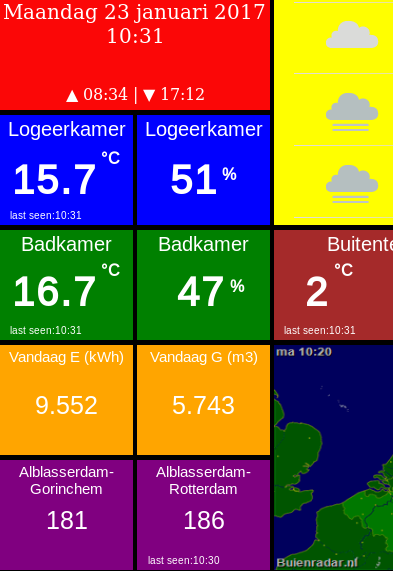
- See left under, nr 181
- Spectacle.kn3558.png (44.54 KiB) Viewed 6201 times
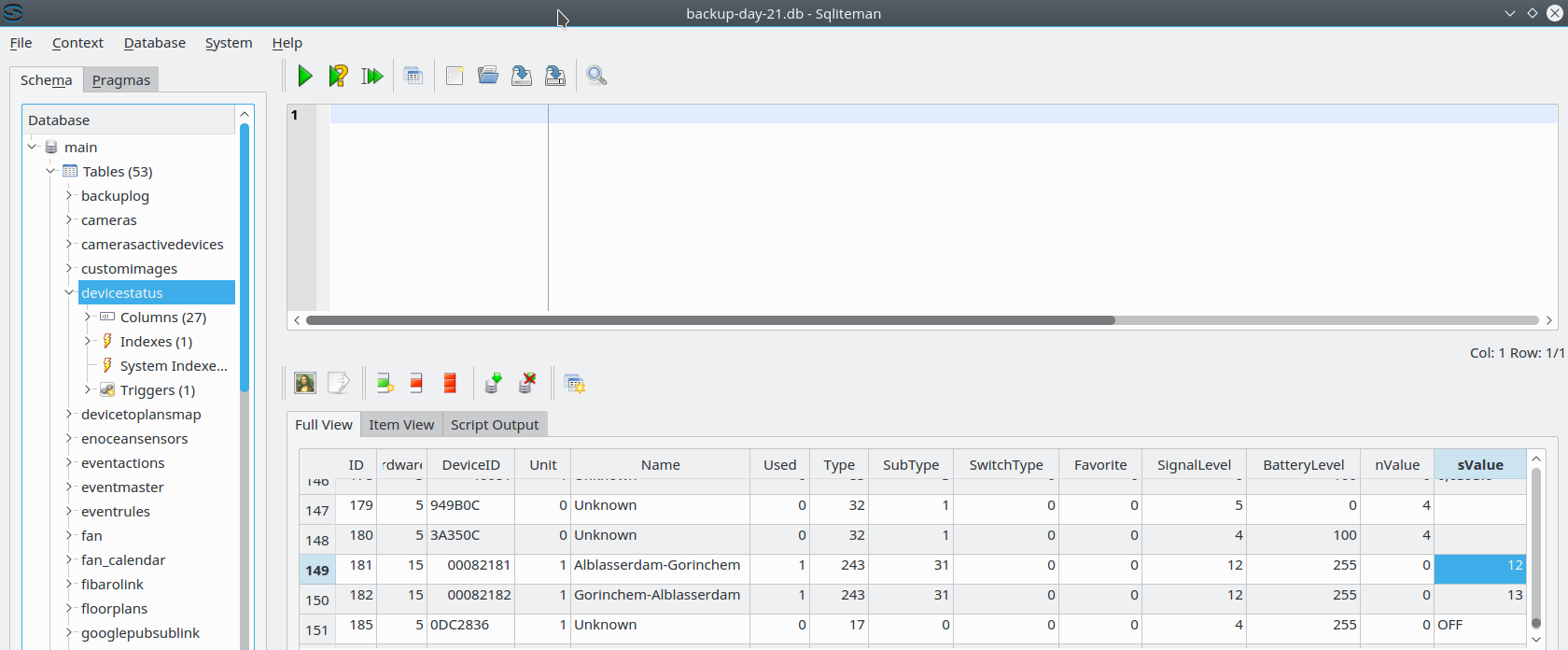
- Spectacle.db.png (121.32 KiB) Viewed 6201 times
Re: NEW frontpage.html - request comments
Posted: Monday 23 January 2017 15:38
by ubfssF
To answer my own question...

I had to look up the available datafields, for example in:
http://127.0.0.1:8080/json.htm?type=devices&plan=0
There it was clear that I needed the contents of "Data":
So the right line is:
Code: Select all
['181','Data', 'cell8', 'Alblasserdam-Gorinchem','1','0'],
Re: NEW frontpage.html - request comments
Posted: Tuesday 24 January 2017 13:14
by madrian
G3rard wrote:@hpapagaj,
Can you try this
Code: Select all
var d = ((level + 10)/100 * 32) + 0.5;
Super it's working now.

Thank you!
Little glitch that one step is 6% instead of 3% (like in Domoticz):
50 to 56:
plus 50
in plus 19.7 50
SUCCES
56 to 62:
plus 56
in plus 21.62 56
SUCCES
Re: NEW frontpage.html - request comments
Posted: Wednesday 25 January 2017 20:30
by EdwinK
Can this be installed on a Synology NAS? Can't find any map in which Domoticz could be living.
Re: NEW frontpage.html - request comments
Posted: Wednesday 25 January 2017 21:00
by G3rard
To install the frontpage on a Synology, enable Web station and put the frontpage in the web folder.
Re: NEW frontpage.html - request comments
Posted: Thursday 26 January 2017 16:36
by EdwinK
G3rard wrote:To install the frontpage on a Synology, enable Web station and put the frontpage in the web folder.
Just that easy? Thanks

Re: NEW frontpage.html - request comments
Posted: Friday 27 January 2017 21:08
by Trigun
G3rard wrote:There is no other documentation, but let my try to help you.
You have to use the IP of your Sonos in the config.php, not the IP of the Pi.
Part of the config.php where 115 is the IDX in Domoticz.
Code: Select all
'zones' => array(
      '115'   => '192.168.1.161', /* kitchen*/
	),
The url you have to use in this example is:
Code: Select all
http://yourserver/tablet/sonos/index.php?zone=115&action=Play
And you have to run the PHP on a PHP enabled web server. So if that's not installed on your Pi, you have to install PHP on it.
Hi G3rard,
I was looking at this post and this is exactly what I would like to use.
I am able to control the sonos via HTTP but I can't get it to work with the PHP option in G3rards files.
perhaps you can help me out here?
maybe a noob question but how do I install the PHP server on the Domoticz Pi?
Thanks in advance!
Kind regards,
Re: NEW frontpage.html - request comments
Posted: Friday 27 January 2017 22:20
by EdwinK
After reading through the 60 pages in this topic, I still not sure what is going on.
When I open the frontpage on my Synology NAS, the page loads, but then keeps trying to connect to some site, but I can't find out what. Because it does this, I also can't see if my changes work.

Re: NEW frontpage.html - request comments
Posted: Friday 27 January 2017 22:42
by Trigun
EdKo66 wrote:After reading through the 60 pages in this topic, I still not sure what is going on.
When I open the frontpage on my Synology NAS, the page loads, but then keeps trying to connect to some site, but I can't find out what. Because it does this, I also can't see if my changes work.
did you make any configutations yet?
for example: put in your ip adress and use the right floorplan in the frontpage_settings file?
Re: NEW frontpage.html - request comments
Posted: Friday 27 January 2017 22:58
by ubfssF
Floorplan 0 will do for starting. Later on, you can create one specially for the Frontpage.
IP address of the domoticz server has to be right.
If you have at least one sensor configured, you should see something.
Page loads slowly, but if configured right it should work.
Re: NEW frontpage.html - request comments
Posted: Friday 27 January 2017 22:58
by EdwinK
Yes. I did
It's just that the frontpage is trying to connect to a site. I think it might either be to Buienradar or the webcam.
Re: NEW frontpage.html - request comments
Posted: Friday 27 January 2017 23:00
by EdwinK
ubfssF wrote:
Page loads slowly, but if configured right it should work.
Have been waiting for over an hour. Still no luck.
Re: NEW frontpage.html - request comments
Posted: Saturday 28 January 2017 13:12
by ubfssF
I suspect Buienradar also for the slow loading, but an hour is way too much. I have a Ubuntu setup, so I don't know the pitfalls of a Synology setup, but I suspect that Frontpage isn't able to reach the Domoticz server. The IP address or port number are the first to think of, but maybe with a Synology setup there are other challenges? The long loading times are not due to the Buienradar or things like that, I would say, but the Domoticz server.
Re: NEW frontpage.html - request comments
Posted: Saturday 28 January 2017 17:30
by EdwinK
Everything else on the Synology is working normally. I will go investigate it a bit more.
Found that somewhere something is calling to a local address (that I don't have). So now looking for where it exactly sits in the files.
Re: NEW frontpage.html - request comments
Posted: Saturday 28 January 2017 17:54
by G3rard
@EdJo66, you can check the Console tab in Chrome which you can open with F12.
Normally that would show the error including file and line which is causing that.