Ha, this one, for me this one have just 4 buttons, not a real dimmer. This one is easy to manage.
The one I haven't tested is this one that work like the Xiaomi cube, with rotation.
Edit:
I have removed my code, mine works for ikea remote with 1 button, and you have 2
So your code will be smething like that (not tested)
B0 = Never used, it's off switch not off bulb.
B1 = on
B2 = off
B3 = more
B4 = less
Code: Select all
commandArray = {}

-- Philips  Switch
if (devicechanged['deCONZ - Philips Switch']) then
    print("deCONZ - Philips Switch")
    local b = devicechanged[deCONZ - Philips Switch']
    if b == 'B1' then
		commandArray['deCONZ - Cordidor'] = 'Off'
    end
    if b == 'B2' then
		commandArray['deCONZ - Coridor'] = 'On'
    end
    if b == 'B3' then
        v = tonumber(otherdevices_svalues['deCONZ - Cordidor']) + 10
        if v > 255 then
            v = 255
        end
        commandArray['deCONZ - Cordidor'']='Set Level '..tostring(v)
    end
    if b == 'B4' then
        v = tonumber(otherdevices_svalues['deCONZ - Cordidor']) - 10
        if v < 0 then
            v = 0
        end
        commandArray['deCONZ - Cordidor'']='Set Level '..tostring(v)
    end
end

return commandArray
But if you have time to give me some information, I can transform your switch with "b1" 'b2" in this one with "on" "less" "more", like tradfri one.
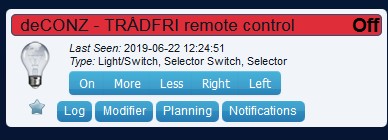
- adresse.jpg (23.97 KiB) Viewed 3061 times
I just need confirmation for button assignement, visible on websocket in log when you press a button (these one are for ikea).
1002 = on/off
2002 = more
3002 = less
4002 = right
5002 = left

