The plugin is written for the stable V3.8153, wich could not work in beta V3.8795, that could be the problemMcMelloW wrote: Saturday 24 February 2018 11:46 Installing the READ plugin hangs domoticz. After restarting Domoticz, no screen visible and no connection via the browser is possible. SSH via Putty remains active. Removing the plugin from the Plugin directory and Domoticz restart solved the problem.
It is sadly, because it looked promising
Python plugin: Modbus RTU / ASCII / TCP/IP Topic is solved
Moderator: leecollings
- Domoticx
- Posts: 90
- Joined: Sunday 07 January 2018 21:19
- Target OS: Raspberry Pi / ODroid
- Domoticz version: 2020.2
- Location: Marienheem / The Netherlands
- Contact:
Re: [Released] Python plugin: Modbus RS485 RTU/ASCII/TCP
My Domoticz plugins:
- Modbus RS485 RTU/ASCII/TCP
Maatwerk in: Domotica - Automatisering - Elektronica - 3D printing - Software ontwikkeling
Website / Webshop / Knowledge Center / Facebook (like de pagina en blijf op de hoogte!)
- Modbus RS485 RTU/ASCII/TCP
Maatwerk in: Domotica - Automatisering - Elektronica - 3D printing - Software ontwikkeling
Website / Webshop / Knowledge Center / Facebook (like de pagina en blijf op de hoogte!)
- McMelloW
- Posts: 434
- Joined: Monday 20 November 2017 17:01
- Target OS: Raspberry Pi / ODroid
- Domoticz version: V2024.1
- Location: Harderwijk, NL
- Contact:
Re: [Released] Python plugin: Modbus RS485 RTU/ASCII/TCP
@Domoticx
I am not sure about the version difference, as I tried the plugin before on beta.
Received the following errors in the log. The hardware is called Test Modbus
/usr/lib/python35.zip This directory does not exist on my Rpi. The plugin is located in /home/pi/domoticz/plugins/modbus-read/
The hardware is the same as on your picture.
What about the data type? Passtrough (1 register)
I am not sure about the version difference, as I tried the plugin before on beta.
Received the following errors in the log. The hardware is called Test Modbus
Code: Select all
2018-02-24 20:32:34.455 Error: (Modbus) failed to load 'plugin.py', Python Path used was ':/usr/lib/python35.zip:/usr/lib/python3.5:/usr/lib/python3.5/plat-arm-linux-gnueabihf:/usr/lib/python3.5/lib-dynload'.
2018-02-24 20:32:34.455 Error: (Test Modbus) Module Import failed, exception: 'ImportError'
2018-02-24 20:32:34.455 Error: (Test Modbus) Module Import failed: ' Name: plugin'
2018-02-24 20:32:34.455 Error: (Test Modbus) Error Line details not available.
2018-02-24 20:34:00.728 Error: Test Modbus hardware (9) thread seems to have ended unexpectedly
2018-02-24 20:34:30.740 Error: Test Modbus hardware (9) thread seems to have ended unexpectedly
The hardware is the same as on your picture.
What about the data type? Passtrough (1 register)
Greetings McMelloW
- Domoticx
- Posts: 90
- Joined: Sunday 07 January 2018 21:19
- Target OS: Raspberry Pi / ODroid
- Domoticz version: 2020.2
- Location: Marienheem / The Netherlands
- Contact:
Re: [Released] Python plugin: Modbus RS485 RTU/ASCII/TCP
Hi McMelloW,
Well it runs perfectly on my V3.8153 installation
without any errors...the python error you see is the python path include on your RPi, have you installed all dependancies?:
1. pymodbus
2. pymodbusTCP
3. six (if needed)
Passtrough means "no data conversion" so the value in domoticz is the same as fetched from modbus.
Well it runs perfectly on my V3.8153 installation
1. pymodbus
2. pymodbusTCP
3. six (if needed)
Passtrough means "no data conversion" so the value in domoticz is the same as fetched from modbus.
My Domoticz plugins:
- Modbus RS485 RTU/ASCII/TCP
Maatwerk in: Domotica - Automatisering - Elektronica - 3D printing - Software ontwikkeling
Website / Webshop / Knowledge Center / Facebook (like de pagina en blijf op de hoogte!)
- Modbus RS485 RTU/ASCII/TCP
Maatwerk in: Domotica - Automatisering - Elektronica - 3D printing - Software ontwikkeling
Website / Webshop / Knowledge Center / Facebook (like de pagina en blijf op de hoogte!)
-
bonebuster
- Posts: 13
- Joined: Saturday 25 November 2017 20:33
- Target OS: Raspberry Pi / ODroid
- Domoticz version:
- Contact:
Re: [Released] Python plugin: Modbus RS485 RTU/ASCII/TCP
Hi
this is that i wanted to work with industrial I/O Thanks
i see in example that you have put value 44 in 40001(+2) address register that you read after
but i don't see this setting in your setting screen
what about read or write in 2048 (HEX 800) ? or others ? (Modbus TCP IP + port 502)
i will try this
this is that i wanted to work with industrial I/O Thanks
i see in example that you have put value 44 in 40001(+2) address register that you read after
but i don't see this setting in your setting screen
what about read or write in 2048 (HEX 800) ? or others ? (Modbus TCP IP + port 502)
i will try this
- McMelloW
- Posts: 434
- Joined: Monday 20 November 2017 17:01
- Target OS: Raspberry Pi / ODroid
- Domoticz version: V2024.1
- Location: Harderwijk, NL
- Contact:
Re: [Released] Python plugin: Modbus RS485 RTU/ASCII/TCP
All dependencies are installed. I see domoticz on a win10 laptop in the browser, connection to the Rpi 2 is via SSH. Because all pages in the browser are blank, you can not check anything. After removing the plugin and a restart of domoticz everything is visible. The hardware is still there, but no devices.Domoticx wrote: Sunday 25 February 2018 19:38 Hi McMelloW,
Well it runs perfectly on my V3.8153 installationwithout any errors...the python error you see is the python path include on your RPi, have you installed all dependancies?:
1. pymodbus
2. pymodbusTCP
3. six (if needed)
Passtrough means "no data conversion" so the value in domoticz is the same as fetched from modbus.
Greetings McMelloW
-
bonebuster
- Posts: 13
- Joined: Saturday 25 November 2017 20:33
- Target OS: Raspberry Pi / ODroid
- Domoticz version:
- Contact:
Re: [Released] Python plugin: Modbus RS485 RTU/ASCII/TCP
hello
i try to install but i have not pip3 installer and i don't now how to install six.py for python 3.4
can you help me ?
thanks
i try to install but i have not pip3 installer and i don't now how to install six.py for python 3.4
can you help me ?
thanks
- Domoticx
- Posts: 90
- Joined: Sunday 07 January 2018 21:19
- Target OS: Raspberry Pi / ODroid
- Domoticz version: 2020.2
- Location: Marienheem / The Netherlands
- Contact:
Re: [Released] Python plugin: Modbus RS485 RTU/ASCII/TCP
You are welcomebonebuster wrote: Monday 26 February 2018 20:18 Hi
this is that i wanted to work with industrial I/O Thanks
In the domoticz settings It is register 2, which reads 44.bonebuster wrote: Monday 26 February 2018 20:18 i see in example that you have put value 44 in 40001(+2) address register that you read after
but i don't see this setting in your setting screen
Only the READ plugin has proper TCP/IP functionalitybonebuster wrote: Monday 26 February 2018 20:18 what about read or write in 2048 (HEX 800) ? or others ? (Modbus TCP IP + port 502)
Last edited by Domoticx on Wednesday 28 February 2018 21:10, edited 2 times in total.
My Domoticz plugins:
- Modbus RS485 RTU/ASCII/TCP
Maatwerk in: Domotica - Automatisering - Elektronica - 3D printing - Software ontwikkeling
Website / Webshop / Knowledge Center / Facebook (like de pagina en blijf op de hoogte!)
- Modbus RS485 RTU/ASCII/TCP
Maatwerk in: Domotica - Automatisering - Elektronica - 3D printing - Software ontwikkeling
Website / Webshop / Knowledge Center / Facebook (like de pagina en blijf op de hoogte!)
- Domoticx
- Posts: 90
- Joined: Sunday 07 January 2018 21:19
- Target OS: Raspberry Pi / ODroid
- Domoticz version: 2020.2
- Location: Marienheem / The Netherlands
- Contact:
Re: [Released] Python plugin: Modbus RS485 RTU/ASCII/TCP
Google will help you just fine: http://lmgtfy.com/?q=pip+3+command+not+foundbonebuster wrote: Monday 26 February 2018 21:19 hello
i try to install but i have not pip3 installer and i don't now how to install six.py for python 3.4
can you help me ?
thanks
My Domoticz plugins:
- Modbus RS485 RTU/ASCII/TCP
Maatwerk in: Domotica - Automatisering - Elektronica - 3D printing - Software ontwikkeling
Website / Webshop / Knowledge Center / Facebook (like de pagina en blijf op de hoogte!)
- Modbus RS485 RTU/ASCII/TCP
Maatwerk in: Domotica - Automatisering - Elektronica - 3D printing - Software ontwikkeling
Website / Webshop / Knowledge Center / Facebook (like de pagina en blijf op de hoogte!)
-
Tonio16
- Posts: 45
- Joined: Friday 23 February 2018 20:38
- Target OS: Raspberry Pi / ODroid
- Domoticz version: 4.9700
- Location: France
- Contact:
Re: [Released] Python plugin: Modbus RS485 RTU/ASCII/TCP
Hello
What about the RS232?
Is there a chance to have a plugin for this serial or is it more complicated?
Regards
Antoine
What about the RS232?
Is there a chance to have a plugin for this serial or is it more complicated?
Regards
Antoine
-
bonebuster
- Posts: 13
- Joined: Saturday 25 November 2017 20:33
- Target OS: Raspberry Pi / ODroid
- Domoticz version:
- Contact:
Re: [Released] Python plugin: Modbus RS485 RTU/ASCII/TCP
Hi
Many thanks
Read Plugin works fine with domoticz beta 3.8975 and FEN20 modul http://pdb2.turck.de/en/DE/products/000 ... 730002003a
read single input fonction at register adress 0 1 2 and 3 for read input state
Write plugin doesn't work to write coil or register at 2048 0x1 or 0x0 payload to set on/off output
great job
Many thanks
Read Plugin works fine with domoticz beta 3.8975 and FEN20 modul http://pdb2.turck.de/en/DE/products/000 ... 730002003a
read single input fonction at register adress 0 1 2 and 3 for read input state
Write plugin doesn't work to write coil or register at 2048 0x1 or 0x0 payload to set on/off output
great job
-
Jan Jansen
- Posts: 229
- Joined: Wednesday 30 April 2014 20:27
- Target OS: Raspberry Pi / ODroid
- Domoticz version: Stable
- Location: The Netherlands
- Contact:
Re: [Released] Python plugin: Modbus RS485 RTU/ASCII/TCP
Hi,
At this moment I am experimenting with a tag reader (RC522 + arduino nano clone). I want to use a tag to disarm the security system. In addition, I prefer a wired connection to the rpi on which Domoticz runs.
By trial and error I succeeded in having tags read and a recognized tag sets pin 9 from the nano to low and after 5 seconds back to high. Pin 9 is connected via wire to a piface and thus the security system can be deactivated.
A recognized tag also generates a serial print.
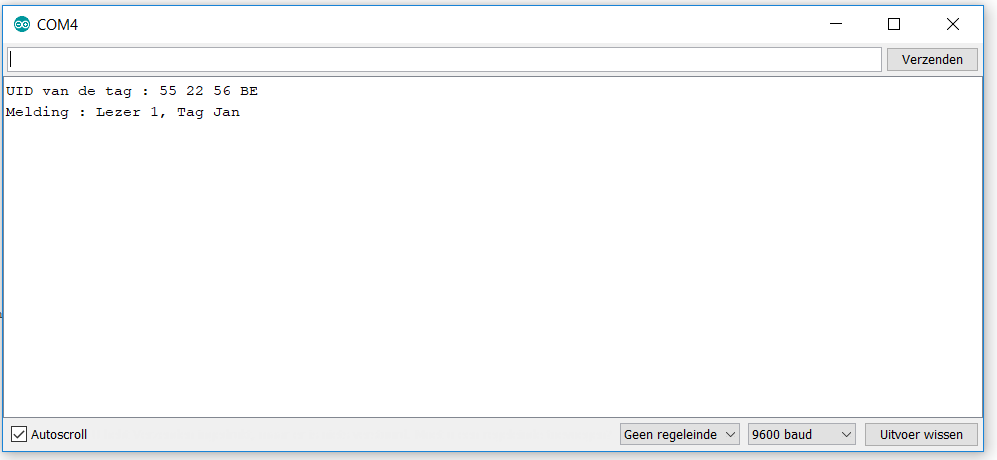
1. Is it possible to send the serial print via Modbus RS485 RTU to Domoticz (for example to a text sensor)? If so, I get a log that states which tag has been read and when. How can I achieve this goal?
I have a USB> RS485 and some TTL> RS485 modules in stock. I will succeed in connecting the hardware (Google).
Further help is very desirable.
Thanks in advance.
At this moment I am experimenting with a tag reader (RC522 + arduino nano clone). I want to use a tag to disarm the security system. In addition, I prefer a wired connection to the rpi on which Domoticz runs.
By trial and error I succeeded in having tags read and a recognized tag sets pin 9 from the nano to low and after 5 seconds back to high. Pin 9 is connected via wire to a piface and thus the security system can be deactivated.
Code: Select all
//Programa : RFID - Toegangscontrole RFID
//https://www.filipeflop.com/blog/controle-acesso-leitor-rfid-arduino/
#include <SPI.h>
#include <MFRC522.h>
#include <LiquidCrystal.h>
#define SS_PIN 10
#define RST_PIN 9
MFRC522 mfrc522(SS_PIN, RST_PIN); // Create MFRC522 instance.
LiquidCrystal lcd(6, 7, 5, 4, 3, 2);
char st[20];
int ledPin = 8; // Gate BS170 verbinden met pin 8, source met massa en drain met betreffende ingang Piface
void setup()
{
Serial.begin(9600); // Initialiseer seriële communicatie
SPI.begin(); // Initialiseer SPI bus
mfrc522.PCD_Init(); // Initialiseer MFRC522
pinMode(ledPin, OUTPUT);
}
void loop()
{
// Look for new cards
if ( ! mfrc522.PICC_IsNewCardPresent())
{
return;
}
// Select one of the cards
if ( ! mfrc522.PICC_ReadCardSerial())
{
return;
}
// Toon UID tag
Serial.print("UID van de tag :");
String inhoud= "";
byte letter;
for (byte i = 0; i < mfrc522.uid.size; i++)
{
Serial.print(mfrc522.uid.uidByte[i] < 0x10 ? " 0" : " ");
Serial.print(mfrc522.uid.uidByte[i], HEX);
inhoud.concat(String(mfrc522.uid.uidByte[i] < 0x10 ? " 0" : " "));
inhoud.concat(String(mfrc522.uid.uidByte[i], HEX));
}
Serial.println();
Serial.print("Melding : ");
inhoud.toUpperCase();
if (inhoud.substring(1) == "55 22 56 BE") //UID 1 - Jan
{
Serial.println("Lezer 1, tag Jan");
Serial.println();
lcd.clear();
lcd.setCursor(0,0);
lcd.print("Hallo Jan!");
lcd.setCursor(0,1);
lcd.print(" Alarm uit!");
digitalWrite(ledPin, LOW);
delay(3000);
digitalWrite(ledPin, HIGH);
openingstekst();
}
}
void openingstekst()
{
lcd.clear();
lcd.print("Houd uw tag");
lcd.setCursor(0,1);
lcd.print(" voor de lezer!");
}I have a USB> RS485 and some TTL> RS485 modules in stock. I will succeed in connecting the hardware (Google).
Further help is very desirable.
Thanks in advance.
- Domoticx
- Posts: 90
- Joined: Sunday 07 January 2018 21:19
- Target OS: Raspberry Pi / ODroid
- Domoticz version: 2020.2
- Location: Marienheem / The Netherlands
- Contact:
Re: [Released] Python plugin: Modbus RS485 RTU/ASCII/TCP
Thank you!bonebuster wrote: Wednesday 28 February 2018 19:05 Hi
Many thanks
Read Plugin works fine with domoticz beta 3.8975 and FEN20 modul http://pdb2.turck.de/en/DE/products/000 ... 730002003a
read single input fonction at register adress 0 1 2 and 3 for read input state
Write plugin doesn't work to write coil or register at 2048 0x1 or 0x0 payload to set on/off output
great job
Ps. as stated above, the write plugin is not updated yet...., i will try to make some time this weekend...
My Domoticz plugins:
- Modbus RS485 RTU/ASCII/TCP
Maatwerk in: Domotica - Automatisering - Elektronica - 3D printing - Software ontwikkeling
Website / Webshop / Knowledge Center / Facebook (like de pagina en blijf op de hoogte!)
- Modbus RS485 RTU/ASCII/TCP
Maatwerk in: Domotica - Automatisering - Elektronica - 3D printing - Software ontwikkeling
Website / Webshop / Knowledge Center / Facebook (like de pagina en blijf op de hoogte!)
- Domoticx
- Posts: 90
- Joined: Sunday 07 January 2018 21:19
- Target OS: Raspberry Pi / ODroid
- Domoticz version: 2020.2
- Location: Marienheem / The Netherlands
- Contact:
Re: [Released] Python plugin: Modbus RS485 RTU/ASCII/TCP
Hello Jan,Jan Jansen wrote: Wednesday 28 February 2018 20:48 1. Is it possible to send the serial print via Modbus RS485 RTU to Domoticz (for example to a text sensor)? If so, I get a log that states which tag has been read and when. How can I achieve this goal?
I have a USB> RS485 and some TTL> RS485 modules in stock. I will succeed in connecting the hardware (Google).
Further help is very desirable.
Thanks in advance.
Yes, you can make a modbus slave from your arduino, and domoticz could read it out with this plugin.
You cannot push to domoticz, but domoticz can pull with this plugin, but there is also no binary/string support (yet) in this plugin.
My Domoticz plugins:
- Modbus RS485 RTU/ASCII/TCP
Maatwerk in: Domotica - Automatisering - Elektronica - 3D printing - Software ontwikkeling
Website / Webshop / Knowledge Center / Facebook (like de pagina en blijf op de hoogte!)
- Modbus RS485 RTU/ASCII/TCP
Maatwerk in: Domotica - Automatisering - Elektronica - 3D printing - Software ontwikkeling
Website / Webshop / Knowledge Center / Facebook (like de pagina en blijf op de hoogte!)
- Domoticx
- Posts: 90
- Joined: Sunday 07 January 2018 21:19
- Target OS: Raspberry Pi / ODroid
- Domoticz version: 2020.2
- Location: Marienheem / The Netherlands
- Contact:
Re: [Released] Python plugin: Modbus RS485 RTU/ASCII/TCP
Hi Antoine,Tonio16 wrote: Wednesday 28 February 2018 14:16 Hello
What about the RS232?![]()
Is there a chance to have a plugin for this serial or is it more complicated?
Regards
Antoine
According to this youtube clip: https://www.youtube.com/watch?v=yRpWjjRNE-c ,RS232 is also suported by pymodbus out of the box, can you give it a try?
My Domoticz plugins:
- Modbus RS485 RTU/ASCII/TCP
Maatwerk in: Domotica - Automatisering - Elektronica - 3D printing - Software ontwikkeling
Website / Webshop / Knowledge Center / Facebook (like de pagina en blijf op de hoogte!)
- Modbus RS485 RTU/ASCII/TCP
Maatwerk in: Domotica - Automatisering - Elektronica - 3D printing - Software ontwikkeling
Website / Webshop / Knowledge Center / Facebook (like de pagina en blijf op de hoogte!)
-
freijn
- Posts: 536
- Joined: Friday 23 December 2016 16:40
- Target OS: Raspberry Pi / ODroid
- Domoticz version: Stable
- Location: Netherlands Purmerend
- Contact:
Re: [Released] Python plugin: Modbus RS485 RTU/ASCII/TCP
Tonio
Do you not have a lan connection possible?
Today I have finished , togehter with Mello the py script to talk modbus via lan an can say, works perfectly !
I have it running for two days now an every 10 sec a SolarEdge update
Enable modbus on lan is a 5 min job to do...
Do you not have a lan connection possible?
Today I have finished , togehter with Mello the py script to talk modbus via lan an can say, works perfectly !
I have it running for two days now an every 10 sec a SolarEdge update
Enable modbus on lan is a 5 min job to do...
-
Tonio16
- Posts: 45
- Joined: Friday 23 February 2018 20:38
- Target OS: Raspberry Pi / ODroid
- Domoticz version: 4.9700
- Location: France
- Contact:
Re: [Released] Python plugin: Modbus RS485 RTU/ASCII/TCP
Hellofreijn wrote: Wednesday 28 February 2018 21:58 Tonio
Do you not have a lan connection possible?
Today I have finished , togehter with Mello the py script to talk modbus via lan an can say, works perfectly !
I have it running for two days now an every 10 sec a SolarEdge update
Enable modbus on lan is a 5 min job to do...![]()
I am planing to control my ventilation with Domoticz so I try to know how. It means that I am not able to test the plugin yet. I installed it and I need to understand how it's working.
Lan, would be also practical since I wouldn't need to move my Raspberry Pi. How should I connect the RS232 to the lan? An adaptator RS232 to RJ45 would be enough to do the Job here? Must it be a direct connection between the Pi and the RJ45 adaptator or can I connect directly to my home network?
Cheers
Antoine
-
freijn
- Posts: 536
- Joined: Friday 23 December 2016 16:40
- Target OS: Raspberry Pi / ODroid
- Domoticz version: Stable
- Location: Netherlands Purmerend
- Contact:
Re: [Released] Python plugin: Modbus RS485 RTU/ASCII/TCP
Tonio
Stupid me... I simply assumed you have a SolarEdge too... Appologies...
I have no experience with a serial to lan other than big professional devices..
Stupid me... I simply assumed you have a SolarEdge too... Appologies...
I have no experience with a serial to lan other than big professional devices..
- papoo
- Posts: 126
- Joined: Friday 22 January 2016 22:14
- Target OS: Raspberry Pi / ODroid
- Domoticz version: 4.10
- Location: France
- Contact:
Re: [Released] Python plugin: Modbus RS485 RTU/ASCII/TCP
thanks Domoticx
work's fine for me in TCP mode
is there a possibility to add measurement management unit directly in the plugin ? m3, liters, kw, kwh etc
and create un counter device?
work's fine for me in TCP mode
Code: Select all
2018-03-04 11:17:36.859 (Eau Froide) Started.
2018-03-04 11:17:37.412 (Eau Froide) Entering work loop.
2018-03-04 11:17:37.414 (Eau Froide) Initialized version 1.1.0, author 'S. Ebeltjes / domoticx.nl'
2018-03-04 11:17:37.468 (Eau Froide) Debug log level set to: 'true'.
2018-03-04 11:17:37.468 (Eau Froide) Creating device 'ModbusDEV-READ'.
2018-03-04 11:17:37.470 (Eau Froide) 'Address':'192.168.1.21'
2018-03-04 11:17:37.470 (Eau Froide) 'Port':'502'
2018-03-04 11:17:37.470 (Eau Froide) 'Mode5':'div100'
2018-03-04 11:17:37.470 (Eau Froide) 'Mode4':'debug'
2018-03-04 11:17:37.470 (Eau Froide) 'Key':'Modbus'
2018-03-04 11:17:37.471 (Eau Froide) 'Mode2':'9600'
2018-03-04 11:17:37.471 (Eau Froide) 'DomoticzHash':'63d0d07e'
2018-03-04 11:17:37.471 (Eau Froide) 'Author':'S. Ebeltjes / domoticx.nl'
2018-03-04 11:17:37.471 (Eau Froide) 'Mode3':'S1B8PN'
2018-03-04 11:17:37.471 (Eau Froide) 'Mode1':'tcpip'
2018-03-04 11:17:37.471 (Eau Froide) 'DomoticzVersion':'3.8975'
2018-03-04 11:17:37.471 (Eau Froide) 'SerialPort':'/dev/serial0'
2018-03-04 11:17:37.471 (Eau Froide) 'Mode6':'pass'
2018-03-04 11:17:37.471 (Eau Froide) 'Name':'Eau Froide'
2018-03-04 11:17:37.471 (Eau Froide) 'HomeFolder':'/home/pi/domoticz/plugins/modbus-read/'
2018-03-04 11:17:37.471 (Eau Froide) 'Version':'1.1.0'
2018-03-04 11:17:37.471 (Eau Froide) 'Username':'4'
2018-03-04 11:17:37.471 (Eau Froide) 'HardwareID':'17'
2018-03-04 11:17:37.471 (Eau Froide) 'DomoticzBuildTime':'2018-02-28 08:26:48'
2018-03-04 11:17:37.471 (Eau Froide) 'Password':'1010'
2018-03-04 11:17:37.471 (Eau Froide) Device count: 1
2018-03-04 11:17:37.472 (Eau Froide) Device: 1 - ID: 190, Name: 'Eau Froide - ModbusDEV-READ', nValue: 0, sValue: ''
2018-03-04 11:17:37.472 (Eau Froide) Device ID: '190'
2018-03-04 11:17:37.472 (Eau Froide) Device Name: 'Eau Froide - ModbusDEV-READ'
2018-03-04 11:17:37.472 (Eau Froide) Device nValue: 0
2018-03-04 11:17:37.472 (Eau Froide) Device sValue: ''
2018-03-04 11:17:37.472 (Eau Froide) Device LastLevel: 0
2018-03-04 11:17:37.472 (Eau Froide) Modbus RS485 RTU/ASCII/TCP - Universal READ loaded.
2018-03-04 11:17:46.952 (Eau Froide) Calling message handler 'onHeartbeat'.
2018-03-04 11:17:46.952 (Eau Froide) MODBUS DEBUG TCP CMD - Method=tcpip, Address=192.168.1.21, Port=502, Register=1010, Data type=pass
2018-03-04 11:17:46.982 (Eau Froide) MODBUS DEBUG RESPONSE: 24927
2018-03-04 11:17:46.982 (Eau Froide) MODBUS DEBUG VALUE: 24927
2018-03-04 11:17:46.983 (Eau Froide - ModbusDEV-READ) Updating device from 0:'' to have values 0:'249.27'.is there a possibility to add measurement management unit directly in the plugin ? m3, liters, kw, kwh etc
and create un counter device?
- Domoticx
- Posts: 90
- Joined: Sunday 07 January 2018 21:19
- Target OS: Raspberry Pi / ODroid
- Domoticz version: 2020.2
- Location: Marienheem / The Netherlands
- Contact:
Re: [Released] Python plugin: Modbus RS485 RTU/ASCII/TCP
Great to hear!papoo wrote: Sunday 04 March 2018 11:19 thanks Domoticx
work's fine for me in TCP mode
is there a possibility to add measurement management unit directly in the plugin ? m3, liters, kw, kwh etc
and create un counter device?
1) I don't know how to do that (yet)
2) There is no more room for options in the plugin... (don't know if domoticz beta has more than 6?)
My Domoticz plugins:
- Modbus RS485 RTU/ASCII/TCP
Maatwerk in: Domotica - Automatisering - Elektronica - 3D printing - Software ontwikkeling
Website / Webshop / Knowledge Center / Facebook (like de pagina en blijf op de hoogte!)
- Modbus RS485 RTU/ASCII/TCP
Maatwerk in: Domotica - Automatisering - Elektronica - 3D printing - Software ontwikkeling
Website / Webshop / Knowledge Center / Facebook (like de pagina en blijf op de hoogte!)
- Domoticx
- Posts: 90
- Joined: Sunday 07 January 2018 21:19
- Target OS: Raspberry Pi / ODroid
- Domoticz version: 2020.2
- Location: Marienheem / The Netherlands
- Contact:
Re: [Released] Python plugin: Modbus RS485 RTU/ASCII/TCP
Hi all,
I wrote some articles on domoticx.com to create your own TCP/IP modbus unit with an arduino and Ethernet W5100 shield or ENC28J60 module:
Ethernet W5100 shield: http://domoticx.com/arduino-shield-ethe ... -ip-slave/
ENC28J60 module: http://domoticx.com/module-ethernet-lan ... -ip-slave/
So i can test and update the WRITE plugin soon with actual hardware!
I wrote some articles on domoticx.com to create your own TCP/IP modbus unit with an arduino and Ethernet W5100 shield or ENC28J60 module:
Ethernet W5100 shield: http://domoticx.com/arduino-shield-ethe ... -ip-slave/
ENC28J60 module: http://domoticx.com/module-ethernet-lan ... -ip-slave/
So i can test and update the WRITE plugin soon with actual hardware!
My Domoticz plugins:
- Modbus RS485 RTU/ASCII/TCP
Maatwerk in: Domotica - Automatisering - Elektronica - 3D printing - Software ontwikkeling
Website / Webshop / Knowledge Center / Facebook (like de pagina en blijf op de hoogte!)
- Modbus RS485 RTU/ASCII/TCP
Maatwerk in: Domotica - Automatisering - Elektronica - 3D printing - Software ontwikkeling
Website / Webshop / Knowledge Center / Facebook (like de pagina en blijf op de hoogte!)
Who is online
Users browsing this forum: No registered users and 1 guest