myenergi Monitor - Domoticz plugin for zappi and harvi

Python and python framework

Moderator: leecollings

Post Reply
User avatar
Ragdag
Posts: 220
Joined: Friday 30 March 2018 13:56
Target OS: Raspberry Pi / ODroid
Domoticz version: Beta
Location: Netherlands
Contact:

myenergi Monitor - Domoticz plugin for zappi and harvi

Post by Ragdag »

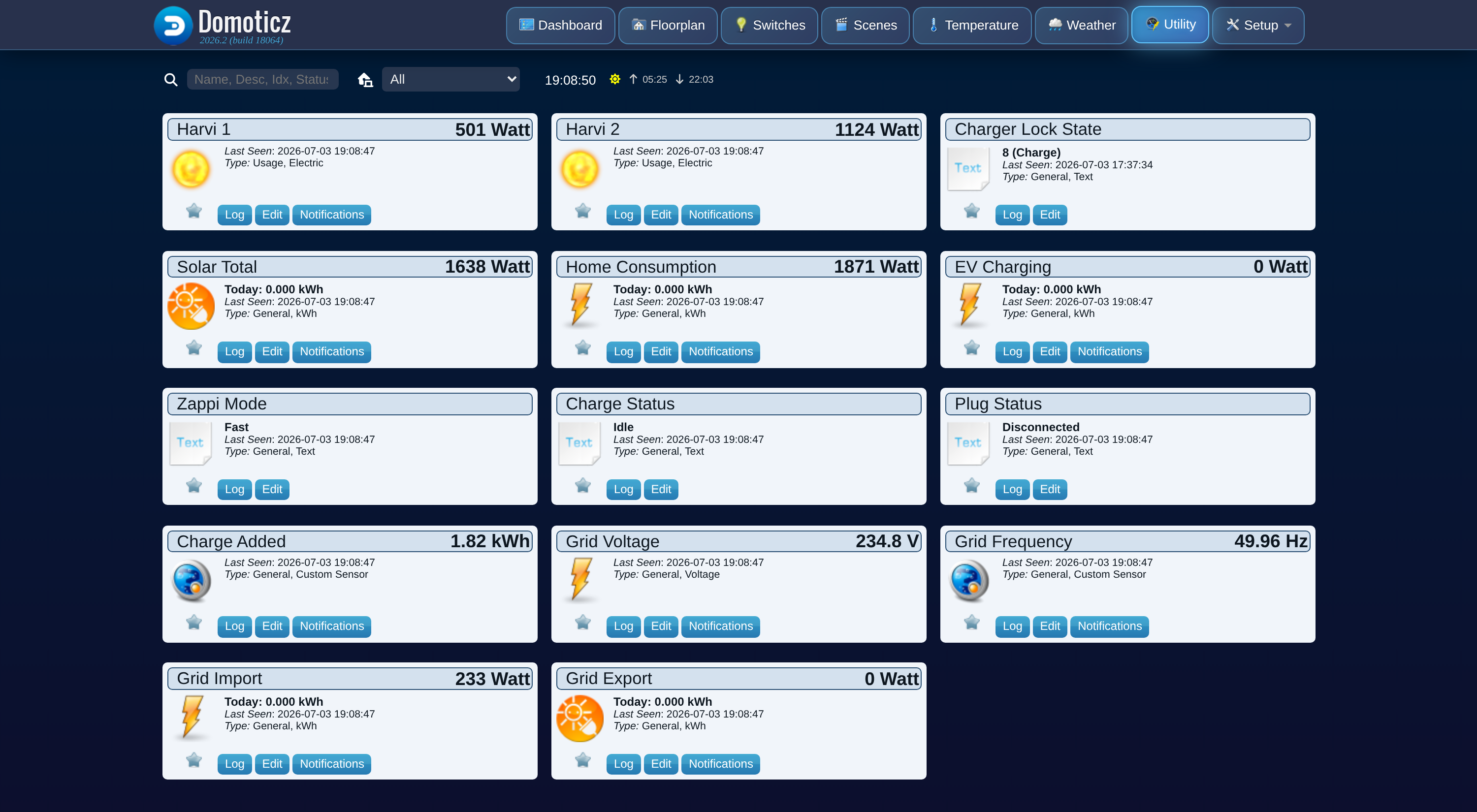
I'd like to share myenergi Monitor, a Domoticz plugin for myenergi zappi and harvi hardware. It reads your system through the myenergi cloud and turns it into a proper set of Domoticz devices: solar generation, EV charging, home consumption, grid import/export, and per-inverter power, all with real kWh counters. Optional charger control is there too, but off by default.

I built it because a normal utility meter can't tell you how much of your solar went straight into the car versus back to the grid. The myenergi app shows that, but Domoticz had no good way to log and graph it over time. So the main goal was accurate, restart-proof counters rather than just live wattage.

What it does
  • Solar generation across all inverters on the hub, as power and a running kWh counter
  • EV charging power, plus energy added this session and cumulative
  • Home consumption, derived from generation, grid flow, and EV charging (Domoticz has no separate meter for this)
  • Grid import and export, both directions, power and kWh
  • One live-power device per harvi, styled for generation or battery/load
  • Grid voltage and frequency, plus charge status, plug status, and zappi mode as text
  • Device names and status text in English or Dutch
The counters are rebuilt from myenergi's own per-minute history, so they only ever count up and survive a Domoticz restart without resetting or spiking the graphs.

Devices
Everything is created automatically on the first successful poll. Nothing to add by hand.

Code: Select all

Unit  | Device            | What it shows
------|-------------------|------------------------------------------------
1     | Solar Total       | Total PV generation, all inverters (W + kWh)
2     | Grid Import       | Power drawn from the grid (W + kWh)
3     | Grid Export       | Power fed back to the grid (W + kWh)
4     | Home Consumption  | Derived rest-of-house usage (W + kWh)
5     | EV Charging       | Power delivered to the car (W + kWh)
6     | Charge Added      | Energy added this charging session (kWh)
7     | Zappi Mode        | Fast / Eco / Eco+ / Stop
8     | Charge Status     | Idle / Paused / Diverting / Boosting / Complete
9     | Plug Status       | Disconnected / Connected / Charging / Fault
10    | Grid Voltage      | Mains voltage
11    | Grid Frequency    | Mains frequency
20+   | Harvi <serial>    | One live-power device per harvi
Optional charger control
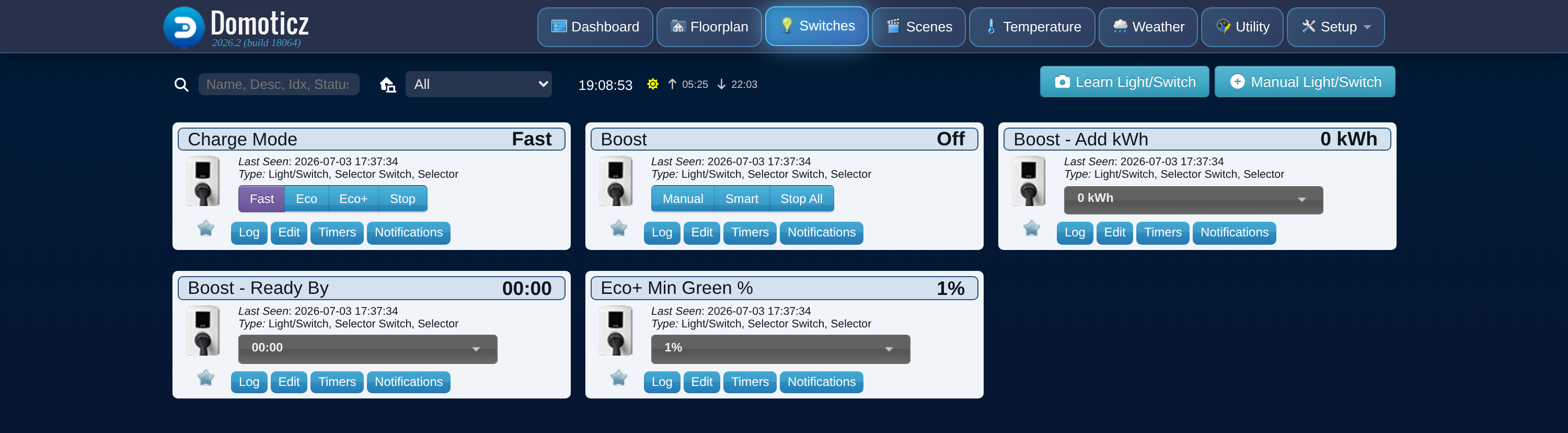
Control is opt-in. There's an "Allow Control" setting that is off by default, and while it's off the plugin never sends anything to your charger, it only reads. Turn it on and you get a few extra devices:

Code: Select all

12    | Charge Mode        | Set Fast / Eco / Eco+ / Stop
13    | Boost              | Start or cancel: Manual, Smart, Stop All
14    | Boost - Add kWh    | kWh to add on the next boost
15    | Boost - Ready By   | Target finish time for a Smart boost
16    | Eco+ Min Green %   | Minimum green level for Eco+
18    | Charger Lock State | Lock status (read-only)
Requirements
  • A myenergi hub with at least one zappi
  • Your hub serial and an API key (myenergi app: Account, then Advanced, then API key)
  • Internet access from the Domoticz host
This talks to the myenergi cloud, not the hub on your LAN, so it needs to be online. The local API isn't supported.

Install

Code: Select all

cd /opt/domoticz/plugins
git clone -b dist https://github.com/Rouzax/myenergi-domoticz-plugin myenergi
sudo systemctl restart domoticz
Then Setup, Hardware, Add, pick "myenergi Monitor", fill in the serial and API key, and enable "Accept new Hardware Devices". Full steps and every setting are in the docs linked below.

Screenshots
Monitoring devices:
Image

Charger control devices (with Allow Control on):
Image

Documentation
Install guide, every setting, the full device reference, FAQ, and security notes (it also links back to the GitHub repository):
https://rouzax.github.io/myenergi-domoticz-plugin/
User avatar
Ragdag
Posts: 220
Joined: Friday 30 March 2018 13:56
Target OS: Raspberry Pi / ODroid
Domoticz version: Beta
Location: Netherlands
Contact:

Re: myenergi Monitor - Domoticz plugin for zappi and harvi

Post by Ragdag »

myenergi Monitor v1.1.0 is out

This release raises the Python requirement and adds a new-version notice. Release notes and download: v1.1.0 on GitHub

Breaking: Python 3.11 or newer is now required
Domoticz runs plugins on the Python installed on its host. Python 3.9 has been out of security support since October 2025 and 3.10 reaches end of life this month, so the plugin now needs 3.11. You can see your version in the Domoticz log at startup:

Code: Select all

PluginSystem: Started, Python version ...
This mainly affects Debian 11 and Raspberry Pi OS bullseye, which ship Python 3.9. On those the plugin does not start; it logs myenergi Monitor needs Python 3.11 or newer; this Domoticz runs 3.9.x and leaves your devices and counters alone. You have two options:
  • Stay on v1.0.5, which still runs on Python 3.9.
  • Upgrade the host to Debian 12 or Raspberry Pi OS bookworm (Python 3.11).
Either way nothing needs to be reconfigured, and the kWh counters catch up on the time the plugin was stopped (up to 14 days). Step-by-step instructions, including where to get the v1.0.5 zip: FAQ: "needs Python 3.11 or newer"

New: the plugin tells you when a newer version is out
  • Once a day the plugin asks GitHub whether a newer release exists. It announces each new version once: a line in the Domoticz log, plus one notification through every notification system you have set up in Domoticz (email, Pushover, Telegram, browser and so on).
  • Notifications need Domoticz 2026.1 or newer. On older versions you get the log line only.
  • A new Update check setting chooses Automatic (the default), Stable releases only, Including betas, or Off. Off makes no connection to GitHub at all.
  • The request sends nothing about your system, and the plugin never updates itself; the notice just links to the release page.
Details: Settings: Update check

How to update
  • Installed with git:

    Code: Select all

    cd myenergi && git pull
  • Installed from the zip: download myenergi-v1.1.0.zip from the release page and replace the myenergi folder.
Then restart Domoticz. Your settings, devices and counters are kept.

As always, feedback and issues are welcome here or on GitHub.
Post Reply