Page 1 of 1
Blockly: timed (and conditioned) event not triggered
Posted: Wednesday 13 January 2016 10:26
by elmortero
Hey all,
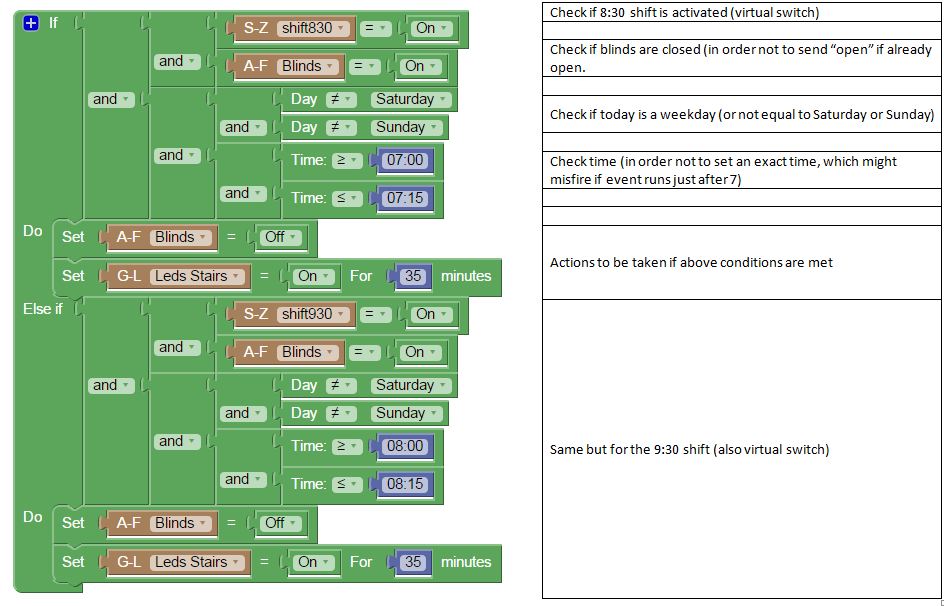
I have created to virtual switches for to different shifts at work. Depending on the fact that either one of them or none (holidays or other exceptions) is set to On execute some actions at the time specified according to the shift.
Yesterday I activated the 830 button and closed the blinds. But this morning nothing happened (blind nor lights) as if the conditions were not met.
Any ideas why?
- autoblinds.JPG (101.23 KiB) Viewed 1620 times
Re: Blockly: timed (and conditioned) event not triggered
Posted: Wednesday 13 January 2016 15:04
by tozzke
How did you close your blinds? Did you do it from Domoticz itself? or did you close them with another switch/app/button/whatever?
Or shouldn't it be If [shift830=on] and [Blinds=closed] and....?
Re: Blockly: timed (and conditioned) event not triggered
Posted: Wednesday 13 January 2016 16:54
by elmortero
The blinds are always managed by domoticz, either from mobile phone or remote control.
I will try the Closed status tonight, I used on/off as this is the command in the timers, where open/closed are not available. The status is however shown as open/closed.
Thanks for the tip, I will post update tomorrow after the test.
*update: in the logs the status of the blinds is always shown On/Off so not sure that this is the reason.
Re: Blockly: timed (and conditioned) event not triggered
Posted: Wednesday 13 January 2016 17:17
by tozzke
Well.... I have this just set up for testing purposes (don't actually have blinds or whatsoever)

and it seems to work quite well

Re: Blockly: timed (and conditioned) event not triggered
Posted: Wednesday 13 January 2016 17:28
by elmortero
ok, thanks for the effort.
Having good hope for tomorrow morning.
Will let you know
Re: Blockly: timed (and conditioned) event not triggered
Posted: Friday 15 January 2016 9:11
by elmortero
It works!!
Yesterday it still didn't, at least the blinds part. The lights were switched on.
Conclusion: checking the state of the blinds uses Open/closed, in the Set part I needed to use On/Off.
So, this morning it was all working.
Re: Blockly: timed (and conditioned) event not triggered
Posted: Friday 15 January 2016 12:06
by tozzke
great!
but why didn't it work at first yesterday?
Re: Blockly: timed (and conditioned) event not triggered
Posted: Monday 18 January 2016 11:45
by elmortero
Well, the first time because I used On/OFF for both the IF and THEN block.
Second day because I used Open/Close for both.
In the end it had to be Open/Close when checking the state and On/Off for setting the state.
Now all is good (tested the 930 shift today).
Thank you for your help.