Page 1 of 1
FIBARO FGD212 Dimmer 2 is not a routing slave?
Posted: Monday 21 December 2015 9:50
by Bikey
Hi,
I recently started with Z-Wave devices on my Domoticz system. So I started with a Zwave.me USB-controler on my RPI2 and added an Everspring SP103 motion sensor.
Because the sensor is quite far from the controler my idea was to add a switch/dimmer to act as a routing slave half way the distance.
So I bought and installed a Fibaro FGD212 Dimmer 2, which works very nice. My network also seems to work fine, however not as expected.
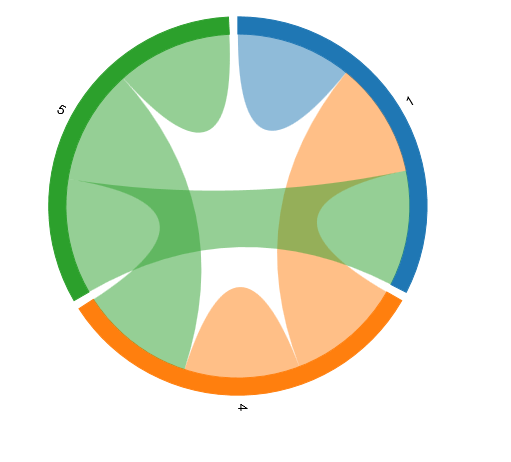
If I look at the topology, this is what I see, with
node 1 = Zwave.me controler
node 4 = SP103 motion sensor
node 5 = Fibaro FGD2012
- Z-wave topology.PNG (28.25 KiB) Viewed 2163 times
Unlike my expectations: the dimmer (node 5) acts as a slave, whereas the battery powered PIR-sensor acts as a routing-slave

That is just the wrong way around. This can also be seen in the open Z-wave control panel:

- Z-wave topology2.PNG (17.2 KiB) Viewed 2163 times
I thought that battery operated devices can not work as a routing slave?
Has anybody a Fibaro FGD212 working as a routing slave?
Re: FIBARO FGD212 Dimmer 2 is not a routing slave?
Posted: Monday 21 December 2015 16:49
by gizmocuz
Looks good, your node 5 connects to both sensors, your pir only to the controller
Re: FIBARO FGD212 Dimmer 2 is not a routing slave?
Posted: Monday 21 December 2015 17:14
by Bikey
That is actually just the problem: the PIR does not connect to the the wall switch which is closer by. It only uses a direct connection to the controller.
Conversely the wall plug has a connection to the PIR thus can use the PIR as a slave...? Seems strange/impossible as the PIR is sleeping most of the time.
Re: FIBARO FGD212 Dimmer 2 is not a routing slave?
Posted: Monday 21 December 2015 17:45
by jvdz
I think only one line is shown when devices are connected so things should be looking good.
Jos
Re: FIBARO FGD212 Dimmer 2 is not a routing slave?
Posted: Monday 21 December 2015 20:57
by Bikey
jvdz wrote:I think only one line is shown when devices are connected so things should be looking good.
Jos
No, it should have 2 colors: the outgoing lines are shown with the same color as the node, while incoming connections have the color of the other node(s).
See also the explanation/diagrams in
this topic.
Re: FIBARO FGD212 Dimmer 2 is not a routing slave?
Posted: Monday 21 December 2015 21:19
by jvdz
Still don't think this is correct.
It is a mess network and the image shows one line between each connected device and the color it seems to uses for the line is the color of the device with the highest number.
Jos
Re: FIBARO FGD212 Dimmer 2 is not a routing slave?
Posted: Monday 21 December 2015 21:37
by Bikey
jvdz wrote:Still don't think this is correct.
It is a mess network and the image shows one line between each connected device and the color it seems to uses for the line is the color of the device with the highest number.
Jos
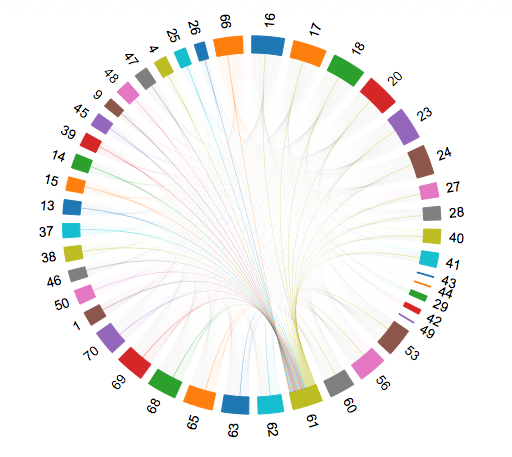
Mmm, could be, but how can you explain this topology (copied from
this topic):
Node 61, has outgoing lines in green, but also "incoming" lines from nodes with lower numbers (like 25 and 50), but also from higher numbers (like 66).
- 6M9ZbIB.png (220.3 KiB) Viewed 2086 times
It is a pity that you can not get a matrix-style report, that would be more clear.
Re: FIBARO FGD212 Dimmer 2 is not a routing slave?
Posted: Monday 21 December 2015 21:43
by jvdz
You actually can see the matrix: go into the ZWAVE control panel (last option in the dropdown box where you found the picture) and select "topology" option in the "Select an Operation" dropdown.
That will show the ZWAVE mess in the cross-reference matrix.
As to the shown picture, I can;t see in there enough details to find one that has 2 connections between 2 specific devices.
Jos
Re: FIBARO FGD212 Dimmer 2 is not a routing slave?
Posted: Monday 21 December 2015 22:02
by Bikey
Yea, I also can't see nodes in the figure with 2 lines between nodes, so indeed perhaps this is not how it should be read.
If I check the matrix in the control panel it looks like everything is connected bi-directional.
So not only that there is a connection from PIR to controller but also from PIR to Dimmer
and Dimmer to PIR. This would suggest that the PIR could do routing, which I can not believe as it is a battery operated and sleeping most of the time.
If I hover with my mouse over the devices in the OpenZwave Control Panel, it shows "beaming routing" for the PIR and "listening, beaming, routing" for the Dimmer.
Confusing

Re: FIBARO FGD212 Dimmer 2 is not a routing slave?
Posted: Tuesday 22 December 2015 18:01
by Gravityz
i had exactly the same situation with exactly the same picture
i also wanted to use the FGD212 a a router to my other module(7)
today i checked and the picture has changed
is this good or bad?
1 is the aeonlabs controller
7 is a qubino flush relais which is most far away(inside the garden)
8 is the FGD212 which is very close to the aeonlabs usb stick
fact is that i could not find module 7 alone because it was to far away
after i installed module 8 it seems to work so it is relaying something but i do not know why the picture changed today
i first paired 7 and after that i paired 8
Re: FIBARO FGD212 Dimmer 2 is not a routing slave?
Posted: Tuesday 22 December 2015 19:19
by Gravityz
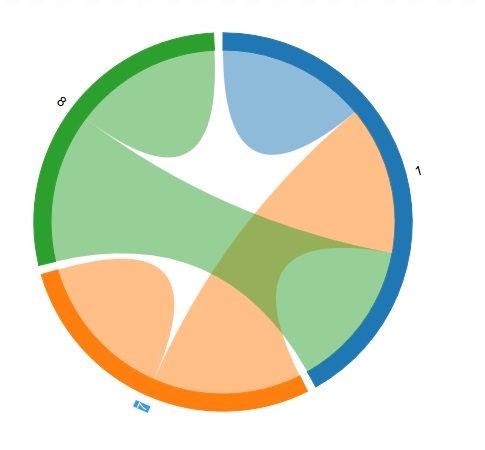
after using an usb extension cable of 3 meters to put the usb stick a bit higher i get this result.
routing seems to be gone but if the thickness of the connections is a measurement of reception it definately improved reception and bandwidth.
now the big question is how to get the routing connection from 7 to 8 also in there
is there any way to force it to make a routing connection or will it only do so if it has bad reception to ther controller(1)
- zwave-new after usb verleng.jpg (28.13 KiB) Viewed 2023 times