Page 1 of 3
WiFi Doorbell
Posted: Monday 04 May 2015 16:33
by Derik
Anyone have experience with the RING doorbell .
https://ring.com/
Or a better alternative
Re: WiFi Doorbell
Posted: Monday 04 May 2015 23:10
by markk
I've wanted something like this for ages. I backed iBell on Kickstarter which estimated delivery in August 2014.
https://www.kickstarter.com/projects/729057054/i-bell
Alas, I'm still waiting now!
Re: WiFi Doorbell
Posted: Tuesday 05 May 2015 10:56
by sj3fk3
Derik wrote:Anyone have experience with the RING doorbell .
https://ring.com/
Or a better alternative
It works, but for me the most important feature is still not there. They promised a API and up till today it's still not there..
Re: WiFi Doorbell
Posted: Tuesday 05 May 2015 11:10
by Derik
sj3fk3 wrote:Derik wrote:Anyone have experience with the RING doorbell .
https://ring.com/
Or a better alternative
It works, but for me the most important feature is still not there. They promised a API and up till today it's still not there..
Is the camera clear all time?
What is the angle of the camera? [ my camera should hang on 1.2M can you see then large people?
How is the sound?
Integrate with Domoticz?
Did you work with motion in Domoticz?
What can you do with a api, what is the thing you miss now?
Re: WiFi Doorbell
Posted: Wednesday 06 May 2015 14:42
by chimit
About the ring.com doorcam: A friend of mine has it and says that the batteries drain really fast.
Also, for as far as I know, you cannot hook it up to Domoticz.
For USD 200, you can better hook up a cheap webcam, connected to a Pi (IMHO).
Re: WiFi Doorbell
Posted: Wednesday 06 May 2015 15:50
by Derik
battery or a poweradapter...
The options from ring are better then a pi cam...
Can you see the camera in the lan?
Then it is perhaps visible in Domoticz?
Re: WiFi Doorbell
Posted: Wednesday 06 May 2015 19:20
by brunod
I have the ring.com doorbell also.
But there is no awareness on your Lan of the camera. So it is not possible yet (awaiting the api connection) to connect to the camera from within Domoticz.
Here you see a pic from my camera:
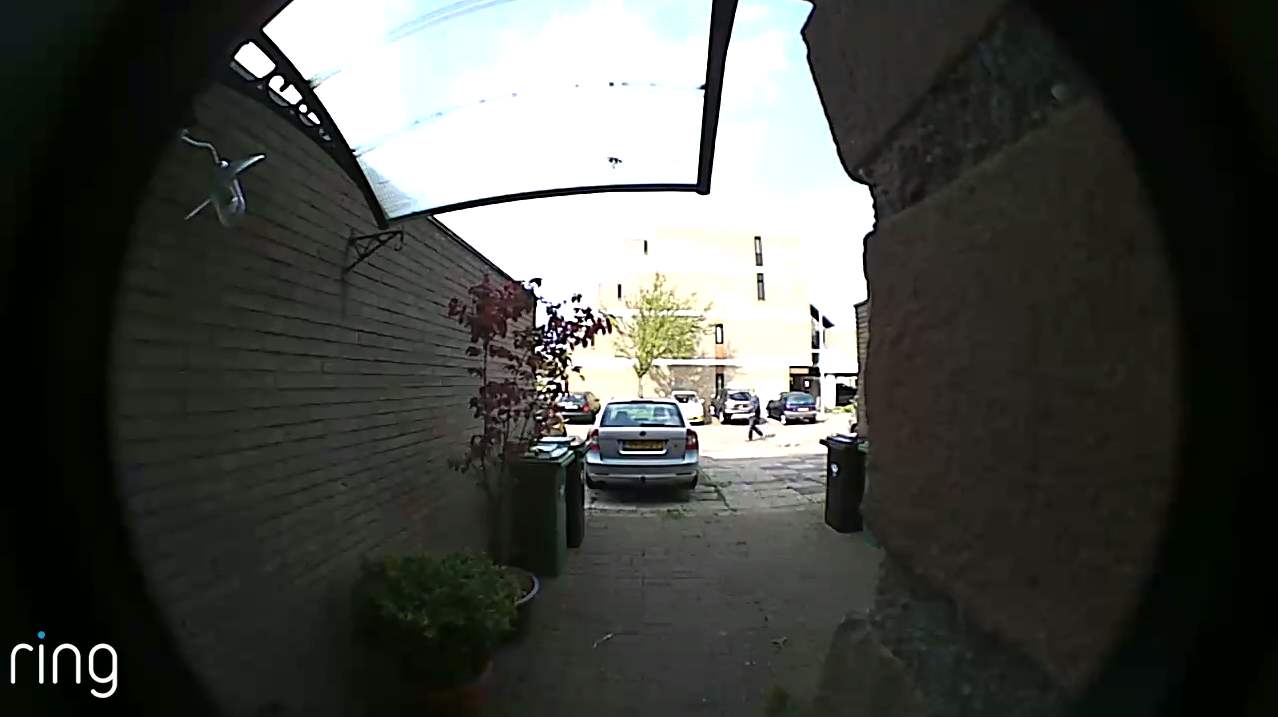
- ringapp.jpg (49.95 KiB) Viewed 17374 times
Re: WiFi Doorbell
Posted: Wednesday 06 May 2015 19:50
by Derik
mmm
What are the dimensions of the height ?
Not really goed in my eyes...
And a picture bij night...?
Re: WiFi Doorbell
Posted: Wednesday 06 May 2015 20:02
by brunod
The distortion of the image was because I played an avi and made an Alt-Printscreen of it.
It does not deliver pictures yet but only video's which are stored in the Ring.com cloud.
I have no video during darkness. It also does not have any infra-red lightning.
So it depends on a external light source.
Re: WiFi Doorbell
Posted: Friday 08 May 2015 14:10
by brunod
I just noticed this Wifi doorbell:
http://www.banggood.com/Wifi-Video-Phon ... 75580.html
May be that this one working in Domoticz? Anyone?
Re: WiFi Doorbell
Posted: Friday 08 May 2015 21:23
by Derik
I see a lot wifi bells..
Only do they have a api, so the camera is visible in domoticz?
So i can see the pictures, perhaps install motion, etc etc on the camera...
Re: WiFi Doorbell
Posted: Friday 15 May 2015 11:03
by markk
This looks interesting:
http://zilink.en.alibaba.com/product/19 ... amera.html
I enquired for price and was quoted $55 for the wifi bell and $4 for the wireless indoor chime!
Re: WiFi Doorbell
Posted: Friday 15 May 2015 14:32
by Derik
Only is this camera visible in Domoticz?
Is the WiFi camera open for a lan device?
Re: WiFi Doorbell
Posted: Saturday 16 May 2015 10:21
by markk
I ordered one today. Unfortunately, I'm not the best person to test all Domoticz comparability possibilities due to my limited knowledge on these things. I'd be quite happy with the remote video/audio function to be kept on the separate dedicated app to be honest. The possibility of setting the doorbell to trigger other events via RFXCom and Domoticz could be useful though and may be possible since the bell can link to a 433mhz wirefree chime.
Re: WiFi Doorbell
Posted: Saturday 16 May 2015 23:12
by Raspberry Piet
Looks nice this cowbell!

(i wonder what the ringtone sounds like)
Price is also nice.
Keep us posted if it will work in Domoticz!
Re: WiFi Doorbell
Posted: Wednesday 27 May 2015 9:41
by ThinkPad
Re: WiFi Doorbell
Posted: Wednesday 27 May 2015 15:29
by markk
Looks like DHL tried to deliver the Zilink one I ordered yesterday whilst I am on holiday. Ironically, I should have had a wifi doorbell so I could have asked The delivery driver to leave the item! I'll have to collect it from the depot when I get home now

Re: WiFi Doorbell
Posted: Wednesday 09 March 2016 21:19
by Dageezah
I have been thinking about a "wifi" doorbell for a while now - and I finally purchased the "Ring" doorbell, some great reviews out there, its really responsive and ticks almost every box... the main one it doesn't tick is domoticz integration.. but after a bit of playing I found that it is actually quite easy to add it to domoticz.
I looked at my DHCP log to find its IP address (192.168.0.6)
Ping 192.168.0.6 and there is no response
OK so as stated above it doesn't seem to be LAN aware
Turns out there must be some mechanism that starts the LAN when there is a doorbell push or motion detected.
So after a door bell push or motion detection you CAN ping the device, thus just add it as a ping test device and the rest is just logic to deal with what you want.
Re: WiFi Doorbell
Posted: Thursday 10 March 2016 14:52
by deennoo
Does your door Bell app show a pictures when some one ringing ?
If yes search on your phone where is store this pic.
Then using tasker, made event profile :
Looks for modify file, and set the directory where is store the pics.
Then set an action : http get : using domoticz JSON API to update your dummy switch.
And done ! Your ipbell is now able to speak to domoticz
Re: WiFi Doorbell
Posted: Saturday 15 October 2016 7:26
by Doudy
I asked various questions about the ring.
here are the answers :
Pour répondre a l'ensemble de vos questions,
les dimensions de la sonnette sont: 12.65 x 6.17 x 2.21 cm.
Oui la caméra reste branchée si elle fonctionne avec des cables, avec la batterie elle ne remplira cette fonction que lorsque quelqun se présentera a la porte.
La batterie a une durée de vie plutôt courte selons les témoignages, et il est préférable de la connecté. Meme si celle ci est rechargeable.
Son angle de vue est de 180°.
Il est effectivement équipé pour une vision nocturne.
Il n'y a pas d'API prévue pour le moment selon les informations communiqué par le fabricant.
Ce modèle est éffectivement integrable dans Domoticz.
Concernant le réseau, il depend a quel réseau vous faites références dans votre question.
