Page 1 of 1
Cannot set room in switch settings
Posted: Friday 10 October 2025 23:14
by wnaves
Version: 2025.1 (Build 16803)
Platform: Docker
Plugin/Hardware: na
Description:
When on the
https://xx.xx.xx:8443/#/LightSwitches page, pressing the
Edit button of any switch opens up the general settings.
In there,
Roomplan can be set, but this does not work.
It's possible to select a room plan from the list, but it never saves?
This switch is already in a roomplan, but is simply does not show as such in this page which is confusing.
I cannot find any documentation of these settings, so please answer on how to use this, or is it just a bug?
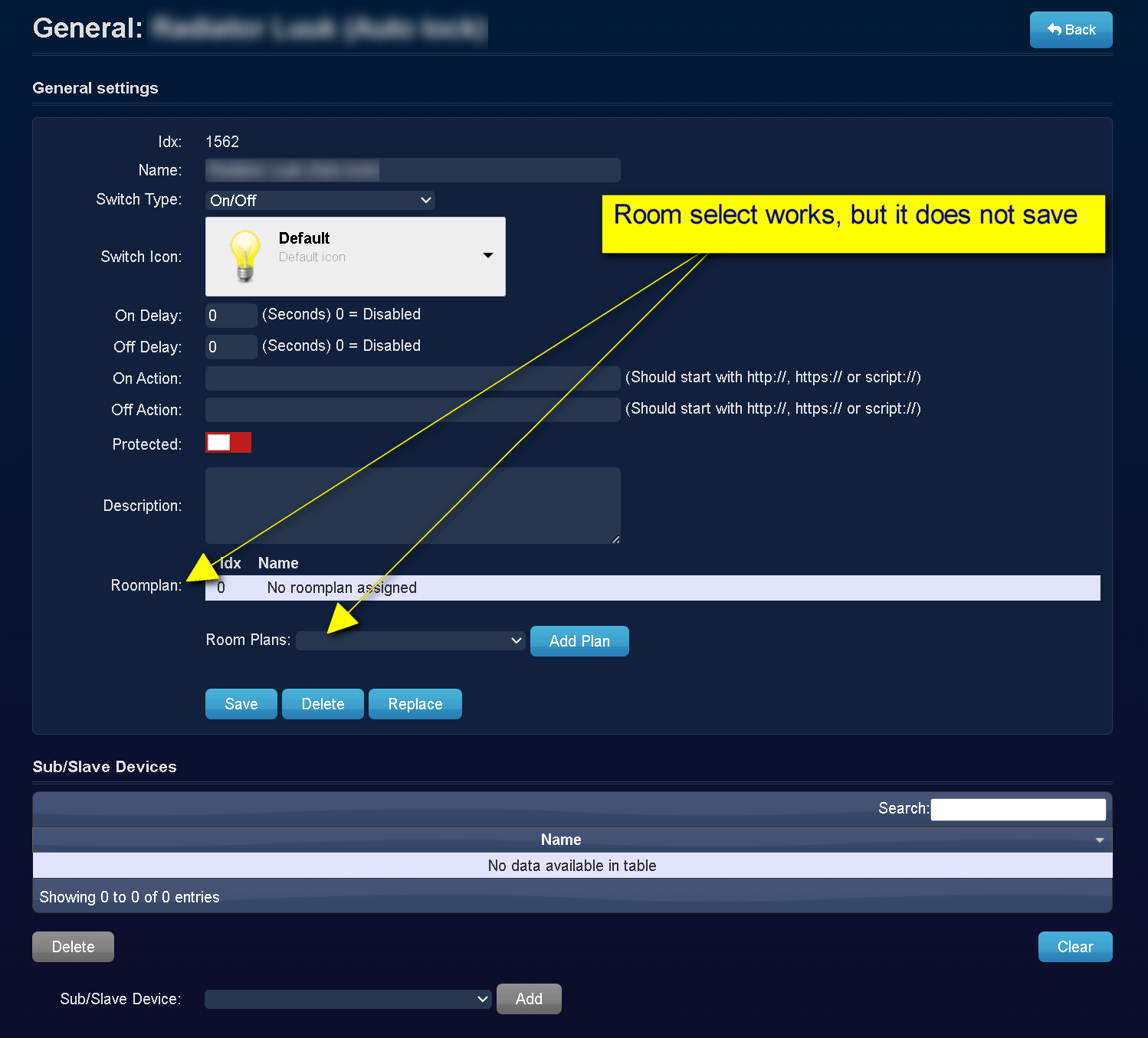
- Screenshot - 10-10-2025 , 22_55_08.png (149.59 KiB) Viewed 94 times
Re: Cannot set room in switch settings
Posted: Saturday 11 October 2025 14:59
by gizmocuz
You have to press the 'Add' button and then it will be added to the selected roomplan.
I just tested and added a dummy switch to 3 roomplans, also after, I refreshed the page, and see the 3 plans here
Re: Cannot set room in switch settings
Posted: Monday 13 October 2025 0:44
by wnaves
For me, i can select a plan from the list and press "Add Plan" button.
Screen flickers as if the whole page reloads, but not saving.
I tried multiple switches with multiple roomplans, but the behavior is the same.
Also tried clear cache and cookies, and also 3 different browsers.
Main browser is Edge currently on Version 141.0.3537.71 (Official build) (64-bit)
I tried to create a dummy switch, but this also acts in the same way.
Could this have something to do with access rights on the database maybe?
Everytime i create a new device, i can only start using it by editing my admin username, set devices, and move it to the right colmun.
Re: Cannot set room in switch settings
Posted: Monday 13 October 2025 8:54
by waltervl
wnaves wrote: Monday 13 October 2025 0:44
Could this have something to do with access rights on the database maybe?
Everytime i create a new device, i can only start using it by editing my admin username, set devices, and move it to the right colmun.
Ideally there should be only one admin and that admin should not have any devices in the set devices list.
Re: Cannot set room in switch settings
Posted: Sunday 26 October 2025 9:26
by wnaves
waltervl wrote: Monday 13 October 2025 8:54
wnaves wrote: Monday 13 October 2025 0:44
Could this have something to do with access rights on the database maybe?
Everytime i create a new device, i can only start using it by editing my admin username, set devices, and move it to the right colmun.
Ideally there should be only one admin and that admin should not have any devices in the set devices list.
I removed all devices from allowed list for my user and it looks that that was the trick.
Only odd thing now is it sometimes shows floorplan id only, and sometimes floorplan id AND the name to the right of it.
Refreshing browser with F5 sometimes helps. Cleared cache and cookies again, but behavior stays the same.
Any ideas on this last info?