Page 1 of 1
[SOLVED] Access state of device external to python plugin
Posted: Saturday 02 August 2025 14:28
by averter
Hello all,
Pretty basic question I'm convinced but I can't solve it by myself nor find anyone else stuck with the same issue. I've installed this
Domoticz-Solax-Plugin and I want to change it so that during its
heartbeat function it:
- Checks the state of a switch selector device (external to the plugin, with IDX=126)
- IF the state of this device is "Con" = Connected then I want to update one of the parameters of the plugin `<param field="Mode1" label="Update interval (seconds)" width="20px" default="10" />` so that it is equal to 10 seconds.
- on the other hand IF the parameter is at 10 seconds and the state of the device is "Dis"=Disconnected then revert back to the original update interval of 30 seconds.
I got stuck right at the start as I cannot find a way to read the state of an external device to the plugin.
What am I trying to achieve? I want the plugin to change the sampling rate of the inverter depending on whether I have my EV connected or not to domoticz. Charging is controlled with a different plugin, which has a selector switch to indicate if the EV is connected or not. Thanks for any help/pointers.
Re: Access state of device external to python plugin
Posted: Sunday 03 August 2025 10:28
by waltervl
You cannot control or read devices external of the ones managed by the plugin.
If you want to do that you have to use the http API calls, read the state and do the actions. You will have to set some extra plugin parameters to get Domoticz IP and port and device IDX into the plugin.
But perhaps it is better to have the plugin create a similar state device to check and have a dzvents script sync the 2 devices.
Re: Access state of device external to python plugin
Posted: Saturday 13 September 2025 13:21
by averter
Hi @waltervi. Thanks very much for your reply and sorry for my super late reply (only now had a moment of peace).
I might be overcomplicating things, so perhaps I'll explain what I'm trying to achieve in full. I want that when this device
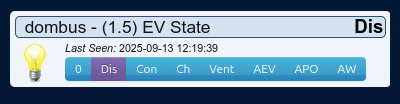
- Screenshot from 2025-09-13 12-19-41.png (12.32 KiB) Viewed 155 times
switches from disconnected (dis) to connected (con) state the input variable "Update interval (seconds):" in the below shown hardware
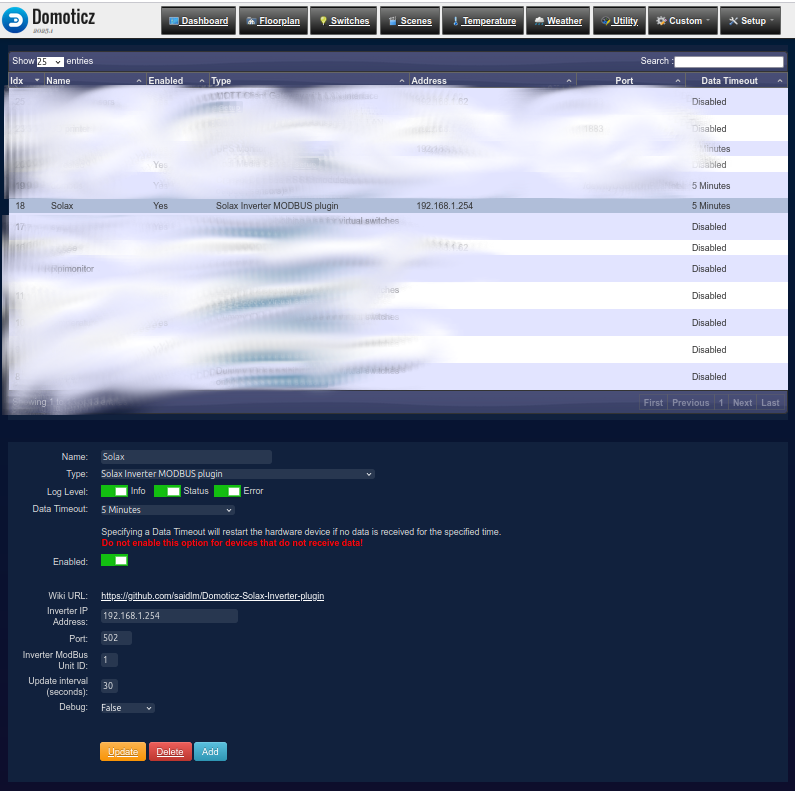
- Untitled.png (221.79 KiB) Viewed 155 times
is updated from 30 seconds or 11 seconds, or vice-versa when it switches from con to dis. Is there a simpler way to do this?

Re: Access state of device external to python plugin
Posted: Saturday 13 September 2025 17:11
by waltervl
You will have to talk with the plugin owner to have a polling frequency setting device.
Switching the polling frequency with a plugin setting will force a restart of the plugin everytime you change it. Not very handy.
I am not familiar with modbus but it seems strange it even needs a polling frequency.
Re: Access state of device external to python plugin
Posted: Wednesday 17 September 2025 11:06
by averter
Can't the domoticz API be used to update this parameter in the hardware? I've developed a code to fetch the hardware info
Code: Select all
import requests
# Configuration
DOMOTICZ_URL = 'http://192.168.65.29:8080/json.htm'
# Function to fetch hardware information
def fetch_hardware_info():
response = requests.get(f"{DOMOTICZ_URL}?type=command¶m=gethardware")
if response.status_code == 200:
data = response.json()
return data['result']
else:
print("Error fetching hardware info:", response.status_code)
return None
# Function to filter and display Solax hardware information
def display_solax_info(hardware_info):
for hardware in hardware_info:
if hardware['Name'] == 'Solax':
print("Solax Hardware Information:")
print(f"ID: {hardware['idx']}")
print(f"Name: {hardware['Name']}")
print(f"Type: {hardware['Type']}")
print(f"Address: {hardware['Address']}")
print(f"Port: {hardware['Port']}")
print(f"Enabled: {hardware['Enabled']}")
print(f"Extra: {hardware['Extra']}")
print(f"LogLevel: {hardware['LogLevel']}")
print(f"DataTimeout: {hardware['DataTimeout']}")
print(f"SerialPort: {hardware['SerialPort']}")
print(f"Mode1: {hardware['Mode1']}")
print(f"Mode2: {hardware['Mode2']}")
print(f"Mode3: {hardware['Mode3']}")
print(f"Mode4: {hardware['Mode4']}")
print(f"Mode5: {hardware['Mode5']}")
print(f"Mode6: {hardware['Mode6']}")
break
else:
print("Solax hardware not found.")
# Main logic
hardware_info = fetch_hardware_info()
if hardware_info:
display_solax_info(hardware_info)
which outputs the following
Code: Select all
Solax Hardware Information:
ID: 18
Name: Solax
Type: 94
Address: 192.168.1.254
Port: 502
Enabled: true
Extra: SolaxMODBUS
LogLevel: 7
DataTimeout: 300
SerialPort:
Mode1: 30
Mode2: 1
Mode3:
Mode4:
Mode5:
Mode6: Normal
From where it is clear that Mode1 is the parameter which would have to be updated. I'm trying to do so with another python code
Code: Select all
import requests
# Configuration
DOMOTICZ_URL = 'http://192.168.65.29:8080/json.htm'
# Function to list parameters before updating Mode1
def list_parameters(hardware_id, new_mode1_value):
# Fetch the current hardware information to get the type and other parameters
response = requests.get(f"{DOMOTICZ_URL}?type=command¶m=gethardware")
if response.status_code == 200:
data = response.json()
hardware_info = data['result']
# Find the hardware by ID
for hardware in hardware_info:
if hardware['idx'] == hardware_id:
# Prepare the payload for updating Mode1
payload = {
'type': 'command',
'param': 'updatehardware',
'idx': hardware_id,
}
# Copy all parameters from the hardware dictionary
payload.update(hardware) # Copy all parameters directly
payload['Mode1'] = new_mode1_value
# Print the parameters to verify
print("Parameters to be sent:")
for key, value in payload.items():
print(f"{key}: {value}")
# print(payload)
# update hardware using payload
update_response = requests.get(DOMOTICZ_URL, params=payload)
if update_response.status_code == 200:
update_data = update_response.json()
if update_data['status'] == 'OK':
print(f"Successfully updated Mode1 to {new_mode1_value} for hardware ID {hardware_id}.")
else:
print("Error updating Mode1:", update_data)
else:
print("Error making request:", update_response.status_code)
break
else:
print("Hardware ID not found.")
else:
print("Error fetching hardware info:", response.status_code)
# Example usage
hardware_id = '18' # Replace with the actual ID of the Solax hardware
new_mode1_value = '11' # Replace with the desired new value for Mode1
list_parameters(hardware_id, new_mode1_value)
but I'm getting a Error updating Mode1: {'status': 'ERR'}

When the payload is printed everything seems to be fine though
Code: Select all
Parameters to be sent:
type: command
param: updatehardware
idx: 18
Address: 192.168.1.254
DataTimeout: 300
Enabled: true
Extra: SolaxMODBUS
LogLevel: 7
Mode1: 11
Mode2: 1
Mode3:
Mode4:
Mode5:
Mode6: Normal
Name: Solax
Password:
Port: 502
SerialPort:
Type: 94
Username:
Re: Access state of device external to python plugin
Posted: Wednesday 17 September 2025 19:54
by averter
The documentation of the API is not very helpful here, but it is doable. Basically I had to
- lowercase all key entries of the hardware except the ones starting with Mode*,
- add a "htype" entry corresponding to the "Type" entry in the original request to fetch hardware info, and
- add "type-command" and "param-updatehardware" dictionary entries to the payload.
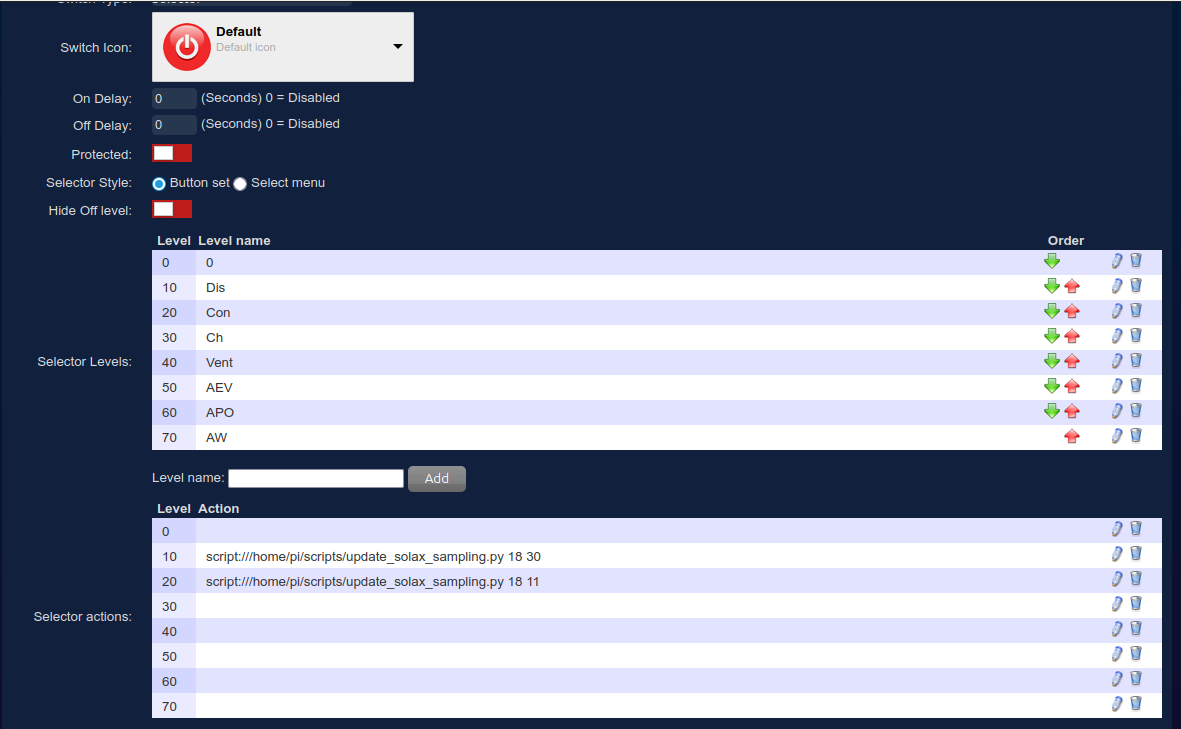
The final code is shown below. I've also added sys so that the script can be called from within the device with input arguments to specify different update intervals. The step change came after reading
this post on github where the lowercase aspect has been mentioned - it ought to be mentioned in the domoticz API/JSON webpage...
Code: Select all
#!/usr/bin/python
import requests
import sys
# Configuration
DOMOTICZ_URL = 'http://192.168.65.29:8080/json.htm'
# Function to list parameters before updating Mode1
def list_parameters(hardware_id, new_mode1_value):
# Fetch the current hardware information to get the type and other parameters
response = requests.get(f"{DOMOTICZ_URL}?type=command¶m=gethardware")
if response.status_code == 200:
data = response.json()
hardware_info = data['result']
# Find the hardware by ID
for hardware in hardware_info:
if hardware['idx'] == hardware_id:
# Prepare the payload for updating Mode1
payload = {
'type': 'command',
'param': 'updatehardware',
}
# Create a new dictionary excluding the 'Type' key
hardware_to_update = {k: v for k, v in hardware.items() if k != 'Type'}
# Copy all parameters from the hardware dictionary
payload.update(hardware_to_update) # Copy all parameters directly
payload['Mode1'] = new_mode1_value
# Convert all keys in the payload to lowercase except Mode* ones
payload = {key.lower() if not key.startswith('Mode') else key: value for key, value in payload.items()}
# Add htype based on Type from hardware
payload['htype'] = hardware['Type']
# update hardware using payload
update_response = requests.get(DOMOTICZ_URL, params=payload)
if update_response.status_code == 200:
update_data = update_response.json()
if update_data['status'] == 'OK':
print(f"Successfully updated Mode1 to {new_mode1_value} for hardware ID {hardware_id}.")
else:
print("Error updating Mode1:", update_data)
else:
print("Error making request:", update_response.status_code)
break
else:
print("Hardware ID not found.")
else:
print("Error fetching hardware info:", response.status_code)
# Main execution
if __name__ == "__main__":
if len(sys.argv) != 3:
print("Usage: script.py <hardware_id> <new_mode1_value>")
sys.exit(1)
hardware_id = sys.argv[1] # Get hardware ID from command line argument
new_mode1_value = sys.argv[2] # Get new Mode1 value from command line argument
# Call the list_parameters function with the provided arguments
list_parameters(hardware_id, new_mode1_value)
and this is how the device looks like
- Screenshot from 2025-09-17 18-51-53.png (79.83 KiB) Viewed 115 times