Page 1 of 1
Widget for Blinds + Stop
Posted: Monday 07 April 2025 19:08
by FireWizard
Hi all,
If I configure a virtual "Switch" and change that later to "Blinds + Stop",
I noticed the following:
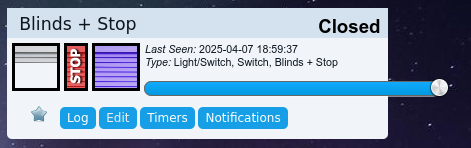
- Screenshot_Blinds_Stop.png (29.22 KiB) Viewed 1503 times
It doesn't look, what it is supposed to look.
Anyone else has seen the same?
Regards
Re: Widget for Blinds + Stop
Posted: Monday 07 April 2025 19:12
by waltervl
I see this sometimes and after a refresh of the page it shows normally. So some glitch somewhere in the css I suppose.
Re: Widget for Blinds + Stop
Posted: Monday 07 April 2025 19:45
by FireWizard
Thanks for your response @waltervl
A page refresh does not help. I tested it both on Firefox and Google Chrome
On both I see the same result.
I tested on the latest stable 2024.7 and also on the (almost) latest beta 2025.1 (build 16611)
Regards
Re: Widget for Blinds + Stop
Posted: Monday 07 April 2025 19:57
by solarboy

It's been like that since the big roller shutter shake up crisis. I rarely see it because I don't control my shutters directly usually.
Re: Widget for Blinds + Stop
Posted: Monday 07 April 2025 21:14
by FireWizard
Hi,
I never payed much attention to that blinds issue, as I do not own blinds, that are able to control by Domoticz.
But I discovered it, while working at @Daro1003 project.
.
But as we are approaching a new stable release in the near future, it is probably time to solve it.
Regards
Re: Widget for Blinds + Stop
Posted: Tuesday 08 April 2025 20:50
by Daro1003
FireWizard wrote: Monday 07 April 2025 21:14
Hi,
I never payed much attention to that blinds issue, as I do not own blinds, that are able to control by Domoticz.
But I discovered it, while working at @Daro1003 project.
.
But as we are approaching a new stable release in the near future, it is probably time to solve it.
Regards
For me, the issue of shutter operation in domoticz is crucial and very useful in the operation of home automation.
On the Polish forum, one of the Domoticz users, being a fan of Domoticz and often defending it among other users, wrote that he gave up on Domoticz precisely because of the lack of integration with shutters and it is precisely the shelly modules that are concerned because they provide shutter control in %%.
I was looking for many solutions for shutters apart from shelly and I found Tasmota and modules:
https://nous.technology/product/b3t.html
I bought one of them and configured it to work with shutters.
Unfortunately, the problem I encountered was integration with Domoticz, which I wrote about here:
https://github.com/joba-1/Tasmoticz/issues/52
It probably did not meet with interest.
Tasmota for blinds is a cheaper and better solution because it can be loaded into cheap Sonoff Dual modules or buy a NOUS B3T module which I hope is less prone to failures than the shells I have, in 3 years 4 pieces have failed and in 14 pieces I replaced capacitors because all of them lost Wi-Fi connection after a year.
It is also worth considering the flow in NodeRed for Tasmota.
Re: Widget for Blinds + Stop
Posted: Tuesday 08 April 2025 23:36
by waltervl
For Domoticz it all should work according the definitions:
https://wiki.domoticz.com/Blinds
For my zigbee controlled devices (with Zigbee4Domoticz plugin) this works perfectly.
Re: Widget for Blinds + Stop
Posted: Wednesday 09 April 2025 7:49
by Daro1003
Hello
I would like to test zigbee because I have never used it. Can you recommend:
waltervl wrote: Tuesday 08 April 2025 23:36
with Zigbee4Domoticz plugin
and a roller shutter controller that works with a plug and Domoticz?
So that's a starter kit.
Re: Widget for Blinds + Stop
Posted: Wednesday 09 April 2025 11:02
by waltervl
Daro1003 wrote: Wednesday 09 April 2025 7:49
Hello
I would like to test zigbee because I have never used it. Can you recommend:
waltervl wrote: Tuesday 08 April 2025 23:36
with Zigbee4Domoticz plugin
and a roller shutter controller that works with a plug and Domoticz?
So that's a starter kit.
See
https://zigbee.blakadder.com/covers.html If it is not compatible the plugin author can make it compatible with the right information.
You also need a zigbee controller (USB stick).
See also the Zigbee4Domoticz wiki
https://zigbeefordomoticz.github.io/wiki/en-eng/