Page 1 of 1

JSON call behind Nginx reverse proxy

Posted: Tuesday 03 September 2024 12:50
by ressof
Hi

I have setup domoticz to run behind a reverse proxy and followed this guide

https://www.domoticz.com/wiki/WebServer_Proxy

I have setup nginx as the guide and also added my proxys ip to trusted networks.
I can access domoticz from everywhere and I have to enter credentials and OTP to login. This works great.

But I want to do a JSON call to toggle a switch from remote.

I paste this command in safari to test it when I on 4G
https://user:password@domain/json.htm?t ... cmd=Toggle
but then I get 401 Unauthorized

I have added the device in "Set devices" under user, and the user have user rights.

I get this in my logs

Code: Select all

2024-09-03 12:45:00.299  Debug: [web:8080] Host:192.168.x.x Uri:/json.htm?type=command&param=switchlight&idx=775&switchcmd=Toggle
2024-09-03 12:45:00.299  Debug: [web:8080] Request Headers:
Host: [domain]
X-Real-IP: [4G IP]
X-Forwarded-For: [4G IP]
X-Forwarded-Proto: https
X-Scheme: https
Connection: close
accept: text/html,application/xhtml+xml,application/xml;q=0.9,*/*;q=0.8
sec-fetch-site: none
accept-encoding: gzip, deflate, br
sec-fetch-mode: navigate
user-agent: Mozilla/5.0 (iPhone; CPU iPhone OS 17_6 like Mac OS X) AppleWebKit/605.1.15 (KHTML, like Gecko) CriOS/128.0.6613.34 Mobile/15E148 Safari/604.1
accept-language: sv-SE,sv;q=0.9
sec-fetch-dest: document

2024-09-03 12:45:00.299  Debug: [web:8080] IP (192.168.x.x) is within Trusted network range!
2024-09-03 12:45:00.299  Debug: [web:8080] Did not find suitable Authorization!
2024-09-03 12:45:00.299  Debug: Web ACLF: [4G IP] - - [03/Sep/2024:12:45:00.299 +0200] "GET /json.htm?type=command&param=switchlight&idx=775&switchcmd=Toggle HTTP/1.1" 401 91 - "M>
Re: JSON call behind Nginx reverse proxy

Posted: Tuesday 03 September 2024 16:59
by waltervl
Some browsers do not support user:password in an url. So you have to test this with tools like curl or postman

Re: JSON call behind Nginx reverse proxy

Posted: Wednesday 04 September 2024 8:01
by ressof
Is there a way to use the API with POST or GET with headers and body instead of having the username and password in the URL? I'm using HTTPS

Re: JSON call behind Nginx reverse proxy

Posted: Wednesday 04 September 2024 8:47
by ressof
I tried with https://reqbin.com/post-online

I used this post:

Code: Select all

POST /json.htm HTTP/1.1
Authorization: Basic [Base64 encoded uername:password]
Host: [domain]
Accept: application/json
Content-Type: application/json
Content-Length: 88

{
  "type": "command",
  "param": "switchlight",
  "idx": 775,
  "switchcmd": "Toggle"
}
but I get this in domoticz log:

Code: Select all

[WebServer] Deprecated RType () for API request. Call ignored, please use correct API Command! (192.168.x.x)

Re: JSON call behind Nginx reverse proxy

Posted: Wednesday 04 September 2024 9:51
by habahabahaba
Hi.
Are you using zigbee plugin and what is the version of Domoticz?

https://zigbeefordomoticz.github.io/wik ... pi-command

Re: JSON call behind Nginx reverse proxy

Posted: Wednesday 04 September 2024 10:07
by waltervl
ressof wrote: Wednesday 04 September 2024 8:47 I tried with https://reqbin.com/post-online

I used this post:

Code: Select all

POST /json.htm HTTP/1.1
Authorization: Basic [Base64 encoded uername:password]
Host: [domain]
Accept: application/json
Content-Type: application/json
Content-Length: 88

{
  "type": "command",
  "param": "switchlight",
  "idx": 775,
  "switchcmd": "Toggle"
}
but I get this in domoticz log:

Code: Select all

[WebServer] Deprecated RType () for API request. Call ignored, please use correct API Command! (192.168.x.x)
Better try the html version. But I am not sure it will work with this application. From what remote application do you want to send the JSON command in the end?

Re: JSON call behind Nginx reverse proxy

Posted: Wednesday 04 September 2024 12:42
by ressof
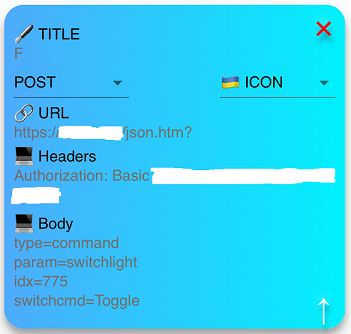
In the end I want to use my Amazfit Watch that has a html app that looks like this

Image

Re: JSON call behind Nginx reverse proxy

Posted: Wednesday 04 September 2024 12:53
by ressof
habahabahaba wrote: Wednesday 04 September 2024 9:51 Hi.
Are you using zigbee plugin and what is the version of Domoticz?

https://zigbeefordomoticz.github.io/wik ... pi-command
I dont use zigbeefordomoticz, I use zigbee2mqtt

Re: JSON call behind Nginx reverse proxy

Posted: Wednesday 11 September 2024 15:57
by ressof
I have tested with some different online json post tester and it seems that when the content is in this form it works:

Code: Select all

type=command&param=switchlight&idx=775&switchcmd=Toggle
but when it is json formatted like this it does not work

Code: Select all

{"type":"command","param":"switchlight","idx":"775","switchcmd":"Toggle"}
Is this something that can be fixed?

Re: JSON call behind Nginx reverse proxy

Posted: Wednesday 11 September 2024 16:57
by waltervl
In the app you cannot use as URL the complete URL (so empty body in the app)?

Code: Select all

https://yourdomain/json.htm?type=command&param=switchlight&idx=775&switchcmd=Toggle

Re: JSON call behind Nginx reverse proxy

Posted: Thursday 12 September 2024 7:39
by ressof
That worked when I added

Code: Select all

Content-Type: application/x-www-form-urlencoded
in header.

Thank you

Re: JSON call behind Nginx reverse proxy

Posted: Thursday 12 September 2024 11:28
by ressof
But when I try to change a selector switch I get this error

Code: Select all

{
	"message" : "Error sending switch command, check device/hardware (idx=193) !",
	"status" : "ERROR",
	"title" : "SwitchLight"
}

Re: JSON call behind Nginx reverse proxy

Posted: Thursday 12 September 2024 13:27
by waltervl

Re: JSON call behind Nginx reverse proxy

Posted: Thursday 12 September 2024 14:42
by ressof
I think so, this i the command I ran:

Code: Select all

/json.htm?type=command&param=switchlight&idx=193&switchcmd=Set%20Level&level=40

Re: JSON call behind Nginx reverse proxy

Posted: Thursday 12 September 2024 15:01
by waltervl
From a browser it works? Level 40 is a valid level number?

Re: JSON call behind Nginx reverse proxy

Posted: Tuesday 17 September 2024 12:52
by ressof
From a browser it worked. But from the logs in Domoticz it lead me to try this from the app instead of last command

Code: Select all

/json.htm?type=command&param=switchlight&idx=193&switchcmd=Set Level&level=40
a space between "Set Level" instead of %20 and now it works

Thank you for your help.