Page 1 of 1
Request Orcon functionality in Domoticz
Posted: Monday 19 February 2024 10:59
by 84dasilva
RFXcom868xl is able to communicate with Orcon (MVS-15H) in the windows test program.
Please activate this functionality in Domoticz.
Re: Request Orcon functionality in Domoticz
Posted: Monday 19 February 2024 13:34
by waltervl
I see references of Orcon in the source code (for Fans). I am no RF user so no idea how to select it in Domoticz.
Re: Request Orcon functionality in Domoticz
Posted: Monday 19 February 2024 13:45
by waltervl
Do you see the Orcon Protocol when selecting Set Mode on your RFXCOM hardware gateway (menu Setup - Hardware)?
Re: Request Orcon functionality in Domoticz
Posted: Wednesday 21 February 2024 18:43
by 84dasilva
Hi, thanks for reply.
No the protocol selection functionality has been removed from domoticz. Also I don't see the required protocol as an option.
In the rfxmngr the orcon protocol is activated.
Re: Request Orcon functionality in Domoticz
Posted: Wednesday 21 February 2024 20:55
by waltervl
Yes it seems this is the new way to not select it within Domoticz anymore. See also
https://github.com/domoticz/domoticz/is ... 1518644890
So what is the issue? When you have set Orcon in RFXManager your receiver can work with that and should communicate with Domoticz.
Re: Request Orcon functionality in Domoticz
Posted: Wednesday 21 February 2024 21:00
by 84dasilva
waltervl wrote: Wednesday 21 February 2024 20:55
Yes it seems this is the new way to not select it within Domoticz anymore. See also
https://github.com/domoticz/domoticz/is ... 1518644890
So what is the issue? When you have set Orcon in RFXManager your receiver can work with that and should communicate with Domoticz.
The issue is that domoticz does not seem to work with the orcon protocol. It does not see any incomming devices. Devices which are seen in the rfxmngr tool.
I cannot find any other options to search or set any rfxcom868 device related settings in domoticz.
Re: Request Orcon functionality in Domoticz
Posted: Wednesday 21 February 2024 21:02
by waltervl
Perhaps ask rfxcom directly how to do that.
Re: Request Orcon functionality in Domoticz
Posted: Wednesday 21 February 2024 21:05
by 84dasilva
waltervl wrote: Wednesday 21 February 2024 21:02
Perhaps ask rfxcom directly how to do that.
He adviced to post the request here.
Re: Request Orcon functionality in Domoticz
Posted: Sunday 24 November 2024 16:08
by opechunka
Also tried with RFXtrx. Received "Invalid data received!....".
But even after I changed the source code and commented out check for type pTypeFan, Domoticz detected new buttons per every Orcon button (if you press it). But they were not functional at all. While looking into Domoticz source code for Orcon support, it looks like the imlementation is not finished.
Re: Request Orcon functionality in Domoticz
Posted: Monday 22 December 2025 20:54
by homeJLB
I found that the respons from a Orcon device is
but the Fan device in domoticz has
so if I make a change in RFXBase.cpp to
Code: Select all
case pTypeFan:
return (pLen == 0x08 || pLen == 0x11);
Then the code works and gives me a on/off switch.
But sometimes it is detected as a second device.
So with 1 remote I have 2 devices discovered.

- RFXcom 868.png (18.43 KiB) Viewed 180 times
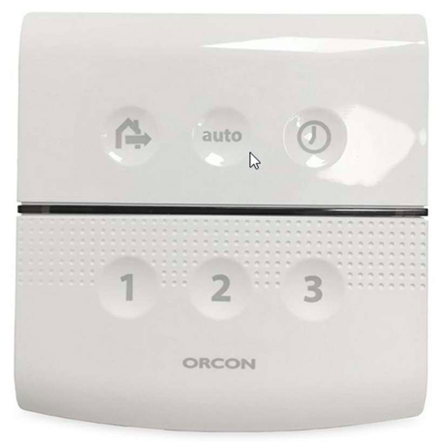
The Hardware remote 15RF has 6 buttons.
- 15RF.png (141.49 KiB) Viewed 180 times
So has someone another remote and does we have to make a separate Fan Device for Orcon (FAN2)
Kind Regards
Re: Request Orcon functionality in Domoticz
Posted: Thursday 25 December 2025 10:23
by homeJLB
With my test setup I now have identified the different messages.
So based on this I propose a change from using RemoteID to using Destination ID as Hardware ID in Domoticz.
Leaves only the state off the device from the 6 buttons.
Happy Hollidays
Re: Request Orcon functionality in Domoticz
Posted: Saturday 27 December 2025 21:29
by 84dasilva
I also have an honeywell hgi80 transeiver, which operates on the same frequency/protocol.
It also notices messages received from the orcon.
2025-12-27 21:15:41.601 Error: EvohomeHGI80: Unknown command 31d9
2025-12-27 21:15:58.464 Error: EvohomeHGI80: Unknown command 31e0
2025-12-27 21:17:41.073 Error: EvohomeHGI80: Unknown command 1298
These messages seem to be status info received from the orcon Unit.
Does anyone here have the skills to add these message ids for decoding?
Re: Request Orcon functionality in Domoticz
Posted: Saturday 27 December 2025 22:21
by homeJLB
if your Honeywell HGI80 is connected to the same hardare as the RFX.
you can add
Code: Select all
_log.Debug(DEBUG_HARDWARE, "CheckValidRFXData: pLen=0x%02X, pType=0x%02X (%s), pData=%s", pLen, pType, RFX_Type_Desc(pType, 1), ToHexString(pData, pLen + 1).c_str());
just like
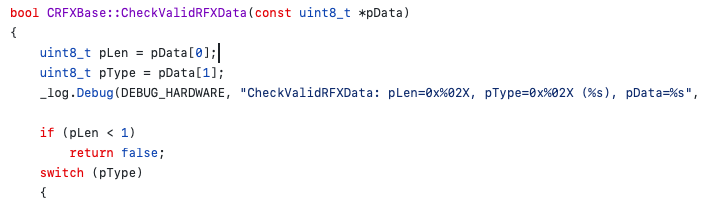
- CheckvalidRFXdata.png (36.19 KiB) Viewed 139 times
then you can see the HEX-code transmitted and received
kind regards
Re: Request Orcon functionality in Domoticz
Posted: Monday 29 December 2025 13:46
by 84dasilva
Thanks for the quick response.
I need to find the time to look into this, this will be later in Januari.
Wil get back to it.
Re: Request Orcon functionality in Domoticz
Posted: Monday 29 December 2025 21:16
by homeJLB
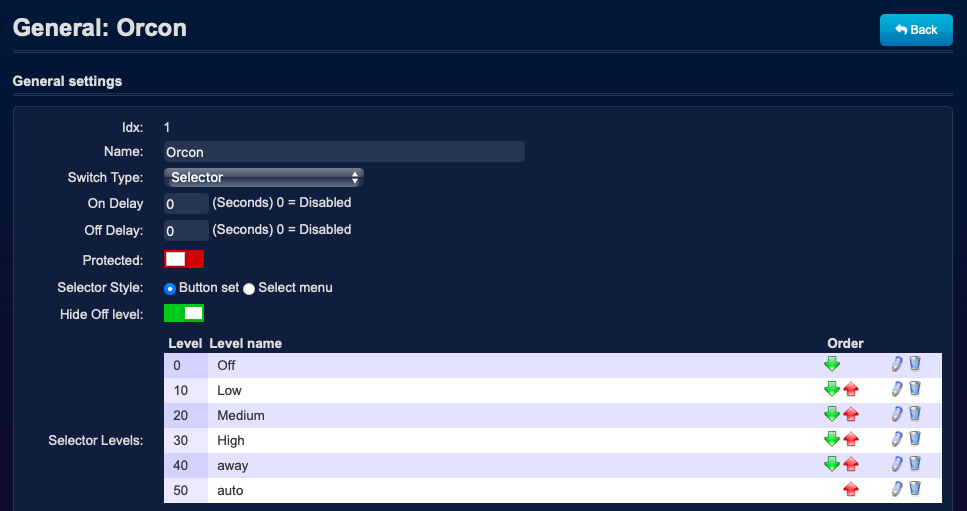
I have found that a FAN-device in domoticz is only correct displayed with a On/Off switch.
With a Selector Switch the Icon is empty.
Also when selecting the FAN as Favorite it is not shown on the Dashboard.
When I changed on the switch-page to selector-switch and add levels.
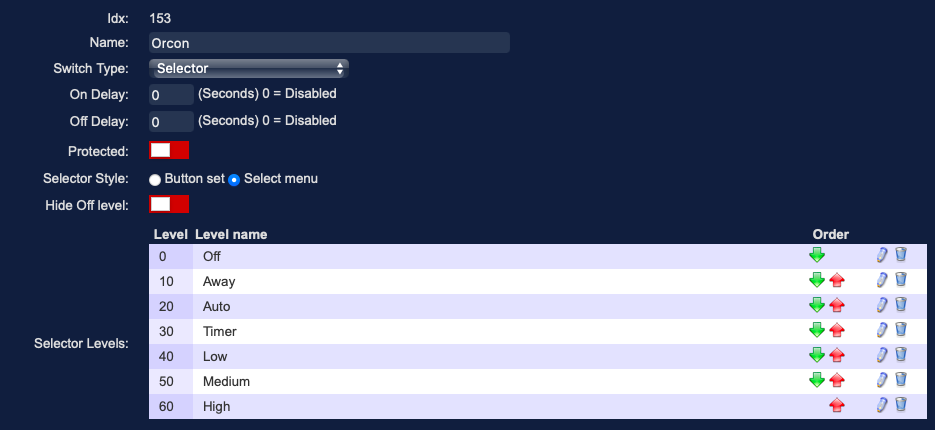
- Orcon.png (68.56 KiB) Viewed 122 times
And when I press a button on the selectorswitch there is a mismatch from the ID
It changed from 772473 to 732473
So I believe the Write to Hardware is also a Problem.

- Fan.png (18.66 KiB) Viewed 122 times
I have changed in
hardware/RFXBase.cpp
Code: Select all
case pTypeFan:
		return (pLen == 0x08 || pLen == 0x11 || pLen == 0x31);
and in
main/mainworker.cpp
Code: Select all
	//      Make a switch for Orcon Device based on Destination ID
	if (pResponse->ICMND.subtype == 0x0C)
	{
		_log.Debug(DEBUG_HARDWARE, "Subtype Orcon detected");
		sprintf(szTmp, "%02X%02X%02X", pResponse->FAN2.did1, pResponse->FAN2.did2, pResponse->FAN2.did3);
		//"CustomImage", 8 FAN
	}
	else
		sprintf(szTmp, "%02X%02X%02X", pResponse->FAN.id1, pResponse->FAN.id2, pResponse->FAN.id3);
This to have the received switch with Destination ID.
Happy Holidays
Re: Request Orcon functionality in Domoticz
Posted: Tuesday 30 December 2025 6:46
by homeJLB
homeJLB wrote: Monday 29 December 2025 21:16
I have found that a FAN-device in domoticz is only correct displayed with a On/Off switch.
With a Selector Switch the Icon is empty.
Also when selecting the FAN as Favorite it is not shown on the Dashboard.
When I changed on the switch-page to selector-switch and add levels.
Orcon.png
And when I press a button on the selectorswitch there is a mismatch from the ID
It changed from 772473 to 732473
So I believe the Write to Hardware is also a Problem.
Fan.png
I have changed in
hardware/RFXBase.cpp
Code: Select all
case pTypeFan:
		return (pLen == 0x08 || pLen == 0x11 || pLen == 0x31);
and in
main/mainworker.cpp
Code: Select all
	//      Make a switch for Orcon Device based on Destination ID
	if (pResponse->ICMND.subtype == 0x0C)
	{
		_log.Debug(DEBUG_HARDWARE, "Subtype Orcon detected");
		sprintf(szTmp, "%02X%02X%02X", pResponse->FAN2.did1, pResponse->FAN2.did2, pResponse->FAN2.did3);
		//Write to Hardware has no DestinationID so using Normal ID
		if (pResponse->FAN2.did1 == 0)
			sprintf(szTmp, "%02X%02X%02X",pResponse->FAN2.id1, pResponse->FAN2.id2, pResponse->FAN2.id3);
		//"CustomImage", 8 FAN
	}
	else
		sprintf(szTmp, "%02X%02X%02X", pResponse->FAN.id1, pResponse->FAN.id2, pResponse->FAN.id3);
This to have the received switch with Destination ID.
Happy Holidays
Re: Request Orcon functionality in Domoticz
Posted: Monday 05 January 2026 20:23
by homeJLB
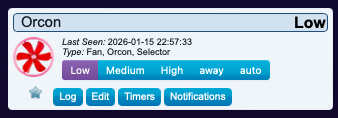
I have found a solution for supporting the ORcon-FAN device.
I have made a Pull-Request on Git-hub.
- Orcon Fan.png (26.82 KiB) Viewed 87 times
- FAN Options.png (77.44 KiB) Viewed 87 times
Kind Regards