Page 1 of 1
Display P1 device on floorplan
Posted: Thursday 11 January 2024 9:32
by BartSr
Hi!
Since update 2023v2 > 2024v1 (which was very easy and without further problems) my P1 device just only show the current Power
Before it showed the total consumed power of that day instead.
How to get back the total power of the day?
Thanks
Bart
Re: Display P1 device on floorplan
Posted: Friday 12 January 2024 11:17
by gizmocuz
Most users want to know the current live usage instead of the total daily usage.
If you click on it, it should display it?
Re: Display P1 device on floorplan
Posted: Friday 12 January 2024 20:39
by BartSr
Gizmocuz, I am happy with many new features but this is a step back. Now it's no longer possible e.g. to see total consumed power of heatpump which is important to manage costs. You say many users asked for display power. But what about the many users who are very happy with displaying total consumed that day?
Can we get a tick-sign to chose how to display P1 on a floorplan?
Clicking on the device makes indeed the wanted value visible. But I have the floorplan with devices on it to have an overview of a number of devices in a view. Need for clicking on the device is for that unwanted.
Do you have a workaround to keep display as it was?
-Bart
Re: Display P1 device on floorplan
Posted: Saturday 13 January 2024 12:25
by McMelloW
@BartSr
Perhaps this script might be of any help for you
https://github.com/BazemanKM/Domoticz-M ... n%20script
Re: Display P1 device on floorplan
Posted: Saturday 13 January 2024 17:11
by BartSr
@ McMelloW
Thanks for your help.
Sadly this (great) script is only to be used with P1 meter from Main Supply. Not from individual P1 device.
-Bart
Re: Display P1 device on floorplan
Posted: Friday 26 January 2024 11:35
by rolfb
I second this request. My smart meter already had a device showing current power usage. So now I have 2 identical metrics, and missing out on daily sum (on my floorplan).
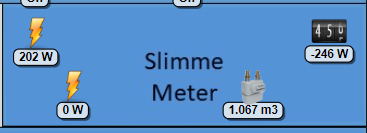
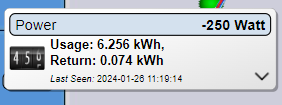
So in pics below, I'd like to have value 6.256kWh on my floorplan instead of -246W.
(Difference between 202W up and -246W is a timing thing I guess.
Or a generic solution: a way to select what value to display on floorplan in case of a multiple-items-device .
- domo1.png (26.6 KiB) Viewed 1315 times
- domo2.png (11.2 KiB) Viewed 1315 times
Re: Display P1 device on floorplan
Posted: Friday 26 January 2024 11:52
by gizmocuz
You could create a git pull request to add this as a floorplan setting maybe?
Re: Display P1 device on floorplan
Posted: Monday 29 January 2024 15:28
by rolfb
If I had the skills to do it, I would be happy to.
But unfortuntely I do not...

Re: Display P1 device on floorplan
Posted: Monday 29 January 2024 22:47
by BartSr
Gizmocus, what a strange reaction. Many users, maybe most, were happy with a daily total on the floorplan. Than you 'surprised' many (probably most? ) users with just current power value. And now you are asking for a pullrequest for something what was there already?
Can you explain why not just a tick possibility what THE USER desires?
Bart
Re: Display P1 device on floorplan
Posted: Tuesday 30 January 2024 14:15
by gizmocuz
If you 'desire' it, you better watch the show 'Lucifer' ... good show bdw!
Two users here... do you really think that you represent 'most users' ?
And I even said I'm open for the change just make a PR
Not that hard to do ... and you learn something as well.
Maybe you can even make more improvements, as I don't use the floorplan at all, and still did a lot of work for this.
Next, I don't get paid for this.... and you may use it for free...
It's time you are going to contribute now and make this simple PR, you have the before and after, welcome to open source!
Re: Display P1 device on floorplan
Posted: Tuesday 30 January 2024 17:35
by BartSr
Rob, don't know what happened to you but it seems you prefer users going to move to HA? For sure Domoticz is a nice piece of programming work. I've worked in a company who also made beautiful industrial software and yes, it was complex. Same as you are stating now the software architect and developers always said that it was not difficult for them. They stood at far distance from the people having none or little experience with programming.
Same behaviour I notice in your answers. It seems you do'nt like critical users. Very pitty.
In your answer you are talking about two users. Yes two users who dare to complain but how many don't dare? Because they complained earlier and got also not that kind answer? How we are missing late Waaren. Always open to help in friendly way. Wish you are at least half of him !
Bart
Re: Display P1 device on floorplan
Posted: Thursday 15 February 2024 14:14
by BartSr
@rolfb
Did you manage a workaround,
If not I might have and will share.
-Bart