Hello @hasselhoffer,
I have looked to your problem and found the following solution:
See the picture below:

- Screenshot_Rain_flow.png (14.33 KiB) Viewed 2901 times
Therefore you need to load a custom node, which measures the time between two messages.
It is called "Interval length", but feel free to give it another name
Go to the "Hamburger" menu and select "Manage palette". Clich tab "Install".
Search for "node-red-contrib-interval-length". Install this node.
See:
https://flows.nodered.org/node/node-red ... val-length
As said, this node measures the time between two incoming messages and gives it (in this case) in milliseconds.
In the flow: Remove the "Inject" node and replace it by your node giving the output: {"RAIN":1311.3,"BAT":"OK"}.
The "function" node has the following contents:
Code: Select all
const idx = 27;
let bat;
let cur_rainvalue = msg.payload.RAIN;
let prev_rainvalue = flow.get("rainvalue");
if (prev_rainvalue == "undefined") {
flow.set ("rainvalue", cur_rainvalue);
} else {
let fallen = cur_rainvalue - prev_rainvalue;
let rate = fallen / (msg.interval / 360000000);
flow.set ("rainvalue", cur_rainvalue);
if (msg.payload.BAT === "OK") {
    bat = 100
} else if (msg.payload.BAT === "LOW") {
    bat = 10
}
msg.payload = {"command": "udevice", "idx": idx, "svalue": rate.toFixed().toString() + ";" + fallen.toString(), "Battery" : bat};
return msg;
}
The first line contains the Domoticz idx. Replace it by the idx of your virtual sensor (Rain).
The second line declares the bat value as this is needed for the "Battery". See also the "Wind" sensor.
Also I declared two variables, called cur_rainvalue and prev_rainvalue.
The cur_rainvalue is the current rain value, as just received, while the prev_rainvalue has been received in the previous message.
The next step is to test if the flow variable, called rainvalue has a valid numeric value. It will happen that after a flow restart or deploy the value is undefined. In that case the received value is stored and nothing will happen until the next message is received.
When we receive the next message, I use two variables, fallen and rate, in order to avoid long lines. These variables are used in the final line to the MQTT output to Domoticz. The cur_rainvalue is now stored in the flow variable and will become the prev_rainvalue as the next message arrives.
The value of "fallen" is the difference between the previous value and the current value.
The rate is the same divided by 1000 (from millisecond to seconds) and 3600 (from seconds to hours) and 100.
This is a requirement for Domoticz. See:
https://www.domoticz.com/wiki/Domoticz_ ... L%27s#Rain
So totally 360.000.000 (360 million)
As I did not know, whether this is the same battery, as for the Wind sensor or a different one, I also included the Battery part.
Create a virtual "Rain" sensor in your Dummy hardware device and note down the idx number.
If everything is alright, you will get the following:
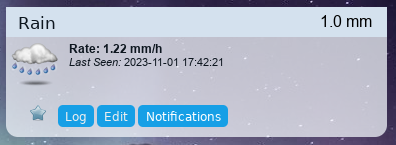
- Screenshot_Rain_widget.png (35.64 KiB) Viewed 2901 times
Do not forget to change the configuration settings of the MQTT node, so that it matches your settings.
See below the complete flow:
Code: Select all
[
    {
        "id": "a8ebc4c23aa074e3",
        "type": "inject",
        "z": "d4b35d52470a739f",
        "name": "Input",
        "props": [
            {
                "p": "payload"
            }
        ],
        "repeat": "",
        "crontab": "",
        "once": false,
        "onceDelay": 0.1,
        "topic": "",
        "payload": "{\"RAIN\":1333.3,\"BAT\":\"OK\"}",
        "payloadType": "json",
        "x": 250,
        "y": 360,
        "wires": [
            [
                "cf1f444b61aaa14a"
            ]
        ]
    },
    {
        "id": "cf1f444b61aaa14a",
        "type": "interval-length",
        "z": "d4b35d52470a739f",
        "format": "mills",
        "bytopic": false,
        "minimum": "",
        "maximum": "",
        "window": "",
        "timeout": false,
        "msgTimeout": "",
        "minimumunit": "msecs",
        "maximumunit": "msecs",
        "windowunit": "msecs",
        "msgTimeoutUnit": "msecs",
        "reset": false,
        "startup": false,
        "msgField": "interval",
        "timestampField": "timestamp",
        "repeatTimeout": false,
        "name": "",
        "x": 440,
        "y": 360,
        "wires": [
            [
                "b9a92466bc45cba4"
            ],
            []
        ]
    },
    {
        "id": "b9a92466bc45cba4",
        "type": "function",
        "z": "d4b35d52470a739f",
        "name": "To Domoticz",
        "func": "const idx = 27;\nlet bat;\n\nlet cur_rainvalue = msg.payload.RAIN;\nlet prev_rainvalue = flow.get(\"rainvalue\");\n\nif (prev_rainvalue == \"undefined\") {\n    flow.set (\"rainvalue\", cur_rainvalue);\n} else {\n    let fallen = cur_rainvalue - prev_rainvalue;\n    let rate = fallen / (msg.interval / 360000000);\n    flow.set (\"rainvalue\", cur_rainvalue);\n    \n    if (msg.payload.BAT === \"OK\") {\n    bat = 100\n    } else if (msg.payload.BAT === \"LOW\") {\n    bat = 10\n    }\n\n    msg.payload = {\"command\": \"udevice\", \"idx\": idx, \"svalue\": rate.toFixed().toString() + \";\" + fallen.toString(), \"Battery\" : bat};\n    \n    return msg;\n}",
        "outputs": 1,
        "timeout": 0,
        "noerr": 0,
        "initialize": "",
        "finalize": "",
        "libs": [],
        "x": 650,
        "y": 360,
        "wires": [
            [
                "8f742a18051a24ce",
                "f4315ef89c60f491"
            ]
        ]
    },
    {
        "id": "8f742a18051a24ce",
        "type": "debug",
        "z": "d4b35d52470a739f",
        "name": "debug 201",
        "active": true,
        "tosidebar": true,
        "console": false,
        "tostatus": false,
        "complete": "payload",
        "targetType": "msg",
        "statusVal": "",
        "statusType": "auto",
        "x": 850,
        "y": 320,
        "wires": []
    },
    {
        "id": "f4315ef89c60f491",
        "type": "mqtt out",
        "z": "d4b35d52470a739f",
        "name": "MQTT Out",
        "topic": "domoticz/in",
        "qos": "0",
        "retain": "false",
        "respTopic": "",
        "contentType": "",
        "userProps": "",
        "correl": "",
        "expiry": "",
        "broker": "108bbff65a6cdbf3",
        "x": 850,
        "y": 360,
        "wires": []
    },
    {
        "id": "108bbff65a6cdbf3",
        "type": "mqtt-broker",
        "name": "",
        "broker": "192.168.10.51",
        "port": "1883",
        "clientid": "",
        "autoConnect": true,
        "usetls": false,
        "protocolVersion": "4",
        "keepalive": "60",
        "cleansession": true,
        "autoUnsubscribe": true,
        "birthTopic": "",
        "birthQos": "0",
        "birthPayload": "",
        "birthMsg": {},
        "closeTopic": "",
        "closeQos": "0",
        "closePayload": "",
        "closeMsg": {},
        "willTopic": "",
        "willQos": "0",
        "willPayload": "",
        "willMsg": {},
        "userProps": "",
        "sessionExpiry": ""
    }
]
Test it and let me know, if this is what you want.
Regards