Page 1 of 2
Textbox
Posted: Friday 07 April 2023 19:22
by jacobsentertainment
Hi all,
I'm using several shelly trv thermostats and as I want to use them without any cloud connections I have set up some script to retract temperature and and send a setpoint. For all additional information I would like to gather this in a single textbox and as something changes this will update.
So far I managed to create a script that gets me the batt status from a single shelly in to a textbox and from this point I'm stuck....
I any of you can help me out that would be great.
Script I use,
Code: Select all
return {
	on = {
		timer = {
			'every hour'
		},
		httpResponses = {
			'trigger' -- must match with the callback passed to the openURL command
		}
	},
	logging = {
		level = domoticz.LOG_INFO,
		marker = 'template',
	},
	execute = function(domoticz, item)

		if (item.isTimer) then
			domoticz.openURL({
				url = 'http://192.168.1.83/status',
				method = 'GET',
				callback = 'trigger', -- see httpResponses above.
			})
		end

		if (item.isHTTPResponse) then

			if (item.ok) then
				if (item.isJSON) then

					local BattValue = item.json.bat.value
					--local mytext = 'Shelly slaapkamer battery level''..BattValue..'

					domoticz.devices(258).updateText('Shelly slaapkamer battery level= '..BattValue..'%')
				end
			else
				domoticz.log('There was a problem handling the request', domoticz.LOG_ERROR)
				domoticz.log(item, domoticz.LOG_ERROR)
			end

		end

	end
}
Re: Textbox
Posted: Sunday 09 April 2023 0:30
by waltervl
That as something changes is normally triggered by a device change. So you have to add those to the on={ } section.
For the rest the possibilities are endless

For a new line add \r\n
Re: Textbox
Posted: Sunday 09 April 2023 10:11
by jacobsentertainment
Thanks,
Using the device as a trigger won't work I think as they don't send any mqtt message to domoticz topic. That's why I have a timer, this can be changed to any number depending on how many updates I want. My issue is that I don't know how to get data from several IP's. And the next issue is how to combine them in to one single textbox.
Re: Textbox
Posted: Sunday 09 April 2023 11:27
by Kedi
Call several url's in the isTimer section and use different triggers.
Before the first openURL you should clear the text by
Code: Select all
domoticz.devices(258).updateText('')
In the response section you can concatenate the different texts by switching in different triggers like:
Code: Select all
if item.trigger == <trigger1> then
	txt = domoticz.devices(258).text
	domoticz.devices(258).updateText(txt..'\nShelly slaapkamer battery level= '..BattValue..'%')
elseif item.trigger == <trigger2> then
etc....
Re: Textbox
Posted: Monday 10 April 2023 10:37
by jacobsentertainment
I have something going now, it works.
Only issue is now that the textbox is getting bigger after each update..
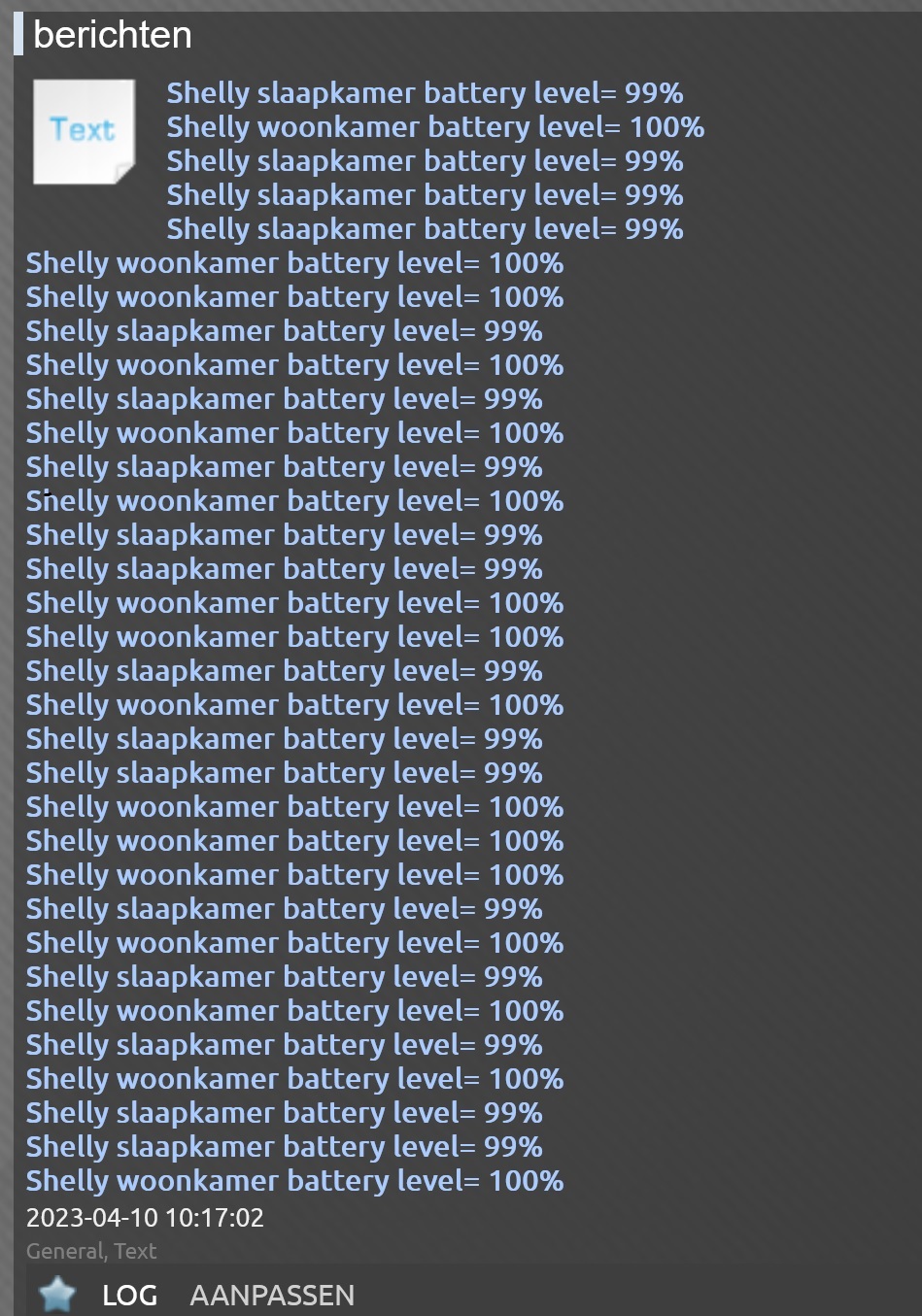
- txt.jpg (392.97 KiB) Viewed 1185 times
Is it possible to delete the textbox content before updating?
Re: Textbox
Posted: Monday 10 April 2023 12:58
by Kedi
Did you use
Code: Select all
domoticz.devices(258).updateText('')
before the first openURL in the isTimer section?
Incase that does not work with a space
Code: Select all
domoticz.devices(258).updateText(' ')
Re: Textbox
Posted: Monday 10 April 2023 13:21
by jacobsentertainment
Sheers, that's a lot better now!

I have a total of 5 devices to display here, but now randomly it displays five, three and sometimes four items and then again all five... is there anything i can change so it's steady constnt all items?
Re: Textbox
Posted: Monday 10 April 2023 13:30
by jacobsentertainment
Current script:
Code: Select all
return {
	on = {
		timer = {
			--'every 6 hours',
			'every minute'
		},
		httpResponses = {
			'trigger1',	'trigger2', 'trigger3', 'trigger4', 'trigger5',
		}
	},

	logging = {
		level = domoticz.LOG_INFO,
		marker = 'template',
	},
	execute = function(domoticz, item)

	    local txtbox = domoticz.devices(258)
	    txtbox.updateText(' ')
	    txt = txtbox.text

		if (item.isTimer) then
			domoticz.openURL({
				url = 'http://192.168.1.83/status', --slaapkamer
				method = 'GET',
				callback = 'trigger1', -- see httpResponses above.
			})
		end

		if (item.isTimer) then
			domoticz.openURL({
				url = 'http://192.168.1.31/status', --woonkamer
				method = 'GET',
				callback = 'trigger2', -- see httpResponses above.
			})
	end

			if (item.isTimer) then
			domoticz.openURL({
				url = 'http://192.168.1.47/status', --slaapkamer boven
				method = 'GET',
				callback = 'trigger3', -- see httpResponses above.
			})
	end

			if (item.isTimer) then
			domoticz.openURL({
				url = 'http://192.168.1.183/status', --logeerkamer
				method = 'GET',
				callback = 'trigger4', -- see httpResponses above.
			})
	end

			if (item.isTimer) then
			domoticz.openURL({
				url = 'http://192.168.1.95/status', --badkamer boven
				method = 'GET',
				callback = 'trigger5', -- see httpResponses above.
			})
	end


		if (item.isHTTPResponse) then

			if (item.ok) then
				if (item.isJSON) then

				    local BattValue = item.json.bat.value

				    if item.trigger == 'trigger1' then
                    txtbox.updateText(txt..'\r\nSlaapkamer battery level= '..BattValue..'%')
                            elseif item.trigger == 'trigger2' then
            			    txtbox.updateText(txt..'\r\nWoonkamer battery level= '..BattValue..'%')
            						elseif item.trigger == 'trigger3' then
                    	            txtbox.updateText(txt..'\r\nSlaapkamer boven battery level= '..BattValue..'%')
                    	                   elseif item.trigger == 'trigger4' then
                    	                   txtbox.updateText(txt..'\r\nLogeerkamer boven battery level= '..BattValue..'%')
                    	                       elseif item.trigger == 'trigger5' then
                    	                       txtbox.updateText(txt..'\r\nBadkamer boven battery level= '..BattValue..'%')
				end
			else
				domoticz.log('There was a problem handling the request', domoticz.LOG_ERROR)
				domoticz.log(item, domoticz.LOG_ERROR)
			end

		end
    end
	end
}
Re: Textbox
Posted: Monday 10 April 2023 13:46
by Kedi
If every openURL is not responding or missed, you could add afterSec(x) after every openURL and use different values for x, like 1,2,3,4 etc...
Code: Select all
			domoticz.openURL({
				url = 'http://192.168.1.83/status', --slaapkamer
				method = 'GET',
				callback = 'trigger1', -- see httpResponses above.
			}).afterSec(1)
				domoticz.openURL({
				url = 'http://192.168.1.31/status', --slaapkamer
				method = 'GET',
				callback = 'trigger1', -- see httpResponses above.
			}).afterSec(2)
Re: Textbox
Posted: Monday 10 April 2023 13:50
by Kedi
If that is not working. Create a data section with data items for every response. Save the response in the data section.
At the end go over all the data's and update the text device with the result of all the data.
Re: Textbox
Posted: Monday 10 April 2023 14:41
by jacobsentertainment
I tried the afterSec option, it ended up with only a single output or nothing at all.
Kedi wrote: Monday 10 April 2023 13:50
If that is not working. Create a data section with data items for every response. Save the response in the data section.
At the end go over all the data's and update the text device with the result of all the data.
So far I managed, but this is above my grade.

Re: Textbox
Posted: Monday 10 April 2023 18:45
by Kedi
Try this one.
Code: Select all
return {
	on = {
		timer = {
			--'every 6 hours',
			'every minute'
		},
		httpResponses = {
			'trigger1',	'trigger2', 'trigger3', 'trigger4', 'trigger5',
		}
	},

	logging = {
		level = domoticz.LOG_INFO,
		marker = 'template',
	},
	execute = function(domoticz, item)

	    local txtbox = domoticz.devices(258)

		if (item.isTimer) then
	    txtbox.updateText(' ')
			domoticz.openURL({
				url = 'http://192.168.1.83/status', --slaapkamer
				method = 'GET',
				callback = 'trigger1', -- see httpResponses above.
			})
		end

		if (item.isTimer) then
			domoticz.openURL({
				url = 'http://192.168.1.31/status', --woonkamer
				method = 'GET',
				callback = 'trigger2', -- see httpResponses above.
			})
	end

			if (item.isTimer) then
			domoticz.openURL({
				url = 'http://192.168.1.47/status', --slaapkamer boven
				method = 'GET',
				callback = 'trigger3', -- see httpResponses above.
			})
	end

			if (item.isTimer) then
			domoticz.openURL({
				url = 'http://192.168.1.183/status', --logeerkamer
				method = 'GET',
				callback = 'trigger4', -- see httpResponses above.
			})
	end

			if (item.isTimer) then
			domoticz.openURL({
				url = 'http://192.168.1.95/status', --badkamer boven
				method = 'GET',
				callback = 'trigger5', -- see httpResponses above.
			})
	end


		if (item.isHTTPResponse) then

			if (item.ok) then
				if (item.isJSON) then

				    local BattValue = item.json.bat.value
	    txt = txtbox.text

				    if item.trigger == 'trigger1' then
                    txtbox.updateText(txt..'\r\nSlaapkamer battery level= '..BattValue..'%')
                            elseif item.trigger == 'trigger2' then
            			    txtbox.updateText(txt..'\r\nWoonkamer battery level= '..BattValue..'%')
            						elseif item.trigger == 'trigger3' then
                    	            txtbox.updateText(txt..'\r\nSlaapkamer boven battery level= '..BattValue..'%')
                    	                   elseif item.trigger == 'trigger4' then
                    	                   txtbox.updateText(txt..'\r\nLogeerkamer boven battery level= '..BattValue..'%')
                    	                       elseif item.trigger == 'trigger5' then
                    	                       txtbox.updateText(txt..'\r\nBadkamer boven battery level= '..BattValue..'%')
				end
			else
				domoticz.log('There was a problem handling the request', domoticz.LOG_ERROR)
				domoticz.log(item, domoticz.LOG_ERROR)
			end

		end
    end
	end
}
Re: Textbox
Posted: Monday 10 April 2023 19:19
by jacobsentertainment
Same result, only getting four lines, then five and then four again...
Re: Textbox
Posted: Monday 10 April 2023 19:51
by Kedi
Sorry did to go thru all the code.
Code: Select all
return {
	on = {
		timer = {
			--'every 6 hours',
			'every minute'
		},
		httpResponses = {
			'trigger1',	'trigger2', 'trigger3', 'trigger4', 'trigger5',
		}
	},

	logging = {
		level = domoticz.LOG_INFO,
		marker = 'template',
	},
	execute = function(domoticz, item)

	    local txtbox = domoticz.devices(258)

		if (item.isTimer) then
		    txtbox.updateText(' ')
			domoticz.openURL({
				url = 'http://192.168.1.83/status', --slaapkamer
				method = 'GET',
				callback = 'trigger1', -- see httpResponses above.
			}).afterSec(1)
			domoticz.openURL({
				url = 'http://192.168.1.31/status', --woonkamer
				method = 'GET',
				callback = 'trigger2', -- see httpResponses above.
			}).afterSec(2)
			domoticz.openURL({
				url = 'http://192.168.1.47/status', --slaapkamer boven
				method = 'GET',
				callback = 'trigger3', -- see httpResponses above.
			}).afterSec(3)
			domoticz.openURL({
				url = 'http://192.168.1.183/status', --logeerkamer
				method = 'GET',
				callback = 'trigger4', -- see httpResponses above.
			}).afterSec(4)
			domoticz.openURL({
				url = 'http://192.168.1.95/status', --badkamer boven
				method = 'GET',
				callback = 'trigger5', -- see httpResponses above.
			}).afterSec(5)
	end


		if (item.isHTTPResponse) then

			if (item.ok) then
				if (item.isJSON) then

				    local BattValue = item.json.bat.value
	    txt = txtbox.text

				    if item.trigger == 'trigger1' then
                    txtbox.updateText(txt..'\r\nSlaapkamer battery level= '..BattValue..'%')
                            elseif item.trigger == 'trigger2' then
            			    txtbox.updateText(txt..'\r\nWoonkamer battery level= '..BattValue..'%')
            						elseif item.trigger == 'trigger3' then
                    	            txtbox.updateText(txt..'\r\nSlaapkamer boven battery level= '..BattValue..'%')
                    	                   elseif item.trigger == 'trigger4' then
                    	                   txtbox.updateText(txt..'\r\nLogeerkamer boven battery level= '..BattValue..'%')
                    	                       elseif item.trigger == 'trigger5' then
                    	                       txtbox.updateText(txt..'\r\nBadkamer boven battery level= '..BattValue..'%')
				end
			else
				domoticz.log('There was a problem handling the request', domoticz.LOG_ERROR)
				domoticz.log(item, domoticz.LOG_ERROR)
			end

		end
    end
	end
}
Re: Textbox
Posted: Monday 10 April 2023 20:34
by jacobsentertainment
Some moment it still spits out only four lines, but 3 out of 4 time it shows all lines. At this level I can live with it. But if there are ways for improvement I'm open for it.
Re: Textbox
Posted: Tuesday 11 April 2023 14:58
by Kedi
Then change the logging to debug at look into domoticz log what is coming in from the 5 openURL calls.
Because it might be possible that not all devices responds with an answer.
Replace
with
Re: Textbox
Posted: Tuesday 11 April 2023 18:13
by jacobsentertainment
Not much to see here, sometimes one is a little later then the other. I checked but all have full wifi range (according to the shelly page)
Code: Select all
 2023-04-11 18:10:04.008 Status: dzVents: Info: Shelly text: ------ Start internal script: #Shelly battery to txt: HTTPResponse: "trigger3"
2023-04-11 18:10:04.023 Status: dzVents: Info: Shelly text: ------ Finished #Shelly battery to txt
2023-04-11 18:10:04.298 Status: dzVents: Info: Shelly text: ------ Start internal script: #Shelly battery to txt: HTTPResponse: "trigger1"
2023-04-11 18:10:04.312 Status: dzVents: Info: Shelly text: ------ Finished #Shelly battery to txt
2023-04-11 18:10:04.432 Status: dzVents: Info: Shelly text: ------ Start internal script: #Shelly battery to txt: HTTPResponse: "trigger2"
2023-04-11 18:10:04.449 Status: dzVents: Info: Shelly text: ------ Finished #Shelly battery to txt
2023-04-11 18:10:04.977 Status: dzVents: Info: Shelly text: ------ Start internal script: #Shelly battery to txt: HTTPResponse: "trigger4"
2023-04-11 18:10:04.995 Status: dzVents: Info: Shelly text: ------ Finished #Shelly battery to txt
2023-04-11 18:10:06.543 Status: dzVents: Info: Shelly text: ------ Start internal script: #Shelly battery to txt: HTTPResponse: "trigger5"
Re: Textbox
Posted: Tuesday 11 April 2023 18:39
by Kedi
Then save responses into data like below. I cannot check for programming errors.
Code: Select all
return {
	on = {
		timer = {
			--'every 6 hours',
			'every minute'
		},
		httpResponses = {
			'trigger1',	'trigger2', 'trigger3', 'trigger4', 'trigger5',
		}
	},

	logging = {
		level = domoticz.LOG_INFO,
		marker = 'template',
	},
    data = {
        XX1 = { initial = "" },
        XX2 = { initial = "" },
        XX3 = { initial = "" },
        XX4 = { initial = "" },
        XX5 = { initial = "" }
    },


	execute = function(domoticz, item)

	    local txtbox = domoticz.devices(258)

		if (item.isTimer) then
			domoticz.openURL({
				url = 'http://192.168.1.83/status', --slaapkamer
				method = 'GET',
				callback = 'trigger1', -- see httpResponses above.
			}).afterSec(1)
			domoticz.openURL({
				url = 'http://192.168.1.31/status', --woonkamer
				method = 'GET',
				callback = 'trigger2', -- see httpResponses above.
			}).afterSec(2)
			domoticz.openURL({
				url = 'http://192.168.1.47/status', --slaapkamer boven
				method = 'GET',
				callback = 'trigger3', -- see httpResponses above.
			}).afterSec(3)
			domoticz.openURL({
				url = 'http://192.168.1.183/status', --logeerkamer
				method = 'GET',
				callback = 'trigger4', -- see httpResponses above.
			}).afterSec(4)
			domoticz.openURL({
				url = 'http://192.168.1.95/status', --badkamer boven
				method = 'GET',
				callback = 'trigger5', -- see httpResponses above.
			}).afterSec(5)
	end


		if (item.isHTTPResponse) then

			if (item.ok) then
				if (item.isJSON) then

				    local BattValue = item.json.bat.value
				    if item.trigger == 'trigger1' then
				    	domoticz.data.XX1 = 'Slaapkamer battery level= '..BattValue..'%'
                            elseif item.trigger == 'trigger2' then
                            		domoticz.data.XX2 = 'Woonkamer battery level= '..BattValue..'%'
            						elseif item.trigger == 'trigger3' then
                    	            	domoticz.data.XX3 = 'Slaapkamer boven battery level= '..BattValue..'%'
                    	                   elseif item.trigger == 'trigger4' then
                    	                   domoticz.data.XX4 = 'Logeerkamer boven battery level= '..BattValue..'%'
                    	                       elseif item.trigger == 'trigger5' then
                    	                       domoticz.data.XX5 = 'Badkamer boven battery level= '..BattValue..'%'
				end
				txtbox.updateText(domoticz.data.XX1..'\n'..domoticz.data.XX2..'\n'..domoticz.data.XX3..'\n'..domoticz.data.XX4..'\n'..
					domoticz.data.XX5..'\n'..)
			else
				domoticz.log('There was a problem handling the request', domoticz.LOG_ERROR)
				domoticz.log(item, domoticz.LOG_ERROR)
			end

		end
    end
	end
}
This way you save every response in a data item and use those to fill the text device.
B.t.w If you send URL request seconds apart, then you cannot have almost all responses in the same second.
And you did not use LOG_DEBUG.
Re: Textbox
Posted: Tuesday 11 April 2023 19:44
by jacobsentertainment
This works perfect!
Code: Select all
 2023-04-11 19:41:00.396 Status: dzVents: Info: template: ------ Start internal script: #test text:, trigger: "every minute"
2023-04-11 19:41:00.398 Status: dzVents: Info: template: ------ Finished #test text
2023-04-11 19:41:03.316 Status: dzVents: Info: template: ------ Start internal script: #test text: HTTPResponse: "trigger1"
2023-04-11 19:41:03.320 Status: dzVents: Info: template: ------ Finished #test text
2023-04-11 19:41:04.311 Status: dzVents: Info: template: ------ Start internal script: #test text: HTTPResponse: "trigger2"
2023-04-11 19:41:04.328 Status: dzVents: Info: template: ------ Finished #test text
2023-04-11 19:41:04.660 Status: dzVents: Info: template: ------ Start internal script: #test text: HTTPResponse: "trigger3"
2023-04-11 19:41:04.676 Status: dzVents: Info: template: ------ Finished #test text
2023-04-11 19:41:05.724 Status: dzVents: Info: template: ------ Start internal script: #test text: HTTPResponse: "trigger5"
2023-04-11 19:41:05.739 Status: dzVents: Info: template: ------ Finished #test text
2023-04-11 19:41:06.196 Status: dzVents: Info: template: ------ Start internal script: #test text: HTTPResponse: "trigger4"
2023-04-11 19:41:06.225 Status: dzVents: Info: template: ------ Finished #test text
2023-04-11 19:42:00.513 Status: dzVents: Info: template: ------ Start internal script: #test text:, trigger: "every minute"
2023-04-11 19:42:00.516 Status: dzVents: Info: template: ------ Finished #test text
2023-04-11 19:42:03.215 Status: dzVents: Info: template: ------ Start internal script: #test text: HTTPResponse: "trigger1"
2023-04-11 19:42:03.219 Status: dzVents: Info: template: ------ Finished #test text
2023-04-11 19:42:04.255 Status: dzVents: Info: template: ------ Start internal script: #test text: HTTPResponse: "trigger2"
2023-04-11 19:42:04.272 Status: dzVents: Info: template: ------ Finished #test text
2023-04-11 19:42:05.284 Status: dzVents: Info: template: ------ Start internal script: #test text: HTTPResponse: "trigger3"
2023-04-11 19:42:05.311 Status: dzVents: Info: template: ------ Finished #test text
2023-04-11 19:42:06.363 Status: dzVents: Info: template: ------ Start internal script: #test text: HTTPResponse: "trigger4"
2023-04-11 19:42:06.379 Status: dzVents: Info: template: ------ Finished #test text
2023-04-11 19:42:06.635 Status: dzVents: Info: template: ------ Start internal script: #test text: HTTPResponse: "trigger5"
2023-04-11 19:42:06.650 Status: dzVents: Info: template: ------ Finished #test text
I did had an small error in the script and replaced
Code: Select all
				txtbox.updateText(domoticz.data.XX1..'\n'..domoticz.data.XX2..'\n'..domoticz.data.XX3..'\n'..domoticz.data.XX4..'\n'..
					domoticz.data.XX5..'\n'..)
With
Code: Select all
				txtbox.updateText(domoticz.data.XX1..'\n'..domoticz.data.XX2..'\n'..domoticz.data.XX3..'\n'..domoticz.data.XX4..'\n'..
					domoticz.data.XX5..'\n')
Re: Textbox
Posted: Tuesday 11 April 2023 19:48
by jacobsentertainment
Side question, this 'data' is how you store results from the script and how long is this stored for?
Anyway big thanks for the help in this topic, this really is a full functioning local solution to my shelly trv devices. Now I can replace the rest of my thermostats. Cheers.